Introduction
Сатып алганыңыз үчүн рахматasing the AFEXOA Night Light Bluetooth Speaker Alarm Clock. This multi-functional device combines a Bluetooth speaker, alarm clock, sound machine, and a versatile LED lamp, designed to enhance your daily routine and create a pleasant atmosphere. This manual provides detailed instructions to help you set up, operate, and maintain your device for optimal performance.

The AFEXOA Night Light Bluetooth Speaker Alarm Clock offers multiple functionalities for diverse user needs.
Коопсуздук чаралары
- Аппаратты экстремалдык температурага, түз күндүн нуруна же жогорку нымдуулукка дуушар кылбаңыз.
- Аппаратты түшүрүүдөн же катуу таасирлерден сактаныңыз.
- Do not disassemble or attempt to repair the device yourself. Contact qualified service personnel.
- Аппаратты суудан жана башка суюктуктардан алыс кармаңыз.
- Берилген заряддоо кабелин же тастыкталган эквивалентти гана колдонуңуз.
Пакеттин мазмуну
Сураныч, пакетте төмөнкү нерселерди текшериңиз:
- AFEXOA Night Light Bluetooth Speaker Alarm Clock (Model DY29S)
- USB заряддоо кабели
- User Manual
Продукт бүттүview

The main unit of the AFEXOA Night Light Bluetooth Speaker Alarm Clock.

Бүттүview of the device's controls and connectivity ports.
Башкаруу каражаттары жана порттор:
- Күйгүзүү/Ойнотуу/Тындыруу баскычы: Күйгүзүү/өчүрүү үчүн көпкө басыңыз. Музыканы ойнотуу/тындыруу үчүн кыска басыңыз.
- Режим баскычы: Short press to switch between Bluetooth, MP3 Player (USB/Micro SD), and Sound Machine modes.
- Кийинки трек / Үнүн күчөтүү: Кийинки трекке кыска басыңыз. Үнүн жогорулатуу үчүн көпкө басыңыз.
- Мурунку трек / Үндү азайтуу: Мурунку трекке кыска басыңыз. Үнүн азайтуу үчүн көпкө басыңыз.
- Ойготкуч баскычы: Short press to check alarm time. Long press to enter alarm setting mode.
- Top Mesh: Touch sensitive area for light control and snooze.
- Санариптик дисплей: Shows time, alarm status, and Bluetooth connection.
- Тип-C Port: Аппаратты заряддоо үчүн.
- ON/OFF которуу: Агрегаттын негизги өчүргүч.
- Micro SD оюгу: Micro SD/TF картадан музыка ойнотуу үчүн.
- USB HOST Port: USB флеш-дисктен музыка ойнотуу үчүн.
Жайгашуу
1. Аппаратты заряддоо
- Ensure the main ON/OFF switch on the bottom of the device is in the 'ON' position.
- Connect the provided USB charging cable to the Type-C port on the device.
- Connect the other end of the USB cable to a standard USB power adapter (5V/1A recommended, not included) or a computer USB port.
- The charging indicator light will illuminate during charging and turn off when fully charged. A full charge typically takes 3-4 hours.
2. Баштапкы күйгүзүү
- Flip the main ON/OFF switch on the bottom of the device to the 'ON' position.
- Long press the Power button on the control panel to turn on the device. The digital display will light up.
Иштөө нускамалары
1. Убакытты жана ойготкучту коюу
- Орнотуу убактысы: Long press the Alarm button until the hour digits flash. Use the 'Next Track / Volume Up' and 'Previous Track / Volume Down' buttons to adjust the hour. Short press the Alarm button to switch to minute setting, then adjust minutes. Short press again to confirm.
- Ойготкуч орнотуу: After setting the time, long press the Alarm button again to enter alarm setting mode (alarm icon will flash). Adjust hour and minute as above. Short press the Alarm button to select alarm sound (default or custom from USB/Micro SD). Short press again to confirm.
- 12/24 Hour Mode: In time display mode, short press the 'Mode' button to toggle between 12-hour and 24-hour formats.
- Чырым Function: When the alarm sounds, tap the top mesh to activate snooze. The alarm will sound again after 9 minutes. To stop the alarm, press any button on the control panel.

The alarm clock mode gently wakes you up with lights and sounds.
2. Bluetooth динамик режими
- Түзмөк күйгүзүлгөнүн текшериңиз.
- Short press the 'Mode' button until the digital display shows 'BT' (Bluetooth). A voice prompt will indicate Bluetooth pairing mode.
- On your smartphone or other Bluetooth-enabled device, search for 'DY29S' in the Bluetooth settings.
- Select 'DY29S' to pair. A voice prompt will confirm successful connection.
- You can now play audio from your device through the speaker. Use the 'Next Track / Volume Up' and 'Previous Track / Volume Down' buttons to control playback and volume.

Experience Hi-Fi stereo sound by connecting your device via Bluetooth.
3. Жарыкты башкаруу
The device features dimmable warm white light and 48 RGB color-changing ambient lights.
- Жылуу ак жарык: Tap the top mesh to cycle through 3 levels of warm white brightness (30%, 60%, 100%).
- RGB Color Changing Light: Continue tapping the top mesh to enter breathing light mode (multi-color cycles).
- Fixed Color Light: In breathing light mode, long press the top mesh and release to fix the current color. Tap again to resume breathing light mode.
- Music Light Mode: The light color will synchronize with the rhythm of the music when playing audio.
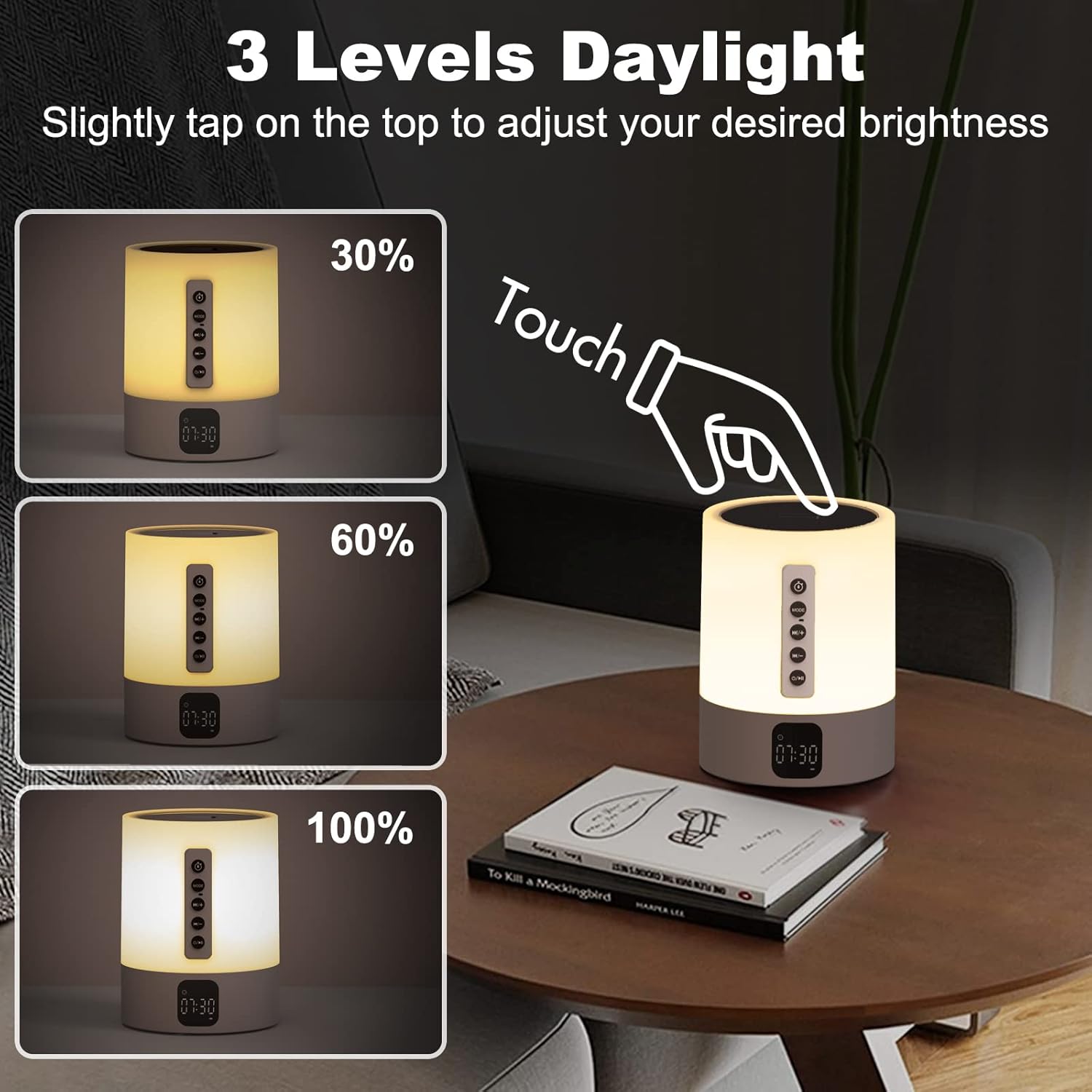
Adjust warm white light brightness with a simple tap on the top mesh.

Explore 48 RGB colors and breathing light effects for ambient lighting.
4. Sound Machine / White Noise
Аппарат эс алууга жана уктоого жардам берүүчү 16 тынчтандыруучу үндөрдү сунуштайт.
- Short press the 'Mode' button until you enter the Sound Machine mode (indicated by a specific icon or voice prompt).
- Use the 'Next Track / Volume Up' and 'Previous Track / Volume Down' buttons to cycle through the 16 available sounds (4 white noise, 2 fan sounds, 2 lullaby sounds, 8 natural sounds).
- Уйку таймери: To set a sleep timer, long press the 'Mode' button in Sound Machine mode. The display will show timer options (15, 30, or 60 minutes). Short press 'Mode' to select the desired duration. The sound and light will automatically turn off after the selected time.
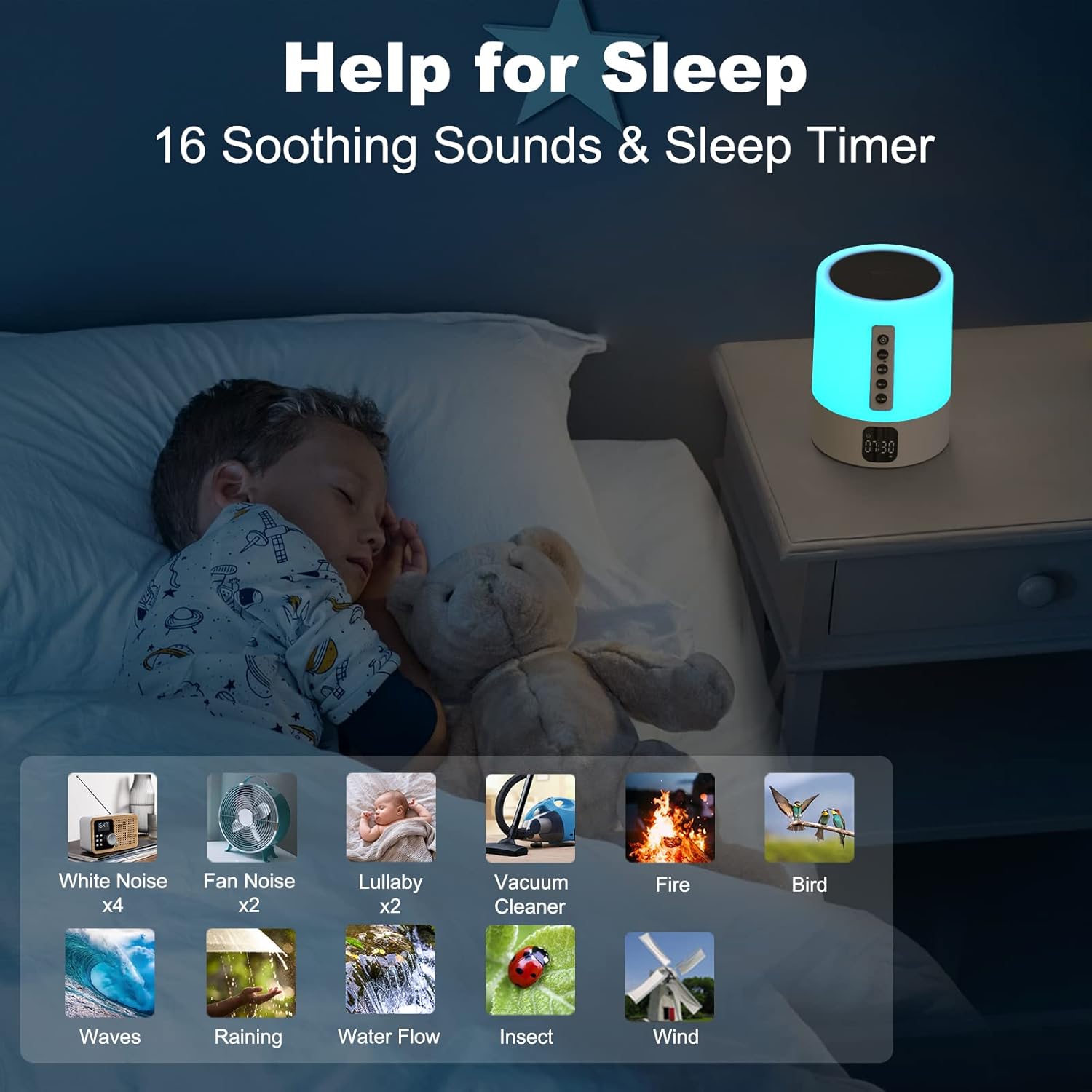
Utilize 16 soothing sounds and a sleep timer for improved rest.
5. MP3 Player Mode (USB/Micro SD)
- Insert a USB flash drive into the USB HOST port or a Micro SD/TF card into the Micro SD slot.
- Short press the 'Mode' button until the device automatically switches to MP3 Player mode.
- The device will automatically start playing audio files from the inserted storage.
- Use the 'Next Track / Volume Up' and 'Previous Track / Volume Down' buttons to control playback and volume.
Техникалык тейлөө
- Тазалоо: Аппаратты жумшак, кургак чүпүрөк менен сүртүңүз. Абразивдүү тазалагычтарды же эриткичтерди колдонбоңуз.
- Сактагыч: Аппаратты узак убакыт бою колдонбогондо салкын, кургак жерде сактаңыз.
- Батареяга кам көрүү: Батареянын иштөө мөөнөтүн узартуу үчүн, бат-баттан батарейканы толук зарядсыздандырбаңыз. Аппаратты дайыма колдонууда болбосо да, үзгүлтүксүз заряддаңыз.
Проблемаларды чечүү
| Көйгөй | Мүмкүн себеп | Чечим |
|---|---|---|
| Түзмөк күйбөйт. | Батарея аз же түгөндү. Негизги күйгүзүү/өчүрүү баскычы өчүк. | Charge the device. Ensure the main ON/OFF switch is in the 'ON' position. |
| Bluetooth аркылуу туташуу мүмкүн эмес. | Device is not in Bluetooth pairing mode. Bluetooth is off on your phone. Device is already connected to another device. | Ensure the device is in 'BT' mode. Turn on Bluetooth on your phone. Disconnect from other devices and try again. |
| Динамиктен үн жок. | Volume is too low. Device is paused. Incorrect mode selected. | Increase volume on both the speaker and your connected device. Press the Play/Pause button. Ensure correct mode (Bluetooth/MP3) is selected. |
| Light functions are not working. | Incorrect touch input. | Ensure you are tapping or long-pressing the top mesh correctly. |
| Ойготкуч угулбайт. | Alarm is not set or is turned off. Volume is too low. | Verify alarm settings and ensure it is enabled. Increase the alarm volume. |
Техникалык шарттар
| Өзгөчөлүк | Деталь |
|---|---|
| Бренд | AFEXOA |
| Модель номери | DY29S |
| Түс | Ак |
| Дисплей түрү | Санарип |
| Power Source | Батарея менен иштейт (1 литий-иондук батарейка камтылган) |
| Продукциянын өлчөмдөрү | 3.66"W x 5"H |
| Материал | Пластик |
| Байланыш | Bluetooth 4.0, USB, Micro SD/TF Card |
| Light Features | 3-level Dimmable Warm White, 48 RGB Color Changing, Music Sync Light Mode |
| Үн өзгөчөлүктөрү | 16 Soothing Sounds (4 White Noise, 2 Fan, 2 Lullaby, 8 Natural) |
| Уйку таймери | 15, 30 же 60 мүнөт |
| Ойготкуч саат | Yes, with Snooze function and custom alarm ringtone support |
Кепилдик жана колдоо
This product comes with a standard manufacturer's warranty. Please refer to the product packaging or the seller's information for specific warranty terms and duration.
For technical support, troubleshooting assistance, or warranty claims, please contact the seller or manufacturer directly through the platform where the product was purchased. Keep your purchase receipt or order number handy for faster service.
You may also find additional support resources or FAQs on the AFEXOA brand store page on Amazon: AFEXOA Store


