1. Киришүү
This manual provides detailed instructions for the proper use and maintenance of your Arlec Remote SS3136. This remote control is specifically designed to operate the Arlec Wall Fan AWDC001HA, offering convenient and effortless control over your fan's functions. Please read this manual thoroughly before first use to ensure optimal performance and longevity of your device.
2. Продукциянын өзгөчөлүктөрү
- Жеңил башкаруу: Utilizes Infrared technology for seamless communication with your Arlec Wall Fan AWDC001HA from up to 10 meters away.
- Узак мөөнөттүү күч: Requires 3 alkaline batteries for extended use.
- Жагымдуу дизайн: Finished in a sophisticated black color.
- Ар тараптуу шайкештик: Designed to control Arlec Wall Fans, specifically model AWDC001HA.
- Жөнөкөй операция: Features 3 intuitive buttons for easy fan control.
3. Пакеттин мазмуну
Пакетте бардык буюмдар бар экенин текшериңиз:
- 1 x Arlec Remote SS3136
- 1 x Дубалга орноткуч кармагыч
- 2 x Монтаждоо бурамалар
- 2 х дубал сайгычтары
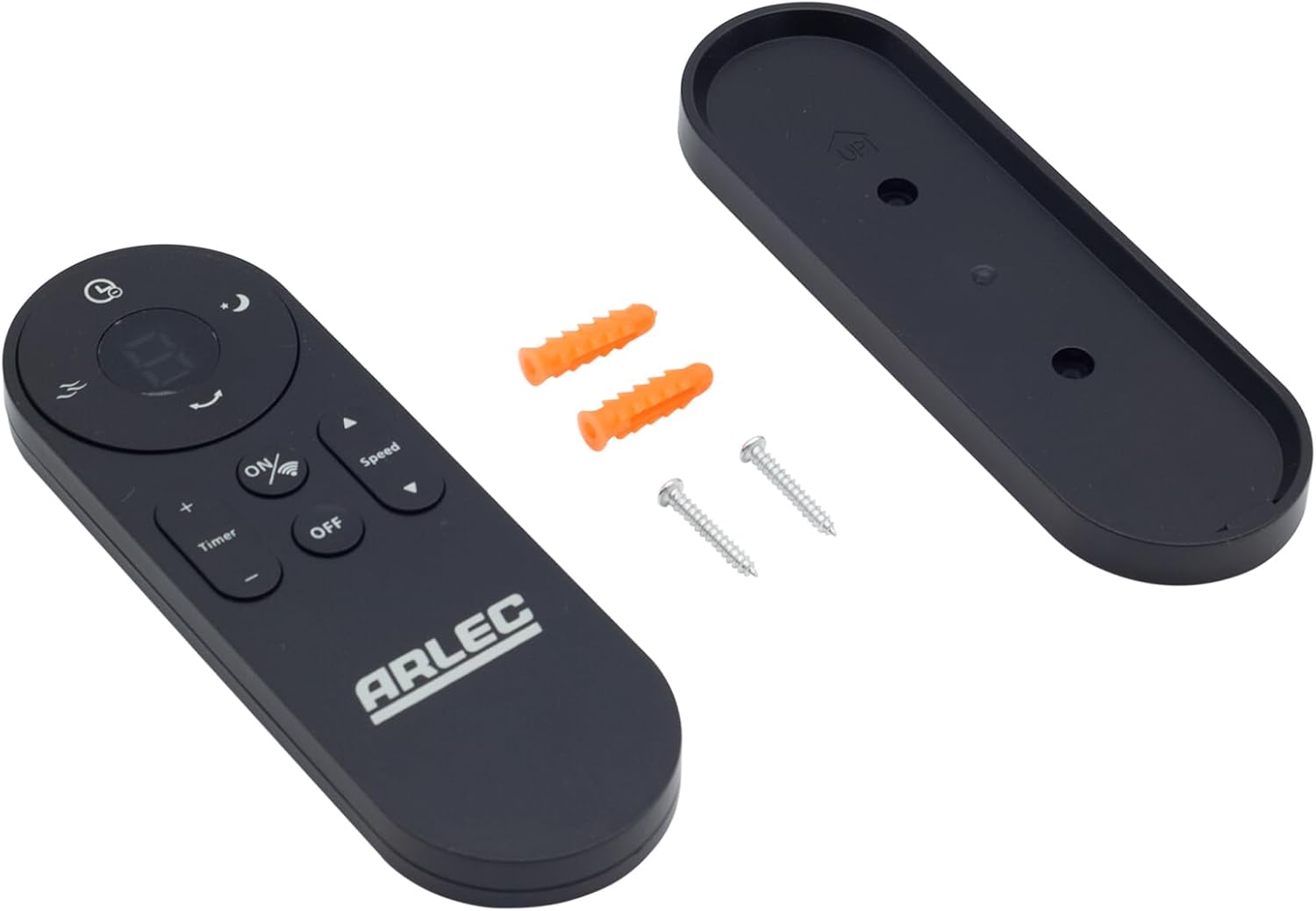
Image: Arlec Remote SS3136 shown with its included wall mount holder, two mounting screws, and two wall plugs, indicating the complete package contents.
4. Орнотуу
4.1 Батареяны орнотуу
- Пульттун артындагы батарея отсегин табыңыз.
- Батарея уясынын капкагын ачыңыз.
- Insert 3 Alkaline batteries (not included) into the compartment, ensuring the correct polarity (+ and -) as indicated inside the compartment. The remote requires 3 Volts (DC).
- Батарея уясынын капкагын бекем жабыңыз.
4.2 Дубалга монтаждоо (кошумча)
- Choose a suitable location on a wall for the remote holder.
- Mark the positions for the two mounting screws using the holder as a template.
- Drill pilot holes at the marked positions. Insert the wall plugs if drilling into drywall or masonry.
- Secure the wall mount holder to the wall using the provided screws.
- Place the remote control into the installed holder for convenient storage.
5. Иштөө нускамалары
The Arlec Remote SS3136 features a simple 3-button layout for controlling your Arlec Wall Fan AWDC001HA. Ensure there is a clear line of sight between the remote and the fan's infrared receiver for optimal performance.

Сүрөт: Жакын план view of the Arlec Remote SS3136, highlighting its three main control buttons: ON/OFF, Speed, and Timer.
- ON/OFF баскычы: Желдеткичти күйгүзүү же өчүрүү үчүн бул баскычты басыңыз.
- Ылдамдык баскычы: Use this button to cycle through the available fan speed settings (e.g., Low, Medium, High).
- Таймер баскычы: Press this button to set or adjust the fan's timer function. Refer to your Arlec Wall Fan AWDC001HA manual for specific timer intervals.
The remote operates using Infrared (IR) technology. Point the remote directly towards the fan's IR receiver. The effective operating range is up to 10 meters (approximately 33 feet).
6. Техникалык тейлөө
- Тазалоо: Пультту жумшак, кургак чүпүрөк менен сүртүңүз. Абразивдүү тазалагычтарды же эриткичтерди колдонбоңуз.
- Батареяны алмаштыруу: Replace batteries when the remote's performance degrades or it stops responding. Always replace all 3 batteries at the same time with new alkaline batteries.
- Сактагыч: Эгер пульт узак убакыт бою колдонулбаса, агып кетпеш үчүн батарейкаларды алып салыңыз. Салкын, кургак жерде сактаңыз.
7. Кыйынчылыктарды
| Көйгөй | Мүмкүн себеп | Чечим |
|---|---|---|
| Алыстан башкаруу желдеткичке жооп бербей жатат. |
|
|
| Баскычтар жабышчаак же жооп бербейт. | баскычтардын астындагы кир же таштанды. | Clean the remote surface with a soft, dry cloth. Avoid liquids. |
8. Техникалык шарттар
| Атрибут | Деталь |
|---|---|
| Модел | SS3136 |
| Өндүрүүчү | Арлек |
| Шайкеш түзмөктөр | Arlec Wall Fan AWDC001HA |
| Байланыш технологиясы | Инфракызыл (IR) |
| баскычтардын саны | 3 |
| Controller Type | Control Button |
| Батарея түрү | Alkaline (3 required) |
| Тtage | 3 вольт (ток) |
| Иштөө диапазону | 10 метрге чейин |
9. Кепилдик жана колдоо
For warranty information and technical support, please refer to the documentation provided with your Arlec Wall Fan AWDC001HA or contact Arlec customer service directly. Keep your purchase receipt as proof of purchase.
Көбүрөөк жардам алуу үчүн, өндүрүүчүнүн расмий дарегине кайрылыңыз webсайтка же кардарларды колдоо линиясына кайрылыңыз.


