Introduction
This manual provides detailed instructions for the setup, operation, and maintenance of your PDP Afterglow Wave Wireless Headset. Designed for an immersive audio experience, this headset is compatible with Xbox Series X|S, Windows 10/11 PC, PlayStation PS5/PS4, and various Bluetooth-enabled devices.

Image: The PDP Afterglow Wave Wireless Headset, showcasing its black design and customizable RGB lighting on the earcups.
Продукт өзгөчөлүктөрү
- Настройкаланган RGB жарыктандыруу: Personalize your headset with millions of color combinations and lighting effects via the free PDP Control Hub app.
- Ыңгайлуу дизайн: Features soft, memory foam ear cushions and swivel earcups for extended gaming sessions and comfortable storage.
- Иммерсивдүү аудио: Equipped with 50mm drivers for clear highs and deep lows.
- Ыңгайлуу башкаруу каражаттары: On-ear volume controls and a game/chat balance dial for quick audio adjustments.
- Ызы-чууну жокко чыгаруучу микрофон: Provides clear communication, with a flip-to-mute function for privacy.
- Ар тараптуу байланыш: Connects wirelessly via a low-latency USB dongle to consoles or via Bluetooth to mobile devices.
- Кеңири шайкештик: Officially licensed for Xbox, and compatible with Windows 10/11 PC, PlayStation consoles (PS5/PS4), and most Bluetooth devices.
- Батареянын узак иштөө мөөнөтү: Бир кубаттоо менен 16 саатка чейин ойноо.
Орнотуу нускамалары
1. Гарнитураны заряддоо
Before initial use, fully charge the headset. Connect the included USB charging cable to the headset's charging port and to a powered USB port (e.g., console, PC, USB wall adapter). The headset's RGB lights will pulse during charging and should turn solid when fully charged. A full charge typically takes approximately 8 hours and provides up to 16 hours of battery life.
Image: The headset highlighting its 16-hour battery life for extended gaming sessions.
2. Connecting to Xbox/PC (Wireless Dongle)
- Insert the USB wireless dongle into an available USB port on your Xbox console or PC.
- Power on the headset by pressing and holding the Power button until the lights illuminate.
- The headset and dongle should automatically pair. A solid light on the dongle and headset indicates a successful connection.
- Adjust volume using the on-ear controls.
Image: The headset emphasizing its cross-compatibility with various gaming platforms and Bluetooth devices.
3. Connecting via Bluetooth (Mobile Devices, PS5/PS4)
- Гарнитура өчүрүлгөнүн текшериңиз.
- Press and hold the Bluetooth button on the headset until the indicator light begins to flash, indicating pairing mode.
- On your device (e.g., smartphone, tablet, PlayStation console), navigate to Bluetooth settings and select "Afterglow Wave" from the list of available devices.
- Once connected, the headset's Bluetooth indicator light will become solid.
Иштөө нускамалары
Гарнитураны башкаруу
- Кубат баскычы: Күйгүзүү/өчүрүү үчүн басып туруңуз. Батареянын абалын текшерүү үчүн кыска басыңыз.
- Үндү терүү: Rotate to adjust the overall audio volume.
- Оюн/Чат балансын терүү: Оюндун аудиосу менен чаттын аудиосунун ортосундагы балансты тууралайт.
- Режим баскычы: Cycles through different RGB lighting effects. Press and hold to turn RGB lights on/off.
- Микрофон: Flip the microphone boom up to mute. Flip down to unmute.
Image: Close-up of the headset's noise-canceling microphone, illustrating the flip-to-mute feature.
PDP башкаруу борбору колдонмосу
Download the free PDP Control Hub app from the Microsoft Store (for Xbox/PC) or your device's app store (for mobile) to customize your headset:
- Modify RGB lighting zones and effects.
- Adjust audio settings and equalizer presets.
- Update headset firmware.
Image: Diagram showing the customizable RGB lighting zones on the headset, managed via the PDP Control Hub app.
Техникалык тейлөө
- Тазалоо: Гарнитураны тазалоо үчүн жумшак, кургак чүпүрөктү колдонуңуз. Абразивдүү тазалоочу каражаттарды же эриткичтерди колдонбоңуз.
- Сактагыч: Store the headset in a cool, dry place away from direct sunlight and extreme temperatures. The swivel earcups allow for a flat storage position.
- Батареяга кам көрүү: To prolong battery life, avoid fully discharging the headset frequently. Charge regularly, even if not in use for extended periods.
- Суу каршылык: Бул гарнитура суу өткөрбөйт. Суюктуктарга тийгизбеңиз.
Проблемаларды чечүү
| Маселе | Мүмкүн чечим |
|---|---|
| Аудио жок же үнү төмөн |
|
| Микрофон иштебей жатат |
|
| Headset disconnects randomly or poor signal |
|
| RGB жарыктары иштебейт |
|
Техникалык шарттар
| Өзгөчөлүк | Деталь |
|---|---|
| Модель аты | Afterglow Wave зымсыз гарнитура |
| Модель номери | 049-032-БК |
| Байланыш | Wireless (USB Dongle), Bluetooth |
| Bluetooth версиясы | 4.0 |
| Bluetooth диапазону | 20 Фут |
| Аудио драйверинин өлчөмү | 50мм динамикалык айдоочулар |
| Импеданс | 32 Ом |
| Батареянын иштөө мөөнөтү | 16 саатка чейин |
| Заряддоо убактысы | Болжол менен 8 саат |
| Микрофон | Ызы-чууну жокко чыгаруу, үнсүз режимге которуу |
| Controls | On-ear Volume, Game/Chat Balance, Mode Button (RGB) |
| Шайкештик | Xbox Series X|S, Windows 10/11 PC, PlayStation PS5/PS4, Bluetooth devices |
| Салмагы | 1.19 фунт (болжол менен 0.54 кг) |
| Материал | Поликарбонат (PC) |
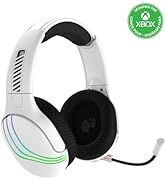
Image: The headset highlighting its 50mm drivers for immersive audio quality.
Кепилдик маалымат
PDP products are covered by a manufacturer's warranty. For specific details regarding your PDP Afterglow Wave Wireless Headset warranty period and terms, please refer to the official PDP webсайтка же кардарларды тейлөөгө кайрылыңыз. Кепилдик дооматтар үчүн сатып алганыңыздын далилин сактаңыз.
Колдоо
For further assistance, technical support, or to download the PDP Control Hub app, please visit the official PDP webсайт:
Ошондой эле, алардын колдоо баракчаларынан Көп берилүүчү суроолорду жана кошумча ресурстарды таба аласыз.


