1. Продукт бүтүп калдыview
The Seplos Smart Battery Management System (BMS) is an advanced electronic device designed to monitor and manage rechargeable LiFePO4 battery packs. It ensures the safe and efficient operation of your battery system by providing comprehensive protection and real-time data monitoring.
Негизги өзгөчөлүктөрү:
- Multifunction Protection: Protects the battery against overcharge, over-discharge, overcurrent, short-circuits, and extreme temperatures, significantly extending battery lifespan.
- реалдуу убакыт мониторинг: High-precision detection of voltage, current, temperature, State of Health (SOH), State of Charge (SOC), and power limits.
- Клетка балансы: Manages cell equalization to maintain balanced voltage across all cells in the battery pack.
- Кеңири шайкештик: Supports Bluetooth, CANbus, and RS485 communication protocols, allowing seamless integration with various inverters including Growatt, Goodwe, Sofar, SMA, Victron, DEYE, Luxpower, Sermatec, Renac, TBB Power, Solis, Foxess, and IMEON.
- Масштабдуулук: Supports up to 16 battery modules connected in parallel for large-scale energy storage solutions.
- Programmable & DIY Friendly: Allows for data programming and logging via PC software, suitable for custom battery designs and advanced users.
This specific model, the Seplos Smart BMS 10E, is configured for 48V 150A 16S LiFePO4 battery systems.
2. Коопсуздук чаралары
Always observe the following safety guidelines to prevent injury or damage to the BMS and battery system:
- Ensure all connections are correct and secure before applying power. Incorrect wiring can cause severe damage.
- Жакшы желдетилген жерде иштеңиз.
- Тиешелүү жеке коргонуу шаймандарын (ЖКК), анын ичинде изоляцияланган кол каптарды жана көздү коргоону кийиңиз.
- Do not short-circuit the battery terminals or BMS connections.
- Keep the BMS away from water, moisture, and flammable materials.
- Only use the BMS with compatible LiFePO4 battery cells.
- If any abnormal behavior is observed, disconnect power immediately.
3. Компоненттер жана байланыштар
Familiarize yourself with the main components of the Seplos Smart BMS and their respective connection points.

3.1-сүрөт: Seplos Smart BMS board and included balance wire harness. The main board features power terminals and various connectors for cell voltage monitoring and communication.

3.2-сүрөт: Seplos Smart BMS connected to an optional LCD display module. The LCD provides real-time battery data directly on the unit.
Туташуу пункттары:
- B- (Battery Negative): Main negative terminal for the battery pack.
- P+ (Pack Positive): Main positive terminal for the battery pack.
- Баланс порту: Multi-pin connector for individual cell voltage monitoring and balancing wires.
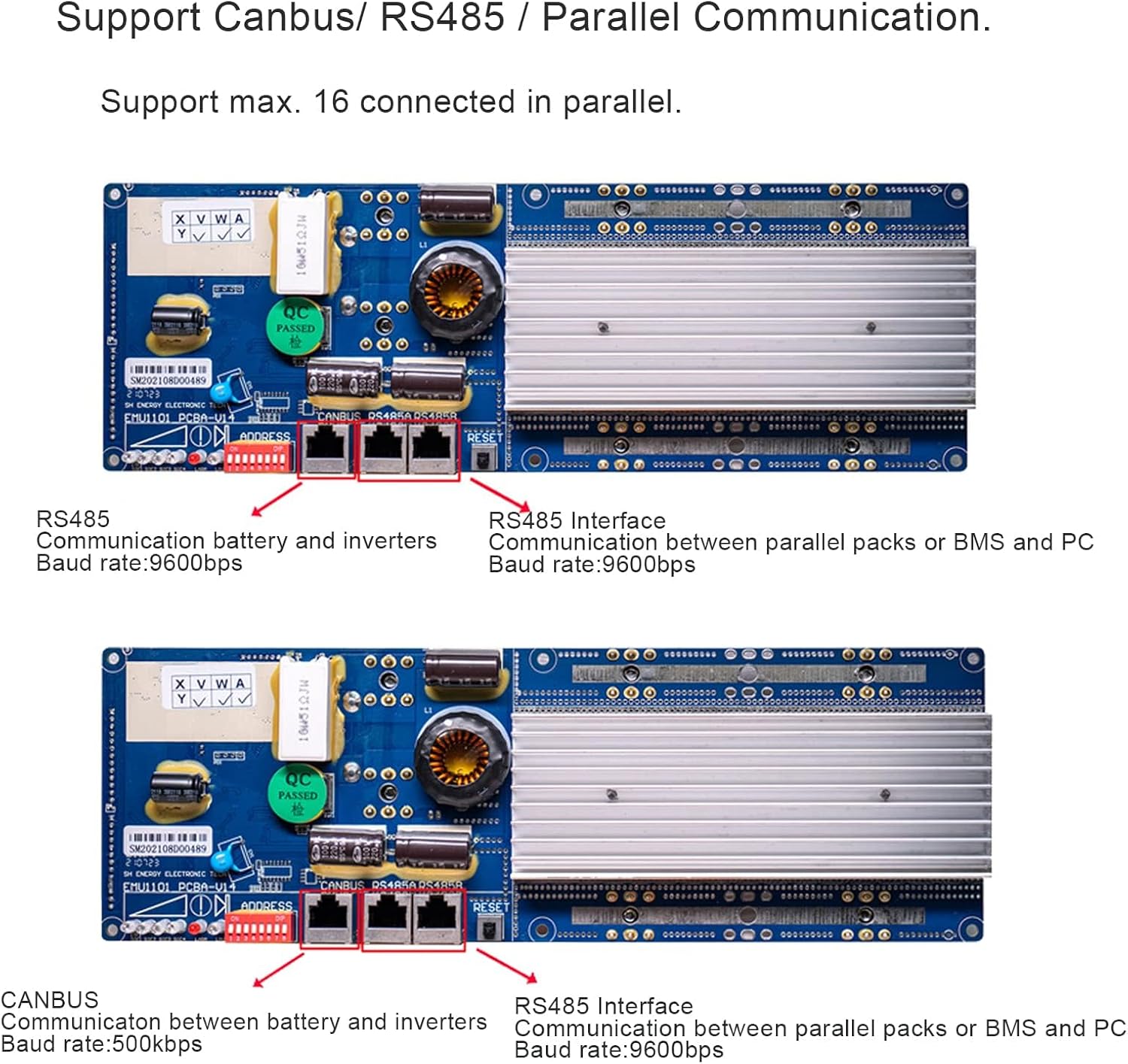
- Байланыш порттору: Includes CANbus and RS485 ports for external device communication (e.g., inverters, PC).
- Bluetooth модулу: Integrated or external module for wireless monitoring via smartphone app.
- LCD Port (Optional): Connector for the external LCD display.
4. Орнотуу жана орнотуу
Follow these steps carefully to install and set up your Seplos Smart BMS.
- Батарея топтомун даярдоо: Ensure your LiFePO4 battery cells are properly assembled into a 16S configuration and are at a safe voltage деңгээл.
- Connect Balance Wires:
- Starting from the lowest voltage cell (B0), connect each balance wire from the provided harness to its corresponding positive terminal on the battery cells.
- Ensure the wiring sequence is correct (B0, B1, B2... B16). Incorrect sequence can damage the BMS.
- Once all balance wires are connected to the cells, plug the balance harness connector into the designated port on the BMS board.
- Негизги электр кабелдерин туташтыруу:
- Connect the main negative cable from the battery pack to the B- terminal on the BMS.
- Connect the main positive cable from the battery pack to the P+ terminal on the BMS.
- Ensure these connections are robust and capable of handling the maximum current.
- Connect Load/Charger: Connect your load and/or charger to the appropriate terminals on your battery system, ensuring they are connected after the BMS for protection.
- Optional: LCD Display Connection: If using the optional LCD display, connect its cable to the dedicated LCD port on the BMS.
- Optional: Communication Setup (CANbus/RS485):

4.1-сүрөт: Close-up of the CANbus and RS485 communication ports on the Seplos Smart BMS. These ports enable communication with inverters and PC monitoring software.
- For inverter communication, connect the appropriate CANbus or RS485 cable from the BMS to your compatible inverter. Refer to your inverter's manual for specific connection details.
- For PC monitoring and programming, you may need a USB to RS485/CANbus adapter.
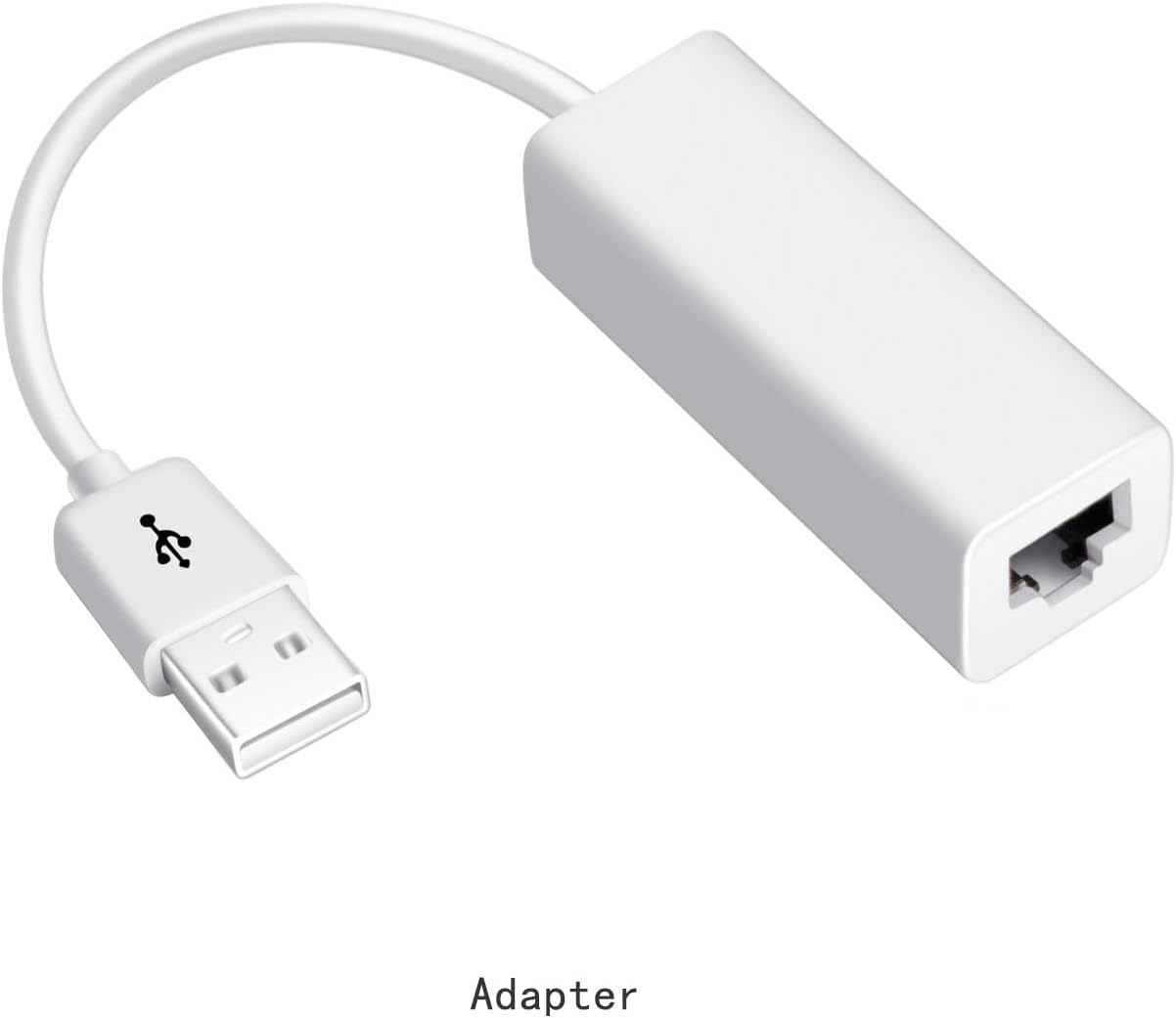
4.2-сүрөт: Example of a USB to Ethernet adapter, often used for PC communication with the BMS via RS485 or CANbus protocols.
5. Operating the BMS
Once installed, the Seplos Smart BMS operates automatically to protect your battery. You can monitor its status and configure settings using the dedicated smartphone app or PC software.
5.1. Bluetooth тиркемесин көзөмөлдөө
The integrated Bluetooth module allows you to monitor your battery system wirelessly via a smartphone application. This provides real-time data on voltage, current, cell temperatures, SOC, SOH, and alarm status.
- Download the official Seplos BMS app from your smartphone's app store.
- Смартфонуңузда Bluetooth'ду иштетип, колдонмону ачыңыз.
- Издөө and connect to your Seplos BMS device. The device name typically includes "Seplos" or "BMS".
- Туташкандан кийин, мүмкүн view detailed battery parameters and receive alerts.
5.2. PC Software Monitoring and Programming
For advanced monitoring, data logging, and programming capabilities, connect the BMS to a computer using an RS485 or CANbus adapter.
5.1-сүрөт: Screenshot illustrating the Seplos PC monitoring software interface, which allows users to view real-time data, program parameters, and save historical data.
- Install the Seplos Battery Monitor software on your computer.
- Connect the BMS to your PC using a compatible RS485 or CANbus adapter.
- Launch the software and establish a connection with the BMS.
- Through the software, you can:
- Monitor all battery parameters in detail.
- Adjust protection thresholds and other operational parameters.
- Log and save historical battery data for analysis.
5.3. Inverter Communication
The Seplos Smart BMS supports communication with various inverters via CANbus or RS485 protocols. This allows the inverter to receive real-time battery status from the BMS and adjust its charging/discharging behavior accordingly, optimizing system performance and battery longevity.
- Ensure your inverter is compatible with Seplos BMS communication protocols (CANbus or RS485).
- Connect the appropriate communication cable between the BMS and the inverter.
- Configure the communication settings on both the BMS (via PC software) and the inverter according to their respective manuals.
6. Техникалык тейлөө
The Seplos Smart BMS is designed for low maintenance. However, periodic checks can help ensure its long-term reliability.
- Визуалдык текшерүү: Periodically inspect the BMS and all wiring connections for any signs of damage, corrosion, or loose connections. Ensure the heatsink is free from dust and debris to maintain proper cooling.
- Программалык камсыздоо жаңыртуулары: Check the Seplos official website or app for any available firmware or software updates for the BMS. Keeping the software updated can improve performance and add new features.
- Экологиялык шарттар: Ensure the BMS operates within its specified temperature and humidity ranges to prevent premature failure.
7. Кыйынчылыктарды
If you encounter issues with your Seplos Smart BMS, refer to the following common troubleshooting steps:
| Көйгөй | Мүмкүн себеп | Чечим |
|---|---|---|
| BMS not powering on / No data on app/LCD | Incorrect main power (B-, P+) connection; Blown fuse; Battery voltage өтө төмөн. | Verify main power connections. Check for internal fuses on the BMS. Ensure battery voltage is within operational range. |
| Bluetooth байланышы көйгөйлөрү | Bluetooth module not powered; App permissions; Interference. | Ensure BMS is powered. Check app permissions on your phone. Try restarting the app and phone. Reduce distance to BMS. |
| Inverter not communicating with BMS | Incorrect communication wiring; Incompatible protocol; Incorrect settings. | Verify CANbus/RS485 wiring. Confirm inverter and BMS protocol compatibility. Check communication settings in both devices. |
| Клетка томtage дисбаланс | Battery cells are out of balance; Balance wires incorrectly connected. | Allow BMS to balance cells over time (may require full charge/discharge cycles). Verify all balance wire connections are correct and secure. |
| Over-protection triggered (e.g., overcurrent, overvoltage) | Exceeding BMS limits; Faulty sensor. | Reduce load/charge current. Check individual cell voltages for anomalies. If persistent, contact support. |
For more detailed diagnostics, use the PC software to view error codes and detailed battery parameters. If the issue persists, please contact Seplos customer support.
8. Техникалык шарттар
| Өзгөчөлүк | Деталь |
|---|---|
| Модель номери | seplos BMS 10E |
| Батарея түрү | LiFePO4 |
| Клетка конфигурациясы | 16S (16 cells in series) |
| Номиналдуу томtage | 48V |
| Максималдуу үзгүлтүксүз ток | 150A |
| Байланыш протоколдору | Bluetooth, CANbus, RS485 |
| Max Parallel Modules | 16 |
| Коргоо функциялары | Overcharge, Over-discharge, Overcurrent, Short-circuit, Overtemperature, Undertemperature |
| Сунушталган колдонуу | Home energy storage, solar systems, RVs, electric vehicles, industrial applications |
9. Кепилдик жана колдоо
Seplos is committed to providing high-quality products and customer satisfaction. While specific warranty details are not provided in this manual, if you encounter any problems or are not satisfied with your Seplos Smart BMS, please contact us directly.
Кардарларды колдоо: For technical assistance, troubleshooting, or any product-related inquiries, please reach out to Seplos customer support via the Amazon online chat service where you purchased the product. We aim to provide the best possible solution as quickly as possible.
Please have your product model number (seplos BMS 10E) and purchase details ready when contacting support.


