1. Продукт бүтүп калдыview
The Mibro Watch A2 is a versatile smartwatch designed to enhance your daily life with advanced features and robust performance. It integrates a dual-core 2-in-1 Bluetooth chip for seamless connectivity, allowing for direct Bluetooth calls from your wrist. Featuring a vibrant 1.39-inch HD display, it offers clear visuals and intuitive navigation. The watch is equipped with an updated 4 PD heart rate monitor for comprehensive health tracking, including SpO2 measurement and sleep monitoring. With 70 dedicated sport modes and 2 ATM water resistance, it is suitable for various activities. The long-lasting battery provides up to 10 days of usage on a single charge.
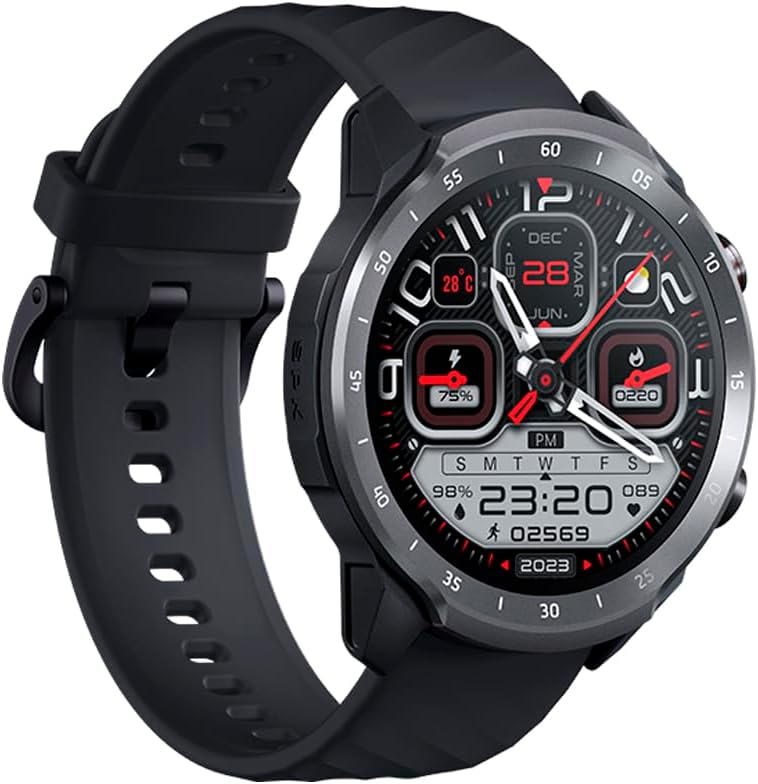
Figure 1.1: Mibro Watch A2, showcasing its design and strap.
2. Коопсуздук маалыматы
- Түзмөктү бөлүктөргө бөлүүгө, оңдоого же өзгөртүүгө аракет кылбаңыз. Бул зыянга, өрткө же электр тогуна урунууга алып келиши мүмкүн.
- Keep the device away from extreme temperatures (hot or cold), direct sunlight, and moisture.
- Аппаратты катуу таасирлерге же титирөөгө жол бербеңиз.
- Use only the provided charging cable and adapter. Using unauthorized accessories may damage the device or pose safety risks.
- Consult a medical professional before starting any new exercise regimen or if you have pre-existing health conditions, especially if relying on the watch for health monitoring.
- The device is 2 ATM water-resistant, suitable for splashes and brief immersion. Do not use it for diving, hot showers, or high-speed water sports.
3. Пакеттин мазмуну
Сураныч, кутудан чыкканда пакеттин мазмунун текшериңиз:
- Mibro Watch A2 Smartwatch
- Магниттик кубаттоочу кабель
- User Manual
4. Продукттун макети жана компоненттери
Familiarize yourself with the main components of your Mibro Watch A2:

Сүрөт 4.1: Алдыңкы view of the Mibro Watch A2 display and physical buttons.
- Дисплей: 1.39-inch HD touchscreen for interaction and information display.
- Каптал баскычтары: Typically used for power on/off, screen wake-up, and navigating menus.
- Жүрөктүн кагышынын сенсору: Located on the back of the watch, used for heart rate and SpO2 monitoring.
- Заряддоо байланыштары: Magnetic contacts on the back for connecting the charging cable.
- Боо: Adjustable and replaceable strap for comfortable wear.
5. Орнотуу колдонмосу
5.1. Аппаратты заряддоо
Before first use, fully charge your Mibro Watch A2.
- Connect the magnetic charging cable to the charging contacts on the back of the watch. Ensure the cable is securely attached.
- Заряддоо кабелинин USB учунун стандарттуу USB кубат адаптерине (5V/1A сунушталат) же компьютердин USB портуна сайыңыз.
- The watch display will show the charging progress. A full charge typically takes approximately 2 hours.
5.2. Колдонмону орнотуу жана жупташтыруу
To unlock the full potential of your Mibro Watch A2, download and install the official Mibro Fit application on your smartphone.
- Колдонмону жүктөп алыңыз: Издөө "Mibro Fit" in the Apple App Store (for iOS) or Google Play Store (for Android) and install it.
- Катталуу/Кирүү: Open the Mibro Fit app and follow the on-screen instructions to register a new account or log in if you already have one.
- Bluetooth иштетүү: Смартфонуңузда Bluetooth иштетилгенин текшериңиз.
- Түзмөктү жупташтыруу: In the Mibro Fit app, navigate to the "Device" or "Add Device" section. Select "Mibro Watch A2" from the list of available devices.
- Жупташтыруу ырастоо: Жупташтыруу өтүнүчү саатыңызда жана смартфонуңузда пайда болот. Эки түзмөктө жупташтырууну ырастаңыз.
- Толук орнотуу: Follow any remaining prompts in the app to complete the initial setup, including personal information and notification permissions.
6. Иштөө нускамалары
6.1. Негизги навигация
- Экранды ойготуу: Капталдагы баскычты басыңыз же билегиңизди көтөрүңүз.
- Өйдө/ылдый сүрүү: Менюларды жана эскертмелерди сыдырыңыз.
- Солго/Оңго сүрүү: Access quick functions or different data screens (e.g., heart rate, weather).
- таптаңыз: Бир нерсени тандаңыз же аракетти ырастаңыз.
- Каптал баскычын басыңыз: Сааттын бетине кайтуу же колдонмолордун тизмесине кирүү.
6.2. Bluetooth чалуу
The Mibro Watch A2 supports Bluetooth calling directly from your wrist.

Figure 6.1: Using the Mibro Watch A2 for Bluetooth calls.
- Ensure your watch is successfully paired with your smartphone via Bluetooth.
- Чалууларды жасоо: Чалууну баштоо үчүн саатыңыздагы тергичке же байланыштар тизмесине кириңиз.
- Чалууларды кабыл алуу: Чакыруу келгенде, сиз ага түздөн-түз саат экранынан жооп бере аласыз же четке кага аласыз.
6.3. Ден соолуктун мониторинги
The watch provides continuous health monitoring features.
- Жүрөктүн кагышы: Swipe to the heart rate interface or select the heart rate app to view your current heart rate. The watch supports 24/7 heart rate monitoring.
- SpO2 (кандагы кычкылтек): Access the SpO2 measurement function to check your blood oxygen saturation. Ensure the watch is snug on your wrist for accurate readings.
- Уйкунун мониторинги: Wear the watch to bed, and it will automatically track your sleep patterns, including deep sleep, light sleep, and awake times. View detailed sleep data in the Mibro Fit app.

Figure 6.2: Blood oxygen measurement in progress on the Mibro Watch A2.
6.4. Спорт режимдери
The Mibro Watch A2 offers 70 sport modes to track your workouts.
- From the watch face, navigate to the "Workout" or "Sport" app.
- Select your desired sport mode (e.g., Running, Cycling, Walking).
- Tap to start the activity. The watch will begin recording data such as duration, calories burned, and heart rate.
- To pause or end an activity, swipe or press the side button as prompted on the screen.

Figure 6.3: Mibro Watch A2 tracking an outdoor activity.
6.5. Notifications and Other Features
- Акылдуу эскертмелер: Receive call, message, and app notifications directly on your watch. Configure notification settings in the Mibro Fit app.
- Бетти көрүү: Customize your watch face from a variety of options available in the Mibro Fit app or directly on the watch.
- Музыкалык башкаруу: Саатыңыздан смартфонуңуздагы музыканы ойнотууну башкарыңыз.
- Аба ырайы: View real-time weather updates.
- Ойготкучтар жана таймерлер: Set alarms and use timer/stopwatch functions.
7. Техникалык тейлөө
- Тазалоо: Саатты жана боону жумшак менен дайыма сүртүп туруңуз, damp кездеме. Катуу химиялык заттарды же абразивдүү материалдарды колдонуудан алыс болуңуз.
- Суу каршылык: The Mibro Watch A2 is 2 ATM water-resistant. This means it can withstand splashes, rain, and brief immersion in shallow water. It is not suitable for swimming, diving, hot showers, or saunas. Always dry the watch thoroughly after exposure to water.
- Батареяга кам көрүү: To prolong battery life, avoid fully discharging the battery frequently. Charge the watch when the battery level is low. Store the watch in a cool, dry place if not used for extended periods.
- Программалык камсыздоо жаңыртуулары: Regularly check for and install software updates via the Mibro Fit app to ensure optimal performance and access to new features.
8. Кыйынчылыктарды
| Көйгөй | Мүмкүн болгон себеп / Чечим |
|---|---|
| Саат күйбөй жатат. | Battery might be depleted. Connect the watch to the charger and allow it to charge for at least 10 minutes before attempting to turn it on. |
| Смартфон менен жупташтыруу мүмкүн эмес. |
|
| Жүрөктүн кагышынын/SpO2 көрсөткүчтөрүнүн так эместиги. |
|
| Эскертмелер көрүнбөй жатат. |
|
9. Техникалык шарттар
| Өзгөчөлүк | Description |
|---|---|
| Модель аты | Mibro Watch A2 |
| Модель номери | XPAW015 |
| Бренд | Микро |
| Дисплей өлчөмү | 1.39 дюйм |
| Байланыш | Bluetooth |
| Өзгөчөлүктөр | Software available in 26 languages, Bluetooth Calling, Heart Rate Monitoring, SpO2 Measurement, Sleep Tracking, 70 Sport Modes |
| Шайкеш түзмөктөр | Bluetooth-enabled smartphones, tablets, PCs, laptops |
| Батареянын курамы | Литий-ион |
| Батареянын иштөө мөөнөтү | 10 күнгө чейин (типтүү колдонуу) |
| Суу каршылык | 2 банкомат |
| GPS | GPS смартфон аркылуу |
| Эстутум сактоо сыйымдуулугу | 1 ГБ |
10. Кепилдик жана колдоо
Mibro products typically come with a limited warranty. Please refer to the warranty card included in your product packaging or visit the official Mibro webСиздин аймакка тиешелүү деталдуу кепилдик шарттары жана шарттары үчүн сайт.
For technical support, troubleshooting assistance, or service inquiries, please contact Mibro customer support through their official website or the contact information provided in the Mibro Fit application.
Official Mibro Store: Visit Mibro Store on Amazon


