Introduction
This manual provides detailed instructions for the safe and efficient operation of your CAIWEI X99+ 4K Smart Projector. Please read this manual thoroughly before using the projector and retain it for future reference.
Коопсуздук маалыматы
Коопсуз иштөөнү камсыз кылуу жана зыян келтирбөө үчүн төмөнкү сактык чараларын аткарыңыз:
- Do not place the projector in boxes or cabinets with poor ventilation properties. Ensure adequate airflow around the device to prevent overheating.
- Avoid direct exposure of the projector lens to sunlight.
- Вентиляция тешиктерин жаппаңыз.
- Проектор менен келген кубат адаптерин гана колдонуңуз.
- Проекторду суудан же башка суюктуктардан алыс кармаңыз.
- Проекторду өз алдынча бөлүктөргө бөлүүгө же оңдоого аракет кылбаңыз. Жардам алуу үчүн квалификациялуу тейлөө кызматкерлерине кайрылыңыз.
Пакеттин мазмуну
Пакетте бардык буюмдар бар экенин текшериңиз:
- CAIWEI X99+ Smart Projector
- Алыстан башкаруу
- HDMI кабели
- Power Cable (UK-plug)
- AV Cable
- Проектор сумкасы
- Колдонуучунун Колдонмосу (бул документ)
Продукт бүттүview
The CAIWEI X99+ is a smart projector designed for versatile entertainment and presentation needs. It features a native 1080P resolution with 4K support, 800 ANSI lumens brightness, and an integrated Android 9.0 operating system.

Figure 1: CAIWEI X99+ Smart Projector front view, showcasinанын компакттуу дизайны жана негизги өзгөчөлүктөрү.
Негизги өзгөчөлүктөрү:
- Дисплей технологиясы: Native 1920x1080P resolution, 4K support, 800 ANSI lumens, 15500:1 contrast ratio.
- Smart OS: Android 9.0 with access to over 6000 authorized apps (Netflix, YouTube, Prime Video, etc.).
- Эстутум: 2 ГБ оперативдүү эс тутум + 16 ГБ ROM.
- Зымсыз туташуу: Dual 2.4G/5G WiFi, Airplay/DLNA/Miracast support, Bluetooth 5.0.
- Аудио: Integrated 10W high-power stereo speakers, Dolby Audio support, 3.5mm audio output.
- Сүрөттү өркүндөтүү: HDR10 processing, MEMC technology for smoother motion.
- Түзөтүүлөр: 4D and ±50° vertical/horizontal electronic keystone correction, 40% digital image zoom.
- Узактыгы: Fully sealed optical engine for dust protection and extended lifespan.

Figure 2: Visual representation of the projector's color accuracy, brightness, and image quality in various lighting conditions.
Жайгашуу
1. Жайгаштыруу
Position the projector on a stable, flat surface or mount it to the ceiling using the four screw holes. Ensure the projector is placed at an appropriate distance from the projection surface to achieve the desired screen size. Maintain adequate ventilation around the unit.
2. Power Connection
- Электр кабелин проектордун кубат киргизүү портуна туташтырыңыз.
- Электр кабелинин экинчи учун ылайыктуу электр розеткасына сайыңыз.
- Аппаратты күйгүзүү үчүн проектордун же пульттун кубат баскычын басыңыз.
3. Баштапкы фокус жана негизги багытты тууралоо
Upon initial power-on, the projected image may appear blurry or distorted. Adjust these settings for optimal clarity:
- Фокус: Проектордун линзасындагы фокус шакекчесин сүрөт так жана даана болгонго чейин айландырыңыз.
- Негизги ташты оңдоо: Use the remote control to access the keystone correction settings. The projector supports 4D keystone correction and ±50° vertical/horizontal electronic correction to square the image if the projector is not perfectly perpendicular to the screen.
- Digital Zoom: Adjust the image size without moving the projector using the digital zoom function (40% zoom out/in).
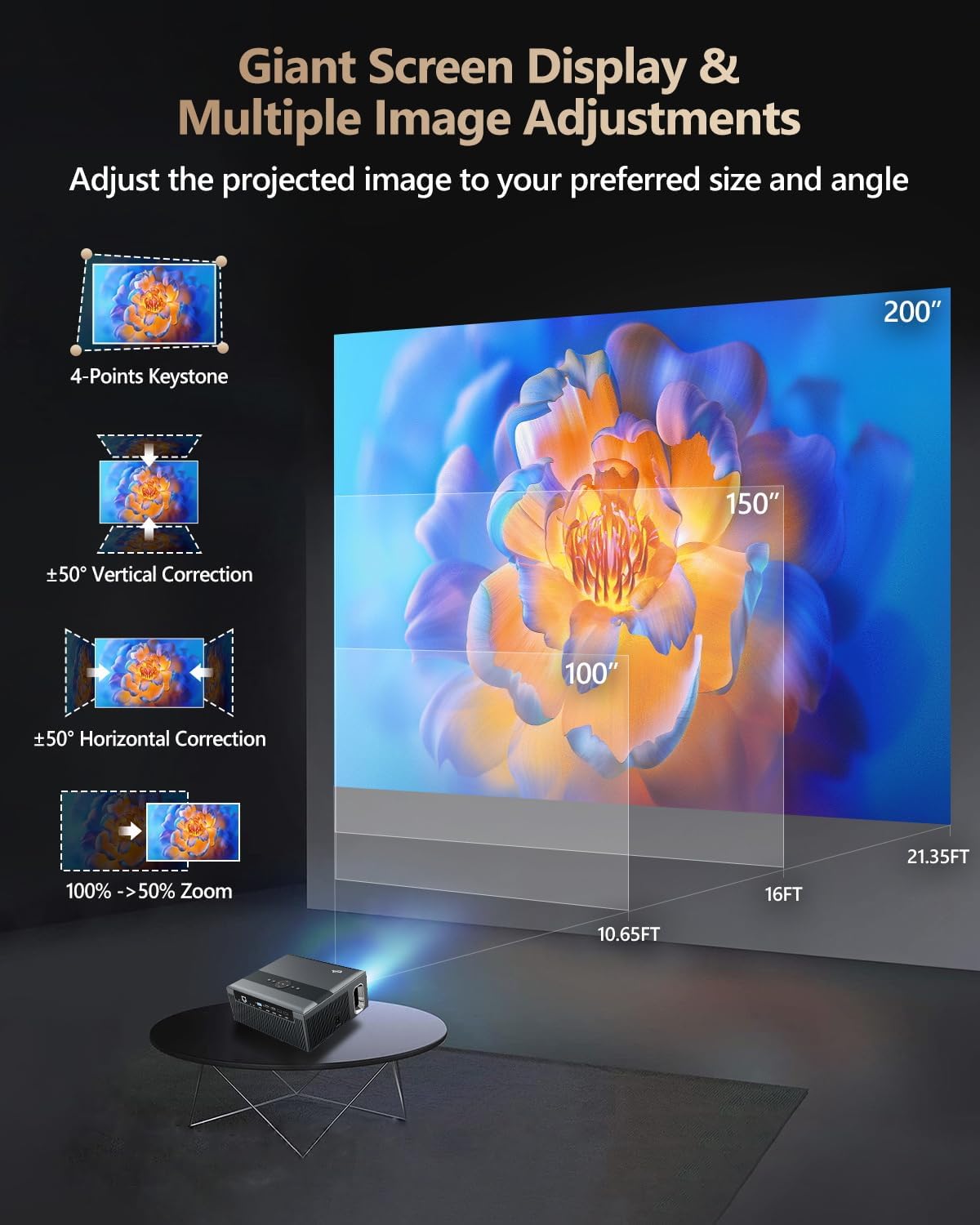
Figure 3: Image adjustment options including keystone correction and digital zoom.
4. Тармакка кошулуу
Connect the projector to the internet for access to streaming apps and online content.
- Wi-Fi: Navigate to the network settings in the Android OS. Select your desired 2.4G or 5G Wi-Fi network and enter the password.
- LAN (Ethernet): Connect an Ethernet cable from your router to the RJ45 port on the projector for a wired internet connection.
5. Bluetooth Жупташтыруу
Pair Bluetooth devices such as external speakers, headphones, mice, keyboards, or gamepads.
- Bluetooth түзмөгү жупташтыруу режиминде экенин текшериңиз.
- On the projector, go to Bluetooth settings within the Android OS.
- Select the desired device from the list and confirm pairing.

Figure 4: Wireless connectivity for streaming and audio.
Иштөө нускамалары
1. Android TV OS Navigation
Use the remote control to navigate the Android 9.0 interface. The home screen provides access to installed applications, settings, and input sources.

Figure 5: Android TV 9.0 interface with pre-installed and accessible applications.
2. Колдонмону орнотуу жана колдонуу
The projector comes with pre-installed apps like Netflix, YouTube, and Prime Video. You can download additional authorized applications from the app store within the Android OS.
- Select an app icon from the home screen to launch it.
- Follow on-screen prompts for login or content selection.
3. Screen Mirroring (Airplay/DLNA/Miracast)
Synchronize your smartphone, tablet, or laptop screen wirelessly to the projector.
- Түзмөгүңүз менен проектор бир Wi-Fi тармагына туташып турганын текшериңиз.
- Select the appropriate mirroring function (Airplay for iOS, Miracast for Android/Windows, DLNA for compatible devices) on the projector's interface.
- Initiate screen mirroring from your source device.
4. Тышкы түзмөктөрдү туташтыруу
The projector offers multiple ports for connecting various external devices.

Figure 6: Available input and output ports for external devices.
- HDMI: Connect Blu-ray/DVD players, TV sticks, game consoles (PS5), PCs, or laptops using an HDMI cable. Select the corresponding HDMI input from the projector's source menu.
- USB: Insert USB flash drives or hard drives into the USB ports to play media fileтүздөн-түз с.
- VGA: Connect older PCs or laptops using a VGA cable.
- OF: Use the AV cable to connect devices with composite video and stereo audio outputs.
5. Аудио чыгаруу
The projector features built-in 10W stereo speakers. For alternative audio experiences:
- Bluetooth: Pair with external Bluetooth speakers or headphones as described in the Setup section.
- 3.5 мм аудио чыгышы: Connect wired headphones or external speakers using a 3.5mm audio cable.

Figure 7: Projector's integrated audio system.
Техникалык тейлөө
1. Тазалоо
- Объектив: Оптикалык линзалар үчүн атайын жасалган жумшак, түксүз кездемени колдонуңуз. Абразивдүү тазалагычтарды колдонбоңуз.
- Сырткы: Проектордун сыртын жумшак, кургак чүпүрөк менен сүртүңүз. Өжөр тактар үчүн бир аз сүртүңүз.ampчүпүрөктү суу менен.
- Вентиляция тешиктери: Periodically check and gently clean the ventilation openings to ensure unobstructed airflow.
2. Dust Protection
The CAIWEI X99+ features a fully sealed optical engine and an air purifier filter, which significantly reduces dust accumulation and light decay, contributing to a longer service life.

Figure 8: Dust-proof design of the CAIWEI X99+ projector.
3. Сактоо
When not in use for extended periods, store the projector in a cool, dry place, preferably in its original packaging or the provided projector bag, to protect it from dust and physical damage.
Проблемаларды чечүү
Проекторуңузда көйгөйлөргө туш болсоңуз, төмөнкү жалпы көйгөйлөрдү жана чечимдерди караңыз:
| Көйгөй | Мүмкүн себеп | Чечим |
|---|---|---|
| Сүрөт жок же "Сигнал жок" деген билдирүү жок | Туура эмес киргизүү булагы тандалды; кабель туташуусу бош; түзмөк күйгөн жок. |
|
| бүдөмүк сүрөт | Фокус туураланган эмес; негизги таш оңдоо керек. |
|
| Үн жок | Volume too low; incorrect audio output selected; external device audio issue. |
|
| Wi-Fi туташуу маселелери | Туура эмес сырсөз; диапазондон тышкары; роутер маселелери. |
|
| Пульт иштебей жатат | Батареялар түгөнүп калган; тоскоолдук; жупташтыруу көйгөйү. |
|
Техникалык шарттар
| Бренд | CAIWEI |
| Модел | X99+ |
| Display Resolution | Native 1920 x 1080 (Supports 4K) |
| Жарыктык | 800 ANSI Lumens (12000 LED Lumens) |
| Контраст катышы | 15500:1 |
| Операция системасы | Android 9.0 |
| Эс | 2 ГБ RAM + 16 ГБ ROM |
| Байланыш технологиясы | Bluetooth 5.0, Dual-band Wi-Fi (2.4G/5G), USB, HDMI, VGA, AV, LAN (RJ45) |
| Өзгөчөлүктөр | Built-In Wi-Fi, Portable, Wireless, HDR10, MEMC, Dolby Audio, Sealed Optical Engine, 4D Keystone Correction, Digital Zoom |
| Аудио | 10W High Power Stereo Speakers, 3.5mm Audio Output |
| Продукциянын өлчөмдөрү | 10.55 x 9.25 x 4.92 дюйм |
| Элемент Салмагы | 7.48 фунт |
Кепилдик жана колдоо
For warranty information and technical support, please refer to the warranty card included with your product or visit the official CAIWEI webсайт. Бул колдонмодо каралбаган маселелер боюнча жардам алуу үчүн кардарларды тейлөө кызматына кайрылыңыз.
Өндүрүүчү: CAIWEI
Webсайт: CAIWEI Official Store on Amazon


