Introduction
This manual provides detailed instructions for the WOLFANG GA300 Action Camera. It covers setup, operation, maintenance, and specifications to ensure optimal performance and user experience. The GA300 is designed to capture high-quality video and photos in various environments, including underwater, with advanced stabilization and versatile features.
Кутуда эмне бар
The WOLFANG GA300 Action Camera package includes the following items:
- 1x WOLFANG GA300 экшн-камера
- 1x Алыстан башкаруу
- 2x 1350mAh Батарея
- 1x суу Case
- 1x Bicycle Stand
- 5x тоосу
- 2x эки тараптуу скотч
- 2x Helmet Mount
- 4x Бинттер
- 5x Tethers
- 1x USB кабели
- 1x Ланс Cloth
- 1x Ыкчам маалымдама колдонмосу
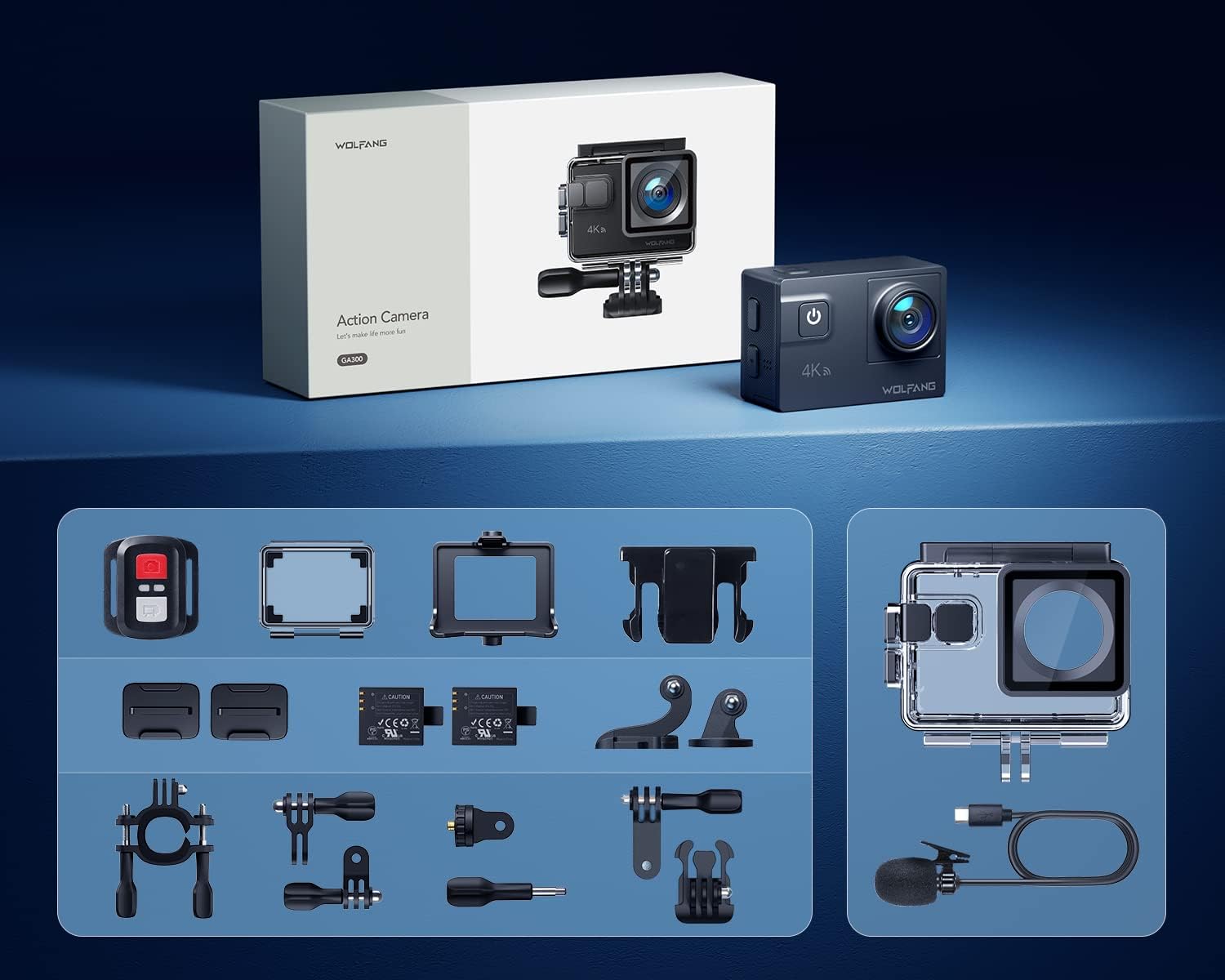
Image: All components included in the WOLFANG GA300 Action Camera kit, neatly laid out.
Продукт бүттүview
The WOLFANG GA300 Action Camera features a compact design with intuitive controls and multiple connectivity options.
Камера компоненттери
- Алдыңкы экран: Түз эфир үчүнview жана абалдын көрсөткүчтөрү.
- Rear Touchscreen (2-inch): For menu navigation, settings adjustment, and playback.
- Кубат / режим баскычы: To power on/off and switch between modes.
- Жапкыч/ОК баскычы: To start/stop recording or take photos.
- USB-C порту: Заряддоо жана маалыматтарды өткөрүү үчүн.
- Мини HDMI порту: For video output to external displays.
- Микрофон киргизүү: For connecting the external microphone.
- Микро SD карта слоту: Supports up to 128GB cards (32GB included).
- Батарея бөлүмү: Houses the removable 1350mAh battery.

Image: The WOLFANG GA300 camera, showcasing its compact size and key accessories.
Жайгашуу
1. Батареяны салуу
Open the battery compartment cover located at the bottom of the camera. Insert a fully charged 1350mAh battery, ensuring the contacts align correctly. Close the cover securely.
2. Inserting Micro SD Card
Locate the Micro SD card slot on the side of the camera. Insert a compatible Micro SD card (Class 10 or higher, up to 128GB) with the contacts facing the correct direction until it clicks into place.
3. Камераны заряддоо
Connect the camera to a USB power source using the provided USB-C cable. The charging indicator will illuminate. A full charge typically takes a few hours. Two batteries are included, each providing approximately 90 minutes of recording time.
4. Суу өткөрбөй турган корпусту бекитүү
For underwater use or protection against dust and impact, place the camera inside the waterproof case. Ensure the case is properly sealed before use. The case allows the camera to be waterproof up to 40 meters.

Image: The WOLFANG GA300 in its waterproof housing, demonstrating its 40M waterproof capability.
5. Тактоо
Utilize the various included mounts (bicycle stand, helmet mounts, general mounts) to secure your camera for different activities. Ensure all mounts are firmly attached to prevent accidental detachment.

Image: A person on a mountain bike with the camera mounted, illustrating helmet mount usage.
Камераны иштетүү
1. Күйгүзүү/өчүрүү
Камераны күйгүзүү же өчүрүү үчүн Кубат/Режим баскычын басып, кармап туруңуз.
2. Сенсордук экранды колдонуу
Navigate through menus and settings by swiping and tapping on the 2-inch rear touchscreen. The responsive touchscreen allows for easy operation.
3. Видео жаздыруу
Select video mode from the menu. Press the Shutter/OK button to start recording. Press again to stop. The camera supports 4K at 60FPS, 1080P at 120FPS, and 720P at 240FPS for various recording needs.
4. Сүрөткө тартуу
Switch to photo mode. Press the Shutter/OK button to take a 24MP photo.
5. Пультту колдонуу
The included remote control allows you to start/stop video recording and take photos from a distance of up to 10 meters.
6. Wi-Fi Connectivity and App
Enable Wi-Fi on the camera and connect it to your smartphone via the IBK Cam app. This allows for live preview, remote control, and easy transfer of media to your device.

Image: The camera's live view displayed on a smartphone, demonstrating Wi-Fi connectivity.
7. Атайын функциялар
- Жай кыймыл: Capture fast-paced action in slow motion.
- Убакыттын өтүшү: Condense long events into short, dynamic videos.
- Жаруу режими: Take multiple photos in quick succession.
- Чумкуу режими: Enhances underwater footage by correcting color balance.

Сүрөт: Visual examples of Time Lapse, Loop Recording, Slow Motion, and Long Exposure modes.
8. Adjustable View Бурчтук линза
The camera features an adjustable view angle lens, allowing you to switch between Wide, Medium, and Narrow fields of view to suit your shooting needs.

Image: The adjustable view angle feature, demonstrating different perspectives from Wide to Narrow.
9. 6-Axis EIS Stabilization & 8x Zoom
The advanced 6-axis Electronic Image Stabilization (EIS) ensures your videos remain smooth and stable, even during dynamic activities. The 8x zoom function allows for precise control over shooting distance and capturing distant details.
Техникалык тейлөө
- Суу өткөрбөй турган кап: Regularly inspect the waterproof case for any damage or debris on the seal. Clean with fresh water after saltwater use and allow to air dry.
- Линзага кам көрүү: Use the provided lens cloth to gently clean the camera lens and waterproof case lens. Avoid abrasive materials.
- Батареяны сактоо: Store batteries in a cool, dry place. For long-term storage, charge batteries to approximately 50% capacity.
- Жалпы тазалоо: Камера корпусун жумшак, кургак чүпүрөк менен сүртүңүз. Күчтүү химиялык заттарды колдонуудан алыс болуңуз.
Проблемаларды чечүү
- Камера күйбөй жатат: Батарея толук заряддалганын жана туура салынганын текшериңиз. Экинчи кошулган батареяны колдонуп көрүңүз.
- Жаздыруу маселелери: Check if the Micro SD card is properly inserted and has sufficient free space. Ensure the card is Class 10 or higher.
- Начар аудио сапаты: If using the external microphone, ensure it is securely plugged into the correct port. Check camera settings to confirm external mic is selected.
- Wi-Fi туташуу көйгөйлөрү: Restart both the camera and your smartphone. Ensure the IBK Cam app is up to date.
- Суу агып кетиши: Immediately remove the camera from the waterproof case. Inspect the case for cracks or damage to the rubber seal. Do not use the case if damaged.
Техникалык шарттар
| Өзгөчөлүк | Спецификация |
|---|---|
| Бренд | WOLFANG |
| Модель номери | GA300 |
| Видео тартуунун резолюциясы | 4K 60FPS, 4K 30FPS, 2.7K 30FPS, 1080P 120FPS, 1080P 60FPS, 1080P 30FPS, 720P 240FPS, 720P 120FPS, 720P 60FPS |
| Сүрөттүн резолюциясы | 24MP |
| Суу өткөрбөйт | 40M (with included case) |
| Image Stabilization | 6-Axis EIS |
| Чоңойтуу | 8x |
| Screen Size | 2 Inches (Touchscreen) |
| Байланыш | Wi-Fi, USB-C, Mini HDMI |
| Сактагыч | Micro SD (128 ГБ чейин, 32 ГБ кошо алганда) |
| Батареялар | 2x 1350mAh литий-ион (кошулган) |
| Элемент Салмагы | 1.19 фунт |
| Продукциянын өлчөмдөрү | 2.36 x 1.65 x 0.98 дюйм |
Расмий продукт Videos
WOLFANG GA300 Audio Test
Video: An audio test demonstrating the sound recording capabilities of the WOLFANG GA300 Action Camera, including both internal and external microphone performance.
WOLFANG Action Camera 4K 60FPS 24MP Review
Видео: деталдуу кайраview of the WOLFANG GA300 Action Camera, highlighting its 4K 60FPS video and 24MP photo capabilities, along with other features.


