Маанилүү коопсуздук маалыматы
Read all instructions before operating the TV. Keep this manual for future reference. Follow all warnings and instructions marked on the product.
- Желдетүүчү тешиктерди жаппаңыз.
- Жылуулук булактарынын жанына орнотпоңуз.
- Электр шнурын басуудан же кысып калуудан сактаңыз.
- Өндүрүүчү тарабынан көрсөтүлгөн тиркемелерди/аксессуарларды гана колдонуңуз.
- Чагылган бороондо же көпкө колдонулбаганда электр розеткасынан ажыратыңыз.
- Бардык тейлөөлөрдү квалификациялуу тейлөө кызматкерлерине тапшырыңыз.
Продукт бүттүview
The THOMSON 24HA2S13C is a 24-inch HD Smart Android TV designed for versatile use, including camping with its 12V power supply. It features Google Assistant, Wi-Fi, Bluetooth, Dolby Digital audio, and a triple-tuner for various signal reception.

Сүрөт: алдыңкы view of the THOMSON 24HA2S13C 24-inch Smart Android TV, showing the screen displaying streaming service logos and a family enjoying the TV in a campорнотуу.
Пакеттин мазмуну
Баардык буюмдар пакетте камтылганын текшериңиз:
- THOMSON 24HA2S13C Smart Android TV
- Алыстан башкаруу
- Power Adapter (12V compatible)
- Телевизорлор (2)
- Телевизор стенддери үчүн бурамалар
- Колдонуучунун Колдонмосу (бул документ)
- Quick Start Guide
Жайгашуу
1. Телевизордун стенддерин бекитүү
- Экран бузулуп калбашы үчүн, телевизорду жумшак, тегиз бетке бетин ылдый каратып этияттык менен коюңуз.
- Align the TV stands with the mounting holes on the bottom of the TV.
- Берилген бурамалар менен стенддерди бекитиңиз. Алардын бекем кысылганын текшериңиз.

Image: The THOMSON 24HA2S13C TV showing two possible stand positions for different furniture widths. The image highlights the flexibility in stand placement.
2. Кубатты туташтыруу
Connect the 12V power adapter to the TV's power input and then to a suitable power source. For camping or mobile use, connect to a 12V DC power outlet.

Image: The THOMSON 24HA2S13C TV mounted in a caravan, with a 12V power adapter shown, illustrating its suitability for mobile use.
3. Тышкы түзмөктөрдү туташтыруу
Сыналгы тышкы түзмөктөрдү туташтыруу үчүн ар кандай портторду сунуш кылат:
- HDMI: For high-definition audio and video devices (e.g., game consoles, Blu-ray players).
- USB: Медиа ойнотуу үчүн USB сактагыч түзмөктөрүн туташтыруу үчүн.
- LAN: Зымдуу интернет байланышы үчүн.
- Антенна/Спутник: For receiving broadcast signals.
- AV IN: Эски аналогдук түзмөктөр үчүн.
- Аудио чыгуу (оптикалык): Тышкы үн системаларына туташуу үчүн.
- CI+: Шарттуу кирүү модулдары үчүн.

Сүрөт: Арткы view of the THOMSON 24HA2S13C TV, detailing the various input and output ports available for connectivity.
Телевизорду иштетүү
1. Баштапкы орнотуу устасы
Биринчи жолу күйгүзүлгөндө, сыналгы сизди баштапкы орнотуу процессине жетектейт. Буга төмөнкүлөр кирет:
- Тил тандоо.
- Тармакка туташуу (Wi-Fi же Ethernet).
- Google account sign-in (optional, but recommended for full Smart TV features).
- Channel scanning (for DVB-T2/C/S2).
2. Алыстан башкаруу функциялары
The included remote control provides access to all TV functions. It features backlit buttons for use in low light and a dedicated "Favorite" button for quick access to your preferred app.

Image: The remote control for the THOMSON 24HA2S13C TV, highlighting its ergonomic design, backlit buttons, and voice control capabilities.
3. Smart TV өзгөчөлүктөрү (Android TV)
This TV runs on Android TV, providing access to a wide range of applications and services:
- Агым кызматтары: Access Netflix, Prime Video, YouTube, Disney+, and more.
- Google Жардамчысы: Use voice commands to search for content, control playback, and get information. Activate by pressing the Google Assistant button on the remote.
- Chromecast камтылган: Cast content from compatible smartphones, tablets, or computers directly to your TV.
- Google Play дүкөнү: Кошумча колдонмолорду жана оюндарды жүктөп алыңыз.

Image: The THOMSON 24HA2S13C TV screen showing the Android TV home interface with popular streaming applications and content recommendations.
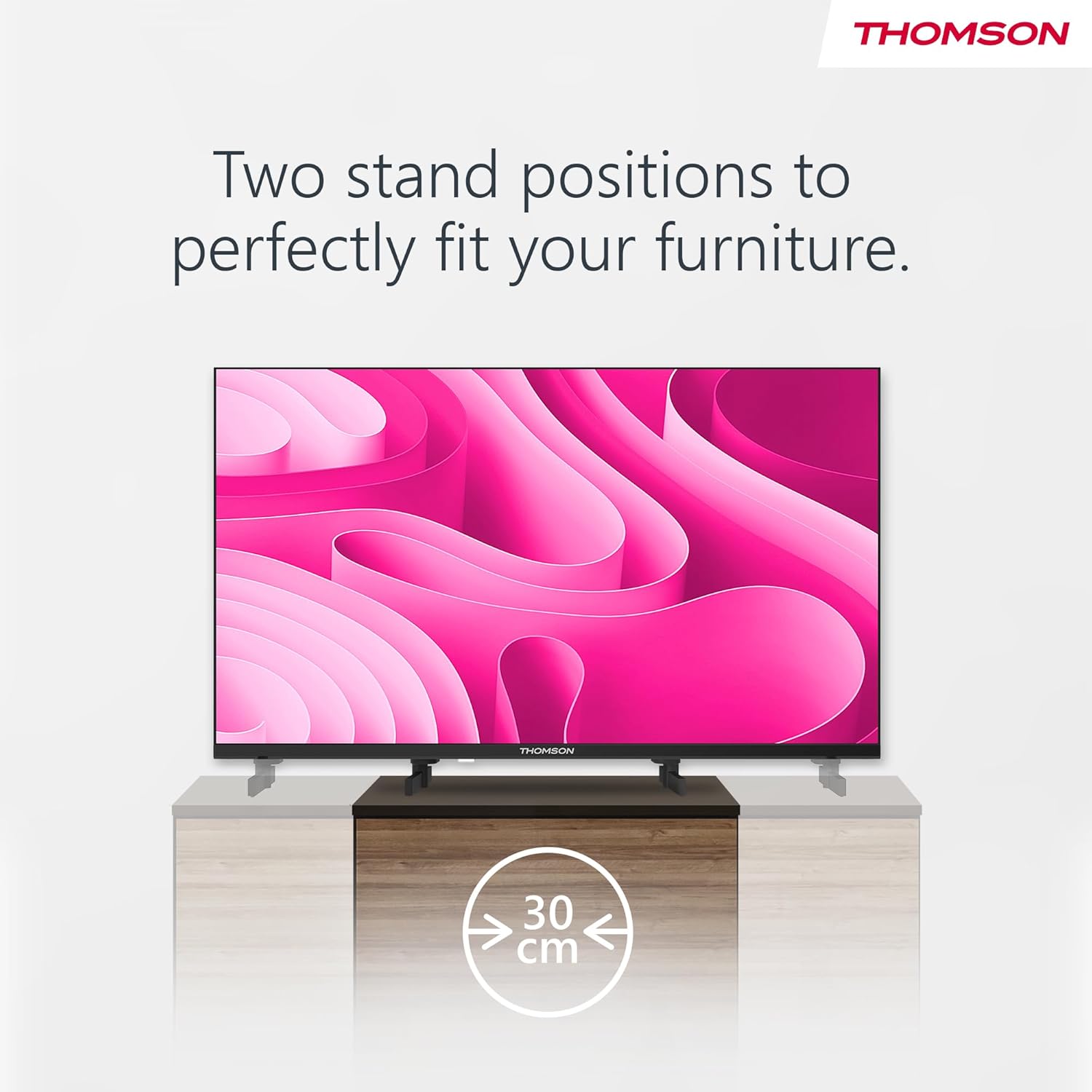
Image: A person using the voice control feature of the THOMSON TV remote, demonstrating interaction with Google Assistant.
Техникалык тейлөө
Телевизорду тазалоо
- Тазалоодон мурун дайыма сыналгыдан ажыратыңыз.
- Use a soft, dry cloth to wipe the screen and cabinet. Do not use liquid cleaners or aerosol sprays.
- өжөр белгилери үчүн, жеңил гampen a microfiber cloth with water and gently wipe. Avoid excessive moisture.
Программалык камсыздоо жаңыртуулары
The TV may receive software updates to improve performance and add new features. Ensure your TV is connected to the internet to receive these updates. You can usually check for updates in the TV's settings menu.
Проблемаларды чечүү
| Көйгөй | Мүмкүн себеп | Чечим |
|---|---|---|
| Күч жок | Электр зымы туташкан эмес; розетка активдүү эмес. | Электр шнурунун туташуусун текшериңиз. Башка түзмөк менен розетка сынагы. |
| Сүрөт жок, бирок үн бар | Туура эмес киргизүү булагы тандалды; арткы жарык көйгөйү. | Press the "Input" button on the remote to select the correct source. Contact support if issue persists. |
| Үн жок, бирок сүрөт бар | Volume too low or muted; audio cables loose. | Increase volume. Check mute status. Ensure audio cables are securely connected. |
| Пульт иштебей жатат | Батареялары түгөнгөн; пульт менен телевизордун ортосундагы тоскоолдук. | Батареяларды алмаштырыңыз. Тоскоолдуктарды алып салыңыз. Пульттун сыналгынын инфракызыл сенсоруна багытталганын текшериңиз. |
| Wi-Fi'га туташпай жатат | Туура эмес сырсөз; роутер көйгөйлөр; Сыналгы роутерден өтө алыс. | Wi-Fi сырсөзүн текшериңиз. Роутерди өчүрүп-күйгүзүңүз. Сыналгыны роутерге жакыныраак жылдырыңыз же зымдуу туташууну колдонуңуз. |
Техникалык шарттар
| Өзгөчөлүк | Деталь |
|---|---|
| Бренд | Томсон |
| Модел | 24HA2S13C |
| Screen Size | 24 дюйм (60 см) |
| Дисплей технологиясы | LED |
| Резолюция | 1366 x 768 (HD) |
| Операция системасы | Android TV |
| Өзгөчөлүктөр | Google Assistant, Chromecast Built-in, 12V Power Supply, Dolby Audio, Triple Tuner (DVB-T2/C/S2) |
| Байланыш | Wi-Fi, Bluetooth, HDMI (x3), USB (x2), LAN, Optical Audio Out, AV In, CI+ |
| Тtage | 12 вольт (ток) |
| Продукт өлчөмдөрү (W x D x H) | 53.5 x 15.1 x 35.3 см (стенд менен) |
| Салмагы | 3.5 кг |
For detailed energy efficiency information, please refer to the EU EPREL database: https://eprel.ec.europa.eu/qr/1456673

Image: The EU Energy Label for the THOMSON 24HA2S13C TV, showing an energy efficiency rating of E and power consumption of 18 kWh/1000h.
Кепилдик жана колдоо
This Thomson TV comes with a 3-year guarantee. For technical support, warranty claims, or service inquiries, please contact your local Thomson service provider or refer to the manufacturer's webсайт.
Manufacturer: STREAMVIEW GMBH
Webсайт: www.streamview.com
Электрондук почта: contact@streamview.com
Расмий продукт Video
Көрүү үчүн бул видеону көрүңүзview of the Thomson 24-inch Easy TV.
Видео: Кыскачаview of the Thomson 24-inch Easy TV, showcasing its design and features. This video is provided by the vendor Streamview GmbH.


