Introduction
This manual provides detailed instructions for the setup, operation, and maintenance of your TRIGKEY Key Mini N150 Mini PC. Designed for efficiency and compact performance, this mini PC is ideal for various applications, from office work to multimedia entertainment. Please read this manual thoroughly before using the device to ensure optimal performance and longevity.

Сүрөт: алдыңкы view of the TRIGKEY Key Mini N150 Mini PC, highlighting its compact design and accessible front ports.
Коопсуздук маалыматы
- Ensure the mini PC is placed on a stable, flat surface to prevent accidental falls.
- Аппаратты экстремалдык температурага, нымдуулукка же түз күн нуруна калтырбаңыз.
- Берилген кубат адаптерин гана колдонуңуз. Уруксат берилбеген адаптерлерди колдонуу түзмөккө зыян келтирип, кепилдикти жокко чыгарышы мүмкүн.
- Keep ventilation openings clear to prevent overheating. Do not block the air vents.
- Avoid spilling liquids on the device. In case of liquid contact, immediately power off and disconnect the device.
- Түзмөктү өз алдынча ачууга же оңдоого аракет кылбаңыз. Оңдоо иштери үчүн квалификациялуу тейлөө кызматкерлерине кайрылыңыз.
Кутуда эмне бар
Сураныч, бардык буюмдар бар экенине ынануу үчүн пакетиңиздин мазмунун текшериңиз:
- 1x TRIGKEY Key mini N150 Mini PC (16GB DDR5 500GB SSD)
- 1x Колдонуучунун колдонмосу (бул документ)
- 1x Power Adapter (US/EU/UK/AU, depending on region)
- 1x HDMI Cable (100cm)
- 1x Wall Mount bracket
Продукт бүттүview жана өзгөчөлүктөрү
The TRIGKEY Key Mini N150 is a high-performance mini PC packed with advanced features for a seamless computing experience.
Негизги өзгөчөлүктөр
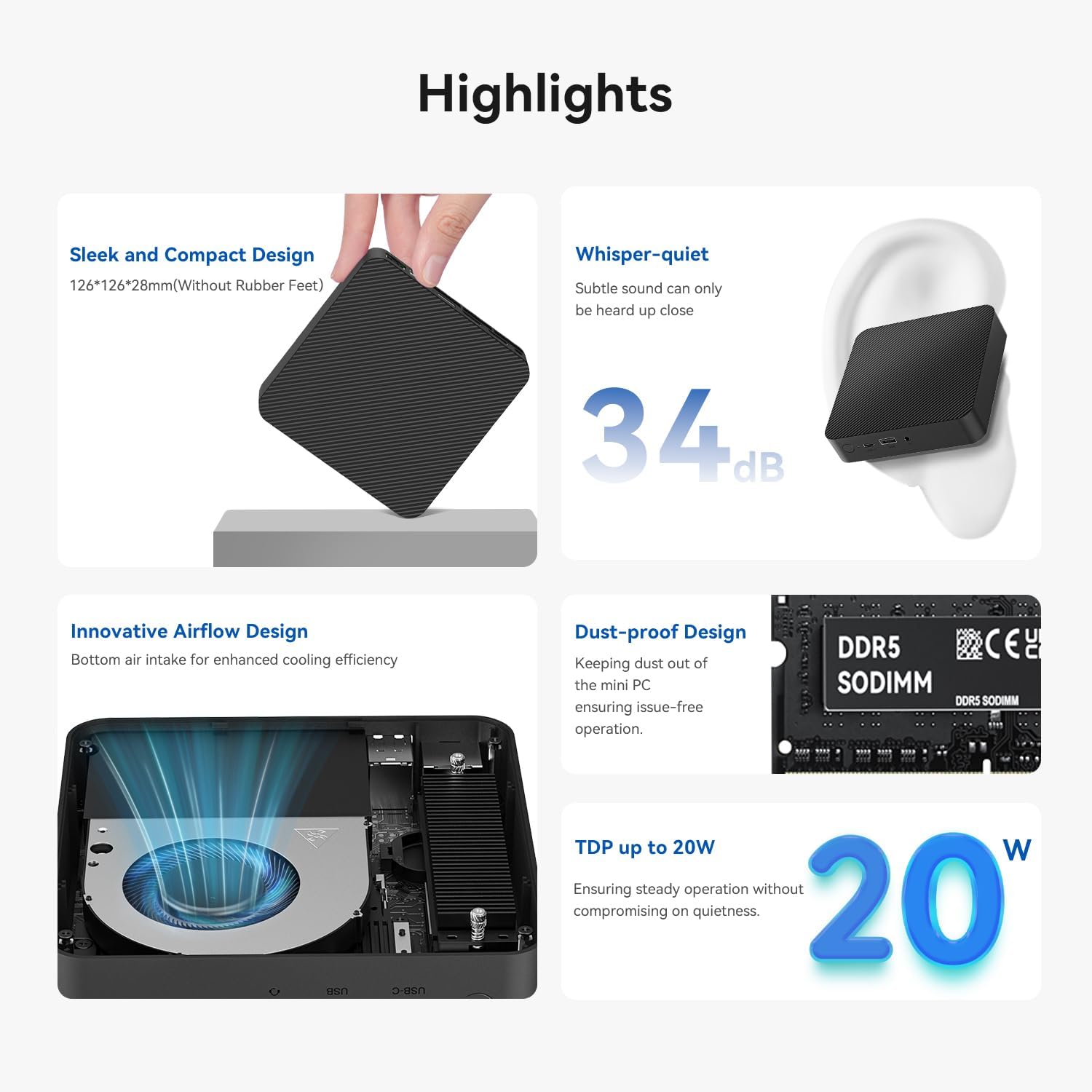
Image: Visual representation of the mini PC's key highlights including its compact size, low noise level, and efficient cooling.
- Жылмакай жана компакт дизайн: Measuring just 126x126x28mm (without rubber feet), it fits easily into any setup.
- Шыбырап-Тынч операция: Operates at less than 34 decibels, ensuring a silent working environment.
- Innovative Airflow Design: Features bottom air intake for enhanced cooling efficiency, maintaining stable performance.
- Dust-Proof Design: Helps keep internal components clean for prolonged, issue-free operation.
- Эффективдүү электр керектөө: With a Thermal Design Power (TDP) of up to 20W, it balances performance with energy efficiency.
Процессор жана графика

Image: Diagram illustrating the Intel Twin Lake Processor N150 and its core specifications.
Powered by the Intel Twin Lake N150 processor (up to 3.6GHz, 4 Cores/4 Threads, Intel 7, 6MB L3 Intel Smart Cache, 20W TDP), the Key Mini N150 offers robust performance. It integrates Intel Graphics with 24 EUs at 1000 MHz, supporting dual 4K 60Hz video output via HDMI 2.0 and AV1 decoding.
Эстутум жана сактоо

Image: Internal layout showing the DDR5 RAM module and the dual M.2 SSD slots for storage expansion.
The mini PC comes equipped with 16GB DDR5 4800MHz RAM and a 500GB M.2 2280 PCIe3.0 x4 SSD. It features a SO-DIMM slot supporting up to 16GB DDR5 RAM and dual PCIe SSD slots that can host up to 4TB of internal storage. The PCIe 3.0x4 slot is also compatible with SATA3 solid-state drives of the M.2 2280 format.
Байланыш

Сүрөт: деталдуу view of the mini PC's front and rear ports, indicating their functions.
The Key Mini N150 offers a comprehensive set of interfaces for versatile connectivity:
- 4x USB3.2 Gen2 (10Gbps) ports
- 1x LAN 2.5Gbps port
- 1x 3.5 мм аудио уячасы
- 2x HDMI (Max 4K 60Hz) ports
- 1x USB-C (Data 10Gbps) port
- 1x DC Jack for power input
- Wireless connectivity: Stable WiFi 6 (Intel AX101) and Fast Bluetooth 5.2.
Орнотуу колдонмосу
Follow these steps to set up your TRIGKEY Key Mini N150 Mini PC:
- Аппаратты таңгактан чыгаруу: Carefully remove the mini PC and all accessories from the packaging.
- Дисплейге туташуу: Use the provided HDMI cable to connect the mini PC to your monitor or TV. The device supports dual 4K 60Hz displays.
- Перифериялык түзүлүштөрдү туташтыруу: Plug in your USB keyboard, mouse, and any other desired peripherals into the available USB ports.
- Тармак туташуусу: For a wired connection, connect an Ethernet cable to the 2.5Gbps LAN port. For wireless, ensure your WiFi network is available.
- Күйгүзүү: Connect the power adapter to the DC Jack on the mini PC, then plug the adapter into a power outlet. Press the power button on the front of the device.
- Баштапкы орнотуу: The mini PC comes pre-installed with OS 11 Pro. Follow the on-screen prompts to complete the initial operating system setup, including language, region, and network configuration.
- Дубалга орнотуу (кошумча): If desired, use the included wall mount bracket to attach the mini PC to the back of a VESA-compatible monitor or to a wall. Ensure proper ventilation when mounting.
Иштөө нускамалары
Your TRIGKEY Key Mini N150 is designed for ease of use. Here are some general operating guidelines:
- Күйгүзүү/өчүрүү: Press the power button once to turn on the device. To shut down, use the operating system's shutdown function. A short press on the power button can also put the device to sleep.
- Wi-Fi'га туташууда: After initial setup, you can connect to Wi-Fi networks through the operating system's network settings. The device supports WiFi 6 for fast and stable connections.
- Bluetooth түзмөктөрү: Pair Bluetooth 5.2 compatible devices like keyboards, mice, or headphones via the operating system's Bluetooth settings.
- Dual Display Setup: Connect two monitors to the HDMI ports for an extended desktop experience. Configure display settings within the operating system.
- Intel Unison App: Utilize the Intel Unison application to seamlessly connect your PC with mobile devices. This allows for viewing photo galleries, transferring files, managing notifications, extending your PC screen with a tablet, and making/receiving calls/texts from your PC.

Image: Illustration of the Intel Unison App's capabilities for seamless device integration.
Техникалык тейлөө
Proper maintenance ensures the longevity and optimal performance of your mini PC:
- Аны таза кармаңыз: Regularly wipe the exterior with a soft, dry cloth. Avoid using liquid cleaners or aerosols.
- Чаңдын алдын алуу: The device has a dust-proof design, but regular cleaning of the surrounding area can further reduce dust accumulation. Ensure the bottom air intake is not obstructed.
- Программалык камсыздоо жаңыртуулары: Keep your operating system and drivers updated to ensure security and performance.
- Температураны башкаруу: While designed for efficient cooling, avoid placing the mini PC in enclosed spaces or near heat sources that could impede airflow.

Image: Exploded diagram illustrating the internal structure and cooling components of the mini PC.
Проблемаларды чечүү
If you encounter issues with your mini PC, refer to the following common solutions:
| Көйгөй | Мүмкүн себеп | Чечим |
|---|---|---|
| Кубат жок/Түзмөк күйбөйт | Power adapter not connected properly; Power outlet issue; Faulty power adapter. | Ensure power adapter is securely connected to both the PC and the outlet. Try a different power outlet. If issue persists, contact support. |
| Монитордо дисплей жок | HDMI cable loose or faulty; Incorrect input selected on monitor; Monitor power off. | Check HDMI cable connections. Ensure monitor is on and set to the correct input source (e.g., HDMI 1, HDMI 2). Try a different HDMI cable or monitor. |
| No internet connection (Wi-Fi) | Wi-Fi disabled; Incorrect password; Router issue; Signal interference. | Ensure Wi-Fi is enabled in OS settings. Re-enter Wi-Fi password. Restart your router. Move closer to the router or reduce interference. |
| Device running slow/overheating | Excessive background processes; Obstructed ventilation; Dust accumulation. | Close unnecessary applications. Ensure air vents are clear and not blocked. Clean dust from the device's exterior. |
| USB түзмөктөрү таанылган жок | Loose connection; Driver issue; Faulty USB device/port. | Try a different USB port. Reinstall or update drivers for the USB device. Test the USB device on another computer. |
For issues not listed here, or if the problem persists, please contact TRIGKEY customer support.
Техникалык шарттар
Detailed technical specifications for the TRIGKEY Key Mini N150 Mini PC:
| Өзгөчөлүк | Спецификация |
|---|---|
| Модел | Trigkey Key mini N150 Mini PC |
| Процессор | Intel Twin Lake N150 (up to 3.6GHz, 4 Cores/4 Threads, 6MB L3 Cache, 20W TDP) |
| Графика | Intel Graphics 24EUs 1000MHz |
| RAM | 16GB DDR5 4800MHz (SO-DIMM slot, max 16GB) |
| Сактагыч | 500GB M.2 2280 PCIe3.0 x4 SSD (Dual PCIe SSD slots, max 4TB total) |
| Операция системасы | OS 11 Pro (Pre-installed) |
| Video Output | 2x HDMI (Max 4K 60Hz), Dual-screen support |
| USB порттору | 4x USB3.2 Gen2 (10Gbps), 1x USB-C (Data 10Gbps) |
| Network | 1x LAN 2.5Gbps, WiFi 6 (Intel AX101), Bluetooth 5.2 |
| Аудио | 1x 3.5 мм аудио уячасы |
| Өлчөмдөр | 126 x 126 x 28 mm (without rubber feet) |
| Салмагы | Болжол менен 2.14 фунт |
| Түс | Кара |

Image: Official product specification sheet for the TRIGKEY Key Mini N150 Mini PC.
Кепилдик жана колдоо
TRIGKEY is committed to providing high-quality products and excellent customer service.
Кепилдик маалымат
Your TRIGKEY Key Mini N150 Mini PC comes with a standard manufacturer's warranty. Please refer to the warranty card included in your package or visit the official TRIGKEY webкепилдик камтууга жана узактыгына байланыштуу толук шарттар жана шарттар үчүн сайт.
Кардарларды колдоо
If you have any questions, require technical assistance, or experience issues with your device, please contact TRIGKEY customer support through the following channels:
- Amazon Messaging: For purchases made on Amazon, you can contact the seller "TRiGKEY" directly through the Amazon platform.
- Официалдуу Webсайт: Visit the TRIGKEY official webколдоо булактары, көп берилүүчү суроолор жана байланыш маалыматы үчүн сайт.
- Электрондук почта колдоо: Check the TRIGKEY website or your product packaging for a dedicated support email address.
When contacting support, please have your product model number (Key mini N150) and purchase details readily available.


