1. Коопсуздук боюнча маанилүү маалымат
Before operating your television, please read all safety instructions carefully. Keep this manual for future reference.
- Кубат булагы: Телевизорду көрсөтүлгөн кубат булагына гана туташтырыңыз.
- Вентиляция: Телевизордун айланасында жетиштүү желдетүүнү камсыз кылыңыз. Вентиляция тешиктерин жаап албаңыз.
- Суу жана ным: Телевизорду жамгырга же нымга тийгизбеңиз. Сыналгыга суюктук толтурулган нерселерди койбоңуз.
- Тазалоо: Тазалоодон мурун сыналгыдан ажыратыңыз. Жумшак, кургак чүпүрөктү колдонуңуз. Суюк тазалагычтардан алыс болуңуз.
- Тейлөө: Телевизорду өзүңүз тейлөөгө аракет кылбаңыз. Бардык тейлөөлөрдү квалификациялуу тейлөө кызматкерлерине тапшырыңыз.
2. Орнотуу
2.1 Пакеттен чыгаруу
Телевизорду жана бардык аксессуарларды таңгактан этияттык менен алып салыңыз. Таңгактоочу материалдарды келечектеги ташуу же тейлөө үчүн сактап коюңуз.
2.2 Стендди орнотуу
The Philips 55OLED807/98 includes a table top stand for stable placement. Follow these steps to attach the stand:
- Экранга зыян келтирбөө үчүн телевизорду жумшак, тегиз бетке ылдый каратып коюңуз.
- Стендди телевизордун астындагы монтаждоо тешиктери менен тууралаңыз.
- Берилген бурамалар менен стендди бекитиңиз. Бардык бурамалар бекем бекемделгенин текшериңиз.
Alternatively, the TV supports VESA wall mounting. Refer to a qualified installer for wall mount installation.
2.3 Перифериялык түзүлүштөрдү туташтыруу
Connect your external devices to the TV using the appropriate ports. Refer to the image below for port locations.

2.3.1-сүрөт: Rear panel of the Philips 55OLED807/98 TV, displaying HDMI, USB, Ethernet, and other connectivity ports for external devices.
- HDMI: For high-definition audio and video devices like Blu-ray players, game consoles, and set-top boxes. The TV features multiple HDMI ports.
- USB: Медияны ойнотуу үчүн USB сактагыч түзмөктөрдү туташтыруу үчүн fileже кызмат көрсөтүүлөрдү жаңыртуу үчүн. Телевизордо 3 USB порту бар.
- Ethernet (LAN): Зымдуу интернет байланышы үчүн.
- Антенна/кабель: Антеннаны же кабелдик ТВ сигналын туташтыруу үчүн.
- Аудио чыгаруу: Digital audio output for connecting to sound systems.
The TV also supports wireless connectivity via Wi-Fi жана Bluetooth for network access and connecting compatible accessories.
2.4 Кубат туташтыруу
After connecting all necessary peripherals, plug the power cord into the TV's power inlet and then into a wall outlet. The TV is now ready for initial setup.
3. Телевизорду иштетүү
3.1 Алыстан башкаруу
The TV comes with a remote control for easy navigation and control. Insert the two AAA batteries (included) into the remote control, ensuring correct polarity.

3.1.1-сүрөт: The Philips TV remote control, featuring dedicated buttons for power, volume, channel selection, input source, and quick access to streaming services like Netflix and YouTube.
- Кубат баскычы: Телевизорду күйгүзөт же өчүрөт.
- Көлөм +/-: Үн деңгээлин тууралайт.
- Канал +/-: Телеканалдарды өзгөртөт.
- Чабыттоо баскычтары: Менюлар боюнча жылдыруу жана параметрлерди тандоо үчүн колдонулат.
- Булак баскычы: Киргизүү булактарын тандайт (HDMI, USB ж.б.).
- Smart App Buttons: Популярдуу агымдык кызматтарга түз жетүү.
3.2 Баштапкы орнотуу жана Android TV
Биринчи жолу күйгүзүлгөндө, сыналгы сизди баштапкы орнотуу процессине жетектейт. Буга тилиңизди тандоо, Wi-Fi тармагына туташуу жана Android TV функцияларына кирүү үчүн Google аккаунтуңуз менен кирүү кирет.
3.3 Ambilight функциясы
The Philips 55OLED807/98 features 4-sided Ambilight. LED lights on all four sides of the TV project colors onto the wall behind, dynamically matching the on-screen content or music. This enhances the viewing experience by creating an immersive glow. You can customize Ambilight settings in the TV menu.
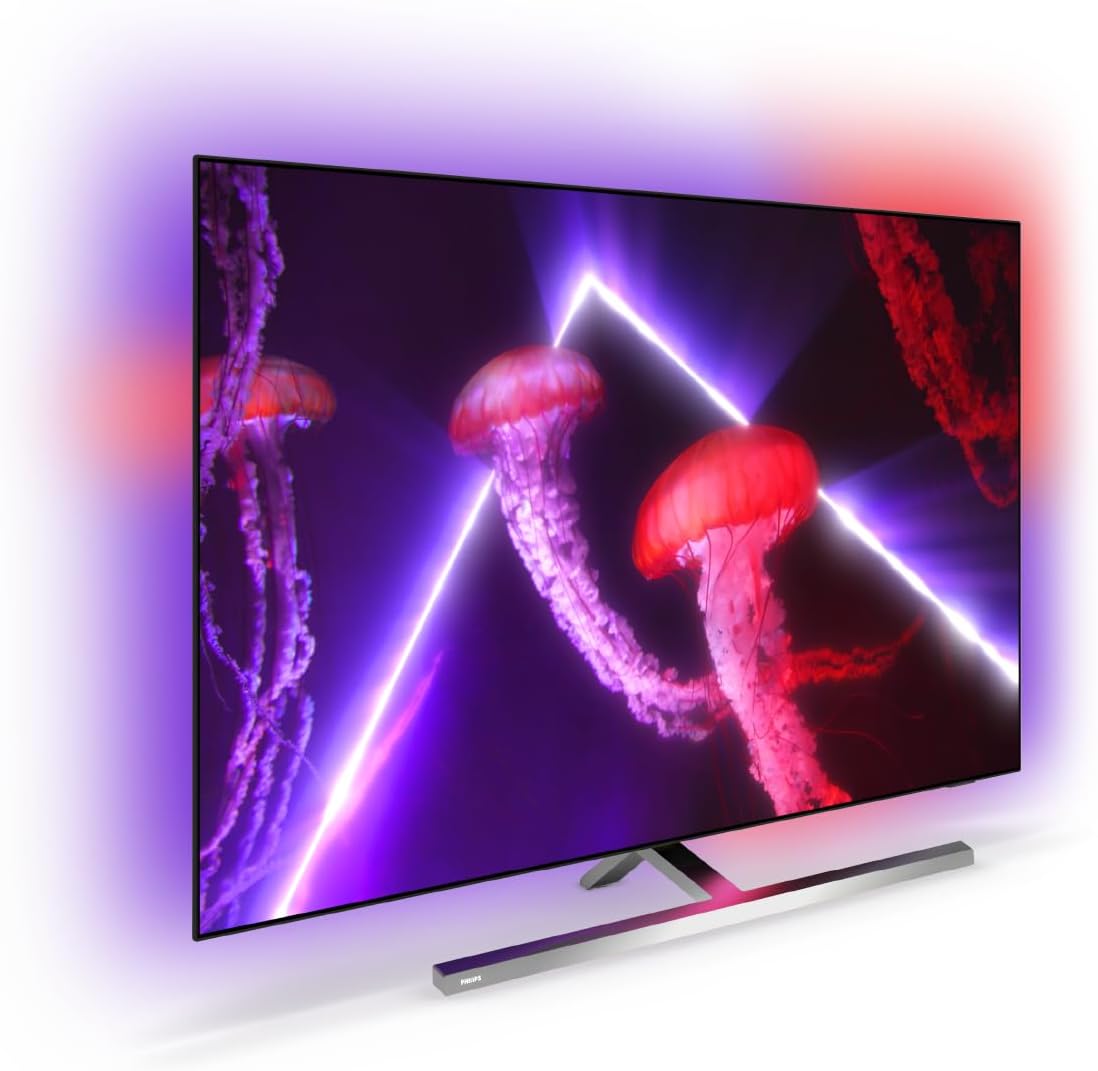
3.3.1-сүрөт: The Philips 55OLED807/98 OLED TV showcasing its 4-sided Ambilight feature, which projects dynamic colors onto the surrounding wall, enhancing immersion.
3.4 Сүрөт жана үн орнотуулары
Access the TV settings menu to adjust picture and sound preferences.
- P5 AI Perfect Picture Engine: This advanced processor optimizes picture quality for lifelike detail, contrast, color, and motion.
- Dolby Vision: Provides enhanced HDR (High Dynamic Range) for superior brightness, contrast, and color accuracy in compatible content.
- Dolby Atmos: Айланаңызда агып турган иммерсивдүү, көп өлчөмдүү аудиону жеткирет.
3.5 Оюн функциялары
The TV is optimized for gaming with features designed to provide a smooth and responsive experience:
- 120Hz жаңыртуу ылдамдыгы: Ensures smooth motion for fast-paced games.
- Өтө төмөн кечигүү: Minimizes input lag for responsive gameplay.
- G-sync, VRR, Freesync: Support for Variable Refresh Rate technologies to prevent screen tearing and stuttering.
3.6 Үн менен башкаруу
The TV supports voice control through the Google Assistant and works with Alexa. Use your voice to search for content, control playback, adjust settings, and more.
4. Техникалык тейлөө
4.1 Телевизорду тазалоо
- Тазалоодон мурун дайыма сыналгыдан ажыратыңыз.
- Use a soft, lint-free cloth to gently wipe the screen and TV body.
- өжөр белгилери үчүн, жеңил гampen the cloth with water or a specialized screen cleaner (ensure it's safe for OLED screens) and wipe gently. Do not spray liquids directly onto the TV.
- Avoid using abrasive cleaners, alcohol, or benzene, as these can damage the TV's finish.
4.2 Программалык камсыздоо жаңыртуулары
Ensure your TV's software is up to date for optimal performance and access to the latest features. The TV can typically update automatically when connected to the internet, or you can manually check for updates in the settings menu.
5. Кыйынчылыктарды
Телевизоруңузда көйгөйлөргө туш болсоңуз, төмөнкү жалпы көйгөйлөрдү чечүү кадамдарын караңыз:
- Кубат жок: Ensure the power cord is securely plugged into both the TV and the wall outlet. Try a different outlet.
- Сүрөт/үн жок: Check the input source. Ensure all cables (HDMI, antenna) are correctly connected. Restart connected devices.
- Алыстан башкаруу иштебейт: Батареяларды текшерип, алардын туура салынганын текшериңиз. Пультту түз эле телевизордун инфракызыл сенсоруна багыттаңыз.
- Тармакка туташуу маселелери: Verify your Wi-Fi password. Restart your router. If using a wired connection, ensure the Ethernet cable is properly connected.
- Сүрөттүн сапаты маселелери: Сүрөттүн жөндөөлөрүн тууралаңыз (жарыктык, контраст, түс). Мазмун булагынын жогорку сапатта экенин текшериңиз.
Эгерде көйгөй чечилбесе, Philips колдоо кызматына кайрылыңыз webсайтка же кардарларды тейлөөгө кайрылыңыз.
6. Техникалык шарттар
Key technical specifications for the Philips 55OLED807/98 OLED 4K UHD Android TV:
| Өзгөчөлүк | Спецификация |
|---|---|
| Бренд | Philips |
| Модел | 55OLED807/98 |
| Дисплей технологиясы | OLED |
| Screen Size | 55 дюйм (139 см) |
| Резолюция | 3840 x 2160 пиксель (4K UHD) |
| Жаңыртуу ылдамдыгы | 120 Гц |
| Аспект катышы | 16:9 |
| Процессор | P5 AI Perfect Picture Engine |
| Ambilight | 4 тараптуу Ambilight |
| HDR колдоо | Dolby Vision, Major HDR formats |
| Аудио технологиясы | Dolby Atmos, DTS Play-Fi |
| Операция системасы | Android TV |
| Үн менен башкаруу | Google Assistant, Works with Alexa |
| Байланыш | Bluetooth, Ethernet, HDMI (multiple), USB (3 total), Wi-Fi |
| Оюн функциялары | Ultra-low latency, 120Hz, G-sync, VRR, Freesync |
| Монтаж түрү | Table Mount (stand included), VESA Wall Mount compatible |
| Өлчөмдөр (Продукт) | 23.6D x 122.5W x 77.1H см |
| Пакеттин өлчөмдөрү | 140 x 86 x 16 см |
| Салмагы (пакет) | 27 кг |
| Камтылган компоненттер | TV, 2 x AAA Batteries, Legal and safety brochure, Power cord, Quick start guide, Remote Control, Table top stand |
6.1 Энергияны үнөмдөө
The Philips 55OLED807/98 TV is designed with energy efficiency in mind. Refer to the energy label for details:

6.1.1-сүрөт: Energy Efficiency Rating for the Philips 55OLED807/98 OLED Television. It indicates a 'Good' rating with an estimated annual energy cost of $61 and consumption of 227 kWh, based on 27¢/kWh and 5 hours daily usage.
7. Кепилдик жана колдоо
For warranty information, please refer to the warranty card or legal and safety brochure included with your product. Philips provides customer support for technical assistance and service inquiries.
- Онлайн колдоо: Philipsтин расмий колдоо кызматына баш багыңыз website for FAQs, software downloads, and contact information.
- Кардарларды тейлөө: Contact Philips customer service for direct assistance.


