1. Киришүү
The UNI-T UT383S is a compact and precise digital light meter designed for measuring illuminance in Lux (lx) or Foot-Candles (FC). It features a split probe for flexible measurements, auto-ranging capabilities, and data hold functions, making it suitable for various applications including public settings, light manufacturing, photo studios, interior renovation, construction, and greenhouses.
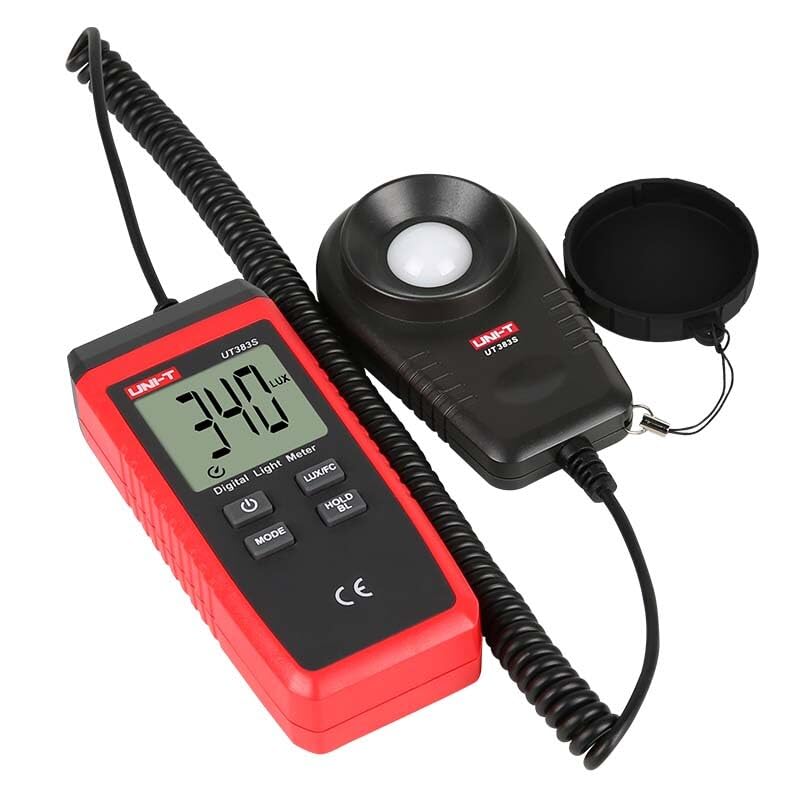
Image 1: The UNI-T UT383S Digital Light Meter, showing the main unit with LCD display and the separate light sensor probe connected by a coiled cable.
2. Коопсуздук маалыматы
Please read and understand all safety warnings and operating instructions before using this device. Failure to do so may result in injury or damage to the meter.
- Do not operate the meter in environments with high temperature or humidity.
- Avoid strong vibrations or impacts to the device.
- Keep the light sensor clean and free from obstructions to ensure accurate readings.
- Батарея аз индикатор пайда болгондо батарейкаларды дароо алмаштырыңыз.
3. Пакеттин мазмуну
The standard package for the UT383S Digital Light Meter includes:
- 1 x UNI-T UT383S Digital Light Meter
- 1 x 1.5V AAA Батарея (кошулган)
- 1 x Англис колдонуучу колдонмо
4. Түзмөктүн жайгашуусу
The UT383S consists of a main display unit and a separate light sensor probe connected by a coiled cable. The main unit features an LCD display and several control buttons.
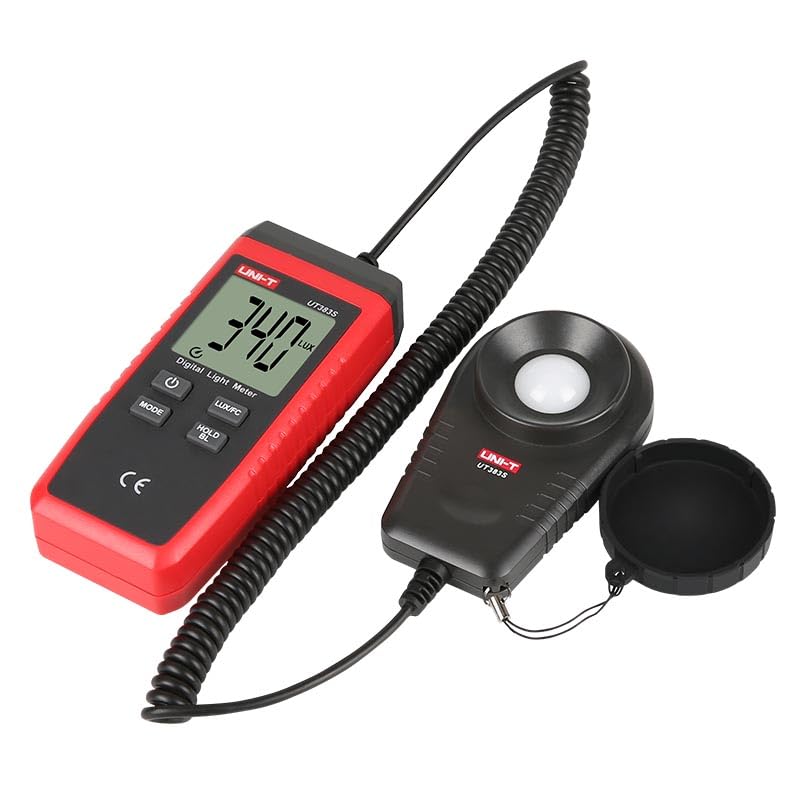
Сүрөт 2: деталдуу view of the UT383S main unit, highlighting the LCD screen and the arrangement of its function buttons.
4.1. Башкаруу баскычтары:
- Кубат баскычы (⏻): Turns the device On/Off.
- MODE баскычы: Cycles through measurement modes or settings.
- LUX/FC баскычы: Toggles between Lux and Foot-Candle units.
- HOLD/BL Button: Freezes the current reading on the display. Long press activates/deactivates backlight.
- MAX/MIN баскычы: Displays maximum or minimum recorded values.
5. Батареяны орнотуу
The UT383S requires 1 Lithium Metal battery (included). To install or replace the battery:
- Аппараттын өчүрүлгөнүн текшериңиз.
- Эсептегичтин артындагы батарея отсегин табыңыз.
- Батарея уясынын капкагын ачыңыз.
- Insert the battery, observing the correct polarity (+/-).
- Батарея уясынын капкагын бекем жабыңыз.
6. Иштөө нускамалары
6.1. Күйгүзүү/өчүрүү
- Эсептегичти күйгүзүү үчүн басыңыз ⏻ Кубат баскычы.
- Эсептегичти өчүрүү үчүн басып, кармап туруңуз ⏻ Power button until the display turns off.
6.2. Unit Selection (Lux/FC)
The UT383S can display readings in either Lux (lx) or Foot-Candles (FC).
- басыңыз LUX/FC button to toggle between Lux and Foot-Candle units. The selected unit will be indicated on the LCD display.
6.3. Маалыматты кармоо функциясы
Дисплейдеги учурдагы окууну токтотуу үчүн:
- басыңыз HOLD/BL button once. The "HOLD" indicator will appear on the screen.
- басыңыз HOLD/BL button again to release the hold and resume live measurements.
6.4. Maximum/Minimum Measurement
The meter can record and display the maximum and minimum illuminance values measured during a session.
- басыңыз МАКС/МИН button once to display the maximum recorded value ("MAX" indicator).
- басыңыз МАКС/МИН button a second time to display the minimum recorded value ("MIN" indicator).
- басыңыз МАКС/МИН button a third time to exit MAX/MIN mode and return to live measurement.
6.5. Арткы жарык
For measurements in low-light conditions, the display backlight can be activated.
- басып, кармап туруңуз HOLD/BL арткы жарыкты күйгүзүү же өчүрүү үчүн баскыч.
6.6. Автоматтык түрдө өчүрүү
The meter features an auto power-off function to conserve battery life. It will automatically shut down after a period of inactivity.
- To disable auto power-off, refer to the full user manual for advanced settings.
6.7. Чыгample Application

Image 3: The UT383S in use, demonstrating its application in measuring light intensity within a specialized setup.
7. Видео демонстрация
Watch this video for a visual guide on operating a similar UNI-T digital light meter. While the model shown is UT381, the basic functions and button operations are largely similar to the UT383S.
Video 1: A demonstration of the UNI-T UT381 Digital Lux Meter, showcasing its power-on, auto-ranging, manual range selection, data hold, maximum/minimum value display, and unit switching (Lux/FC) features. This video is provided by the seller and illustrates functions similar to the UT383S.
8. Техникалык шарттар
| Өзгөчөлүк | Деталь |
|---|---|
| Бренд | UNI-T |
| Модел | UT383S (HY-UT383S) |
| Power Source | Батарея менен иштейт (1 литий металл батарейкасы камтылган) |
| Материал | Акрилонитрил бутадиен стирол (ABS) |
| Sensor Technology | Photodiode/Photoresistor |
| Дисплей түрү | LCD |
| Элемент Салмагы | 0.6 килограмм (1.32 фунт) |
| Продукциянын өлчөмдөрү | 6.5 x 4.33 x 4.72 дюйм |
| Сертификаттар | CE, UKCA |
| Sampубакыт | 0.5с |
| Өзгөчөлүктөр | Split probe, Auto range, Lux/Fc selectable, Max/Min, Overload indication (LO/HI), Data hold, Backlight, Auto power off, Low battery indication |
9. Техникалык тейлөө
To ensure the longevity and accuracy of your UNI-T UT383S Digital Light Meter, follow these maintenance guidelines:
- Тазалоо: Wipe the device and sensor with a soft, dry cloth. Do not use abrasive cleaners or solvents.
- Сактагыч: Store the meter in a cool, dry place away from direct sunlight and extreme temperatures. If storing for extended periods, remove the battery to prevent leakage.
- Сенсорго кам көрүү: Keep the light sensor dome clean and free from dust or fingerprints, as this can affect measurement accuracy.
10. Кыйынчылыктарды
If you encounter issues with your UT383S, refer to the following common problems and solutions:
- Дисплей жок/Түзмөк күйбөйт:
- Батареянын туура полярдуулукта жана туура орнотулганын текшериңиз.
- Replace the battery with a new one if it is depleted.
- "OL" (Overload) Display:
- The measured illuminance exceeds the meter's maximum range. Move the sensor to an area with lower light intensity.
- Туура эмес окуулар:
- Ensure the light sensor is clean and unobstructed.
- Verify that the correct unit (Lux or FC) is selected for your application.
- Allow the meter to stabilize in the measurement environment for a few moments.
- Төмөн батарея көрсөткүчү:
- The battery icon on the display indicates low battery. Replace the battery immediately to ensure accurate operation.
11. Кепилдик жана колдоо
UNI-T products are designed for reliability and performance. For specific warranty information and technical support, please refer to the warranty card included with your product or visit the official UNI-T webсайт. Сатып алуу квитанциясын кепилдик дооматтары үчүн сатып алуунун далили катары сактаңыз.
For further assistance, you may contact the seller or UNI-T customer service directly.