1. Киришүү
This manual provides essential information for the safe and efficient use of your FLEXISPOT 42-inch Sit-to-Stand Desk Riser. This height-adjustable computer workstation is designed to promote a healthy balance between sitting and standing throughout your workday. Please read these instructions thoroughly before assembly and operation.
2. Коопсуздук маалыматы
- Колдонуудан мурун бардык компоненттердин бекем бекитилишин текшериңиз.
- Жумушчу стол үчүн 33 фунттан жана клавиатуранын лоток үчүн 4.4 фунттан ашпаңыз.
- Keep hands and fingers clear of moving parts during height adjustment to prevent injury.
- Place the desk riser on a stable, level surface.
- Туруктуулукту сактоо үчүн салмакты иш тактасына бирдей бөлүштүрүңүз.
- Иштеп жаткан учурда балдарды жана үй жаныбарларын аппараттан алыс кармаңыз.
3. Пакеттин мазмуну
Монтаждоону баштоодон мурун бардык бөлүктөрдүн бар экендигин текшериңиз. Эгерде кандайдыр бир бөлүктөрү жок же бузулуп калса, кардарларды колдоо менен байланышыңыз.
- Main Desk Riser Unit
- Алынуучу клавиатура лоток
- Assembly Hardware (screws for keyboard tray)
- Instruction Manual
4. Орнотуу нускамалары
The FLEXISPOT Sit-to-Stand Desk Riser is designed for quick and straightforward assembly. Two people are recommended for easier setup.
- Агрегатты таңгактан чыгаруу: Бардык компоненттерди таңгактан кылдаттык менен алып салыңыз.
- Негизги блокту жайгаштыруу: Place the main desk riser unit on your existing desk or workstation. Ensure it is centered and stable.
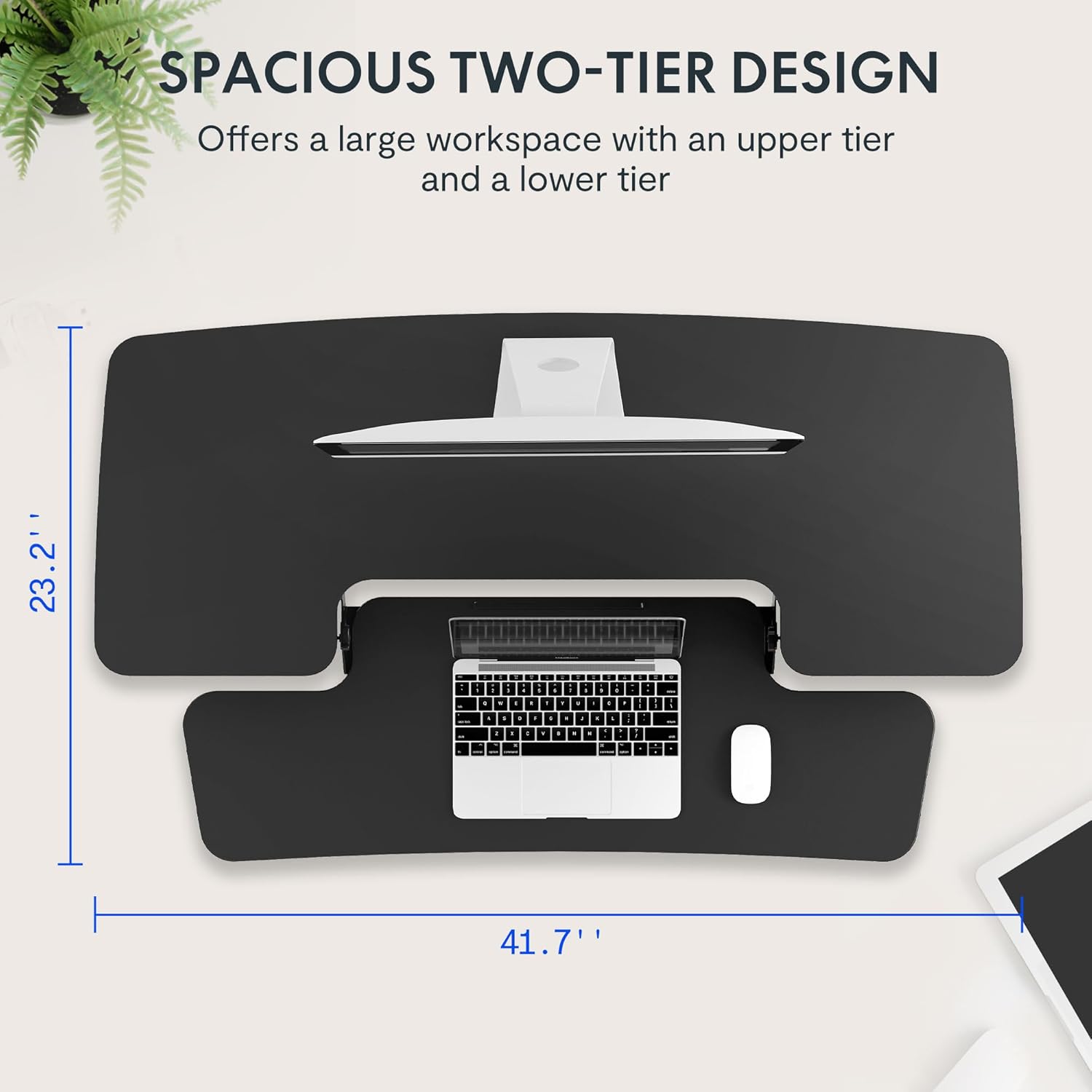
- Баскычтоп салгычын тиркөө: Align the removable keyboard tray with the designated slots on the underside of the main unit. Slide the tray into place until it clicks securely. Use a Phillips screwdriver (not included) to fasten any provided screws for additional stability.
- Кабелдерди уюштуруу: Utilize the included cable management loops to organize your monitor, keyboard, and mouse cables. Ensure cables have enough slack to accommodate the full range of height adjustment.


5. Иштөө нускамалары
The desk riser features a spring-assisted lifting mechanism for smooth and effortless height adjustments.
- Бийиктикти жөндөө: To raise or lower the desk, locate the lever on the right side of the main unit. Squeeze the lever firmly.
- Үстөлдү көтөрүү: While squeezing the lever, gently lift the desktop to your desired standing height. The spring-assisted mechanism will help elevate the unit. Release the lever to lock the desk in place.
- Үстөлдү түшүрүү: While squeezing the lever, gently push down on the desktop to lower it to your desired sitting height. Release the lever to lock the desk in place.
- Вертикалдык кыймыл: The desk riser moves straight up and down within its own footprint, requiring no additional spatial accommodations. The height can be adjusted between 4.7 inches (minimum) and 19.7 inches (maximum).


6. Техникалык тейлөө
Regular maintenance ensures the longevity and optimal performance of your desk riser.
- Тазалоо: Беттерди жумшак менен сүртүңүз, гamp кездеме. Абразивдүү тазалагычтардан же финишке зыян келтирүүчү катаал химиялык заттардан алыс болуңуз.
- Текшерүү: Мезгил-мезгили менен бардык бурамалар менен байланыштарды текшерип туруңуз, алар бекем бойдон калууда. Керек болсо катуулатуу.
- Кыймылдуу бөлүктөр: The lifting mechanism is designed to be maintenance-free. Do not attempt to lubricate or disassemble it.
7. Кыйынчылыктарды
If you encounter any issues with your desk riser, refer to the following common solutions:
- Desk is difficult to adjust: Ensure no objects are obstructing the lifting mechanism. Verify that the weight on the desktop does not exceed the maximum capacity.
- Desk feels unstable: Check that the unit is placed on a flat, stable surface. Ensure all components, especially the keyboard tray, are securely attached. Redistribute weight evenly on the desktop.
- Keyboard tray is loose: Re-check the connection points of the keyboard tray and ensure any fastening screws are tightened.
If problems persist, please contact FLEXISPOT customer support for assistance.
8. Техникалык шарттар
| Өзгөчөлүк | Спецификация |
|---|---|
| Бренд | FLEXISPOT |
| Модел | B0CDWSPYKQ |
| Продукциянын өлчөмдөрү (D x W x Y) | 24"D x 42"W x 19.7"H |
| Түс | Кара |
| Жогорку Материал түрү | Инженердик жыгач |
| Элемент Салмагы | 52 фунт |
| Минималдуу бийиктик | 4.7 дюйм |
| Максималдуу бийиктик | 19.7 дюйм |
| Иш тактасынын жүктөө жөндөмдүүлүгү | 33 фунт |
| Баскычтоп лоток жүктөө сыйымдуулугу | 4.4 фунт |
| Керектүү Ассамблея | Yes (Keyboard Tray) |
| Ассамблеяга сунушталган адамдардын саны | 2 |

9. Кепилдик жана колдоо
Your FLEXISPOT Sit-to-Stand Desk Riser comes with a limited warranty. For specific details regarding warranty coverage, please refer to the warranty documentation included with your purchase or visit the official FLEXISPOT webсайт.
For technical support, troubleshooting assistance, or warranty claims, please contact FLEXISPOT customer service. You can typically find contact information on the manufacturer's webсайт же сатып алуу платформасы аркылуу.
Онлайн колдоо: зыярат кылыңыз Amazonдагы FLEXISPOT дүкөнү продукт маалымат жана колдоо булактары үчүн.


