1. Киришүү
This manual provides detailed instructions for the installation, operation, and maintenance of your COMMAX CDV-77M 7-inch Fine View Monitor. Please read this manual thoroughly before using the product to ensure proper function and safety. Keep this manual for future reference.
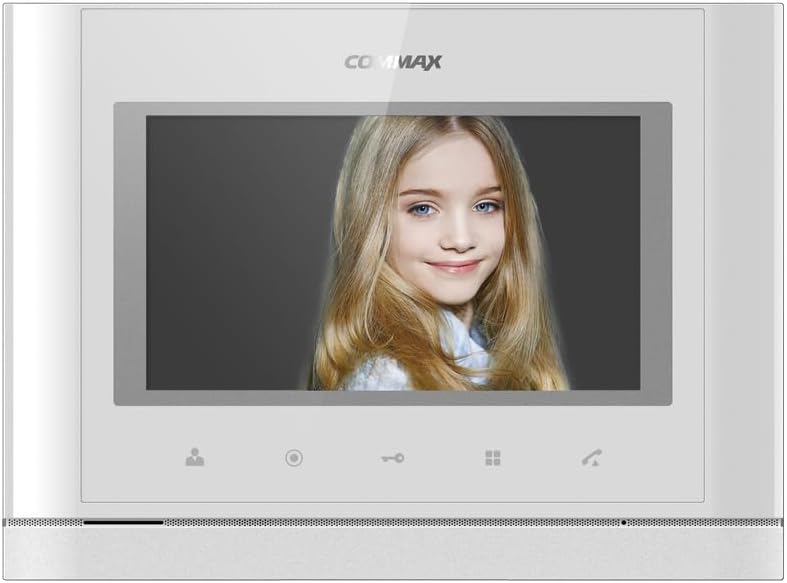
Фронт view of the COMMAX CDV-77M monitor, showcasing its 7-inch TFT LCD screen and sleek design. The screen is active, displaying an image.
2. Продукциянын өзгөчөлүктөрү
- 7-inch TFT LCD screen for clear video display.
- Supports video communication and door lock release functions.
- Expandable system: Connects with up to 2 door cameras, 2 additional monitors, and 2 interphones.
- PAL/NTSC video format conversion capability.
- Hand-free operation for convenience.
- Wall-mounted design for easy installation.
3. Коопсуздук маалыматы
Продукциянын бузулушун алдын алуу жана колдонуучунун коопсуздугун камсыз кылуу үчүн төмөнкү коопсуздук чараларын сактаңыз:
- Агрегатты сууга же ашыкча нымдуулукка дуушар кылбаңыз.
- Аппаратты күн тийген жерге же жылуулук булактарынын жанына коюудан алыс болуңуз.
- Түзмөктү өз алдынча ачууга же оңдоого аракет кылбаңыз. Бардык тейлөө иштерин квалификациялуу адистерге тапшырыңыз.
- Кубат булагынын көрсөтүлгөн вольтко дал келгенин текшериңизtage (AC 100-240V, 50/60Hz).
- Агрегатты күчтүү магнит талаасынан алыс кармаңыз.
- Operate within the specified temperature range of 0℃ to 40℃.
4. Орнотуу
4.1 Пакеттин мазмуну
Бардык компоненттер бар экендигин текшериңиз:
- COMMAX CDV-77M Monitor Unit
- Дубалга орнотуу кашаасы
- Монтаждоо бурамалар жана анкерлер
- Колдонуучунун Колдонмосу (бул документ)
- Электр кабели
4.2 Мониторду орнотуу
The CDV-77M monitor is designed for wall-mounted installation. Choose a suitable location indoors, away from direct sunlight and moisture.
- Secure the wall mounting bracket to the desired location using the provided screws and anchors.
- Кронштейндин тегиз жана бекем бекитилгенин текшериңиз.
- Refer to the dimensions diagram for proper spacing and fit:

Technical drawing showing the dimensions of the COMMAX CDV-77M monitor: 244 mm width and 180 mm height.
4.3 Зымдарды туташтыруу
Before making any connections, ensure the power supply is disconnected.
- Door Camera Connection: Connect the door camera using a 4-wire cable. The maximum recommended distance is 28 meters (using 0.5Ø wire).
- Interphone Connection: Connect the interphone unit using a 4-wire cable.
- Additional Monitor Connection: If connecting additional monitors, refer to the specific wiring diagram provided with your system.
- Кубат туташуу: Connect the AC 100-240V, 50/60Hz power cable to the monitor and a suitable power outlet.
After all connections are made, carefully attach the monitor unit to the wall mounting bracket.
5. Иштөө нускамалары
Familiarize yourself with the monitor's controls:

Detailed diagram illustrating the front panel of the COMMAX CDV-77M monitor, with labels for the TFT LCD, Speaker, Microphone, Power Switch, and control buttons: Monitoring, Interphone, Door Release, Menu, and Talk.
- Күйгүзүү/өчүрүү: Use the Power Switch located on the side/bottom of the unit.
- Чалуу кабыл алуу: When a visitor calls from the door camera, the monitor will display their image and ring. Press the Talk Button to communicate.
- Мониторинг: басыңыз Мониторинг баскычы чейин view the feed from the connected door camera at any time.
- эшикти бошотуу: Чалуу учурунда же мониторинг учурунда, баскычын басыңыз Эшикти бошотуу баскычы to unlock the connected door.
- Телефон аралык байланыш: басыңыз Interphone Button to initiate communication with another connected interphone or monitor.
- Меню навигациясы: колдонуу Меню баскычы to access settings and adjustments for the monitor.
6. Техникалык тейлөө
- Тазалоо: Монитордун экранын тазалоо үчүн жумшак, кургак чүпүрөктү колдонуңуз жанаasinг. Абразивдүү тазалагычтарды же эриткичтерди колдонбоңуз.
- Чаңды тазалоо: Regularly dust the unit to prevent accumulation, especially around ventilation areas.
- Суюктуктардан алыс болуңуз: Do not spray liquids directly onto the monitor.
7. Кыйынчылыктарды
| Көйгөй | Мүмкүн себеп | Чечим |
|---|---|---|
| Мониторго электр кубаты туташкан жок. | Power cable disconnected; power outlet faulty; power switch off. | Check power cable connection; test outlet with another device; ensure power switch is on. |
| No video from door camera. | Camera cable loose or damaged; camera faulty. | Check camera wiring connections; ensure camera is powered and functioning. |
| Байланыш учурунда үн жок. | Микрофон/динамик бузулган; зымдарда көйгөй бар. | Check audio wiring; ensure volume settings are appropriate. |
| Эшиктин кулпусу жокasing. | Door lock wiring issue; lock mechanism faulty. | Verify door lock wiring; test door lock mechanism independently. |
Бул чечимдерди колдонуу аракетинен кийин көйгөй чечилбесе, кардарларды колдоо кызматына кайрылыңыз.
8. Техникалык шарттар
| Өзгөчөлүк | Деталь |
|---|---|
| Модел | CDV-77M |
| Screen Size | 7 дюймдук TFT LCD |
| Power Source | AC 100-240V, 50/60Hz |
| Тоо түрү | Дубалга орнотулган түрү |
| Иштөө температурасы | 0℃ ~ 40℃ |
| Wiring (Door Camera) | 4 wires (Distance: 28m with 0.5Ø wire) |
| Wiring (Interphone) | 4 зым |
| Макс. Байланыштар | 2 Cameras, 2 Monitors, 2 Interphones |
| Керектөө | Max. 15W / Standby 3W |
| Өлчөмдөрү (W×H×D) | 244 мм × 180 мм × 18 мм |
| Video Format | PAL/NTSC convertible |
9. Кепилдик жана колдоо
For warranty information, please refer to the warranty card included with your product or contact your local COMMAX distributor. For technical support or service inquiries, please visit the official COMMAX webсайтка же кардарларды тейлөө бөлүмүнө кайрылыңыз.
Өндүрүүчү: COMMAX
Биринчи жеткиликтүү болгон күнү: 7 август 2023 жыл


