1. Киришүү
Thank you for choosing the Havit PA304 Projector Ceiling and Wall Mount. This mount is designed to securely hold your projector, offering flexible positioning with 360-degree rotation and adjustable height. Please read this manual carefully before installation and use to ensure proper setup and safe operation.
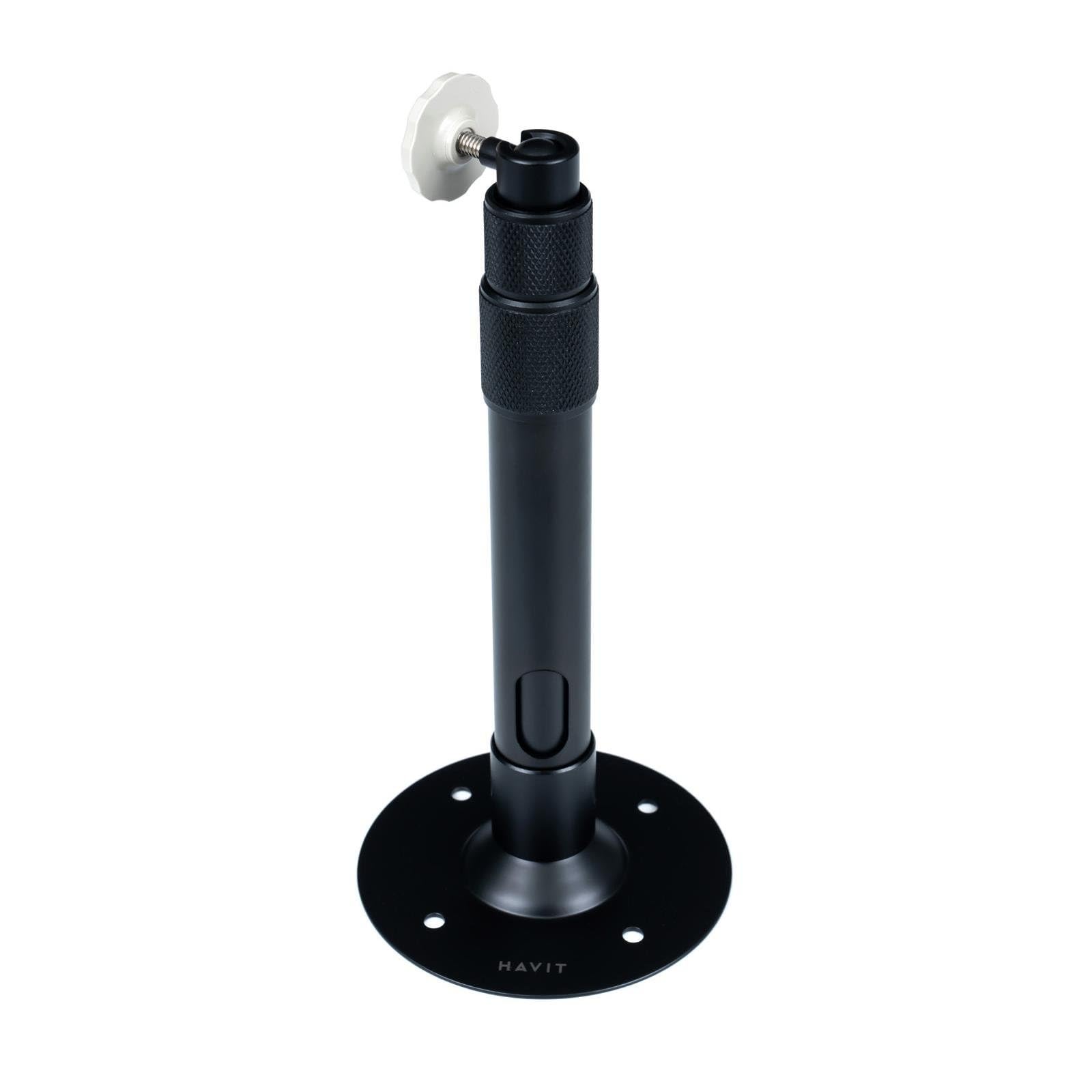
1-сүрөт: Havit PA304 Projector Mount. This image displays the main components of the Havit PA304 mount, including the mounting plate, adjustable arm, and projector attachment head.
2. Коопсуздук маалыматы
- Ensure the mounting surface (ceiling or wall) can support the combined weight of the mount and your projector. The maximum load capacity for this mount is 3 kg.
- 3 кг максималдуу салмак жөндөмдүүлүгүн ашпаңыз.
- Use appropriate tools and follow all installation steps carefully to prevent injury or damage to the product or property.
- Орнотуу процессинин кандайдыр бир бөлүгүнө ишенбесеңиз, квалификациялуу адиске кайрылыңыз.
- Майда тетиктерди жана таңгактоочу материалдарды балдардан алыс кармаңыз.
- Бардык бурамалар менен туташуулардын бекем экенине ынануу үчүн аларды үзгүлтүксүз текшерип туруңуз.
3. Пакеттин мазмуну
Сураныч, орнотууну баштоодон мурун бардык компоненттер бар экенин текшериңиз.
- Havit PA304 Projector Mount Assembly
- Screw Mounting Kit (includes screws and wall anchors)
Эскертүү: Projector and installation tools (drill, screwdriver, pencil, measuring tape) are not included.
4. Орнотуу боюнча нускамалар
The Havit PA304 mount can be installed on either a ceiling or a wall. Follow the steps below for your desired mounting location.
4.1. Талап кылынган куралдар (камтылган эмес)
- Бургулоо
- Бурагыч (Филипс башы сунушталат)
- Карандаш
- Өлчөө лентасы
4.2. Mounting the Bracket to the Ceiling or Wall
- Жайгашкан жерди тандоо: Choose a suitable location on your ceiling or wall that is structurally sound and can support the weight. Ensure there are no electrical wires or pipes behind the drilling area.
- Бургулоо тешиктерин белгилөө: Hold the mounting plate of the Havit PA304 mount against the desired surface. Use a pencil to mark the positions for the drill holes.
- Бургулоо тешиктери: Using an appropriate drill bit for your wall/ceiling material, drill pilot holes at the marked positions. Insert the wall anchors (if required for your surface type) into the drilled holes.
- Коопсуз монтаждоо плитасы: Align the mounting plate with the drilled holes and secure it firmly using the provided screws and a screwdriver. Ensure the plate is level and tightly fastened.
Image for this step (e.g., "PA304_MountingPlate_Installation.jpg") is not available in the provided data.
4.3. Attaching the Projector to the Mount
- Identify Projector Mounting Point: Locate the universal mounting screw hole on the bottom of your projector.
- Проекторду бекитүү: Carefully align the projector's mounting hole with the screw on the projector attachment head of the Havit PA304 mount. Screw the projector onto the mount until it is secure. Do not overtighten.
- Туруктуулукту текшерүү: Gently test the projector's stability on the mount. It should feel firm and not wobble.
Image for this step (e.g., "PA304_Projector_Attachment.jpg") is not available in the provided data.
5. Иштетүү жана жөндөө
The Havit PA304 mount offers flexibility for optimal projector positioning.
- 360 градуска айлануу: The projector attachment head can rotate 360 degrees. Loosen the adjustment knob/screw on the head, position your projector to the desired angle, and then tighten the knob/screw to secure it.
- Бийиктигин тууралоо: The mount allows for height adjustment between 27.5 cm and 39 cm. Loosen the height adjustment mechanism (usually a collar or screw on the main pole), extend or retract the pole to the desired height, and then firmly tighten the mechanism to lock it in place.
- Бурчту тууралоо: Some projectors may require slight tilting. The mount's head allows for minor tilt adjustments. Loosen the relevant screw, adjust the projector's vertical angle, and then retighten.
Image illustrating adjustment points (e.g., "PA304_Adjustment_Points.jpg") is not available in the provided data.
6. Техникалык тейлөө
- Тазалоо: Орноткучту жумшак, кургак чүпүрөк менен сүртүңүз. Абразивдүү тазалоочу каражаттарды же эриткичтерди колдонбоңуз, анткени алар капталга зыян келтириши мүмкүн.
- Үзгүлтүксүз текшерүүлөр: Periodically inspect all screws and connections to ensure they are tight and secure. Over time, vibrations or adjustments can cause screws to loosen.
- Салмак чеги: Always ensure that the total weight of your projector does not exceed the 3 kg maximum load capacity.
7. Кыйынчылыктарды
| Көйгөй | Мүмкүн себеп | Чечим |
|---|---|---|
| Тоо туруксуз же солкулдаган сезилет. | Screws are loose; mounting surface is not strong enough; projector weight exceeds limit. | Tighten all mounting screws. Ensure the mounting surface is solid. Verify projector weight is within 3 kg. |
| Cannot adjust height or rotation. | Adjustment mechanisms are too tight. | Loosen the relevant adjustment knob/screw before attempting to adjust. Retighten after positioning. |
| Projector does not fit the mount. | Projector lacks a universal mounting screw hole or has an unusual design. | Ensure your projector has a standard 1/4-inch screw hole for mounting. This mount is designed for projectors with a single mounting point. |
8. Техникалык шарттар
| Модель аты | Havit PA304 |
| Модель номери | PA304 |
| Бренд | зыян |
| Материал | Металл |
| Тоо түрү | Шыпка орнотуу, дубалга орнотуу |
| Максималдуу Салмак сыйымдуулугу | 3 кг (6.6 фунт) |
| Жөнгө салынуучу бийиктик диапазону | 27.5 см - 39 см (10.8 дюйм - 15.3 дюйм) |
| Айлануу | 360 градус |
| Камтылган компоненттер | Mount assembly, screw mounting kit |
9. Кепилдик жана колдоо
The Havit PA304 Projector Mount comes with a 2 жылдык кепилдик from the date of purchase. This warranty covers manufacturing defects under normal use. It does not cover damage caused by improper installation, misuse, accidents, or unauthorized modifications.
For technical support, warranty claims, or further inquiries, please contact your local Havit dealer or visit the official Havit website for contact information. Please retain your proof of purchase for warranty service.


