Introduction
This manual provides instructions for the HCDZ Replacement Remote Control, designed for use with AT&T Directv RC82V, RC83V, C71KW-200, C71KW-400 4K Streaming Midea Player Receivers. This remote operates via both Infrared (IR) and Bluetooth interfaces. The RC83V model specifically utilizes Bluetooth 2-way communication, eliminating the need for a direct line of sight between the remote and the paired device. Voice recognition functionality is available on the RC83V model, but it requires the remote to be paired with a C71KW device.
Жайгашуу
Батарея орнотуу
The remote control requires two AA alkaline batteries (not included). Ensure correct polarity when inserting the batteries.
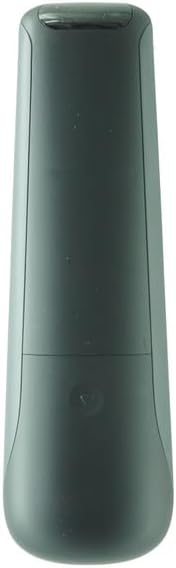
Image: Back of the remote control with the battery cover removed, illustrating the battery compartment. Insert two AA batteries according to the polarity indicators.

Image: Back of the remote control with the battery cover securely attached after battery installation.
Once batteries are inserted, the remote is ready for use. No programming is typically required for basic functions.
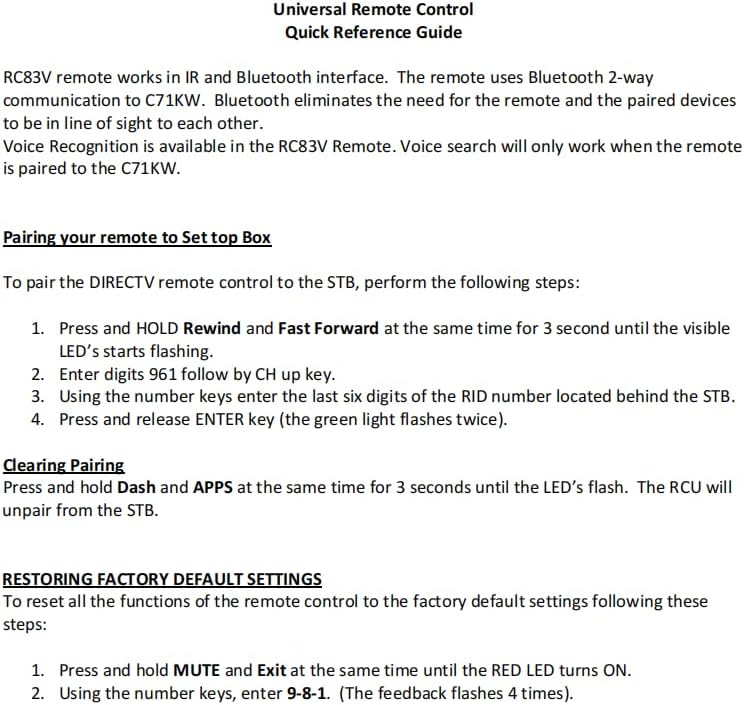
Pairing your Remote to Set Top Box (STB)
To pair the DIRECTV remote control to your Set Top Box, follow these steps:
- жана басыңыз БЕРҮҮ the Rewind and Fast Forward buttons simultaneously for 3 seconds until the visible LED starts flashing.
- Enter digits 961, followed by the CH up key.
- Using the number keys, enter the last six digits of the RID number located behind the STB.
- Press and release the ENTER key (the green light will flash twice).
Note: Voice search functionality is only active when the remote is paired to a C71KW device.
Иштөө нускамалары
This replacement remote control is designed to function immediately upon battery insertion for most basic operations. It supports both Infrared (IR) and Bluetooth connectivity, depending on the model (RC82V for IR, RC83V for IR and Bluetooth) and the device it's paired with.
Сүрөт: алдыңкы view of the HCDZ remote control, displaying the button layout for various functions.
For specific functions related to your AT&T Directv or 4K Streaming Midea Player Receiver, refer to your device's manual for button assignments.
Техникалык тейлөө
Батареяга кам көрүү
- Жаңы батарейкаларды эскилери менен аралаштырбаңыз.
- Эгерде пульт көпкө чейин колдонулбаса, агып кетүүнүн жана дат басуунун алдын алуу үчүн батарейкаларды алып салыңыз.
- Avoid leaving the remote in extremely hot or humid environments.
Тазалоо
Пультту жумшак, кургак чүпүрөк менен сүртүңүз. Абразивдүү тазалагычтарды же эриткичтерди колдонбоңуз.
Проблемаларды чечүү
General Remote Malfunctions
- Пульт жооп бербей жатат:
- Пульттун батарейкаларын жаңыларына алмаштырыңыз.
- Check the battery terminals to ensure they are clean and making proper contact.
- Remote not controlling device:
- Ensure the remote is within range of the device (up to 10 meters for IR/Bluetooth).
- Move closer to the device if it's out of range.
- Remove any obstructions between the remote and the IR sensor of the device.
- Verify that the power cord to your device is plugged in and the device is turned on.
Жупташтыруу тазалоо
To unpair the remote control unit (RCU) from the Set Top Box, perform the following:
- жана басыңыз БЕРҮҮ the Dash (-) and APPS buttons simultaneously for 3 seconds until the LED flashes. This action will unpair the RCU from the STB.
Демейки жөндөөлөрдү калыбына келтирүү
To reset all functions of the remote control to factory default settings, follow these steps:
- жана басыңыз БЕРҮҮ the MUTE and Exit buttons simultaneously until the RED LED turns ON.
- Сан баскычтарын колдонуп, киргизиңиз 9-8-1. The feedback LED will flash 4 times, indicating the reset is complete.
Техникалык шарттар
| Өзгөчөлүк | Деталь |
|---|---|
| Бренд | HCDZ |
| Модель аты | RC82V (Compatible with RC83V) |
| Байланыш технологиясы | Infrared (IR), Bluetooth (for RC83V variant) |
| Шайкеш түзмөктөр | 4K Streaming Device, Directv Receiver (C71KW-200, C71KW-400) |
| Колдоого алынган түзмөктөрдүн максималдуу саны | 1 |
| Controller Type | Control Button |
| Button Quantity | 10 |
| Максималдуу диапазон | 10 метр |
| Батарея түрү | щелочтуу |
| Керектүү батарейкалардын саны | 2 АА батарейка |
| Түс | Кара |
Кепилдик жана колдоо
Бул продукт менен келет 90 күндүк кепилдик from the date of purchase. For warranty claims or technical support, please refer to the seller's contact information provided at the time of purchase.
For additional information or assistance, you may also visit the HCDZ Store on Amazon.


