Navitel AR202NV

NAVITEL AR202NV Dash Cam

User Manual

Introduction

This manual provides comprehensive instructions for the installation, operation, maintenance, and troubleshooting of your NAVITEL AR202NV Front Facing Dash Cam. Designed to record your journeys in Full HD, this device features a 140-degree wide viewing angle, advanced night vision capabilities, parking mode, and a G-Sensor for enhanced security.

Фронт view of the NAVITEL AR202NV Dash Cam

Сүрөт 1: Алдыңкы view of the NAVITEL AR202NV Dash Cam, showing the lens and compact design.

Пакеттин мазмуну

Пакетте бардык буюмдар бар экенин текшериңиз:

Note: A microSD card (up to 64GB) is required for recording and is not included in the package.

Жайгашуу

  1. MicroSD картасын салыңыз: Locate the microSD card slot on the dash cam. Gently insert a Class 10 or higher microSD card (up to 64GB) with the contacts facing the correct direction until it clicks into place.
    Жогорку view of the NAVITEL AR202NV Dash Cam showing ports

    2-сүрөт: Жогорку view of the dash cam, highlighting the USB port and indicating the location for the microSD card slot.

  2. Даш камерасын орнотуу:
    • Clean the windshield surface where you intend to mount the dash cam.
    • Attach the car mount to the dash cam.
    • Securely affix the mount to the windshield, ensuring it does not obstruct your view. Position the camera centrally for optimal recording.
  3. Кубат туташуу: Connect the car charger to the dash cam's USB port and plug the other end into your vehicle's 12V power outlet (cigarette lighter socket).

    The device will automatically power on and begin recording when the vehicle's ignition is turned on, provided it is connected to the power supply.

  4. Баштапкы орнотуу: Upon first power-on, you may need to set the date, time, and language. Follow the on-screen prompts using the device's buttons.

Иштөө нускамалары

Негизги жаздыруу

Once powered on and connected to the vehicle's ignition, the NAVITEL AR202NV will automatically start recording in a continuous loop. Older files will be overwritten by new recordings when the microSD card is full. Video is recorded in Full HD (1920x1080) at 30 frames per second using H.264 compression for efficient storage.

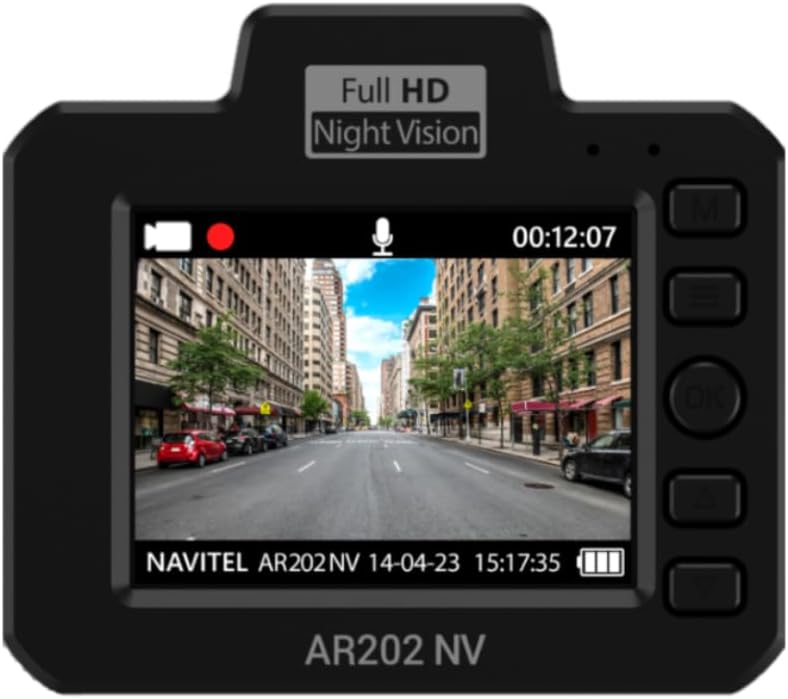
Арткы view of the NAVITEL AR202NV Dash Cam showing the screen displaying live footage

3-сүрөт: Арткы view of the dash cam, showing the display screen with live video feed and control buttons.

Illustration of the 140-degree wide camera angle of the NAVITEL AR202NV Dash Cam

Figure 4: Visual representation of the 140-degree wide viewing angle, capturing a broad perspective of the road.

Түнкү көрүнүш

The dash cam is equipped with an advanced GC2053 sensor and a 4-layer glass lens, ensuring high-quality video recordings even in low-light conditions or at night.

Image illustrating the night vision capability of the NAVITEL AR202NV Dash Cam

Figure 5: Depiction of the dash cam's enhanced night vision performance in dark environments.

Parking Mode and G-Sensor

The Parking Mode feature allows the dash cam to detect vibrations and automatically begin recording even when the vehicle is parked and the ignition is off. This is enabled by the built-in G-Sensor, which detects sudden impacts or movements. These event-triggered recordings are typically protected from being overwritten.

Illustration of the G-sensor detecting an impact while parked

Figure 6: Visual explanation of the G-sensor's function in detecting impacts during parking mode.

File Башкаруу

Бардык видео files are recorded in loop mode and stored on the microSD card. The H.264 compression standard ensures high quality while minimizing file size. Important files triggered by the G-Sensor or manually locked will be protected from loop recording overwrites.

үчүн view or edit video files on a Windows computer, you can use the Navitel DVR Player program.

иллюстрация files under protection with H.264 codec

Figure 7: Diagram showing how video files are protected and stored using H.264 compression.

Screenshot of Navitel DVR Player software on a laptop

Figure 8: Screenshot demonstrating the Navitel DVR Player interface for viewing and managing dash cam footage компьютерде.

Техникалык тейлөө

Проблемаларды чечүү

КөйгөйМүмкүн себепЧечим
Dash камерасы күйбөйт.No power supply; faulty cable/charger; vehicle's 12V outlet is off.Check power connection; ensure vehicle ignition is on; try a different power outlet or charger.
Жаздыруу токтойт же катып калат.MicroSD card error; card full; incompatible card; faulty card.Format the microSD card; replace with a new Class 10 (or higher) microSD card (up to 64GB).
Видеонун сапаты начар.Кир линза; аз жарык шарттары; туура эмес орнотуулар.Clean the lens; ensure proper lighting (Night Vision is automatic); check video resolution settings.
Parking mode not activating.G-Sensor sensitivity too low; no power supply when parked.Adjust G-Sensor sensitivity in settings; ensure continuous power supply for parking mode if required.
Files are being overwritten.Normal loop recording; G-Sensor not triggered for protected files.This is normal for loop recording. Ensure G-Sensor is active for impact protection. Manually lock important files керек болсо.

Техникалык шарттар

ӨзгөчөлүкДеталь
Модель атыAR202NV
Видео тартуунун резолюциясы1080p (Full HD 1920x1080) at 30 FPS
Viewбурч140 градус
ӨзгөчөлүктөрNight Vision, Parking Mode, G-Sensor
СенсорGC2053
Объектив4 катмарлуу айнек линза
Видеону кысууH.264
СактагычMicroSD card up to 64GB (Class 10 or higher recommended)
Байланыш технологиясыUSB
Монтаж түрүАлдынкы айнек тоосу
ТүсКара
ӨндүрүүчүNavitel

Кепилдик жана колдоо

For detailed warranty information, please refer to the warranty card included with your product or visit the official Navitel webсайт. Кепилдиктин шарттары жана шарттары аймакка жараша өзгөрүшү мүмкүн.

Should you encounter any issues not covered in the troubleshooting section or require further assistance, please contact Navitel customer support. Contact details can typically be found on the official Navitel webсайтында же продуктунун таңгагында.

Navitel brand logo

Figure 9: The official Navitel brand logo.

Тектеш документтер - AR202NV

Preview NAVITEL R3 User Manual: Installation, Features, and Specifications
Comprehensive user manual for the NAVITEL R3 dash cam, covering installation, device layout, specifications, button functions, and operational features.
Preview NAVITEL R260 NV колдонуучусунун колдонмосу - Көчмө видео жазгыч үчүн колдонмо
NAVITEL R260 NV көчмө видеорегистраторунун кеңири колдонуучу колдонмосу. Бул жогорку сапаттагы видеорегистраторду орнотуу, функциялар, мүнөздөмөлөр жана коопсуздук чаралары жөнүндө маалымат берет.
Preview NAVITEL R10 Dash Cam колдонуучунун колдонмосу
NAVITEL R10 сызык камерасы үчүн комплекстүү колдонуучу нускама, орнотууну, түзмөктүн түзүлүшүн, спецификацияларды, баскыч функцияларын, колдонмо интеграциясын жана санарип ылдамдык өзгөчөлүктөрүн камтыйт. Камераңыздын мүмкүнчүлүктөрүн кантип иштетүү жана максималдуу көбөйтүүнү үйрөнүңүз.
Preview NAVITEL R250 DUAL Колдонуучунун колдонмосу: Орнотуу, Функциялар жана Иштетүү
NAVITEL R250 DUAL сызык камерасы үчүн комплекстүү колдонуучу колдонмосу, орнотуу көрсөтмөлөрүн, аппараттын өзгөчөлүктөрүн, баскыч функцияларын жана оптималдуу колдонуу үчүн операциялык деталдарды камтыйт.
Preview NAVITEL MR450 GPS Колдонуучунун колдонмосу - Комплекстүү колдонмо
NAVITEL MR450 GPS санариптик видео жазгыч үчүн расмий колдонуучу колдонмо. Орнотуу, өзгөчөлүктөр, спецификациялар, GPS, паркинг режими жана колдонмо туташуусу жөнүндө билип алыңыз.
Preview NAVITEL R66 2K Колдонуучунун колдонмосу - High-Definition Dashcam
NAVITEL R66 2K көчмө видео жазгыч үчүн комплекстүү колдонуучу колдонмо. Анын жогорку дааналыктагы жазуусу, түнкү көрүнүшү, G-сенсору, токтотуу режими, орнотуу жана иштетүү жөнүндө билип алыңыз.