1. Киришүү
Бул колдонмо Neomounts AFP-875BL пол плитаңызды коопсуз жана туура орнотуу, иштетүү жана тейлөө боюнча ар тараптуу көрсөтмөлөрдү берет. Бул пол плитасы Neomounts шайкеш келген дисплей стенддери, атап айтканда, FL55-875BL1 жана WL55-875BL1 моделдери үчүн туруктуу негизди камсыз кылуу үчүн иштелип чыккан. Орнотууну баштоодон мурун бул колдонмону кылдат окуп чыгыңыз жана аны келечекте колдонуу үчүн сактап коюңуз.
2. Коопсуздук маалыматы
Төмөнкү коопсуздук көрсөтмөлөрүн сактоо жаракат алуунун жана продуктуга же мүлккө зыян келтирүүнү алдын алуу үчүн абдан маанилүү.
- Орнотуудан мурун бардык компоненттердин бар экенин жана бузулбаганын текшериңиз. Эгерде кандайдыр бир тетиктер жок же бузук болсо, колдонбоңуз.
- Орнотуу компоненттердин салмагына жана өлчөмүнө байланыштуу кеминде эки адам тарабынан аткарылышы керек.
- Полдун бети тегиз жана пол плитасынын, көргөзмө стендинин жана дисплейдин жалпы салмагын көтөрө ала тургандыгын текшериңиз.
- Neomounts тарабынан берилген же ушул колдонмодо көрсөтүлгөн жабдууларды гана колдонуңуз.
- Шайкеш келген дисплей стендинин максималдуу салмак көтөрүү мүмкүнчүлүгүнөн ашпаңыз.
- Балдарды жана үй жаныбарларын орнотуу аянтынан алыс кармаңыз.
3. Пакеттин мазмуну
Кутучаны кылдаттык менен ачып, төмөндө көрсөтүлгөн бардык буюмдардын бар экенин жана жакшы абалда экенин текшериңиз.
- Neomounts AFP-875BL пол плитасы (1x)
- Орнотуу жабдууларынын комплекти (мисалы, стендди бекитүү үчүн бурамалар, шайбалар, гайкалар) (1x) - Контенттин мазмуну ар кандай болушу мүмкүн; стенддин колдонмосундагы схеманы караңыз.
4. Орнотуу жана орнотуу
Бул бөлүмдө AFP-875BL пол плитасын шайкеш келген Neomounts дисплей стендине (FL55-875BL1 же WL55-875BL1) туура орнотуу үчүн талап кылынган кадамдар кеңири баяндалган.
4.1. Даярдоо
- Көргөзмө стенди үчүн керектүү жерди аныктаңыз. Анын туруктуу, тегиз бет экенине ынаныңыз.
- Пол плитасынын жана дисплей стендинин бардык компоненттерин ачып алыңыз.
- Көрсөтмө стендиңиздин колдонмосунда көрсөтүлгөндөй, керектүү шаймандарды (мисалы, ачкычтарды, бурагычтарды) чогултуңуз.
4.2. Чогултуу кадамдары
- Полго төшөлгөн плитаны жайгаштырыңыз: AFP-875BL пол плитасын тандалган жерге этияттык менен коюңуз. Көрсөтмө стендиңиз үчүн багыт туура экенин текшериңиз.
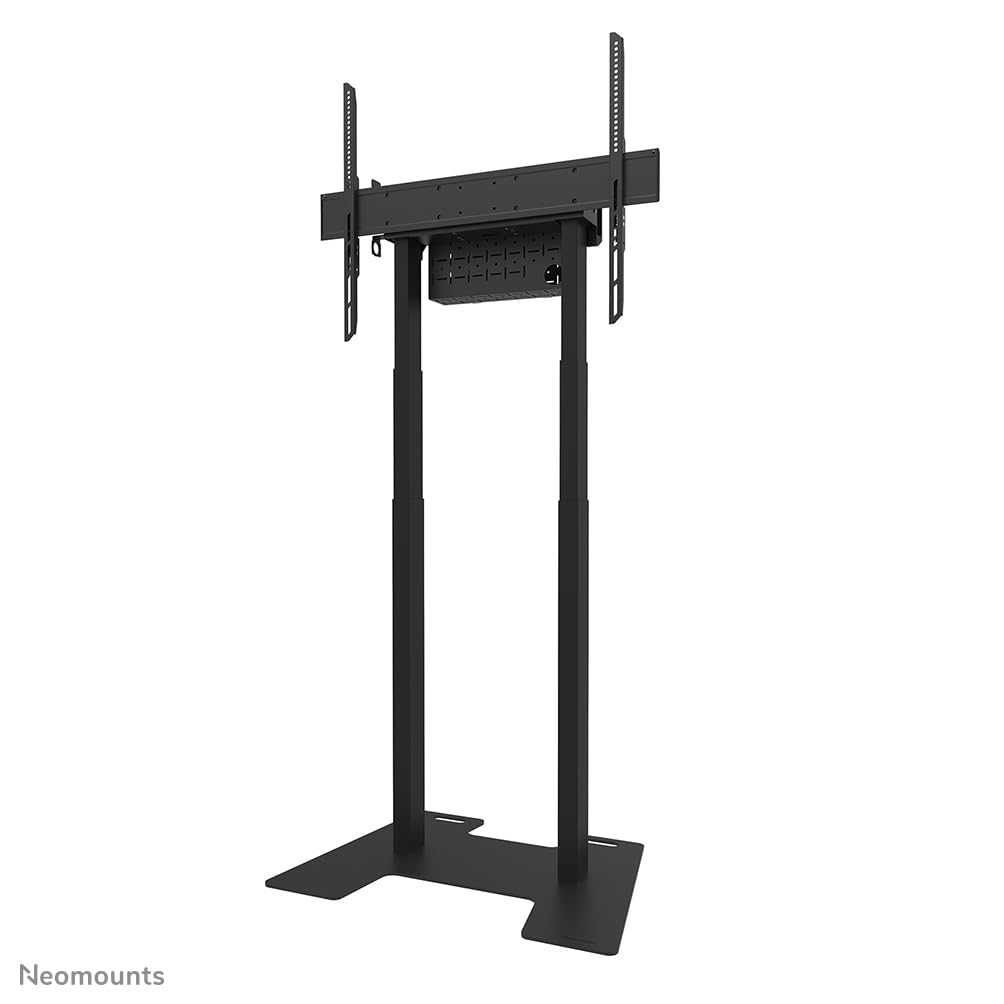
1-сүрөт: Neomounts AFP-875BL пол плитасы шайкеш келген дисплей стенди менен көрсөтүлгөн. Бул сүрөттө жалпы чогултуу көрсөтүлгөн.
- Дисплей стендинин мамычаларын бекитиңиз: FL55-875BL1 же WL55-875BL1 дисплей стендиңиздин негизги мамычаларын AFP-875BL пол плитасындагы белгиленген орнотуу тешиктери менен тегиздеңиз.

Сүрөт 2: Жакын план view пол плитасынын негизинин, дисплей стендинин мамычалары үчүн кесилген жерлерди жана орнотуу чекиттерин көрсөтүү.
- Мамычаларды бекитүү: Берилген бекитүүчү жабдыктарды (бурамаларды, шайбаларды, гайкаларды) колдонуп, дисплей стендинин мамычаларын полго бекем бекитиңиз. Бардык туташуулардын чайпалып кетпеши үчүн бекем экенин текшериңиз. Айландыруу моментинин белгилүү бир талаптары үчүн дисплей стендинин колдонмосун караңыз.

3-сүрөт: Пол плитасынын негизинин дагы бир көрүнүшү, бекем дизайнды жана бекитүү чекиттерин баса белгилейт.
- Акыркы текшерүү: Чогултулгандан кийин, бүтүндөй блоктун туруктуулугун акырын текшериңиз. Ашыкча кыймыл же боштук жок экенине ынаныңыз.
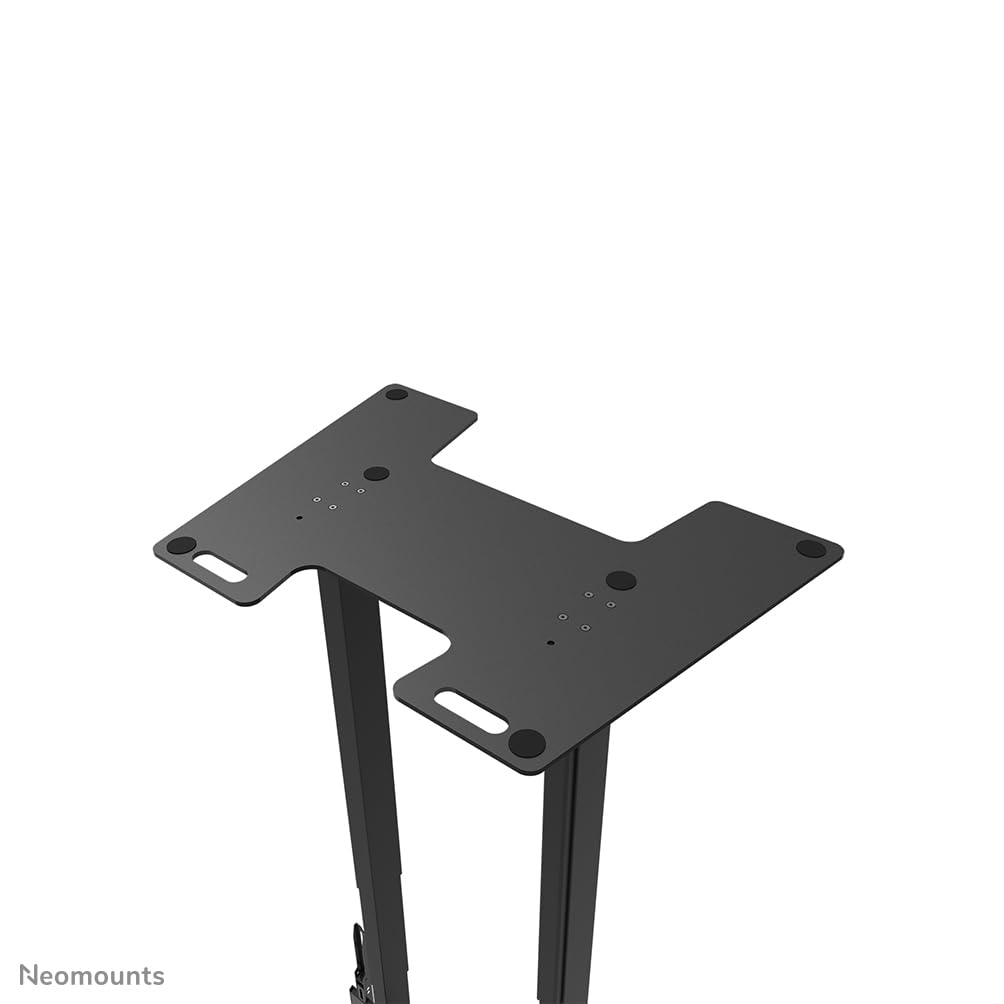
4-сүрөт: жогорудан ылдыйга view пол плитасынын негизинин туура тегизделишин жана бекем туташууларды текшерүү үчүн пайдалуу.
5. Иштөө нускамалары
Neomounts AFP-875BL пол плитасы дисплей стендиңиз үчүн статикалык негиз катары кызмат кылат. Орнотулгандан кийин, анын негизги функциясы туруктуулукту камсыз кылуу болуп саналат. Пол плитасынын өзүнөн эч кандай активдүү "иштетүү" талап кылынбайт.
- Туруктуулукту текшерүү: Дүңгүрөөк стенддин бүтүндөй түзүлүшүнүн туруктуулугун мезгил-мезгили менен текшерип туруңуз. Пол плитасы менен стенд мамычаларынын ортосундагы бардык туташуулардын бекем экенин текшериңиз.
- Көчүрүү: Эгерде дисплей стендин башка жерге жылдырып жатсаңыз, анда аны толугу менен этияттык менен көтөрүңүз. Түзмөктү сүйрөп баруудан алыс болуңуз, анткени бул полдун плитасына, полго зыян келтириши же түзүлүштүн бүтүндүгүнө доо кетириши мүмкүн.
6. Техникалык тейлөө
Үзгүлтүксүз техникалык тейлөө сиздин пол плитаңыздын узак мөөнөттүү иштешин жана коопсуз колдонулушун камсыздайт.
- Тазалоо: Полдун плитасын жумшак, d менен тазалаңызamp кездеме. Финишке зыян келтирүүчү абразивдүү тазалагычтардан же эриткичтерден качыңыз.
- Текшерүү: Жыл сайын, же андан да тез-тез, эл көп жүргөн жерлерде бардык орнотуучу жабдыктардын бекемдигин текшерип туруңуз. Бош калган бурамалар же болттор кайра бекемделет. Пол плитасында эскирүүнүн, коррозиянын же бузулуунун белгилери бар-жогун текшериңиз.
- Зыян: Эгерде пол плитасында олуттуу бузулуу же деформация белгилери байкалса, колдонууну дароо токтотуп, Neomounts колдоо кызматына кайрылыңыз.
7. Кыйынчылыктарды
Бул бөлүм сиз кабылышы мүмкүн болгон жалпы көйгөйлөрдү карайт.
- Маселе: Орнотуудан кийин дисплей стенди туруксуз же чайпалып тургандай сезилет.
Чечим: Тирөөч мамыларды пол плитасына туташтырган бардык бекитүүчү жабдыктарды кайра текшериңиз. Алардын толугу менен бекемделгенин текшериңиз. Полдун бети тегиз экенин текшериңиз. - Маселе: Тирөөч мамычаларды пол плитасы менен тегиздөөдө кыйынчылык.
Чечим: Полдун плитасы туура багытталып турганын текшериңиз. Зарыл болсо, бир аз өзгөртүүлөрдү киргизүү үчүн тирөөч мамычаларынын туташууларын убактылуу бошотуп, андан кийин кайра бекемдеңиз. - Маселе: Полдогу чийиктердин издери.
Чечим: Пол плитасынын полго сүйрөлүп түшпөгөнүн текшериңиз. Эгерде пол плитасынын коргоочу буттары болсо, алардын бүтүн экенин текшериңиз. Пол плитасынын астына коргоочу төшөнчү коюуну карап көрүңүз.
8. Техникалык шарттар
Neomounts AFP-875BL пол плитасынын деталдуу техникалык мүнөздөмөлөрү.
| Өзгөчөлүк | Спецификация |
|---|---|
| Модель номери | AFP-875BL |
| Бренд | Neomounts |
| Продукт өлчөмдөрү (W x D x H) | 864 мм x 600 мм x 9.5 мм (34.02 x 23.62 x 0.37 дюйм) |
| Элемент Салмагы | 24 кг (52.9 фунт) |
| Туура келүүчү монтаждар | FL55-875BL1, WL55-875BL1 |
| Материал | Болот (продукциянын түрүнөн жана салмагынан алынган) |
| Түс | Кара (продукциянын аталышынан келип чыккан) |

5-сүрөт: AFP-875BL пол плитасынын өлчөмдөрүн миллиметр менен көрсөткөн техникалык чийме.
9. Кепилдик жана колдоо
Neomounts өнүмдөрү бышык жана ишенимдүү болуу үчүн иштелип чыккан.
- Кепилдик: Бул продукт материалдардагы жана жасалыштагы кемчиликтерге каршы 2 жылдык кепилдик менен камтылган. Кепилдик дооматтары үчүн сатып алганыңызды тастыктаган документти сактап коюңуз.
- Кардарларды колдоо: Техникалык жардам, жетишпеген тетиктер же кепилдик боюнча суроолоруңуз болсо, жергиликтүү Neomounts дилерине кайрылыңыз же расмий Neomounts дүкөнүнө баш багыңыз. webколдоо байланыш маалыматы үчүн сайт.