1. Киришүү
Thank you for choosing the ALLmeter Pinless Moisture Meter Model ALL019-DEFBA. This device is designed for non-invasive measurement of moisture content in various materials such as wood, walls, drywall, and masonry. Its advanced technology ensures accurate readings without causing damage to surfaces. This manual provides detailed instructions for the proper use, maintenance, and troubleshooting of your moisture meter to ensure optimal performance and longevity.
2. Коопсуздук боюнча маанилүү маалымат
- Аппаратты иштетүүдөн мурун бардык нускамаларды кылдат окуп чыгыңыз.
- Аппаратты ачууга же өзгөртүүгө аракет кылбаңыз. Ичинде колдонуучу тейлей турган бөлүктөр жок.
- Түзмөктү бузулуп калбашы үчүн, аны суудан жана жогорку нымдуулуктан алыс кармаңыз.
- Аппаратты экстремалдык температурага же түз күн нуруна узак убакытка калтыруудан сактаңыз.
- Эгерде түзмөк көпкө чейин колдонулбаса, батарея агып кетишинин алдын алуу үчүн батареяларды алып салыңыз.
- Батареяларды жана аппаратты жергиликтүү эрежелерге ылайык жок кылыңыз.
3. Пакеттин мазмуну
Төмөндө тизмеленген нерселердин баары пакетиңизге камтылганын текшериңиз:
- ALLmeter Pinless Moisture Meter (Model ALL019-DEFBA)
- AAA Batteries (3 pieces)
- User Manual
- Ташуу баштыкчасы

Image 3.1: The ALLmeter Pinless Moisture Meter package contents, showing the meter, three AAA batteries, a user manual, and a gray carry pouch.
4. Продукт бүтүп калдыview
4.1 Түзмөктүн жайгашуусу

Сүрөт 4.1.1: Алдыңкы view of the ALLmeter Pinless Moisture Meter, highlighting its ergonomic design, large LCD display, and central control panel.
4.2 Башкаруу баскычтары
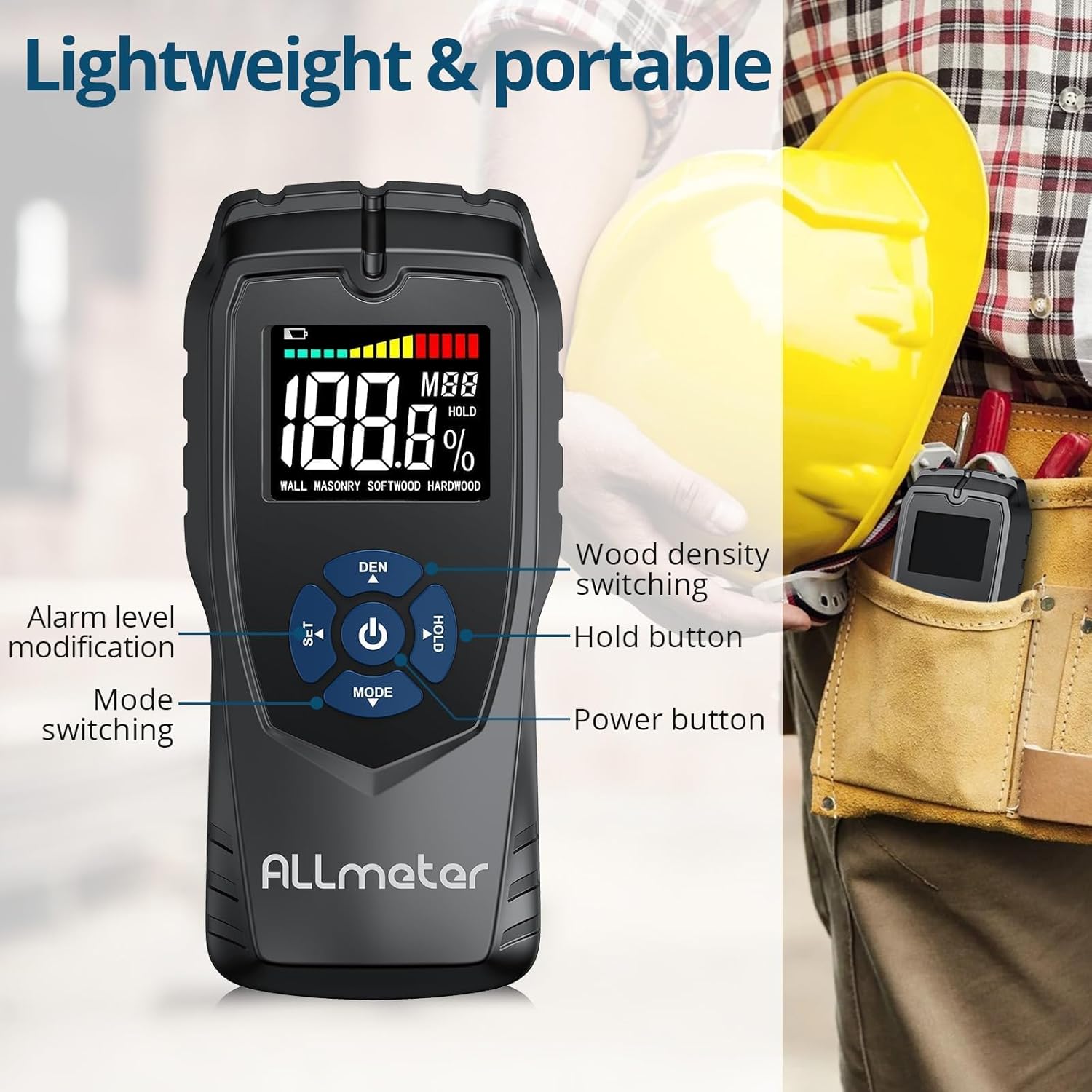
Сүрөт 4.2.1: Детальдуу view of the control buttons on the ALLmeter Pinless Moisture Meter. These include SET (for alarm level modification), DEN (for wood density switching), Power, HOLD, and MODE (for switching measurement modes).
- Кубат баскычы (⑂): Аппаратты күйгүзүү же өчүрүү үчүн басыңыз.
- MODE Button (▼): Press to cycle through different measurement modes (WALL, MASONRY, SOFTWOOD, HARDWOOD).
- SET Button (▲): Used to adjust alarm levels or other settings.
- DEN Button (▲): Used to switch between different wood density grades when in wood measurement modes.
- HOLD баскычы: Дисплейдеги учурдагы окууну токтотот. Чыгаруу үчүн кайра басыңыз.
4.3 Дисплейдин элементтери

Image 4.3.1: The LCD display of the ALLmeter Pinless Moisture Meter, indicating low battery, moisture bar display, moisture value, wood density grade (MBB), data hold symbol (HOLD), and current measuring mode.
- Батареянын төмөн көрсөткүчү: Батарея кубаты аз болгондо сөлөкөт пайда болот.
- Moisture Bar Display: Graphical representation of moisture level.
- Moisture Value: Digital display of the measured moisture percentage.
- Wood Density Grade (MBB): Indicates the selected wood density setting.
- Data Hold Symbol (HOLD): Appears when the HOLD function is active.
- Measuring Mode Indication: Displays the currently selected material mode (e.g., WALL, MASONRY, SOFTWOOD, HARDWOOD).
5. Орнотуу
5.1 Батареяны орнотуу
- Аппараттын артындагы батарея бөлүкчөсүнүн капкагын табыңыз.
- Бөлүктү ачуу үчүн капкакты жылдырыңыз же ачыңыз.
- Үч (3) AAA батарейкасын бөлүмдүн ичинде көрсөтүлгөндөй туура полярдуулукту (+/-) камсыз кылып салыңыз.
- Батарея бөлүкчөсүнүн капкагын бекем орнотуңуз.
6. Иштөө нускамалары
6.1 Күйгүзүү/өчүрүү
- To turn on: Press the Power button (⑂). The display will illuminate.
- To turn off: Press and hold the Power button (⑂) for approximately 2 seconds. The device also features an auto power-off function to conserve battery life after a period of inactivity.
6.2 Өлчөө режимин тандоо
- After powering on, press the MODE button (▼) repeatedly to cycle through the available material modes: WALL, MASONRY, SOFTWOOD, HARDWOOD.
- Select the mode that corresponds to the material you intend to measure.
6.3 Ченөө
- Ensure the correct measurement mode is selected.
- Place the back of the meter (the sensing plate area) flat against the surface of the material you wish to measure. Ensure full contact.
- The moisture reading will be displayed instantly on the LCD screen.
- Move the meter across the surface to check for variations in moisture content.
6.4 HOLD Функциясы
- While taking a measurement, press the HOLD button to freeze the current reading on the display. This is useful for reading measurements in hard-to-reach areas.
- Press the HOLD button again to release the reading and resume live measurement.
6.5 Audible Alarm Settings
- The device features an audible alarm that activates when the measured moisture level exceeds a preset threshold for the selected material.
- To adjust the alarm threshold, press the SET button (▲). Follow the on-screen prompts to increase or decrease the alarm percentage.
6.6 Wood Density Adjustment (DEN)
- When in SOFTWOOD or HARDWOOD mode, the DEN button (▲) can be used to cycle through different wood density grades (MBB) for more accurate readings based on the specific wood type. Refer to wood density charts for your material.
7. Measurement Modes and Ranges
The ALLmeter Pinless Moisture Meter provides distinct measurement ranges and visual indicators for different moisture levels across various materials.

Image 7.1: The visual moisture alarm system and a table detailing the 'Dry', 'Mid', and 'Wet' moisture percentage ranges for Wall, Masonry, Softwood, and Hardwood materials.
7.1 Moisture Level Indicators
- Жашыл: Indicates a Dry moisture level.
- Сары: Indicates a Mid-range moisture level.
- Кызыл: Indicates a Wet moisture level, potentially requiring attention.
7.2 Measurement Ranges by Material
| Өлчөө режими | Кургак | Орто | нымдуу |
|---|---|---|---|
| WALL | <8% | 8-11.9% | ≥12% |
| МАСОНЕР | <17% | 17-19.9% | ≥20% |
| SOFTWOOD | <13% | 13-17.9% | ≥18% |
| КАТУУ АГАЧ | <12% | 12-15.9% | ≥16% |
7.3 Non-Invasive Measurement Principle
The ALLmeter Pinless Moisture Meter utilizes advanced inductive surveying technology. This method allows for moisture detection without penetrating the material surface, preventing damage. Unlike destructive surveying methods that require pins or probes, the pinless meter provides quick and clean readings.

Image 7.3.1: A visual comparison between inductive (pinless) surveying, which leaves no marks, and destructive (pin-type) surveying, which creates small holes in the material.
7.4 Бир нече колдонмолор
This moisture meter is versatile and suitable for a wide range of applications in home inspection, construction, and woodworking:

Сүрөт 7.4.1: Мисamples of the meter's application on various materials including walls, masonry, softwood, and hardwood.
8. Техникалык тейлөө
- Тазалоо: Аппаратты жумшак, кургак чүпүрөк менен сүртүңүз. Абразивдүү тазалагычтарды же эриткичтерди колдонбоңуз.
- Сактагыч: Store the meter in its carry pouch in a cool, dry place when not in use. Avoid areas with extreme temperatures or high humidity.
- Батареяны алмаштыруу: Дисплейде батарейка аз индикатору пайда болгондо батарейкаларды алмаштырыңыз.
9. Кыйынчылыктарды
| Көйгөй | Мүмкүн себеп | Чечим |
|---|---|---|
| Түзмөк күйбөйт | Өлүк же туура эмес орнотулган батарейкалар | Check battery polarity; replace with new AAA batteries. |
| Так эмес окуулар | Incorrect measurement mode selected; poor contact with surface; device malfunction. | Ensure correct mode is selected for the material; press the meter firmly and flat against the surface; if problem persists, contact customer support. |
| Дисплей бош же бүлбүлдөп турат | Батареянын аздыгы; аппараттын бузулушу. | Батареяларды алмаштырыңыз; эгер көйгөй чечилбесе, кардарларды тейлөө кызматына кайрылыңыз. |
| Үн сигнализациясы иштебейт | Alarm disabled or volume too low; device malfunction. | Check alarm settings using the SET button; ensure moisture level exceeds threshold; if problem persists, contact customer support. |
10. Техникалык шарттар
| Спецификация | Нарк |
|---|---|
| Модель номери | ALL019-DEFBA |
| Бренд | ALLmeter |
| Өлчөө принциби | Pinless, Inductive |
| Sensing Depth | 5 см |
| Sensing Plate Size | 5 x 6 см |
| Тактык | ±4% |
| Дисплей | LCD Color Display with Analog Bar |
| Power Source | 3 x AAA батареялары |
| Автоматтык түрдө өчүрүү | Ооба |
| Үндүү сигнал | Ооба |
| Элемент Салмагы | 231 г (0.23 килограмм) |
| Пакеттин өлчөмдөрү | 19.4 x 8.8 x 4.2 см |
11. Кепилдик жана Кардарларды колдоо
For warranty information, technical assistance, or customer support, please refer to the contact details provided with your purchase documentation or visit the official ALLmeter website. Please have your model number (ALL019-DEFBA) and purchase date available when contacting support.

