1. Киришүү
Thank you for choosing the ERAY WD11 Portable Karaoke Machine. This device is designed to provide an enjoyable and interactive karaoke experience for children and families. It features two wireless microphones, Bluetooth connectivity, voice-changing effects, and dynamic LED lights, making it suitable for various occasions such as parties, birthdays, and family gatherings.
Please read this manual carefully before using the product to ensure proper operation and to maximize your enjoyment.

Image 1.1: ERAY WD11 Portable Karaoke Machine with two wireless microphones.
2. Пакеттин мазмуну
Пакетте бардык буюмдар бар экенин текшериңиз:
- 1 x ERAY WD11 Karaoke Machine (Speaker)
- 2 x зымсыз микрофондор
- 1 x USB заряддоо кабели
- 1 x User Manual

Image 2.1: Illustration of the ERAY WD11 package contents and dimensions.
3. Продукт бүтүп калдыview
3.1. Динамик башкаруу каражаттары жана порттор
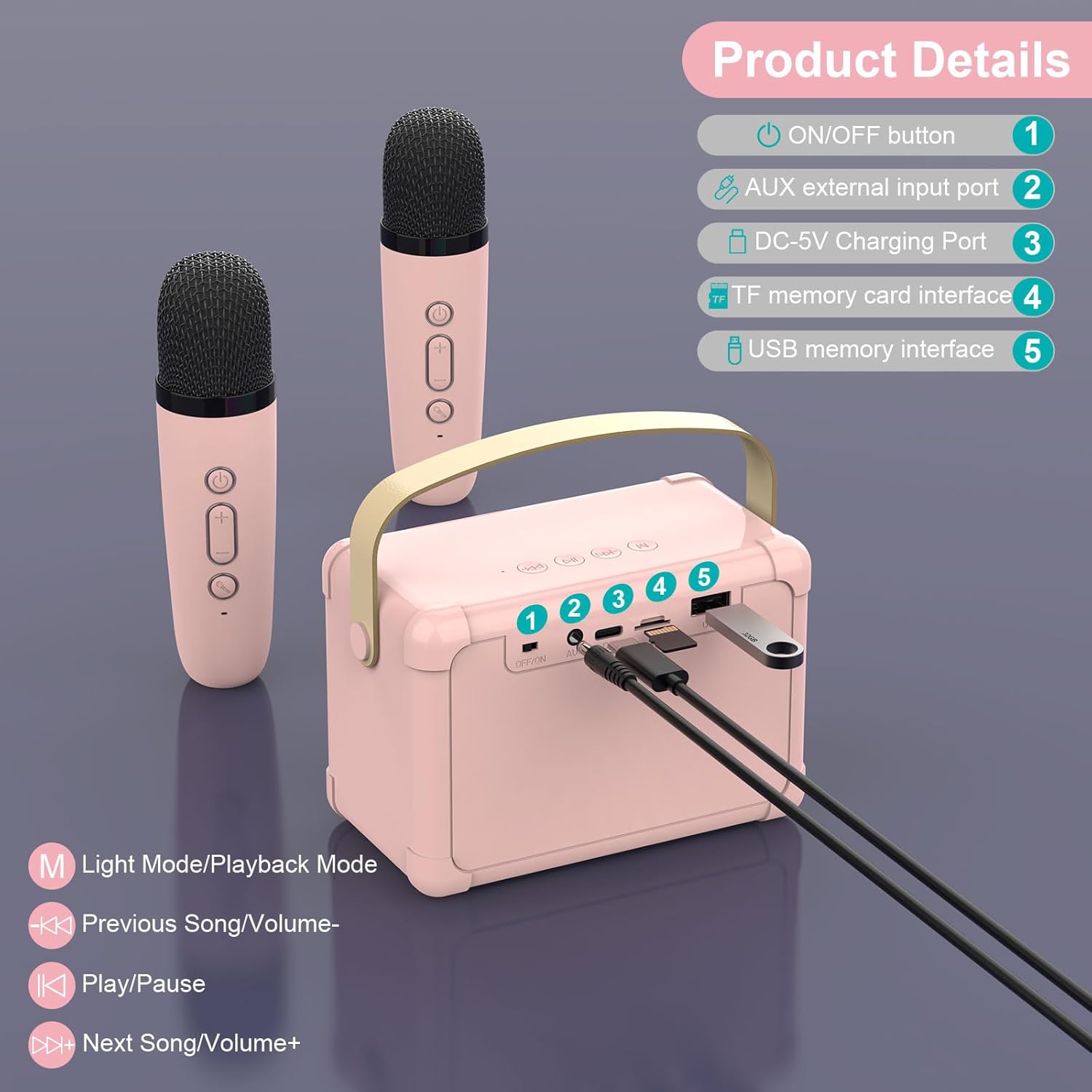
Image 3.1: Speaker controls and ports diagram.
- ON/OFF баскычы: Динамикти күйгүзөт же өчүрөт.
- AUX External Input Port: Тышкы аудио түзмөктөрдү 3.5 мм аудио кабель аркылуу туташтыруу үчүн (кошулмага кирбейт).
- DC-5V кубаттоо порту: Берилген USB кабелин колдонуп, динамикти кубаттоо үчүн.
- TF Memory Card Interface: Түздөн-түз TF (MicroSD) картасынан музыка ойнотуу үчүн.
- USB Memory Interface: USB флешкасынан түз музыка ойнотуу үчүн.
Speaker Playback Controls:
- M (Light Mode/Playback Mode): Short press to change LED light modes; Long press to switch between playback modes (Bluetooth, TF Card, USB, AUX).
- Previous Song/Volume-: Short press for previous song; Long press to decrease volume.
- Ойнотуу/тындыруу: Учурдагы тректи ойнойт же тындырат.
- Next Song/Volume+: Short press for next song; Long press to increase volume.
3.2. Микрофонду башкаруу элементтери

Image 3.2: Microphone controls and voice effects.
- Кубат баскычы: Press and hold to turn the microphone on or off.
- Үн +/- баскычтары: Микрофондун үнүн жөндөңүз.
- Voice Change Button:
- Кыска басуу: Cycles through voice effects: Male Voice, Female Voice, Baby Voice, Monster Voice, KTV Mode.
- Эки жолу басуу: Activates or deactivates the original vocal cancellation (for karaoke tracks).
4. Орнотуу жана туташуу
4.1. Аппаратты заряддоо
Before first use, fully charge the karaoke machine speaker and both microphones.
- Connect the USB charging cable to the DC-5V Charging Port on the speaker and to a standard USB power adapter (not included).
- Connect the USB charging cable to the charging port on each microphone.
- The charging indicator light will show charging status (e.g., red for charging, off when fully charged).

Image 4.1: Battery capacities for speaker and microphones.
4.2. Күйгүзүү жана автоматтык жупташтыруу
- Press and hold the ON/OFF button on the speaker to turn it on. The LED lights will illuminate.
- Press and hold the Power button on each wireless microphone to turn them on.
- The microphones will automatically connect to the speaker. A confirmation sound may be heard.
4.3. Bluetooth туташуусу
To play music from your smartphone, tablet, or computer:
- Ensure the speaker is powered on and in Bluetooth mode (indicated by a voice prompt or LED light pattern). If not, short press the 'M' button on the speaker until it enters Bluetooth mode.
- Түзмөгүңүздө Bluetooth иштетиңиз жана жеткиликтүү түзмөктөрдү издеңиз.
- Select "ERAY WD11" (or similar name) from the list to pair.
- Туташкандан кийин, караоке аппаратынын динамиги аркылуу түзмөгүңүздөн музыка ойното аласыз.

Image 4.2: Multiple connection options for the ERAY WD11.

Image 4.3: Bluetooth range of up to 10 meters.
4.4. TF картасы / USB ойнотуу
To play music directly from a TF card or USB flash drive:
- Insert a TF card (with MP3 songs) into the TF Memory Card Interface or a USB flash drive into the USB Memory Interface.
- The speaker should automatically detect the storage device and begin playing music.
- If not, short press the 'M' button on the speaker to cycle through playback modes until TF Card or USB mode is selected.
4.5. AUX киргизүү
To connect an external audio source via AUX cable:
- Connect one end of a 3.5mm audio cable (not included) to the AUX External Input Port on the speaker.
- Connect the other end to the audio output jack of your external device (e.g., MP3 player).
- Short press the 'M' button on the speaker to cycle through playback modes until AUX mode is selected.
5. Иштөө нускамалары
5.1. Үндү тууралоо
- Динамиктин үнү: Use the "Volume-" and "Volume+" buttons on the speaker (long press) to adjust the overall music playback volume.
- Микрофондун үнү: Use the "Volume-" and "Volume+" buttons on each microphone to adjust the individual microphone's output volume.
5.2. Using Voice Changing Effects
Each microphone features multiple voice-changing effects:
- баскычын кыска басыңыз Үндү өзгөртүү баскычы on the microphone to cycle through the available effects: Male Voice, Female Voice, Baby Voice, Monster Voice, and KTV Mode.
- Experiment with different effects to enhance your performance.
5.3. Vocal Cancellation (KTV Mode)
To remove vocals from a song and sing along:
- While music is playing, double-click the Үндү өзгөртүү баскычы on the microphone. This feature attempts to reduce or remove the original vocals from the track, allowing you to sing over the instrumental.
- Double-click again to reactivate the original vocals.
5.4. LED жарык режимдери
The speaker features dynamic LED lights that can be adjusted:
- баскычын кыска басыңыз 'M' button on the speaker to cycle through different LED light modes.
- The lights will beat to the rhythm of the music, creating an engaging atmosphere.

Image 5.1: Dynamic RGB LED lights on the speaker.
6. Техникалык тейлөө жана кам көрүү
- Тазалоо: Аппаратты жумшак, кургак чүпүрөк менен сүртүңүз. Абразивдүү тазалагычтарды же эриткичтерди колдонбоңуз.
- Сактагыч: Store the karaoke machine in a cool, dry place away from direct sunlight and extreme temperatures.
- Батареяга кам көрүү: Батареянын иштөө мөөнөтүн узартуу үчүн, түзмөктү тез-тез толук зарядсыздандырбаңыз. Узак убакытка колдонулбаса дагы, үзгүлтүксүз кубаттап туруңуз.
- Суу таасири: Бул аппарат суу өткөрбөйт. Суунун же жогорку нымдуулуктун таасиринен алыс болуңуз.
7. Кыйынчылыктарды
| Көйгөй | Мүмкүн себеп | Чечим |
|---|---|---|
| Динамиктен үн жок |
|
|
| Микрофон иштебей жатат |
|
|
| Bluetooth байланышы туруксуз |
|
|
8. Техникалык шарттар
| Өзгөчөлүк | Деталь |
|---|---|
| Модель номери | WD11 |
| Бренд | Эрай |
| Өлчөмдөрү (L x W x Y) | 20 x 16 x 8.5 cm (Speaker) |
| Салмагы | 650 грамм |
| Материал | Акрилонитрил бутадиен стирол (ABS) |
| Power Source | Батарея менен иштейт (1 литий-иондук батарейка камтылган) |
| Динамиктин батареясынын сыйымдуулугу | 1200mAh |
| Микрофондун батареясынын сыйымдуулугу | 500mAh |
| Байланыш технологиясы | Bluetooth 5.0, USB, TF Card, AUX |
| Шайкеш түзмөктөр | Smartphones, PCs, Laptops, other music applications |
| Өзгөчөлүктөр | Voice changing effects, LED lights |
| Микрофон форма фактору | Колдук |
| Түс | Rose |
9. Кепилдик жана колдоо
For warranty information and customer support, please refer to the product packaging or contact the seller directly. Keep your purchase receipt for any warranty claims.
For further assistance, please visit the official ERAY webсайтка же кардарларды тейлөө бөлүмүнө кайрылыңыз.


