1. Киришүү
This manual provides detailed instructions for the installation, operation, and maintenance of your ID-COOLING FROZN A620 Black Dual-Tower Air CPU Cooler. Please read this manual thoroughly before installation to ensure proper setup and optimal performance. This cooler is designed to provide efficient heat dissipation for your Central Processing Unit (CPU).
2. Продукт бүтүп калдыview жана өзгөчөлүктөрү
The ID-COOLING FROZN A620 Black is a high-performance dual-tower air CPU cooler engineered for effective thermal management. Its all-black design integrates seamlessly into various PC builds.
- Dual-Tower Heatsink: Features a robust dual-tower heatsink design for enhanced heat dissipation capacity.
- Алты жез жылуулук түтүгү: Equipped with six Φ6mm copper heat pipes that efficiently transfer heat from the CPU to the heatsink fins.
- Dual FDB Fans: Includes two 120x120x25mm Fluid Dynamic Bearing (FDB) fans for quiet operation and stable performance.
- PWM функциясы: Fans support Pulse Width Modulation (PWM) for automatic speed control, optimizing cooling performance and noise levels. Maximum airflow is 78.25 CFM, with a maximum noise level of 29.85 dB(A).
- Compact Бийиктиги: With a total height of 153mm, this cooler is designed to fit into most standard tower cases.
- RAM Compatibility: Offers 36mm clearance for standard RAM modules and up to 63mm clearance with its cut-out fin design, allowing for compatibility with various memory configurations.
- Broad Socket Compatibility: Supports Intel LGA1700, LGA1851, LGA1200, LGA1150, LGA1151, LGA1155, LGA1156, and AMD AM4, AM5 sockets.

Image 2.1: The ID-COOLING FROZN A620 Black CPU Cooler, showcasing its dual-tower design and all-black aesthetic.

Сүрөт 2.2: Жакын пландан view of the dual-tower heatsink and the six Φ6mm copper heat pipes designed for efficient heat transfer.

Image 2.3: Diagram illustrating the Fluid Dynamic Bearing (FDB) technology used in the fans, contributing to longer lifespan, quieter operation, and reduced vibration.
3. Пакеттин мазмуну
Орнотууну улантуудан мурун пакетте бардык компоненттер бар экенин текшериңиз:
- ID-COOLING FROZN A620 Black CPU Cooler (Heatsink with pre-attached fans)
- Mounting Brackets for Intel LGA1700/1851/1200/115X sockets
- Mounting Brackets for AMD AM4/AM5 sockets
- Арткы пластина (Intel розеткалары үчүн)
- Mounting Screws and Spacers
- Thermal Paste (syringe)
- Fan Clips (if fans are not pre-attached)
- Колдонуучунун Колдонмосу (бул документ)
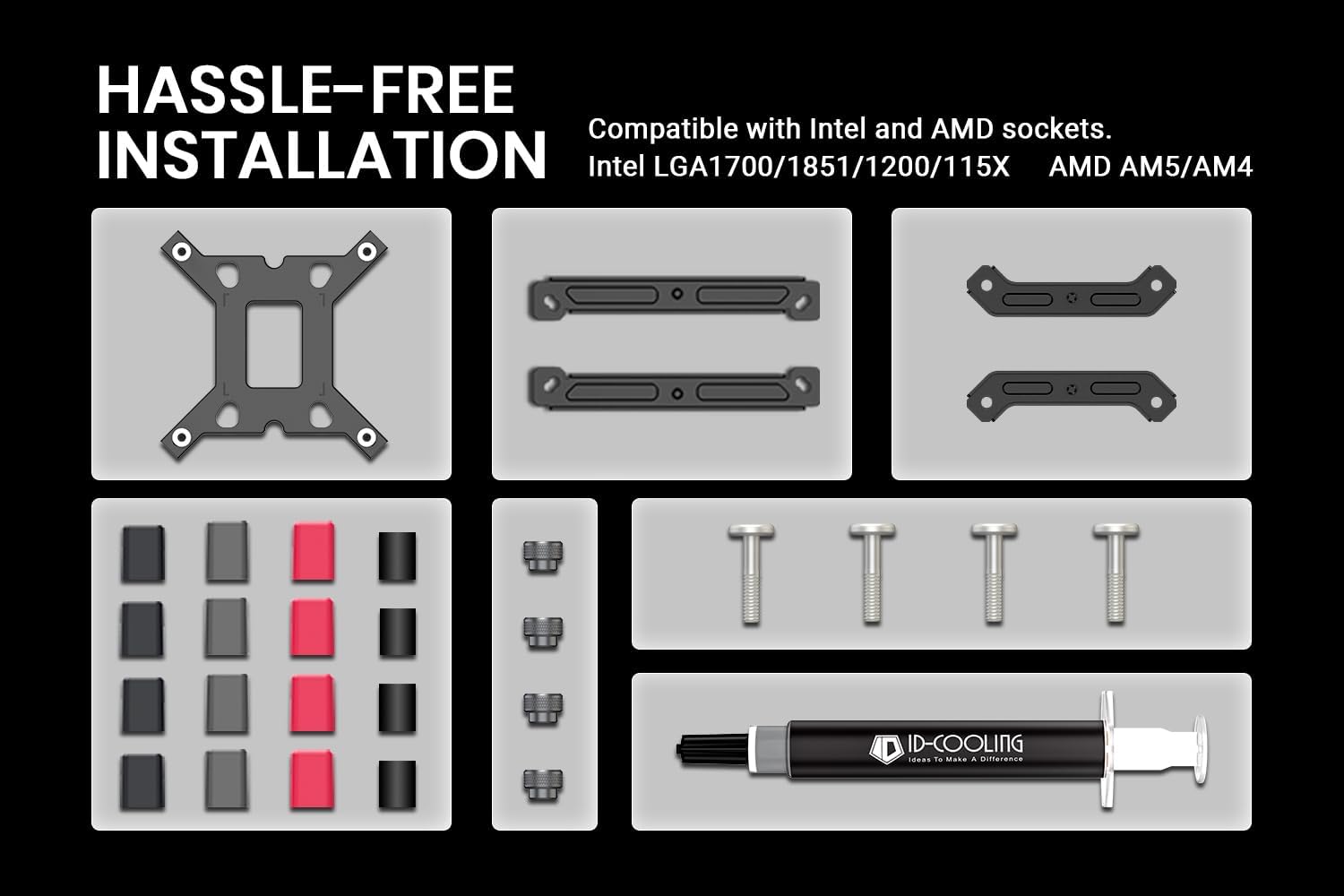
Сүрөт 3.1: Бүттүview of the included mounting hardware and thermal paste for hassle-free installation on both Intel and AMD platforms.
4. Техникалык шарттар
| Өзгөчөлүк | Спецификация |
|---|---|
| Продукциянын өлчөмдөрү | 4.72"L x 0.98"W x 6.02"H (Heatsink only, fans add to width) |
| Муздатуу ыкмасы | Аба муздатуу |
| Жылуулук түтүктөрү | 6 x Φ6mm Copper Heat Pipes |
| Fan Size | 2 x 120x120x25мм |
| Желдетүүчү подшипник түрү | Суюктуктун динамикалык подшипниги (FDB) |
| Fan Speed | 500-2000 ±10% RPM (PWM Controlled) |
| Макс. Аба агымы | 78.25 CFM |
| Ызы-чуу деңгээли | 29.85 dB(A) Max. |
| Power Connector | 4-пин PWM |
| Rated Voltage | 12V DC |
| TDP шайкештиги | 270 Вт чейин |
| Материал | Алюминий (канат), жез (жылуулук түтүктөрү, негизи) |
| Бийиктик | 153мм |
| RAM Тазалоо | 36mm (standard), 63mm (with cut-out fin) |
| Шайкеш розеткалар | Intel LGA1700/1851/1200/115X; AMD AM4/AM5 |

Image 4.1: Diagram illustrating the cooler's height (153mm) and RAM clearance (36mm standard, 63mm with fin cut-out).
5. Орнотуу жана орнотуу
Before beginning, ensure your system is powered off and disconnected from the power source. Refer to your motherboard manual for CPU and RAM installation if not already completed.
5.1. Энелик платаны даярдаңыз
- Remove any existing CPU cooler and thoroughly clean the CPU surface of old thermal paste using isopropyl alcohol.
- For Intel Sockets (LGA1700/1851/1200/115X): Install the appropriate backplate behind the motherboard. Secure the standoffs through the motherboard holes.
- For AMD Sockets (AM4/AM5): Remove the plastic retention clips from the stock AMD backplate (if present), but keep the stock backplate in place. Install the AMD standoffs directly into the backplate.
5.2. Термикалык пастаны сүйкөңүз
- CPU'нун интеграцияланган жылуулук чачкычынын (IHS) ортосуна бир аз өлчөмдөгү термикалык пастаны (буурчактын өлчөмүндөй чекит же ичке сызык) сүйкөңүз. Аны кол менен жайбаңыз; муздаткычтан чыккан басым аны бирдей бөлүштүрөт.

Image 5.1: The included thermal paste, essential for efficient heat transfer between the CPU and the cooler's base.
5.3. Mount the Cooler
- Attach the correct mounting brackets to the base of the cooler using the provided screws.
- Carefully place the cooler onto the CPU, aligning the mounting holes on the brackets with the standoffs on the motherboard.
- Secure the cooler by tightening the mounting screws in a diagonal pattern (e.g., top-left, bottom-right, top-right, bottom-left) until snug. Do not overtighten.
5.4. Install and Connect Fans
- If the fans are not pre-attached, use the included fan clips to secure them to the heatsink towers. Ensure the fans are oriented to pull air through the front tower and push it through the rear tower, towards the rear exhaust fan of your PC case.
- Connect the 4-pin PWM fan cables to the CPU_FAN and CPU_OPT (or CHA_FAN) headers on your motherboard. Consult your motherboard manual for header locations.

Image 5.2: The FROZN A620 Black cooler installed within a PC case, demonstrating its fit and orientation.
6. Иштөө нускамалары
Once installed, the ID-COOLING FROZN A620 Black operates automatically via the motherboard's PWM control. The fans will adjust their speed based on CPU temperature, providing optimal cooling while minimizing noise.
- BIOS/UEFI Орнотуулары: You may access your motherboard's BIOS/UEFI settings to fine-tune fan curves if desired. Most motherboards offer standard, silent, or performance profiles for CPU fan control.
- Температура мониторинги: Use system monitoring software (e.g., HWMonitor, Core Temp) to observe CPU temperatures, especially during initial use and under load, to ensure proper cooling performance.
7. Техникалык тейлөө
Үзгүлтүксүз техникалык тейлөө CPU муздаткычыңыздын узак иштөөсүн жана оптималдуу иштешин камсыз кылууга жардам берет.
- Чаңды тазалоо: Periodically (e.g., every 3-6 months), power off your system and use compressed air to remove dust accumulated on the heatsink fins and fan blades. Hold the fan blades gently to prevent them from spinning rapidly during cleaning, which can damage the bearings.
- желдеткич текшерүү: Check fan cables for secure connections and ensure no cables are obstructing fan rotation.
- Термикалык пастаны кайра колдонуу: While not frequently necessary, if you remove the cooler for any reason (e.g., CPU upgrade), clean off the old thermal paste and reapply a fresh layer before reinstallation.
8. Кыйынчылыктарды
Эгерде сиз CPU муздаткычыңызда көйгөйлөргө туш болсоңуз, төмөнкү жалпы көйгөйлөрдү чечүү кадамдарын караңыз:
- Жогорку CPU температурасы:
- Verify that the cooler is securely mounted and making full contact with the CPU.
- Ensure thermal paste was applied correctly and evenly.
- Check fan connections to the motherboard and confirm fans are spinning.
- Clean any dust accumulation from the heatsink and fans.
- Confirm proper airflow within your PC case (intake/exhaust fans).
- Вентиляторлор айланбай же жай айланбай жатат:
- Check fan cable connections to the motherboard's CPU_FAN/CPU_OPT headers.
- Verify fan control settings in BIOS/UEFI.
- Ensure no cables or obstructions are preventing fan rotation.
- Ашыкча ызы-чуу:
- Check for loose fan clips or vibrations.
- Ensure fan blades are clean and free of obstructions.
- Adjust fan curves in BIOS/UEFI to a quieter profile if temperatures allow.
9. Кепилдик жана колдоо
For warranty information and technical support, please refer to the official ID-COOLING webсайтка же түздөн-түз кардарларды тейлөөгө кайрылыңыз. Кепилдик дооматтар үчүн сатып алганыңыздын далилин сактаңыз.
ID-COOLING Official Webсайт: www.idcooling.com


