Introduction
This manual provides comprehensive instructions for the Mibro 3 True Wireless Bluetooth Earbuds. It covers essential information regarding setup, operation, maintenance, troubleshooting, and product specifications to ensure optimal performance and longevity of your device. The Mibro 3 earbuds offer a perfect blend of style and functionality, featuring an attractive design, long battery life, an LED display, and impressive sound quality.
Продукт бүттүview
Familiarize yourself with the components of your Mibro 3 True Wireless Bluetooth Earbuds.
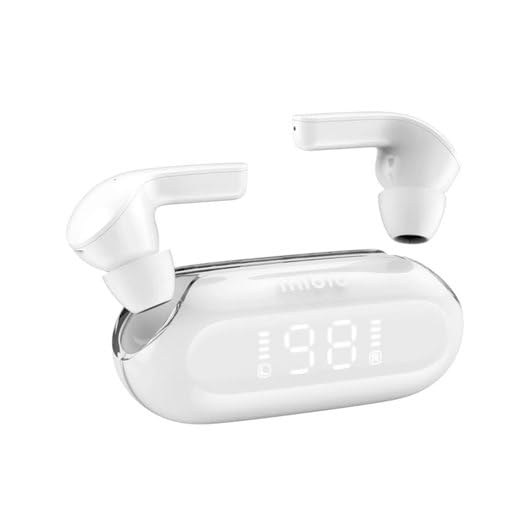
1-сүрөт: Mibro 3 True Wireless Bluetooth Earbuds and Charging Case. This image displays the white earbuds, one removed from the charging case and one partially visible, alongside the sleek white charging case which features a clear lid and an LED display showing '98', indicating battery percentage.
Компоненттери:
- Кулакчындар: Left and Right True Wireless Earbuds.
- Заряддоо кутусу: Portable case for charging and storing earbuds, with an integrated LED display.
- Заряддоо кабели: (Typically USB-C, though not specified) For charging the case.
- Наушниктер: (Various sizes, though not specified) For comfortable fit.
Жайгашуу
1. Баштапкы заряддоо
- Кулакчындардын экөөнү тең зарядкага салыңыз.
- Connect the charging cable (not included in product details, but standard) to the charging port on the case and a power source.
- The LED display on the charging case will indicate the charging status. Ensure the case and earbuds are fully charged before first use.
2. Түзмөк менен жупташтыруу
- Open the charging case. The earbuds will automatically enter pairing mode (indicated by a flashing light on the earbuds, if applicable).
- Түзмөгүңүздө (смартфон, планшет, компьютер) Bluetooth иштетиңиз.
- Издөө "Mibro 3" or a similar name in the list of available Bluetooth devices.
- Select "Mibro 3" to connect. Once connected, a voice prompt or indicator light will confirm successful pairing.
- If pairing fails, place the earbuds back in the case, close the lid, wait a few seconds, and then repeat the steps.
Иштөө нускамалары
Күйгүзүү/өчүрүү
- Күйгүзүү: Open the charging case, and the earbuds will automatically power on and connect to the last paired device. Alternatively, press and hold the touch control area on both earbuds for 2-3 seconds.
- Өчүрүү: Place the earbuds back into the charging case and close the lid. They will automatically disconnect and power off. Alternatively, press and hold the touch control area on both earbuds for 5 seconds.
Touch Controls (Typical Functions)
The Mibro 3 earbuds feature intuitive touch controls. Specific functions may vary slightly, but common operations include:
- Ойнотуу/тындыруу: Кулакчындарды бир жолу таптаңыз.
- Кийинки трек: Оң кулакчынды эки жолу таптаңыз.
- Мурунку трек: Сол кулакчынды эки жолу таптаңыз.
- Чалууга жооп берүү/аяктоо: Кирүүчү чалуу учурунда гарнитураны бир жолу таптаңыз.
- Чакырууну четке кагуу: Кирүүчү чалуу учурунда гарнитураны 2 секунд басып туруңуз.
- Үн Жардамчысын жандыруу: Кулакчындарды үч жолу таптаңыз.
- Үндү көзөмөлдөө: (If supported) Tap and hold on the right earbud to increase volume, tap and hold on the left earbud to decrease volume.
Кулакчын тагынуу
Gently insert the earbuds into your ear canal. Rotate them slightly until they fit snugly and comfortably. Ensure the microphone is pointing towards your mouth for optimal call quality.
Техникалык тейлөө
Тазалоо
- Кулакчындарды жана кубаттоочу кутуну сүртүү үчүн жумшак, кургак, түксүз чүпүрөктү колдонуңуз.
- өжөр кир үчүн, бир аз гampчүпүрөктү суу же жумшак, абразивдүү тазалагыч менен жууп салыңыз.
- Катуу химиялык заттарды, спиртти же абразивдик материалдарды колдонбоңуз.
- Regularly clean the eartips and the mesh covers to prevent wax buildup, which can affect sound quality.
Сактагыч
- Кулакчындарды коргоо жана кубаттоо үчүн колдонулбаган учурда аларды кубаттоо кутучасында сактаңыз.
- Store the device in a cool, dry place, away from direct sunlight, extreme temperatures, and humidity.
Батареяга кам көрүү
- Батареяны бат-баттан толук кубаттап калуудан алыс болуңуз.
- Батареянын ден соолугун сактоо үчүн аппаратты тез-тез колдонбосо дагы, дайыма заряддаңыз.
- Аппаратты өтө ысыкка же суукка тийгизбеңиз, анткени бул батареянын иштешин начарлатышы мүмкүн.
Проблемаларды чечүү
If you encounter issues with your Mibro 3 earbuds, try the following solutions:
| Көйгөй | Мүмкүн чечим |
|---|---|
| Кулакчындар түзмөк менен жупташкан жок. |
|
| Бир гана кулакчын иштеп жатат. |
|
| Үн жок же үнү төмөн. |
|
| Заряддоо куту заряддалбай жатат. |
|
Техникалык шарттар
Key technical specifications for the Mibro 3 True Wireless Bluetooth Earbuds:
| Өзгөчөлүк | Деталь |
|---|---|
| Модель номери | sol-me3 |
| Бренд | Микро |
| Байланыш технологиясы | Зымсыз (Bluetooth) |
| Форма фактору | In-Ear |
| Түс | Ак |
| Материал | Пластик |
| Элемент Салмагы | 100 грамм |
| Өзгөчөлүктөр | Жеңил |
| Заряддалуучу батарея | Ооба |
| Башкаруу түрү | Volume Control (and touch controls for playback/calls) |
Кепилдик жана колдоо
Кепилдик маалымат
The Mibro 3 True Wireless Bluetooth Earbuds are covered by a standard manufacturer's warranty. Please refer to the warranty card included with your purchase or visit the official Mibro webкепилдик камтууга жана узактыгына байланыштуу толук шарттар жана шарттар үчүн сайт.
Кардарларды колдоо
For technical assistance, product inquiries, or warranty claims, please contact Mibro customer support. Contact information can typically be found on the official Mibro website or within the product packaging. When contacting support, please have your product model number (sol-me3) and purchase details ready.


