1. Киришүү
This manual provides detailed instructions for the assembly, operation, and maintenance of your FLEXISPOT Height-Adjustable Electric Desk, Model QS2LW-1811. Please read this manual thoroughly before use to ensure proper function and safety. This L-shaped desk features a robust 4-leg design with dual motors for stable height adjustment, offering a versatile workspace for various activities.

Figure 1: FLEXISPOT L-shaped Height-Adjustable Electric Desk.
2. Коопсуздук нускамалары
Жаракат алуунун же продуктунун бузулушунун алдын алуу үчүн, төмөнкү коопсуздук көрсөтмөлөрүн аткарыңыз:
- Электр камсыздоо: Use only AC100-240V, Frequency 50/60Hz.
- Иштөө чөйрөсү: Suitable for indoor use only, within a temperature range of 0-40°C.
- Өрт коркунучу: Keep the desk away from open flames and heat sources.
- Тазалоо: Always unplug the desk before cleaning. Use a damp cloth and avoid water entering electrical components. Regularly check and tighten all screws.
- Орнотуу: Ensure correct installation using only manufacturer-provided accessories. Maintain a safety gap around moving parts.
- Балдардын коопсуздугу: Тумчугуп калуу коркунучун болтурбоо үчүн кичинекей бөлүктөрүн балдардан алыс кармаңыз.
- Тазалоочу агенттер: Use only non-corrosive, non-abrasive cleaners.
- Таңгактоо: Handle packaging cautiously to avoid suffocation risks. Retain packaging for future reference.
- Транспорт: For transportation, secure all parts, unplug the desk, and use multiple people for lifting.

Figure 2: Important safety warnings in multiple languages.
3. Орнотуу жана чогултуу
The FLEXISPOT Height-Adjustable Electric Desk is designed for quick and straightforward assembly. It comes with detailed step-by-step instructions and a complete set of tools. Pre-drilled holes simplify the process significantly.
3.1 Пакеттин мазмуну
Before beginning assembly, ensure all components are present and undamaged. The package typically includes:
- Desktop sections (L-shaped)
- Lifting columns (4 legs)
- Feet for the lifting columns
- Аркалык тилке/рамканын компоненттери
- Башкаруу кутучасы
- Hand control panel
- Кубаттуу адаптер жана кабелдер
- Монтаждоо жабдуулары (буроолор, болттар ж.
- Монтаждоо үчүн аспаптар
3.2 Чогултуу кадамдары
Follow the included graphical instructions for precise assembly. A general overview процесси төмөнкүдөй:
- Ар бир көтөрүүчү мамынын түбүнө буттарды бекитиңиз.
- Connect the lifting columns to the main crossbar and frame components.
- Secure the control box to the designated area on the frame.
- Carefully place the desktop sections onto the assembled frame and secure them using the provided screws and pre-drilled holes.
- Connect all necessary cables from the motors to the control box and then to the hand control panel.
- Mount the hand control panel in an easily accessible location on the desk.

Figure 3: Assembly diagram for the desk frame and desktop.
The desk features strong steel legs and a solid 4-leg structure, ensuring stability even at its highest settings.

Figure 4: Detail of the headphone hook and robust steel legs.

Figure 5: The desk's dual-stage legs provide continuous height adjustment.

Figure 6: The 4-leg solid structure ensures stability and safety, tested for over 20,000 cycles.
4. Иштөө нускамалары
Your FLEXISPOT electric desk offers flexible height adjustment and smart control features.
4.1 Бийиктигин тууралоо
The desk's height can be adjusted from 72 cm to 117 cm (approximately 28.3 inches to 46 inches). This range allows for comfortable sitting or standing positions for various users and activities.
4.2 Smart Hand Control Panel
The intelligent hand control panel allows for precise height adjustments and memory presets.
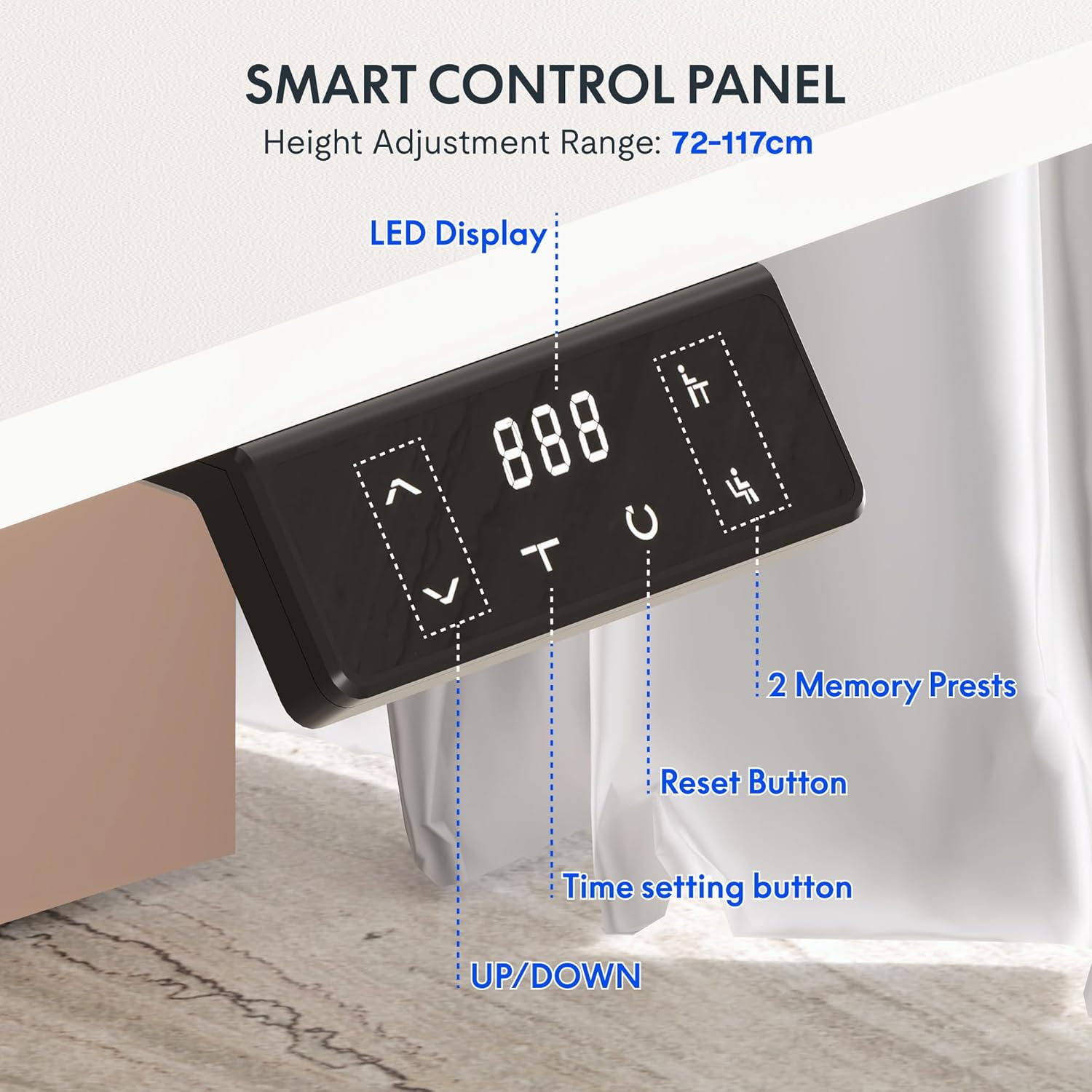
Figure 7: Smart Control Panel features.
- LED дисплей: Учурдагы столдун бийиктигин сантиметр менен көрсөтөт.
- UP/DOWN Buttons (< / >): Press and hold to move the desk up or down to your desired height.
- Эстутумдун алдын ала орнотуулары (1, 2): To save a preferred height, adjust the desk to the desired position, then press and hold one of the memory buttons (1 or 2) until the display flashes or beeps. To recall a saved height, simply press the corresponding memory button.
- Reset Button (C): Used to reset the desk to its lowest position or clear error codes. Typically, press and hold until the desk moves to its lowest point and resets.
- Time Setting Button (T): This button may be used for setting reminders to stand or sit, depending on the specific model's features. Refer to the detailed manual for specific time setting functions.
4.3 Dual Motor Stabilization
The desk is equipped with advanced dual motor technology, providing an impressive load capacity of up to 80 kg. This ensures smooth, even, and stable height adjustment, even when the desk is fully loaded with equipment.
5. Техникалык тейлөө
Regular maintenance ensures the longevity and optimal performance of your electric desk.
- Тазалоо: Unplug the desk before cleaning. Use a soft, damp cloth to wipe down surfaces. Avoid harsh chemicals or abrasive cleaners.
- Бурама тыгыздыгы: Мезгил-мезгили менен текшерип, структуралык бүтүндүгүн камсыз кылуу үчүн бардык бурамалар менен болтторду бекемдөө.
- Кабелдик башкаруу: Бардык кабелдердин тыкан жайгашканын жана кысылбаганын же чыңалбаганын текшериңиз.
- Салмак сыйымдуулугу: Do not exceed the maximum weight recommendation of 80 kg to prevent damage to the motors and frame.
The desktop features protective rounded edges, which also contribute to durability and user safety.

Figure 8: Protective rounded edges of the desktop.
6. Кыйынчылыктарды
Үстөлүңүздө көйгөйлөргө туш болсоңуз, төмөнкү жалпы көйгөйлөрдү жана чечимдерди караңыз:
- Үстөл кыймылдабайт:
- Электр кабели столго да, розеткага да бекем сайылганын текшериңиз.
- Бардык мотор кабелдеринин башкаруу кутучасына туура туташтырылганын текшериңиз.
- Press the Reset button (C) and hold until the desk moves to its lowest position and resets.
- Тегиз эмес кыймыл:
- Perform a reset procedure as described above.
- Үстөлдүн ашыкча жүктөлбөгөнүн жана салмактын бирдей бөлүштүрүлгөнүн текшериңиз.
- Дисплейдеги ката коду:
- Refer to the specific error code in the detailed manual provided with your product. Often, a reset (pressing and holding 'C') can clear minor errors.
- Unplug the desk for 10 minutes, then plug it back in and try again.
- Иш учурундагы ызы-чуу:
- A slight motor sound is normal during adjustment.
- If the noise is excessive or unusual, check for loose screws or obstructions.
If problems persist after attempting these solutions, please contact FLEXISPOT customer support.
7. Техникалык шарттар
| Өзгөчөлүк | Спецификация |
|---|---|
| Бренд | FLEXISPOT |
| Модель номери | QS2LW-1811 |
| Иш тактасынын көлөмү | 180 x 110 cm (L-shaped) |
| Жөнгө салынуучу бийиктик диапазону | 72 см - 117 см |
| Продукциянын өлчөмдөрү (жалпы) | 110 x 180 x 71 cm (at lowest height) |
| Элемент Салмагы | 30 килограмм |
| Максималдуу салмак боюнча сунуш | 80 килограмм |
| Негизги материал | Эритме болот |
| Өзгөчөлүктөр | Electric Height Adjustment, Dual Motors, Memory Presets |
| Түс | Ак |
| Керектүү Ассамблея | Ооба |

Figure 9: Desk dimensions and adjustable height range.
8. Кепилдик жана колдоо
8.1 Кепилдик маалыматы
For detailed warranty information, please refer to the warranty card included with your product or visit the official FLEXISPOT website. Warranty terms typically cover manufacturing defects and motor malfunctions under normal use conditions.
8.2 Кардарларды колдоо
If you have any questions, require technical assistance, or need to report an issue, please contact FLEXISPOT customer support through their official website or the retailer from whom you purchased the product. Please have your model number (QS2LW-1811) and purchase date ready when contacting support.


