1. Киришүү
The ZWO 5X 2 Electronic Filter Wheel (EFW) is a precision-engineered device designed for astronomical imaging. It allows for the automated selection of up to five 2-inch filters, enhancing the efficiency and quality of astrophotography. The EFW features a robust construction from aircraft-grade aluminum and incorporates a high-quality stepper motor from NPM, Japan, ensuring reliable and precise filter positioning. Its compact and lightweight design, with a thickness of only 20mm, makes it suitable for various imaging setups.
2. Негизги өзгөчөлүктөрү
- The filter wheel body is CNC milled from an aircraft graded aluminum block, ensuring durability and precision.
- The 2" Electronic Filter Wheel can be rotated in both counter-clockwise and clockwise directions for flexible filter selection.
- The maximum power supply of this EFW is approximately 120mAh @ 5V, which can be operated conveniently from a Cooled CCD’s USB2.0 port.
3. Кутуда эмне бар

Figure 3.1: Contents of the ZWO 5X 2 Electronic Filter Wheel package.
Таңгактан чыгаргандан кийин, төмөнкү компоненттердин бардыгы камтылганын текшериңиз:
- EFW 2"x5 Body
- USB2.0 - 2m cable
- A bag of M2.5*6 screws (6pcs/bag)
- A bag of filter masks for 50mm filters (7pcs/bag)
- Мукаддас бурагыч.
- A bag of M2*4 flat screws (23pcs/bag)
- M54M-M48F адаптер
- M54M-M42F адаптер
4. Продукт бүтүп калдыview
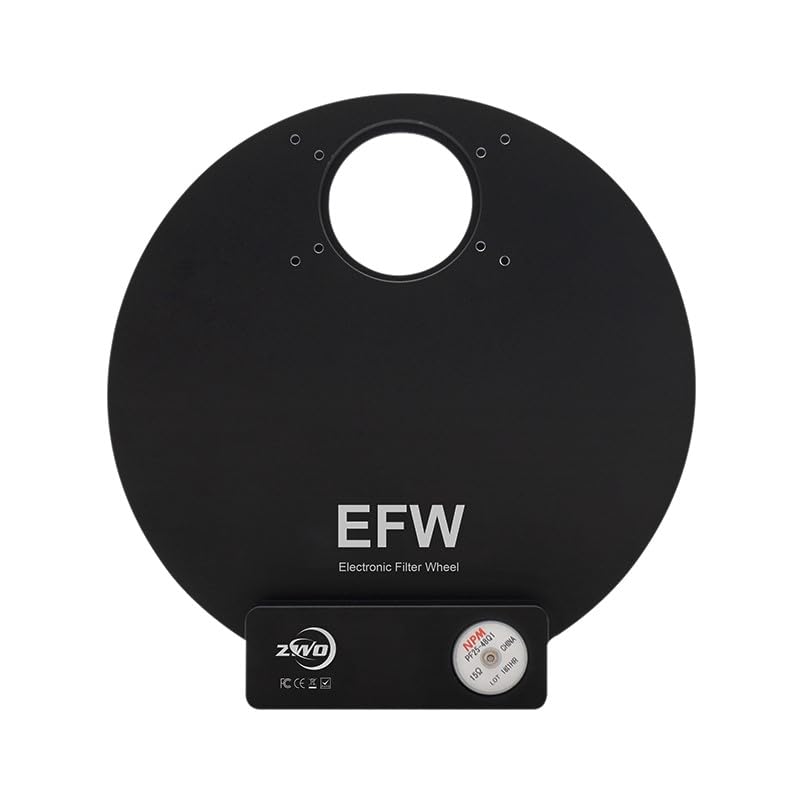
Сүрөт 4.1: Алдыңкы view of the ZWO 5X 2 Electronic Filter Wheel.
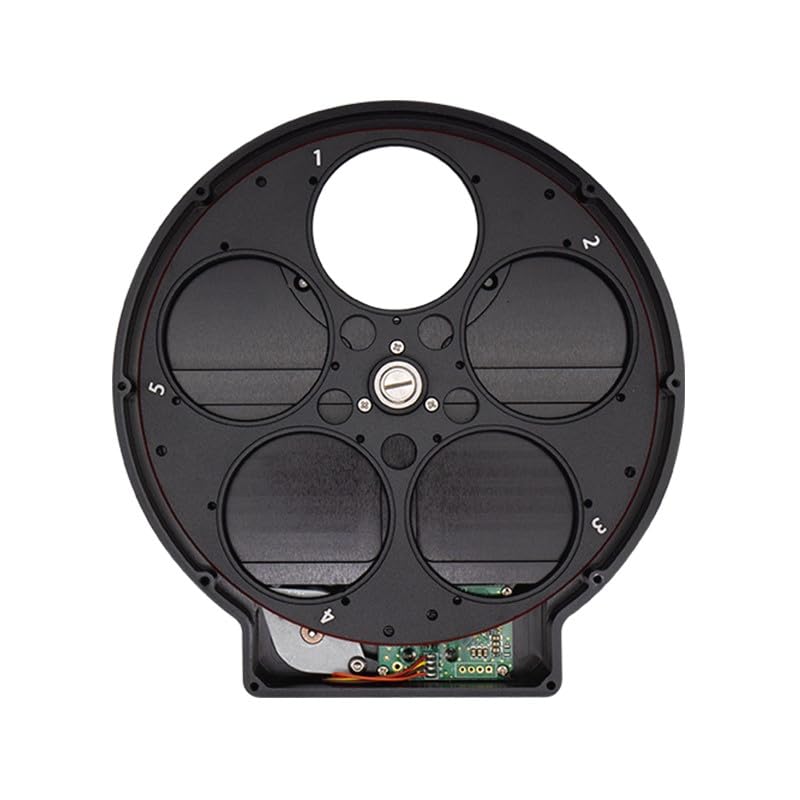
4.2-сүрөт: Ички view of the ZWO 5X 2 Electronic Filter Wheel with numbered filter slots.
5. Орнотуу
5.1 Чыпканы орнотуу
- Carefully open the filter wheel body to expose the filter slots.
- Insert your 2-inch filters into the designated slots. Ensure that filters (excluding threads) are less than 7.5mm in thickness and less than 50.8mm in diameter. Threads must be less than 2.7mm in thickness.
- Secure the filters using the provided M2*4 flat screws if necessary, or ensure they are seated correctly.
- Close the filter wheel body securely.
5.2 Connecting to Imaging System
- Connect the EFW to your imaging camera (e.g., ASI6200) using the appropriate adapters (M54M-M48F or M54M-M42F) as needed for your setup. The distance from the filter to the sensor when connected to ASI6200 is approximately 18mm.
- Connect the EFW to your computer or cooled CCD's USB2.0 port using the provided 2m USB2.0 cable. A single USB cable is sufficient for both power and control.
6. Иштөө нускамалары
6.1 Электр энергиясы
The EFW is powered via its USB2.0 connection. The maximum power consumption is approximately 120mAh at 5V. This low power requirement allows it to be powered directly from the USB2.0 port of a cooled CCD camera, simplifying cable management.
6.2 Башкаруу режими
The ZWO EFW can be controlled using industry-standard ASCOM drivers or through the provided SDK (Software Development Kit). Ensure you have the necessary drivers installed on your computer for proper communication.
- ASCOM Driver: For Windows users, the ASCOM platform provides a standardized interface for controlling astronomical equipment. Install the ZWO ASCOM driver for the EFW to integrate it with your preferred imaging software.
- SDK: Developers can use the SDK to create custom applications or integrate the EFW into existing software solutions.
6.3 Фильтр тандоо
Once connected and recognized by your software, you can select the desired filter position. The filter wheel supports rotation in both clockwise and counter-clockwise directions to reach the target filter efficiently.
7. Техникалык тейлөө
- Тазалоо: Keep the EFW body clean and free from dust. Use a soft, dry cloth for external cleaning. Avoid using harsh chemicals or abrasive materials.
- Чыпкага кам көрүү: Handle filters with care, preferably by their edges, to avoid fingerprints and smudges. Clean filters only when necessary, using appropriate optical cleaning solutions and cloths.
- Сактагыч: When not in use, store the EFW in a dry, dust-free environment, preferably in its original packaging or a protective case.
- Таасирден качуу: The EFW is a precision instrument. Avoid dropping or subjecting it to strong impacts, which can damage the internal mechanism.
8. Кыйынчылыктарды
- Түзмөк таанылган жок:
- Ensure the USB cable is securely connected to both the EFW and the computer/camera.
- Verify that the necessary drivers (ASCOM, SDK) are correctly installed.
- Try connecting to a different USB port or a different computer to rule out port issues.
- Filter Wheel Not Rotating:
- Check if the EFW is receiving power (indicated by LED, if present, or by software connection).
- Ensure no physical obstructions are preventing the wheel from rotating.
- Restart the control software and/or reconnect the EFW.
- Incorrect Filter Position:
- Recalibrate the filter wheel through your control software, if such an option is available.
- Ensure filters are properly seated and not interfering with the rotation mechanism.
9. Техникалык шарттар
| Спецификация | Нарк |
|---|---|
| Бренд | ZWO |
| Модель номери | EFW-5x2 |
| Продукт Салмагы | 500г |
| Калыңдыгы | 20мм |
| Башкаруу режими | ASCOM and SDK Driver |
| Электр камсыздоо | USB2.0 |
| Max Power Supply | Approx. 120mAh @ 5V |
| Материал | Aircraft-grade Aluminium |
| Түс | Кара |
| Чыпканын шайкештиги | 5 x 2-inch filters |
| Max Filter Thickness (no threads) | 7.5мм |
| Max Filter Diameter | 50.8мм |
| Max Thread Thickness | 2.7мм |
| Distance from filter to sensor (with ASI6200) | Болжол менен 18 мм |
10. Кепилдик жана колдоо
ZWO provides a limited warranty for its products. For detailed warranty terms, technical support, and service inquiries, please refer to the official ZWO webсайтка же түздөн-түз кардарларды колдоо менен байланышыңыз. Сатып алуу квитанциясын кепилдик дооматтары үчүн сатып алуунун далили катары сактаңыз.
Расмий ZWO Webсайт: www.zwoastro.com


