Introduction
Thank you for choosing the MEGATEK Portable CD Player. This device is designed to provide a versatile and high-quality audio experience, supporting various media formats and offering multiple connectivity options. Please read this manual carefully to ensure proper use and maintenance of your new CD player.

Image: The MEGATEK Portable CD Player, showcasing its compact design, integrated speakers, control buttons, and included accessories like headphones and USB-C charging cables.
Коопсуздук маалыматы
Коопсуз иштөөнү камсыз кылуу жана зыян келтирбөө үчүн төмөнкү сактык чараларын сактаңыз:
- Аппаратты экстремалдык температурага, нымдуулукка же түз күн нуруна калтырбаңыз.
- Аппаратты түшүрүүдөн же катуу таасирлерден сактаныңыз.
- Аппаратты өзүңүз ажыратпаңыз же оңдоого аракет кылбаңыз. Бардык тейлөөлөрдү квалификациялуу кызматкерлерге тапшырыңыз.
- Берилген заряддоо кабелин жана туура келген кубат адаптерин гана колдонуңуз.
- Аппаратты суудан жана башка суюктуктардан алыс кармаңыз.
- Аппаратты жумшак, кургак чүпүрөк менен тазалаңыз. Абразивдүү тазалагычтарды же эриткичтерди колдонбоңуз.
- Үндүн катуу деңгээлинде узакка созулган угуу угуунун бузулушуна алып келиши мүмкүн. Үндү коопсуз деңгээлге тууралаңыз.
Пакеттин мазмуну
Пакетте бардык буюмдар бар экенин текшериңиз:
- MEGATEK Portable CD Player - Black
- Зымдуу кулакчындар
- USB-C заряддоо кабели
- Колдонуучунун колдонмосу

Image: A visual representation of the package contents, including the CD player, headphones, USB-C cable, and user manual.
Продукт бүттүview
Familiarize yourself with the various parts and controls of your MEGATEK Portable CD Player.
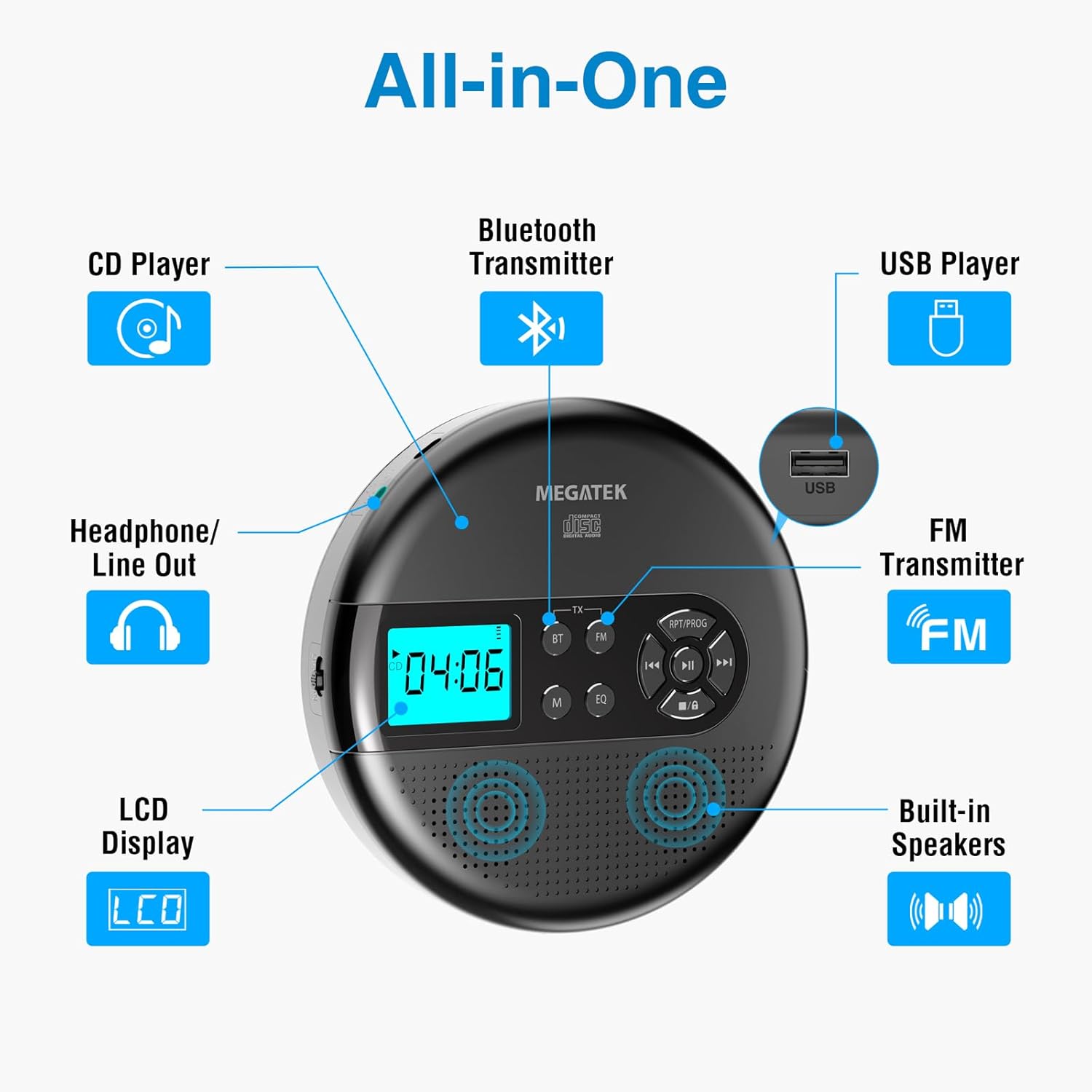
Image: An "All-in-One" diagram highlighting key features such as the CD Player, Bluetooth Transmitter, USB Player, FM Transmitter, Built-in Speakers, LCD Display, and Headphone/Line Out port.
Башкаруу каражаттары жана порттор:
- LCD дисплей: Shows track number, time, mode, and battery status.
- Ойнотуу/тындыруу баскычы: Ойнотууну баштайт же тындырат.
- Мурунку/Кийинки баскычтары: Тректерди өткөрүп жиберет же алдыга/артка түртөт.
- Токтотуу баскычы: Ойноону токтотот.
- RPT/PROG Button: Controls repeat modes and programming tracks.
- BT баскычы: Bluetooth өткөрүү режимин иштетет.
- FM баскычы: Activates FM transmission mode.
- M (режим) баскычы: Switches between CD, USB, Bluetooth, and FM modes.
- EQ баскычы: Эквалайзер алдын ала орнотуулары аркылуу айланышат.
- Үндү көзөмөлдөө: Аудио чыгаруу деңгээлин тууралайт.
- USB порт: Аудио ойнотуу үчүн fileUSB дисктен.
- Type-C заряддоо порту: Ички батареяны заряддоо үчүн.
- 3.5mm Audio Out Jack: Наушниктерди же тышкы динамиктерди туташтыруу үчүн.
- Камтылган стерео динамиктер: Түз аудио ойнотуу үчүн.
Жайгашуу
Батареяны заряддоо:
The device is equipped with a built-in 2000mAh rechargeable Li-ion battery. Before first use, fully charge the player.
- Connect the provided USB-C charging cable to the Type-C charging port on the player.
- USB-C кабелинин экинчи учун USB кубат адаптерине (кошумча эмес) же компьютердин USB портуна туташтырыңыз.
- The battery indicator on the LCD display will show charging status. A full charge provides up to 15 hours of playtime at medium volume.

Image: The portable CD player connected to a power source via its USB-C cable, resting on a nightstand next to a bed.
Inserting a CD:
- Locate the CD compartment latch/button on the side of the player and slide/press it to open the lid.
- Carefully place the CD onto the center spindle with the label side facing up.
- CDди ордунан чыккыча акырын басыңыз.
- CD бөлүктүн капкагын бекитилмейинче бекем жабыңыз.

Image: The portable CD player with its lid open, showing a blue CD disc inserted into the compartment, ready for playback.
Иштөө нускамалары
CD ойнотуу:
- Insert a CD as described in the Setup section.
- басыңыз Ойнотуу/Тыныгуу ойнотууну баштоо үчүн баскыч.
- колдонуу Мурунку/Кийинки buttons to navigate between tracks. Hold to fast-forward or rewind.
- басыңыз RPT/PROG button to cycle through repeat modes (repeat one, repeat all, random) or to program a custom playback order.
- басыңыз Токто ойнотууну аяктоо үчүн баскыч.
- Adjust volume using the dedicated volume control.
USB ойнотуу:
The player supports MP3, WMA, and WAV audio fileUSB дисктен.
- USB флэш-дискти USB портуна салыңыз.
- басыңыз M (режим) USB режимине өтүү үчүн баскыч.
- колдонуу Ойнотуу/Тыныгуу, Мурунку/Кийинки, жана RPT/PROG CD ойнотуудагыдай эле баскычтар.
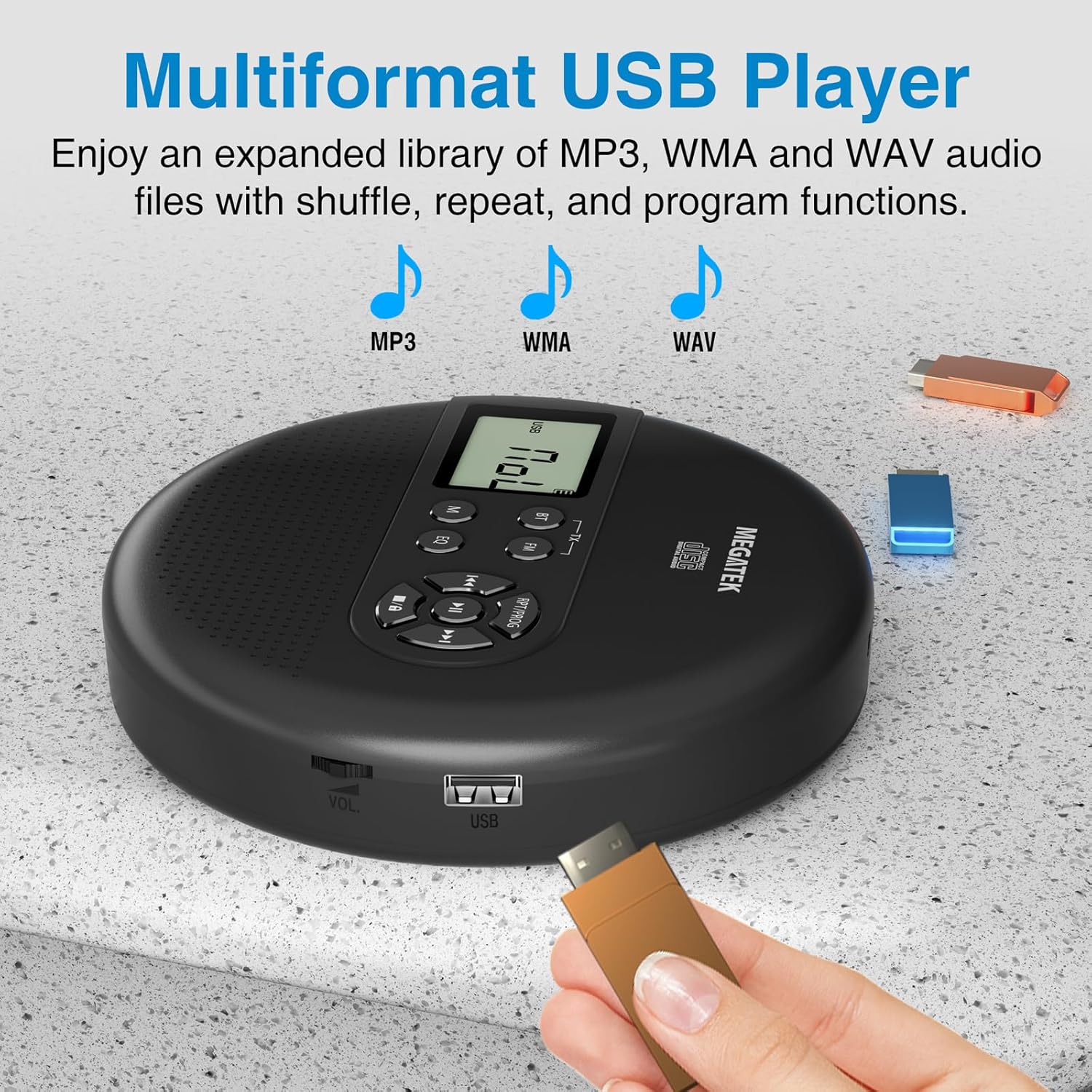
Image: The portable CD player with a USB flash drive inserted into its side port, illustrating its multi-format USB playback capability.
Bluetooth өткөрүү:
Stream audio wirelessly to Bluetooth-enabled headphones or speakers. Note: This feature does not support connections to car stereo systems.
- Bluetooth гарнитураңыз же динамигиңиз жупташтыруу режиминде экенин текшериңиз.
- On the CD player, press the BT button. The Bluetooth indicator on the display will flash.
- The player will automatically search for and connect to nearby Bluetooth devices. Once connected, the indicator will stop flashing.

Image: The portable CD player wirelessly transmitting audio to two external Bluetooth speakers, demonstrating its Bluetooth transmission capability.
FM берүү:
Transmit audio signals to nearby FM radios, including car FM stereos and home stereo systems.
- басыңыз FM button on the CD player. The display will show an FM frequency.
- Tune your FM radio (car stereo, home stereo) to the same frequency displayed on the CD player.
- Adjust the frequency on the CD player using the Мурунку/Кийинки buttons if interference occurs or to find a clearer channel.

Image: The portable CD player placed on a car dashboard, transmitting audio to the car's FM stereo system, indicated by an FM frequency on the car's display.
Using Headphones/External Speakers:
For private listening or connecting to wired audio systems:
- Plug the included wired headphones into the 3.5mm audio out jack.
- Alternatively, connect an audio cable (not included) from the 3.5mm audio out jack to the AUX input of external speakers or an audio system.
- The built-in speakers will automatically mute when headphones or external speakers are connected.

Image: A close-up of the portable CD player, visually representing sound waves emitting from its dual stereo speakers, emphasizing the built-in audio capability.
Техникалык тейлөө
- Тазалоо: Use a soft, dry, lint-free cloth to clean the exterior of the player. For the CD lens, use a specialized CD lens cleaner. Do not use liquids or aerosol cleaners directly on the device.
- Сактагыч: Ойноткучту көпкө чейин колдонбогондо, аны салкын, кургак жерде, күн нуру түз тийген жерден жана өтө жогорку температурадан алыс сактаңыз.
- Батареяга кам көрүү: Батареянын иштөө мөөнөтүн узартуу үчүн, батареяны тез-тез толук зарядсыздандырбаңыз. Түзмөктү активдүү колдонулбаса дагы, үзгүлтүксүз кубаттап туруңуз.
Проблемаларды чечүү
| Көйгөй | Мүмкүн себеп | Чечим |
|---|---|---|
| Ойноткуч күйбөйт. | Батарея түгөнүп калды. | Ойноткучту USB-C кабели аркылуу кубаттаңыз. |
| Динамиктерден/наушниктерден үн чыкпайт. | Volume is too low; headphones not fully plugged in; incorrect mode selected. | Increase volume; ensure headphones are securely connected; press the M (режим) туура булагын тандоо үчүн баскыч. |
| CD ойнотулбай жатат же ойнотулбай жатат. | CD is dirty, scratched, or inserted incorrectly; anti-skip function overwhelmed. | Clean the CD; ensure CD is properly seated; avoid strong vibrations. |
| Bluetooth байланышы көйгөйлөрү. | Device not in pairing mode; too far from player; interference. | Ensure receiving device is in pairing mode; move closer to the player; restart both devices. |
| FM transmission static/poor quality. | Interference; incorrect frequency. | Adjust the FM frequency on the player and receiver to find a clear channel. |
Техникалык шарттар
| Өзгөчөлүк | Деталь |
|---|---|
| Модель номери | CP27BR |
| Продукциянын өлчөмдөрү | 5.91 x 5.91 x 1.32 дюйм |
| Элемент Салмагы | 10.9 унция |
| Батарея | 2000 мАч литий-ион (кайра заряддоого болот) |
| Оюн убактысы | 15 саатка чейин (орточо көлөмдө) |
| Колдоого алынган CD форматтары | CD, CD-R/RW, MP3 CD, Audio Book CD |
| Колдоого алынган USB форматтары | MP3, WMA, WAV |
| Өткөрүп жиберүүгө каршы коргоо | 60 секунд |
| Байланыш | USB, Bluetooth Transmitter, FM Transmitter, 3.5mm Audio Out |
| Өзгөчөлүктөр | Built-in Stereo Speakers, Resume Play, Shuffle, Repeat, Program Functions, 5 EQ Options |
Кепилдик жана колдоо
MEGATEK offers comprehensive support for its products:
- 12 айлык алмаштыруу: In case of product defects or issues within 12 months of purchase.
- Өмүр бою техникалык колдоо: Assistance with product usage, troubleshooting, and general inquiries.
- 24/7 Кардарларды тейлөө: Available through Amazon buyer-seller messaging.
For any questions or problems, please contact MEGATEK customer service via the Amazon platform or refer to the contact information provided in the product packaging.
Image: A graphic detailing MEGATEK's customer support, including 12-month replacement, lifetime technical support, and 24/7 Amazon buyer-seller messaging, alongside an image of customer service representatives.


