Introduction
This manual provides essential information for the setup, operation, maintenance, and troubleshooting of your Star Micronics mC-Label3 MCL32CBI Direct Thermal Printer. Please read this manual thoroughly before using the printer to ensure proper and safe operation.
Пакеттин мазмуну
Төмөндө тизмеленген нерселердин баары пакетиңизге камтылганын текшериңиз:
- mC-Label3 Multifunctional Printer
- AC адаптер
- Электр кабели
- USB Cables (C-C 1.0m and C-A 1.8m)
- LAN кабели (1м)
- Simple Setup Sheet Safety Guide

Сүрөт: алдыңкы view of the Star Micronics mC-Label3 printer, showcasing its compact design and label output slot.
Жайгашуу
1. Принтерди туташтыруу
The mC-Label3 MCL32CBI printer offers multiple connectivity options:
- USB-C: Connect the printer directly to your PC, Android, or iOS device using the provided USB-C to USB-C or USB-C to USB-A cables.
- Ethernet (LAN): For network connectivity, connect the printer to your router or network switch using the supplied LAN cable.
- Bluetooth: The MCL32CBI model supports Bluetooth connectivity for iOS and Android devices. Ensure Bluetooth is enabled on your device and pair with the printer.

Сүрөт: Арткы view of the mC-Label3 printer, highlighting the LAN, USB, and power ports for various connection types.
2. Медиа жүктөө
The printer supports various media types, including linerless labels, die-cut labels, continuous labels, and thermal receipt paper.
- Open the top cover of the printer by lifting the latch.
- Place the media roll into the media compartment, ensuring the leading edge feeds out from the top.
- Pull a small amount of media past the print head and close the top cover securely.
- Ensure the media is properly aligned within the guides.

Сүрөт: жогорудан төмөнгө view of the mC-Label3 printer with its cover open, illustrating the internal mechanism for loading thermal paper or label rolls.
Иштөө нускамалары
1. Күйгүзүү / Өчүрүү
Connect the power cable to the printer and a power outlet. Press the power button located on the front of the printer to turn it on. The status indicator light will illuminate.
2. Этикеткаларды жана квитанцияларды басып чыгаруу
The mC-Label3 MCL32CBI printer is designed for efficient label and receipt printing. It supports various applications and cloud services.
- Программалык шайкештик: Works seamlessly with PC, Android, and iOS applications.
- Булут кызматтары: Utilize Star Micronics Cloud Services to design and manage labels.
- One Touch Label: This feature allows storing pre-made receipts and labels for quick and easy printing directly from the printer.
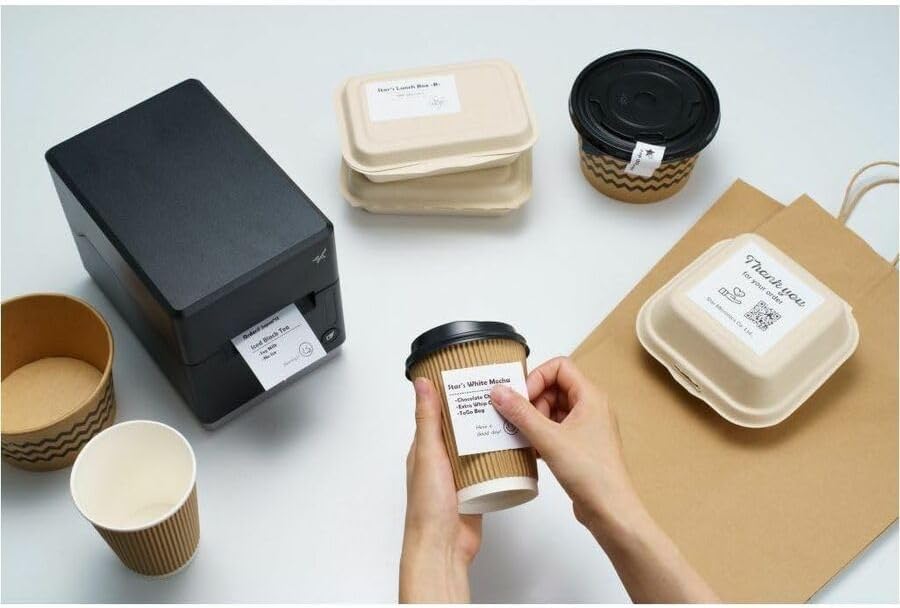
Image: A hand pressing the feed button on the mC-Label3 printer, demonstrating the printing of a 'Thank you' label.

Image: The mC-Label3 printer shown in a practical setting, printing labels for food containers and coffee cups, illustrating its versatility.
Техникалык тейлөө
1. Принтерди тазалоо
Regular cleaning ensures optimal performance and extends the life of your printer.
- Жумшак, түксүз кездемени колдонуңуз dampened with isopropyl alcohol to clean the print head.
- Wipe down the exterior of the printer with a soft, dry cloth.
- Абразивдүү тазалагычтарды же эриткичтерди колдонуудан алыс болуңуз.
2. Replacing Media
When the media roll is depleted, follow the media loading instructions in the Setup section to replace it.
3. Effortless Repairs
The mC-Label3 is designed for effortless, no-tools-required repairs with minimal upkeep, simplifying any necessary component replacements.
Проблемаларды чечүү
Бул бөлүмдө сиз кабылышы мүмкүн болгон жалпы маселелерди чечүү жолдору каралган.
| Көйгөй | Мүмкүн себеп | Чечим |
|---|---|---|
| Принтер күйбөй жатат | Электр кабели туташкан эмес; Электр розеткасынын маселеси | Электр кабели бекем туташтырылганын текшериңиз; Башка электр розеткасын колдонуп көрүңүз. |
| Басып чыгаруу жок | Out of media; Media loaded incorrectly; Driver issue | Load new media; Re-load media correctly; Reinstall printer drivers. |
| Басып чыгаруу сапаты начар | Dirty print head; Low quality media | Clean the print head; Use recommended thermal media. |
| Туташуу маселелери | Incorrect cable connection; Bluetooth not paired; Network configuration | Check USB/Ethernet cables; Re-pair Bluetooth; Verify network settings. |
Техникалык шарттар
| Өзгөчөлүк | Деталь |
|---|---|
| Модель аты | mC-Label3 |
| Элемент моделинин номери | MCL32CBI |
| Басма технологиясы | Түз жылуулук |
| Принтердин чыгышы | Монохромдуу |
| Макс басып чыгаруу ылдамдыгы монохромдуу | 23 промилле |
| Максималдуу кара жана ак басып чыгаруу чечими | 203 DPI (203 x 203 DPI) |
| Басма маалымат каражаттары | Labels (Linerless, Die-Cut, Continuous), Thermal Receipt |
| Байланыш технологиясы | Bluetooth, Wired (USB, Ethernet) |
| Аппараттык интерфейс | USB-Ethernet |
| Шайкеш түзмөктөр | PC, Android, iOS |
| Controller Type | iOS, Android |
| Продукциянын өлчөмдөрү | 6.7"D x 5.6"W x 8.3"H (17.0 x 14.2 x 21.1 см) |
| Элемент Салмагы | 7.2 фунт (3.27 кг) |
| Эстутум сактоо сыйымдуулугу | 64 MB |
| Түс | Кара |
| Өндүрүүчү | STAR MICRONICS |
| Келип чыккан өлкө | Кытай |
Кепилдик маалымат
The Star Micronics mC-Label3 MCL32CBI printer comes with a manufacturer's warranty. For specific terms and conditions, please refer to the warranty card included in your package or visit the official Star Micronics webсайт.
Кепилдик түрү: Өндүрүүчү
Колдоо
For further assistance, technical support, or to download the latest drivers and firmware, please visit the official Star Micronics support webсайтка же кардарларды тейлөөгө кайрылыңыз.
Star Micronics Official Webсайт: www.starmicronics.com
Колдоо шилтемеси: www.starmicronics.com/support


