Introduction
The SUNOL T16 Wireless Earbuds are designed for an active lifestyle, offering high-quality audio and convenient features. These Bluetooth headphones provide up to 48 hours of total playtime with their wireless charging case, featuring an LED power display for easy monitoring. With earhooks for a secure fit and water resistance, they are ideal for workouts, running, and various sports activities. The built-in microphone with noise cancellation ensures clear calls.
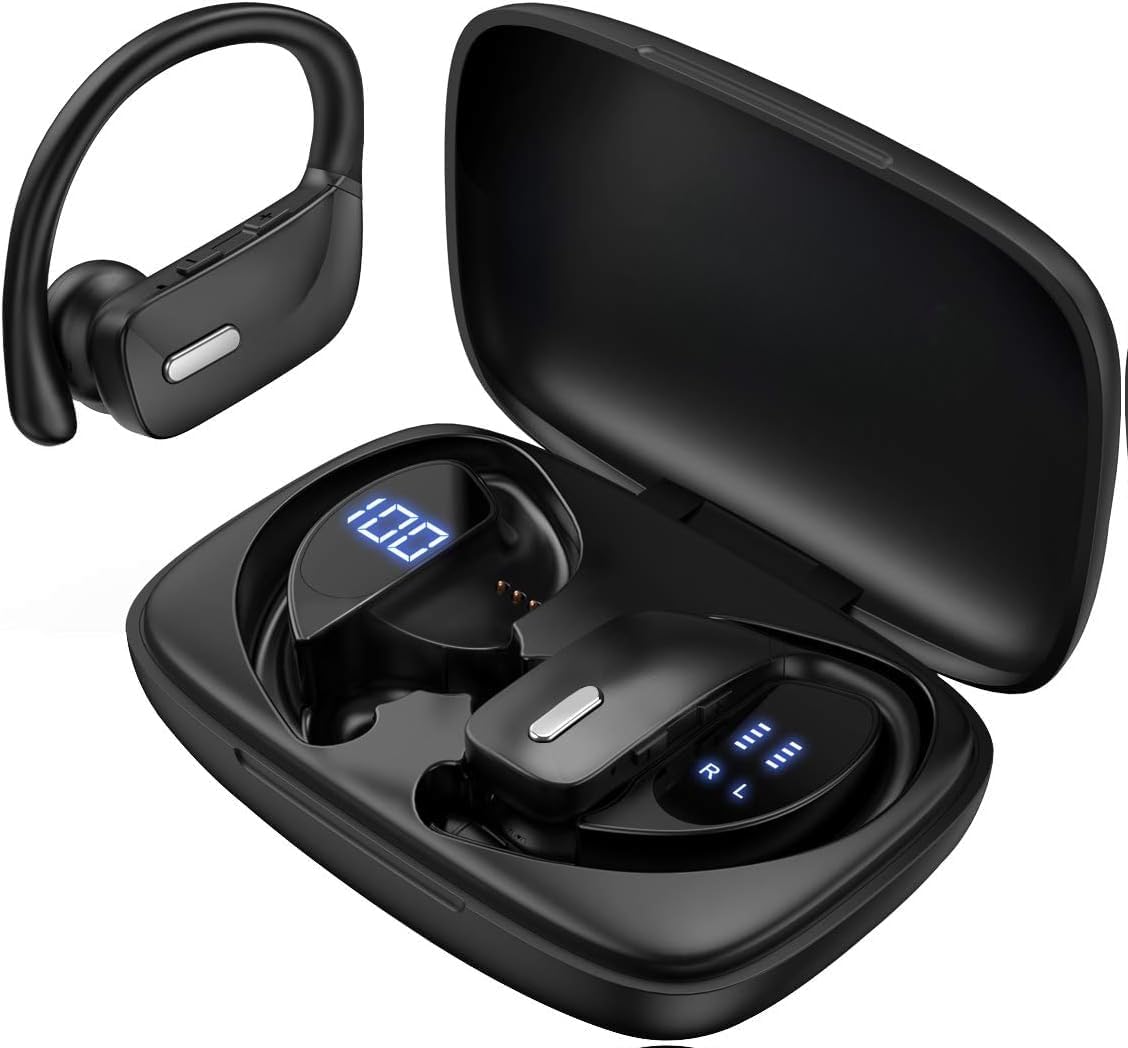
Image: The SUNOL T16 Wireless Earbuds with their charging case, showcasing the digital display.
Кутуда эмне бар
- SUNOL T16 Wireless Earbuds (Left and Right)
- Зымсыз кубаттоо кутусу
- USB-C заряддоо кабели
- 3 Pairs of Ear Caps (S, M, L)
Техникалык шарттар
| Өзгөчөлүк | Деталь |
|---|---|
| Модель аты | T16 |
| Байланыш технологиясы | Зымсыз (Bluetooth 5.0) |
| Bluetooth диапазону | 10 метрге чейин |
| Наушниктин батареясынын иштөө мөөнөтү | 9 саатка чейин (бир кубаттоо) |
| Жалпы ойноо убактысы (капка менен) | 48 саатка чейин |
| Заряддоо параметрлери | Wireless Charging, USB-C Charging |
| Аудио драйверинин өлчөмү | 10 мм динамикалык драйвер |
| Жыштык диапазону | 20 Гц - 20 000 Гц |
| Импеданс | 40 Ом |
| Noise Control | Активдүү ызы-чууну жокко чыгаруу |
| Микрофон | Built-in with Noise Cancellation |
| Сууга туруктуулук деңгээли | Сууга чыдамдуу |
| Башкаруу түрү | Touch, Siri Voice Assistant |
| Кулак жайгаштыруу | Over Ear (with earhooks) |
| Материал | Акрилонитрил бутадиен стирол (ABS) |
| Элемент Салмагы | 6.4 унция |

Image: Diagram illustrating the premium stereo sound quality and Bluetooth 5.0 connectivity.
Жайгашуу
1. Кулакчындарды жана кутуну кубаттоо
The charging case supports both wireless charging and USB-C charging. The impressive 9 hours of listening time on a single charge for the sports wireless headphones are extended to a remarkable 48 hours of play time with the included charging case.
- To charge the case, connect a USB-C cable to the charging port on the back of the case, or place it on a compatible wireless charging pad.
- Place the earbuds into their respective slots in the charging case. Ensure they are properly seated to initiate charging.
- The smart LED digital power display on the case will show the remaining battery level of the charging case and the individual earbuds. The percentage in the middle indicates the case battery, while the battery icons on both sides indicate the left and right earbud charge levels.

Image: The charging case with its LED display showing battery levels for the case and individual earbuds.

Image: Diagram illustrating the battery life: 15 min charge for 1 hour playtime, 8 hours on a single charge, and 48 hours with the charging case.
2. Түзмөгүңүз менен жупташтыруу
The earbuds automatically enter pairing mode when removed from the charging case.
- Заряддоо кутусун ачып, эки кулакчынды алып салыңыз. Алар автоматтык түрдө күйүп, жупташтыруу режимине кирет.
- Мобилдик түзмөгүңүздө (смартфон, планшет, ноутбук) Bluetooth жөндөөлөрүнө өтүңүз.
- Издөө available devices. You should see "T16" or "S8" appear in the list.
- Select "T16" or "S8" to connect. Once connected, you will hear an audio prompt, and the earbuds will be ready for use.

Image: Diagram showing the earbuds automatically pairing with mobile phones.
Video: Official product video demonstrating the unboxing, charging, and Bluetooth pairing process of the SUNOL T16 Wireless Earbuds.
Иштөө нускамалары
Кулакчын тагынуу
The T16 earbuds are designed with flexible earhooks to ensure a secure and comfortable fit, especially during physical activity. Gently place the earbud into your ear canal and adjust the earhook over the top of your ear until it feels stable and comfortable. Experiment with the included ear cap sizes to find the best fit for optimal sound and comfort.

Image: A woman wearing the SUNOL T16 earbuds, demonstrating their secure fit for an active lifestyle.
Touch Controls
The earbuds feature physical buttons for precise control of various functions:
- Ойнотуу/тындыруу: Кулакчындарды бир жолу таптаңыз.
- Чалууга жооп берүү/түп коюу: Чалуу учурунда кулакчындардын бирин бир жолу басыңыз.
- Мурунку ыр: Сол кулакчынды эки жолу таптаңыз.
- Кийинки ыр: Оң кулакчынды эки жолу таптаңыз.
- Active Voice Assistant (Siri): Кулакчындарды үч жолу таптаңыз.
- Чалууларды четке кагуу: Long press on either earbud during an incoming call.
- Үндү тууралоо: Use the dedicated volume buttons on the earbuds.

Image: Diagram detailing the physical buttons and their functions, including volume adjustment, play/pause, call management, and voice assistant activation.
Техникалык тейлөө
To ensure the longevity and optimal performance of your SUNOL T16 Wireless Earbuds, follow these maintenance guidelines:
- Тазалоо: Regularly wipe the earbuds and charging case with a soft, dry, lint-free cloth. For ear caps, remove them and clean with mild soap and water, then dry thoroughly before reattaching.
- Суу каршылык: While water-resistant, avoid submerging the earbuds in water. Dry them completely if they get wet from sweat or rain before placing them back in the charging case.
- Сактагыч: Колдонулбаганда, кулакчындарды коргоо жана кубаттоо үчүн кубаттоочу кутучага сактаңыз. Салкын, кургак жерде, экстремалдык температурадан алыс сактаңыз.
- Заряддоо порту: USB-C кубаттоо портун чаңдан жана таштандыдан тазалаңыз.
Проблемаларды чечүү
If you encounter any issues with your SUNOL T16 Wireless Earbuds, try the following solutions:
- Кулакчындар жупташкан жок:
- Эки кулакчындын тең кубатталганын текшериңиз.
- Кулакчындарды кайра кутуга салып, капкагын жаап, бир нече секунд күтүп, андан кийин ачып, кайра алып чыгыңыз.
- Түзмөгүңүздөгү Bluetooth'ду өчүрүп, кайра күйгүзүп, кайра жупташтырып көрүңүз.
- Forget or remove the "T16" or "S8" device from your device's Bluetooth list and attempt to pair from scratch.
- Бир гана кулакчын иштейт:
- Эки кулакчындын тең кубатталганын текшериңиз.
- Place both earbuds back in the charging case, close the lid, and then take them out simultaneously.
- If the issue persists, try resetting the earbuds.
- Үн сапаты начар:
- Ensure the earbuds are properly seated in your ears and the ear caps provide a good seal.
- Check the audio source device's volume and sound settings.
- Move closer to your connected device to avoid interference or exceeding the 10-meter Bluetooth range.
- Clean the earbud speakers and ear caps.
- Заряддоо кутучасы заряддалбай жатат:
- USB-C кабели корпуска да, кубат булагына да бекем туташып турганын текшериңиз.
- Башка USB-C кабелин же кубат адаптерин колдонуп көрүңүз.
- Эгер зымсыз кубаттоону колдонуп жатсаңыз, куту кубаттоочу тактага туура коюлганын текшериңиз.
Кепилдик жана колдоо
For warranty information and technical support, please refer to the documentation included with your product or contact the manufacturer, SUNOL, directly through their official website or customer service channels. Keep your purchase receipt as proof of purchase for any warranty claims.


