1. Киришүү
This manual provides detailed instructions for the assembly, operation, and maintenance of your Mars Gaming MC-CORE Ultra-Compact Micro-ATX PC Case. Please read this manual thoroughly before beginning installation to ensure proper setup and optimal performance.
Видео 1: Продукт бүттүview. Бул видео жалпы маалымат беретview of the Mars Gaming MC-CORE PC case, highlighting its compact design and key features.
2. Негизги өзгөчөлүктөрү
- Ultra-Compact Size: Designed for Micro-ATX and Mini-ITX motherboards, offering an efficient footprint for desktop setups.
- Metal-MESH Front Design: Innovative front grille for enhanced aesthetics and optimized airflow.
- Full Side Window: ачык-айкын камсыз кылат view ички компоненттеринин.
- Pre-installed FRGB Fans: Includes two 120mm Fixed RGB fans at the front for cooling and lighting.
- Ар тараптуу сактоо параметрлери: Supports up to 3 x 2.5" SSDs and 3 x 3.5" HDDs.
- Алдыңкы I/O порттору: Equipped with USB 3.0 for convenient connectivity.

1-сүрөт: Detail of the metal-mesh front panel, showcasing the design that aids in airflow and the integrated FRGB lighting from the pre-installed fans.

2-сүрөт: The two included 120mm FRGB fans, providing both cooling and aesthetic lighting to the interior of the case.
3. Техникалык шарттар
| Өзгөчөлүк | Спецификация |
|---|---|
| Модель аты | MC-CORE |
| Иштин түрү | Ultra-Compact Micro-ATX Tower |
| Motherboard шайкештиги | Micro-ATX, Mini-ITX |
| Өлчөмдөрү (LxWxH) | 10.24 x 6.3 x 13.78 дюйм (260 x 160 x 350 мм) |
| Элемент Салмагы | 4.51 фунт (2.05 кг) |
| GPU узундугун колдоо | Up to 235mm (260mm without front fan) |
| CPU муздаткычынын бийиктигин колдоо | 137 мм чейин |
| Drive Bays | 3 x 2.5" SSD, 3 x 3.5" HDD |
| Алдын ала орнотулган күйөрмандар | 2 x 120mm FRGB (Front) |
| Additional Fan Support | Up to 3 fans total (e.g., 1x 80mm optional rear) |
| Алдыңкы I / O порттору | 2 x USB 3.0, Аудио кириш/чыгыш |
| Материал | Металл |
| Түс | Кара |
Эскертүү: The MC-CORE is designed for Micro-ATX and Mini-ITX motherboards only. Standard ATX motherboards or larger components are not compatible. For Micro-ATX motherboards with 24.4cm x 24.4cm dimensions, front fans may need to be uninstalled.

3-сүрөт: Internal layout and maximum component dimensions, including CPU cooler height, VGA length, and fan placements.
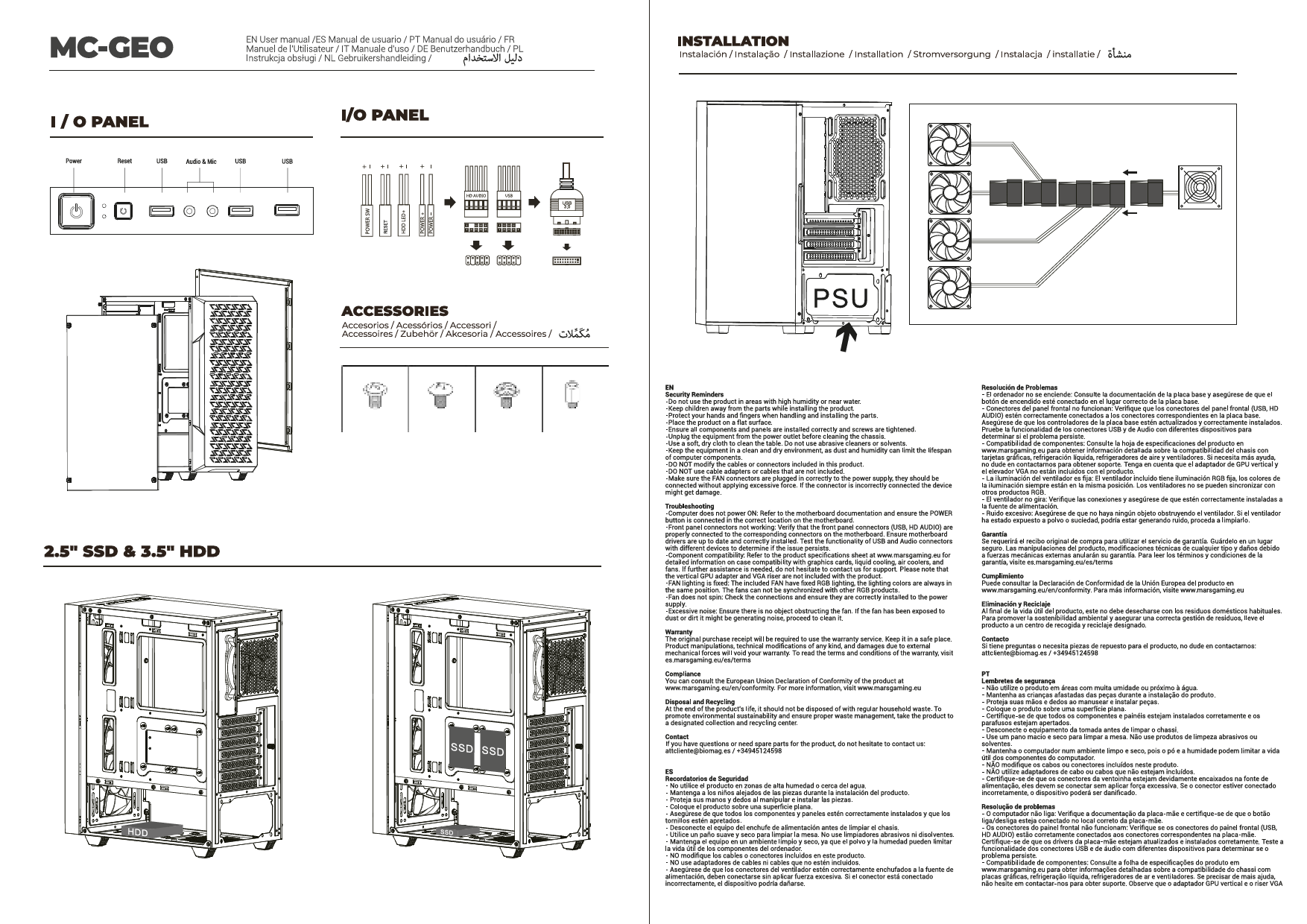
4. Орнотуу жана орнотуу
Follow these steps to install your components into the MC-CORE PC case:
- Ишти даярдоо: Carefully remove the side panels by unscrewing the thumbscrews at the rear of the case.
- Motherboard орнотуу: Align your Micro-ATX or Mini-ITX motherboard with the standoffs inside the case. Secure it with the provided screws.
- CPU муздаткычын орнотуу: Install your CPU cooler, ensuring it does not exceed the maximum height of 137mm.
- Графикалык картаны (GPU) орнотуу: Insert your graphics card into the appropriate PCIe slot. Ensure its length does not exceed 235mm (or 260mm if no front fan is installed). Secure the GPU with screws.
- Электр менен камсыздоо блогун (PSU) орнотуу: Install your PSU in its designated area. Connect all necessary power cables to your motherboard, GPU, and storage devices.
- Сактагыч түзмөктү орнотуу: Mount your 2.5" SSDs and 3.5" HDDs into the available drive bays. Connect data and power cables.
- Кабелдик башкаруу: Utilize the space behind the motherboard tray for cable routing to maintain optimal airflow and a clean interior.
- Алдыңкы киргизүү/чыгарууну туташтыруу: Connect the front panel cables (USB 3.0, audio, power/reset switches) to their respective headers on the motherboard.
- Ишти жабуу: Once all components are installed and cables are managed, reattach the side panels and secure them with the thumbscrews.

4-сүрөт: The interior of the MC-CORE case with the side panel removed, illustrating the space available for component installation.
5. Иштөө нускамалары
After successful assembly, connect your peripherals (monitor, keyboard, mouse) and power cable to the PC. Press the power button on the front panel to start your system. The pre-installed FRGB fans will illuminate, indicating power is on.
Use the front panel USB 3.0 ports for connecting compatible devices. Ensure proper drivers are installed for all components for optimal performance.

5-сүрөт: The full side window allows for a clear view of the internal components and their lighting effects.
6. Техникалык тейлөө
Үзгүлтүксүз тейлөө сиздин PC компоненттеринин иштөө мөөнөтүн узартууга жардам берет жана оптималдуу иштешин камсыз кылат:
- Чаң чыпкасын тазалоо: The metal-mesh front panel and other ventilation areas may accumulate dust. Regularly clean these areas using compressed air or a soft brush to maintain optimal airflow.
- Ички тазалоо: Periodically open the side panels and use compressed air to remove dust from internal components, especially CPU cooler fins and GPU heatsinks.
- Кабель башкаруу текшерүү: Ensure all cables remain neatly routed and do not obstruct airflow.

6-сүрөт: The case design, including the mesh front and potential for additional fans, is optimized for maximum cooling performance.
7. Кыйынчылыктарды
If you encounter issues with your PC build, consider the following general troubleshooting steps:
- Кубат жок: Double-check all power connections from the PSU to the motherboard, CPU, and GPU. Ensure the PSU switch is in the 'ON' position.
- Дисплей жок: Verify that your monitor is connected to the graphics card (not the motherboard's integrated graphics ports, unless you are using integrated graphics). Reseat the graphics card and RAM modules.
- Ашыкча ысып кетүү: Ensure all case fans and CPU cooler fans are spinning correctly. Check for dust buildup on filters and heatsinks. Verify proper thermal paste application on the CPU.
- Компонентти тууралоо маселелери: Refer to the specifications section to ensure all components (GPU, CPU cooler) are within the case's maximum supported dimensions.
8. Кепилдик жана колдоо
For warranty information and technical support, please refer to the official Mars Gaming webсайтка же сатуучуга кайрылыңыз. Кепилдик дооматтар үчүн сатып алганыңыздын далилин сактаңыз.