1. Киришүү
This manual provides detailed instructions for the setup, operation, maintenance, and troubleshooting of your CUPEISI YQ10S MAX Android 15 Tablet. Please read this manual thoroughly before using your device to ensure proper functionality and to maximize your user experience. Keep this manual for future reference.

Image 1.1: CUPEISI YQ10S MAX Android 15 Tablet with included accessories (keyboard, mouse, stylus, and protective case).
2. Пакеттин мазмуну
Төмөндө тизмеленген нерселердин баары сиздин продукт таңгагыңызда бар экенин текшериңиз:
- CUPEISI YQ10S MAX Android 15 Tablet
- Зымсыз клавиатура
- Bluetooth чычкан
- Foldable Protective Cover
- Стилус
- Type-C кабели
- Заряддагыч
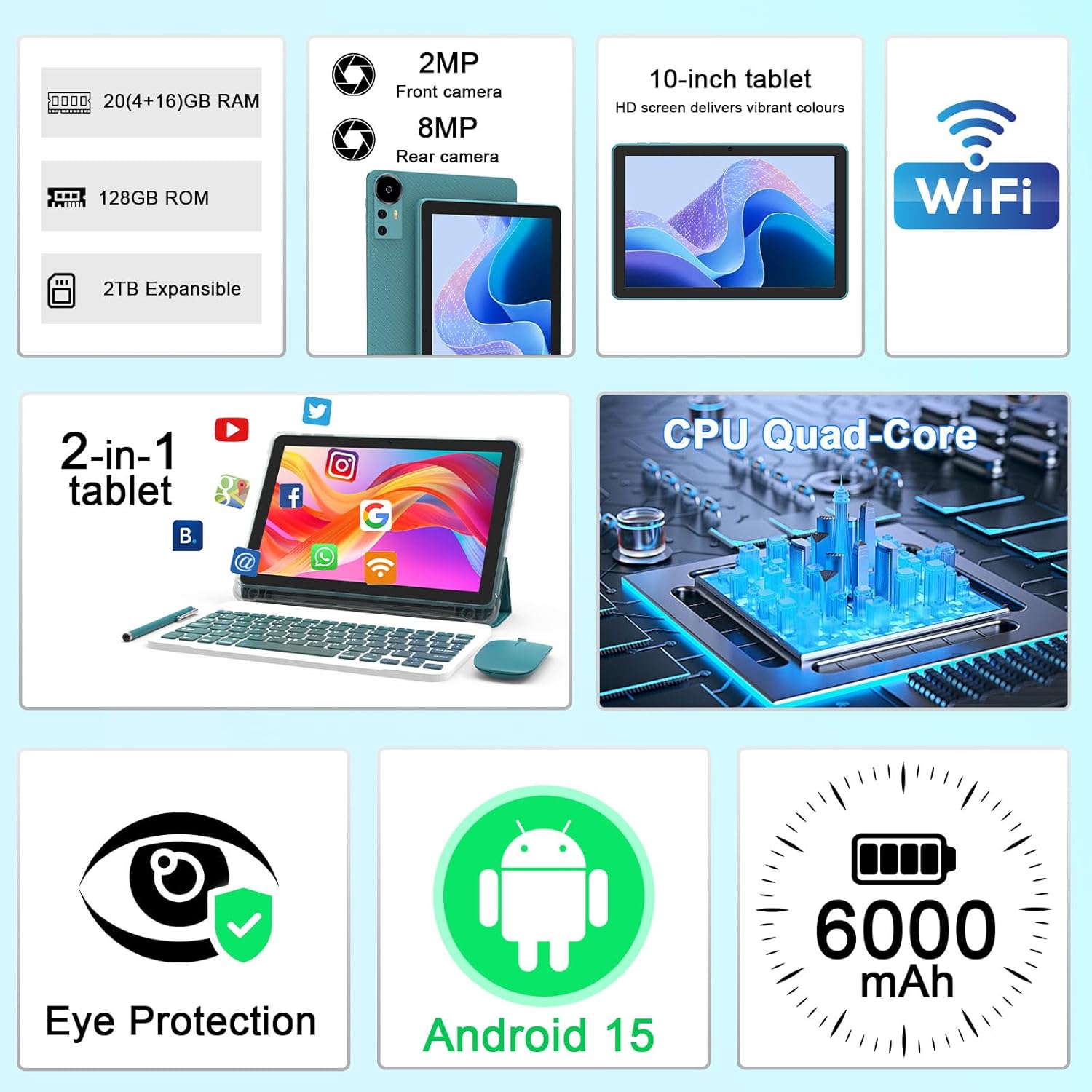
Сүрөт 2.1: Бүттүview of key features and included components.
3. Баштапкы орнотуу
3.1 Күйгүзүү/өчүрүү
- Күйгүзүү үчүн: Планшеттин капталында жайгашкан кубат баскычын экран жарык болгонго чейин басып, кармап туруңуз.
- Өчүрүү үчүн: Кубат баскычын басып, кармап туруңуз, андан кийин экранда пайда болгон параметрлерден "Өчүрүү" дегенди тандаңыз.
- Кайра баштоо үчүн: Кубат баскычын басып, кармап туруңуз, андан кийин параметрлерден "Кайра баштоону" тандаңыз.
3.2 Планшетти заряддоо
Биринчи колдонуудан мурун, планшетти толук заряддаңыз. Берилген Type-C кабелин жана заряддагычты колдонуңуз.
- Type-C кабелин планшеттин кубаттоо портуна туташтырыңыз.
- Кабелдин экинчи учун кубат адаптерине туташтырыңыз.
- Кубат адаптерин розеткага сайыңыз.
- The battery icon on the screen will indicate charging status. A full charge typically takes several hours.

Image 3.1: Battery and charging information.
3.3 Connecting Accessories (Keyboard, Mouse, Stylus)
The tablet supports Bluetooth connectivity for the included keyboard and mouse.
- Bluetooth иштетүү: барыңыз Орнотуулар > Туташкан түзмөктөр > Bluetooth жана аны күйгүзүңүз.
- Клавиатураны/чычканды жупташтыруу: Put the keyboard or mouse into pairing mode (refer to their individual instructions if needed). Select the device name from the list of available Bluetooth devices on your tablet to pair.
- Калем: The included stylus is typically passive and does not require pairing. It can be used directly on the screen for navigation or drawing.
3.4 Wi-Fi туташуусу
Connect your tablet to a Wi-Fi network for internet access.
- барыңыз Орнотуулар > Тармак жана интернет > Wi-Fi.
- Wi-Fi'ды күйгүзүңүз. Планшет жеткиликтүү тармактарды издейт.
- Тизмеден каалаган тармакты тандаңыз.
- Эгер суралса, тармактын сырсөзүн киргизип, таптаңыз Туташуу.
4. Негизги операция
4.1 Багыттоо Android 15
Your tablet runs on Android 15, offering an intuitive user interface. Swipe gestures, tap actions, and the navigation bar (Back, Home, Recents) are standard for interaction. The Google Mobile Services (GMS) certification ensures access to the Google Play Store and other Google applications.

Image 4.1: Android 15 operating system features.
4.2 Дисплей орнотуулары
The 10.1-inch IPS display with 1280x800 resolution provides clear visuals. You can adjust display settings to suit your preferences:
- Жарыктык: Adjust screen brightness from the quick settings panel or in Орнотуулар > Дисплей.
- Окуу режими: Enable 'Reading Mode' in display settings to reduce blue light emission, which can enhance comfort during extended reading sessions.
- Ариптин өлчөмү: Жакшыраак окуу үчүн тексттин өлчөмүн ыңгайлаштырыңыз.

Image 4.2: Details of the 10.1-inch HD screen display.
4.3 Сактагычты башкаруу
The tablet features 128GB of internal storage and 20GB RAM (4GB physical + 16GB virtual expansion). Storage can be expanded up to 2TB using a microSD card (not included).
- Сактагычты текшерүү: барыңыз Орнотуулар > Сактагыч чейин view ички жана тышкы сактагычты колдонуу.
- MicroSD картасын салыңыз: Locate the microSD card slot on the tablet, insert the card gently until it clicks into place.

Image 4.3: Storage and RAM configuration.
4.4 Камераны колдонуу
Планшет 8 МП арткы камера жана 2 МП алдыңкы камера менен жабдылган.
- Камера колдонмосун ачуу: Үй экраныңыздагы же колдонмо суурмасындагы Камера сүрөтчөсүн таптаңыз.
- Камераларды алмаштыруу: Алдыңкы жана арткы камералардын ортосунда которулуу үчүн камеранын которгуч сүрөтчөсүн колдонуңуз.
- Сүрөттөрдү/видеолорду тартуу: Сүрөткө тартуу же видео жазууну баштоо/токтоо үчүн жапкычты таптаңыз.

Image 4.4: Camera specifications and modes.
4.5 Мультимедиа ойнотуу
The tablet supports Widevine L1, enabling high-definition streaming from platforms like Netflix, Hulu, YouTube, and Prime Video.
- Оптималдуу агым сапаты үчүн туруктуу интернет байланышын камсыз кылыңыз.
- Download streaming apps from the Google Play Store.

Image 4.5: Widevine L1 support for multimedia streaming.
4.6 Көп тапшырмалуулук
Android 15 enhances multitasking capabilities. Use the 'Recents' button to switch between open applications or utilize split-screen mode for running two apps simultaneously.
- Бөлүнгөн экран: From the 'Recents' view, tap the app icon at the top of an app's card and select 'Split screen'. Choose a second app to open alongside it.
- The included keyboard and mouse facilitate a laptop-like experience for productivity tasks.

Image 4.6: Tablet used in 2-in-1 mode with keyboard and mouse.
5. Кароо жана тейлөө
5.1 Тазалоо
- Планшеттин экранын жана корпусун тазалоо үчүн жумшак, түксүз чүпүрөктү колдонуңуз.
- Катуу химиялык заттарды, абразивдүү тазалагычтарды же аэрозолдук спрейлерди колдонуудан алыс болуңуз.
- Планшетті тазалоодон мурун, анын өчүрүлгөнүн жана розеткадан суурулганын текшериңиз.
5.2 Батареяга кам көрүү
- Планшетти экстремалдык температурага (ысык же муздак) тийгизүүдөн сактаңыз.
- Планшетти узак убакытка толук зарядсыз калтырбаңыз.
- Use only the provided charger and cable to prevent damage to the battery.
5.3 Программалык камсыздоо жаңыртуулары
- Оптималдуу аткарууну, коопсуздукту жана жаңы функцияларга жетүүнү камсыз кылуу үчүн программалык камсыздоо жаңыртууларын дайыма текшерип, орнотуп алыңыз.
- барыңыз Орнотуулар > Система > Системаны жаңыртуу жеткиликтүү жаңыртууларды текшерүү үчүн.
6. Кыйынчылыктарды
If you encounter issues with your tablet, refer to the following common problems and solutions:
6.1 Электр энергиясы маселелери
- Планшет күйбөйт: Батарея заряддалганын текшериңиз. Заряддагычты туташтырыңыз жана кайра күйгүзүү аракетинен мурун бир нече мүнөт күтүңүз.
- Tablet freezes: Кайра күйгүзүүгө мажбурлоо үчүн кубат баскычын 10-15 секунд басып туруңуз.
6.2 Байланыш көйгөйлөрү
- Wi-Fi туташпай жатат: Check if Wi-Fi is enabled in settings. Restart your router and the tablet. Ensure you are entering the correct password.
- Bluetooth түзмөгү жупташкан жок: Ensure the Bluetooth accessory is in pairing mode and within range. Restart Bluetooth on the tablet and try pairing again.
6.3 Performance Lags
- Жай аткаруу: Close unused applications running in the background. Clear cache data for frequently used apps. Consider adding a microSD card for additional storage if internal storage is nearly full.
- Колдонмолор бузулуп жатат: Ensure apps are updated to their latest versions. Clear the app's cache and data (Орнотуулар > Колдонмолор > [Колдонмонун аты] > Сактагыч).
7. Продукттун спецификациялары
| Өзгөчөлүк | Спецификация |
|---|---|
| Бренд | CUPEISI |
| Модель аты | CP31M (Item model number: YQ10S MAX) |
| Операция системасы | Android 15 |
| Screen Size | 10.1 дюйм |
| Screen Resolution | 1280 x 800 пиксел (HD) |
| Процессор | 2.0 ГГц төрт ядролуу |
| RAM | 20 ГБ (4 ГБ физикалык + 16 ГБ кеңейтүү) |
| Ички сактагыч | 128 ГБ |
| Кеңейтүүчү сактагыч | Up to 2TB with microSD card (not included) |
| Зымсыз түрү | 802.11ax (Wi-Fi 6.0, 2.4G/5G) |
| Bluetooth | BT 5.0 |
| Арткы камера | 8 депутат |
| Алдыңкы камера | 2 депутат |
| Батарея сыйымдуулугу | 6000 мАч |
| Батареянын орточо иштөө мөөнөтү | 6-8 саат (колдонууга жараша) |
| Өлчөмдөрү (LxWxH) | 9.7 x 6.5 x 0.3 дюйм |
| Элемент Салмагы | 0.176 унция |
| Түс | NavyBlue |
8. Кепилдик жана колдоо
For warranty information, please refer to the warranty card included in your product packaging or contact CUPEISI customer support directly. If you require technical assistance or have questions not covered in this manual, please reach out to our support team through the contact information provided with your purchase.


