ATOMSTACK S30 Pro лазердик гравировка машинасынын колдонуучу колдонмосу
Модели: S30 Pro
1. Киришүү
The ATOMSTACK S30 Pro is a professional-grade laser engraving and cutting machine designed for high precision and efficiency. Featuring a powerful 33000mW laser output and advanced control methods, it is suitable for a wide range of materials and applications. This manual provides essential information for safe operation, setup, maintenance, and troubleshooting to ensure optimal performance and longevity of your device.
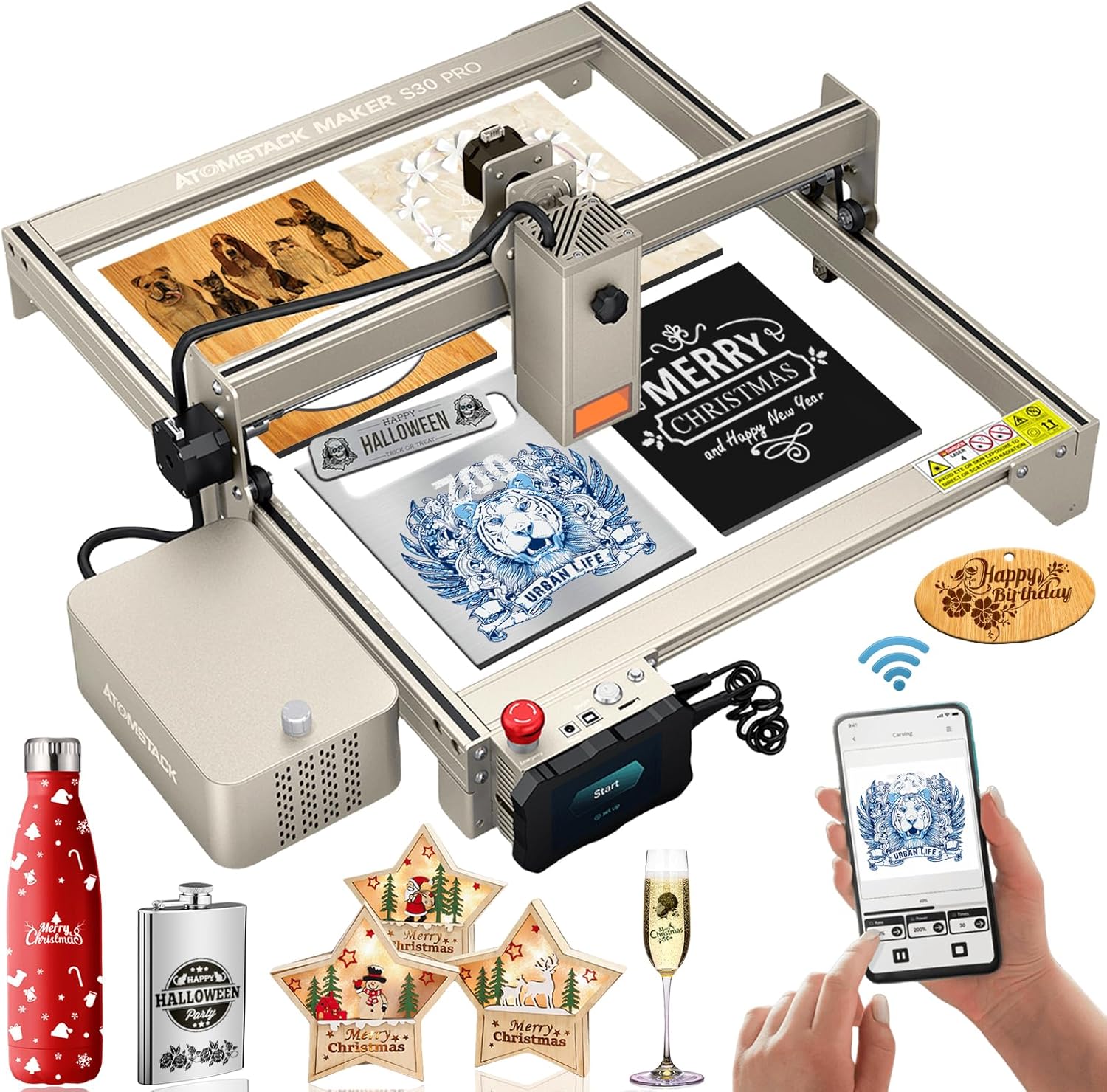
Figure 1: The ATOMSTACK S30 Pro Laser Engraving Machine, showcasinанын дизайны жана эксamples of engraved and cut materials.
2. Коопсуздук маалыматы
Operating a laser engraving machine requires strict adherence to safety protocols to prevent injury and damage. The ATOMSTACK S30 Pro is a Laser Class 4 device, indicating a high-power laser that can cause severe eye and skin damage from direct or scattered exposure. Always prioritize safety.
- Көздү коргоо: Always wear the provided eye protection glasses during operation. The panoramic lens eye protection cover filters out 97% of harmful UV rays, but additional safety glasses are recommended.
- Вентиляция: Гравировка жана кесүү учурунда пайда болгон түтүндү жана түтүнү жок кылуу үчүн машинаны жакшы желдетилген жерде иштетиңиз.
- Өрт коопсуздугу: Keep a fire extinguisher nearby. Do not leave the machine unattended during operation, especially when cutting flammable materials.
- Шашылыш токтотуу: Familiarize yourself with the emergency stop switch and its location. In case of any malfunction or emergency, immediately press this switch to halt operation.
- Балдар жана үй жаныбарлары: Keep children and pets away from the operating area to prevent accidental exposure to the laser.
- Материалдык шайкештик: Only engrave or cut materials specified as safe. Avoid reflective or unknown materials that could cause unexpected laser reflections.

Figure 2: Key safety features of the ATOMSTACK S30 Pro, highlighting the eye protection cover and the prominent emergency stop button for immediate shutdown.
3. Пакеттин мазмуну
Монтаждоону баштоодон мурун, бардык компоненттердин бар экенин жана бузулбаганын текшериңиз:
- ATOMSTACK S30 Pro Laser Engraving Machine Frame
- 33000mW Laser Module
- Air Assist Pump Kit
- Control Box with Touchscreen
- Кубаттуу адаптер жана кабелдер
- USB туташуу кабели
- Коопсуздук көз айнек
- Material Samples for Testing
- Колдонуучунун Колдонмосу (бул документ)
- Assembly Tools (screws, wrenches, etc.)
4. Орнотуу
Follow these steps to assemble and prepare your ATOMSTACK S30 Pro for first use:
- Пакеттен чыгаруу: Carefully remove all components from the packaging. Keep the original packaging for future storage or transport.
- Рамка монтажы: Assemble the aluminum profile frame according to the included quick start guide. Ensure all screws are tightened securely for stability.
- Лазердик модулду орнотуу: Mount the 33000mW laser module onto the gantry. The S30 Pro features a tool-free focus and height adjustment knob for easy installation.
- Control Box Connection: Connect the control box to the main frame and the laser module using the provided cables.
- Air Assist Pump Connection: Connect the air assist pump to the designated port on the laser module and the control box. Ensure the air hose is securely attached.
- Кубат туташуу: Connect the power adapter to the control box and then to a suitable power outlet (AC100-240V, 50/60Hz).
- Программалык камсыздоону орнотуу: Install the recommended software (LaserGRBL or LightBurn) on your computer. These operating systems support Win XP, Win 7, Win 8, XP, Win 10 system.
- Баштапкы сыноо: Perform a small test engraving on a scrap piece of material to verify proper setup and laser alignment.

Figure 3: ашыкview of the ATOMSTACK S30 Pro's core components and features, essential for understanding its capabilities during setup.
5. Иштөө
The ATOMSTACK S30 Pro offers versatile control methods and powerful engraving/cutting capabilities. Always ensure proper material placement and laser focus before starting any operation.
5.1. Башкаруу ыкмалары
The S30 Pro supports three primary control methods:
- Компьютерди башкаруу: Connect via USB and use LaserGRBL or LightBurn software for comprehensive control.
- Сенсордук экранды башкаруу: Insert a TF/SD card with your design files and operate directly via the integrated touchscreen.
- Смартфонду башкаруу: After a firmware update, download the ATOMSTACK app and connect via Wi-Fi for mobile operation.

Figure 4: Illustration of the diverse control options available for the ATOMSTACK S30 Pro, including touchscreen, smartphone, and computer interfaces.
5.2. Material Preparation and Focusing
Ensure your material is flat and securely placed on the working area. The S30 Pro features a fixed-focus laser, eliminating the need for manual focusing. Simply ensure the material thickness is within the optimal range for the laser's focal point.

Figure 5: Demonstrating the ultra-fine laser spot of the S30 Pro, crucial for achieving high-precision engraving results.
5.3. Гравировка жана кесүү
The S30 Pro excels in both engraving and cutting tasks. Its 33000mW output allows for deep cuts and intricate engravings.
- Гравюра: Achieve precise and high-contrast engravings on various materials, including wood, bamboo, cardboard, plastic, leather, PCB, aluminum oxide, non-reflective coated metals, 304 mirror stainless steel, glass, ceramic, cotton fabric, and slate. The 32-bit motherboard provides 256-bit color gradient mapping for enhanced detail.
- Кесүү: Capable of cutting 20mm wood, 10mm black acrylic in a single pass, and 0.1mm stainless steel. With multiple passes, it can cut 25mm thick wood and 30mm black acrylic. The integrated air assist pump significantly improves cutting capabilities and prevents laser head clogging.

Figure 6: A visual guide to the wide array of materials compatible with the ATOMSTACK S30 Pro for both engraving and cutting.

Figure 7: Detailed illustration of the ATOMSTACK S30 Pro's impressive single-pass cutting thickness on various materials.

Figure 8: Visual representation of the S30 Pro's enhanced working speeds for both cutting and engraving, demonstrating its efficiency.
Video 1: Demonstrates the ATOMSTACK S30 Pro 130W Laser Engraver in action, showcasing its cutting and engraving capabilities on various materials, including wood and acrylic. It highlights the precision and speed of the machine, as well as the effectiveness of the air assist system in producing clean cuts.
6. Техникалык тейлөө
Regular maintenance ensures the longevity and consistent performance of your ATOMSTACK S30 Pro.
- Лазердик линзаларды тазалоо: Periodically clean the laser lens with a soft, lint-free cloth and lens cleaning solution to maintain optimal laser output.
- Рельс жана кайыш тазалоо: Keep the guide rails and belts free from dust and debris to ensure smooth movement of the laser module. Use a dry cloth or compressed air.
- Аба жардам берүүчү сопло: Regularly check the air assist nozzle for any blockages or buildup, especially after cutting materials that produce significant residue. The new poly wind cover design helps prevent clogging.
- Программалык камсыздоонун жаңыртуулары: Расмий ATOMSTACKты текшериңиз website for any available firmware updates to ensure your machine has the latest features and performance improvements.
- Жалпы тазалоо: Машинанын сыртын жарнама менен сүртүңүзamp cloth to remove dust and residue.

Figure 9: Highlighting the benefits of the standard air assist kits in maintaining a clean laser path and preventing material residue buildup.
7. Кыйынчылыктарды
Бул жерде кээ бир жалпы маселелер жана алардын мүмкүн болуучу чечимдери:
- Лазер күйбөйт:
- Check power connections.
- Ensure the emergency stop button is disengaged.
- Verify software settings and laser power output. - Гравюра/кесүү сапаты начар:
- Ensure the material is flat and properly positioned.
- Clean the laser lens.
- Adjust laser power and speed settings in your software.
- Check for any obstructions in the laser path or air assist nozzle. - Машина жооп бербейт:
- Restart the machine and your controlling device (computer/smartphone).
- Check USB or Wi-Fi connection.
- Ensure firmware is up to date. - адаттан тыш үндөр:
- Inspect the belts and rails for debris or misalignment.
- Lubricate moving parts if necessary (refer to detailed maintenance guide).
8. Техникалык шарттар
| Өзгөчөлүк | Спецификация |
|---|---|
| Элемент модели | ATOMSTACK S30 PRO |
| Гравюра аянты | 400*410мм |
| Output Laser Power | 33000мВт |
| Лазердик класс | 4 |
| Электр энергиясы | 160 Вт |
| Толкун узундугу | 445 ± 5нм |
| Гравюра тактыгы | 0.01мм |
| Фокустун ыкмасы | Fixed-Focus Laser |
| Контролдоо ыкмалары | Smartphone (App), Computer (USB), Touchscreen (TF/SD card) |
| Операциялык системаны колдоо | LaserGRBL, LightBurn (Win XP, Win 7, Win 8, Win 10) |
| Киргизүү форматы | NC, BMP, JPG, PNG, DXF, etc. |
| Маалыматтарды өткөрүү ыкмасы | USB туташуу |
| Киргизүү көлөмүtage | AC100-240V, 50/60Hz |
| Output Voltage | DC24V, 6A |
9. Кепилдик жана колдоо
For warranty information and technical support, please refer to the official ATOMSTACK website or contact the seller directly. Keep your purchase receipt as proof of purchase for warranty claims. Regular updates and support resources may be available online.


