1. Киришүү
The Orbit B-hyve Gen 2 Smart Hose Watering Timer with Wi-Fi Hub (Model 21206) provides an automated and intelligent solution for managing your outdoor watering needs. This system allows you to control your watering schedule from anywhere using your mobile device, ensuring optimal hydration for your lawn and plants while conserving water.
This manual provides detailed instructions for setting up, operating, and maintaining your B-hyve Gen 2 Smart Hose Watering Timer system.
2. Эмнелер камтылган
Your Orbit B-hyve Gen 2 Smart Hose Watering Timer package includes the following components:
- B-hyve Gen 2 Smart Hose Watering Timers (2 units)
- Wi-Fi борбору
- Hose Y Splitter
- Instruction Manual
3. Орнотуу колдонмосу
3.1. Install Batteries in the Smart Hose Timer
The B-hyve Smart Hose Timer requires batteries for operation. Locate the battery compartment, typically on the back or side of the timer, and insert the required batteries (usually AA or AAA, refer to the timer itself for exact type). Ensure correct polarity.

Image: Orbit B-hyve Gen 2 Smart Hose Watering Timer, showing the battery compartment.
3.2. Connect the Smart Hose Timer to your Faucet
Attach the B-hyve Smart Hose Timer directly to your outdoor hose faucet. Hand-tighten the connection to prevent leaks. If using the included Hose Y Splitter, attach the splitter to the faucet first, then attach the timers to the splitter outlets.
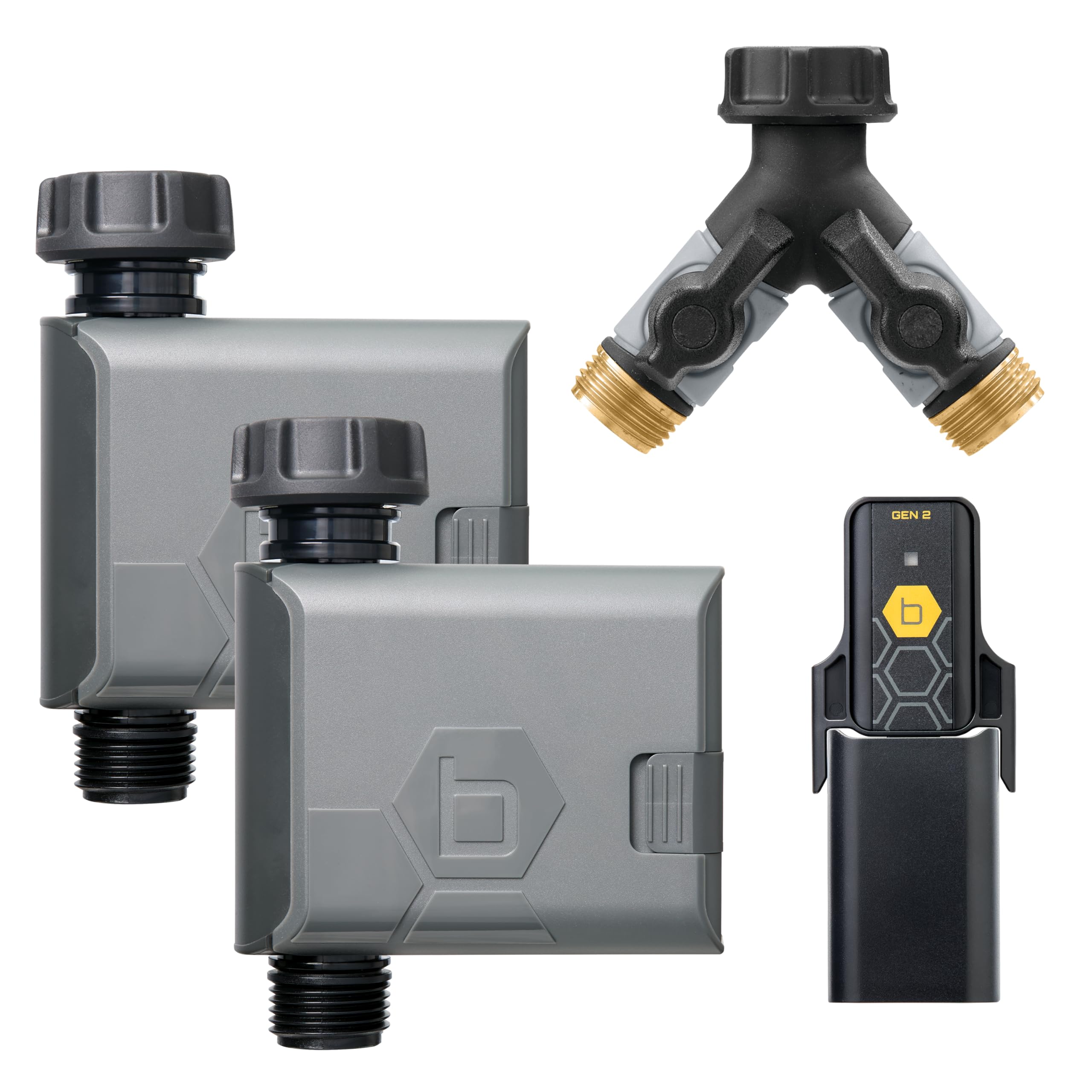
Image: Orbit B-hyve Gen 2 Smart Hose Watering Timer connected to a standard outdoor hose faucet.
3.3. Connect the Wi-Fi Hub
Plug the Wi-Fi Hub into an indoor power outlet. For optimal performance, place the hub in a central location within range of your Wi-Fi router and the B-hyve Smart Hose Timers. The hub connects the timers to your home Wi-Fi network, enabling remote control.
Important Note on Hub Compatibility: The B-hyve Gen 2 Smart Hose Watering Timer requires a Gen 2 Wi-Fi Hub. Gen 1 hubs are not compatible with Gen 2 timers. You can identify a Gen 2 hub by the "Gen 2" label and black graphic on its sticker, while Gen 1 hubs have a gray sticker.

Image: Visual guide for B-hyve Wi-Fi Hub compatibility, distinguishing between Gen 1 and Gen 2 hubs.
3.4. Download the B-hyve App and Pair Devices
Download the B-hyve app from your smartphone's app store. Follow the in-app instructions to create an account and pair your Wi-Fi Hub and Smart Hose Timers. This process typically involves pressing a button on the devices and confirming connection within the app.
Video: An official Orbit video introducing the B-hyve Gen 2 Smart Hose Timer, detailing its features and setup process.
4. Иштөө нускамалары
4.1. Using the B-hyve App
The B-hyve app is your primary interface for controlling the Smart Hose Timers. From the app, you can:
- Create Watering Schedules: Сугаруу үчүн так баштоо убактысын, узактыгын жана күндөрүн белгилеңиз.
- Кол менен сугаруу: Initiate watering instantly for a set duration.
- WeatherSense технологиясы: Enable smart watering based on local weather conditions, preventing overwatering during rain or adjusting for heat.
- View Сугаруу тарыхы: Monitor past watering events and water usage.

Image: A smartphone displaying the B-hyve app, illustrating remote control capabilities for watering.
4.2. Manual Control on the Timer
Each B-hyve Smart Hose Timer also features a manual ON/OFF button. Pressing this button will typically initiate a default manual watering cycle or stop an active one. Refer to the app for configuring manual watering defaults.

Сүрөт: Жакын план view of the B-hyve Gen 2 Smart Hose Watering Timer, highlighting the manual ON/OFF button.
5. Техникалык тейлөө
5.1. Батареяны алмаштыруу
When the battery indicator in the B-hyve app shows low power, replace the batteries in your Smart Hose Timer. Use fresh alkaline batteries of the specified type (e.g., AA or AAA). Ensure the battery compartment is sealed properly after replacement to maintain water resistance.
5.2. Тазалоо
Periodically inspect the timer and hose connections for debris or mineral buildup. Clean with a soft brush and water. Do not use harsh chemicals or abrasive cleaners.
5.3. Кышка даярдоо
Before the first frost, disconnect the Smart Hose Timer from the faucet and store it indoors in a dry, protected area. Remove batteries to prevent corrosion. Failure to properly winterize may result in damage to the unit due to freezing water.
6. Кыйынчылыктарды
6.1. Байланыш маселелери
- Timer not connecting to Hub: Ensure the Wi-Fi Hub is plugged in and within range of the timer. Check that the hub is a Gen 2 model for compatibility with your Gen 2 timer.
- Хаб Wi-Fiга туташпай жатат: Verify your home Wi-Fi network is active and the hub is within range of your router. Try restarting the hub and your router.
- Колдонмо жооп бербей жатат: Close and reopen the B-hyve app. Ensure your smartphone has a stable internet connection.
6.2. Watering Problems
- Суу агымы жок: Check that the faucet is fully open. Ensure the timer is securely attached and there are no kinks in the hose. Verify batteries are charged.
- Timer not following schedule: Confirm the schedule is correctly set in the B-hyve app. Check for any active rain delays or manual overrides.
- Байланыштардагы агып кетүүлөр: Ensure all connections are hand-tightened. Check for worn-out washers and replace if necessary.
7. Техникалык шарттар
| Өзгөчөлүк | Деталь |
|---|---|
| Бренд | Орбита |
| Модель номери | 21206 |
| Түс | Боз |
| Материал | Пластик |
| Элемент Салмагы | 8 унция (0.5 фунт) |
| Орнотуулардын саны | 3 |
| UPC | 046878212060 |
| Пакеттин өлчөмдөрү | 12.68 x 9.45 x 2.17 дюйм |
| Батареялар талап кылынат | Ооба |
| Камтылган компоненттер | Wi-Fi hub, Hose Y, Instruction manual |
8. Кепилдик маалыматы
The Orbit B-hyve Gen 2 Smart Hose Watering Timer (Model 21206) is covered by a 2 жылдык өндүрүүчүнүн кепилдиги. Бул кепилдик нормалдуу колдонуудагы материалдардагы жана жасалгадагы кемчиликтерди камтыйт. Кепилдик дооматтары үчүн сатып алганыңыздын далилин сактап коюңуз.
9. Кардарларды колдоо кызматы
For technical assistance, troubleshooting, or warranty inquiries, please visit the official Orbit website or contact their customer support team. Refer to the product packaging or Orbit's webакыркы байланыш маалыматы үчүн сайт.
Онлайн ресурстар: Amazon сайтындагы Orbit дүкөнүнө баш багыңыз