1. Киришүү
This manual provides essential information for the safe and efficient operation of your THOMSON 40FD2S13 40 Inch LED Full HD Easy TV. Please read it thoroughly before using the television and retain it for future reference.
Your THOMSON Easy TV is designed for straightforward entertainment, featuring a Full HD display, multiple connectivity options, and a triple tuner for versatile signal reception.

Сүрөт: алдыңкы view of the THOMSON 40FD2S13 40 Inch LED Full HD Easy TV, showcasing анын дисплейи жана жаркыраган дизайны.
2. Коопсуздук маалыматы
Өрт, электр шок жана жаракат алуу коркунучун азайтуу үчүн бул телевизорду колдонууда ар дайым негизги коопсуздук чараларын сактаңыз.
- Телевизорду жамгырга же нымга тийгизбеңиз.
- Корпусту ачпаңыз; бардык тейлөө иштерин квалификациялуу адистерге тапшырыңыз.
- Телевизордун айланасын туура желдетүүнү камсыз кылыңыз.
- Телевизорду күн нурунан жана жылуулук булактарынан алыс кармаңыз.
- Чагылган бороондо же көпкө чейин пайдаланылбай турганда сыналгыны розеткадан ажыратыңыз.
- Position the TV on a stable, level surface or securely wall-mount it.
3. Пакеттин мазмуну
Пакетте бардык буюмдар бар экенин текшериңиз:
- THOMSON 40FD2S13 40 Inch LED Full HD Easy TV
- Алыстан башкаруу
- Электр кабели
- Колдонуучунун Колдонмосу (бул документ)
- Телевизор үчүн стенддер (эгер бар болсо, таңгагын текшериңиз)
- Телевизор стенддери үчүн бурамалар (эгер бар болсо)
4. Орнотуу
4.1 Installing the TV Stands
If you are not wall-mounting the television, attach the included stands to the bottom of the TV. Ensure the stands are securely fastened with the provided screws to prevent the TV from tipping.

Image: Diagram showing the dimensions of the THOMSON 40FD2S13 TV, including stand measurements, to assist with placement.
4.2 Дубалга орнотуу
For wall mounting, use a VESA-compatible wall mount kit (not included) that matches the TV's specifications. Follow the instructions provided with your wall mount kit carefully. Ensure the wall can support the weight of the TV.
4.3 Перифериялык түзүлүштөрдү туташтыруу
Your THOMSON TV offers various connection ports for external devices. Refer to the image below for port locations and types.
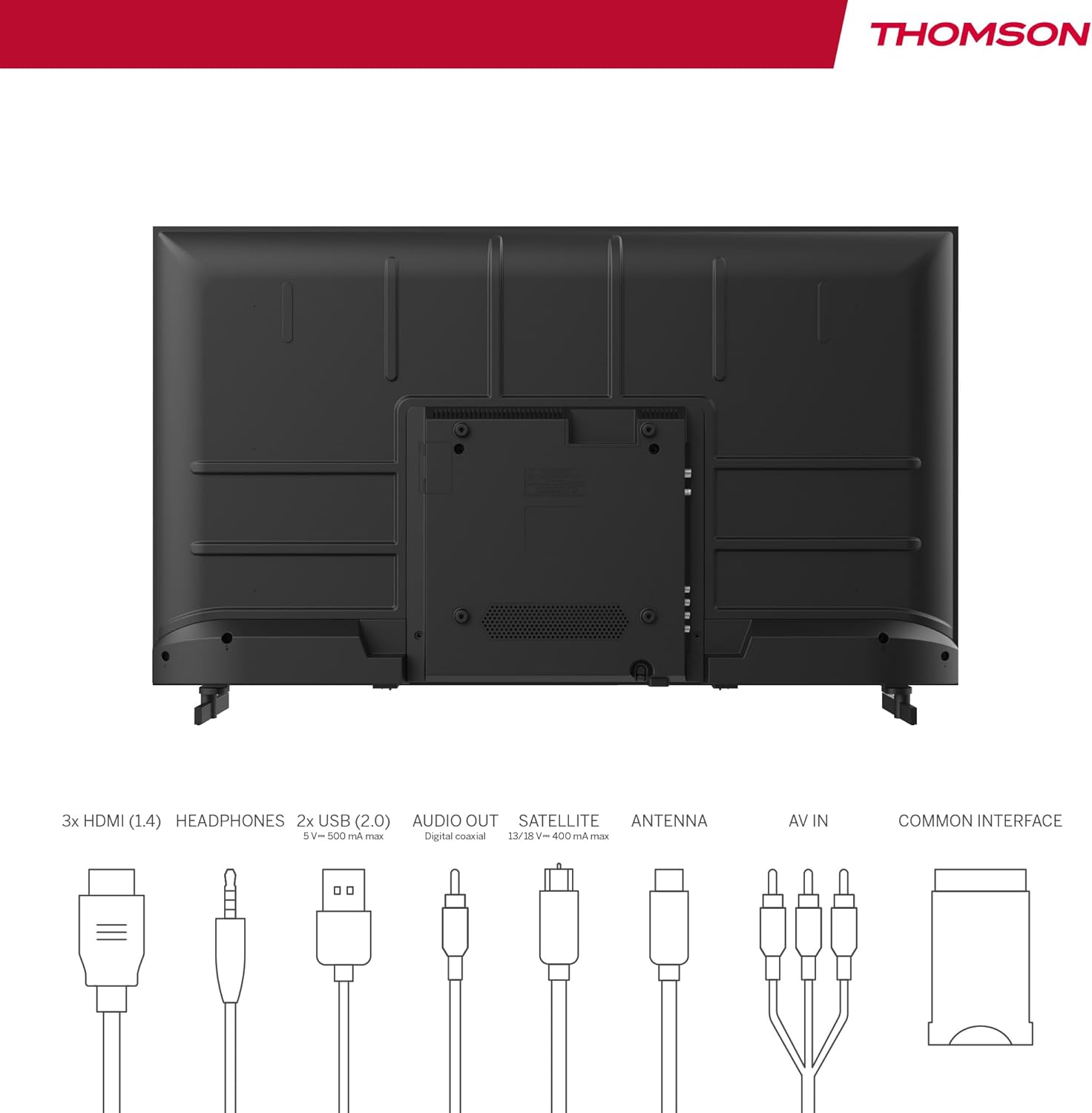
Image: Rear panel of the THOMSON 40FD2S13 TV, illustrating the location of all input and output ports, including HDMI, USB, Audio Out, Satellite, Antenna, AV IN, and Common Interface.
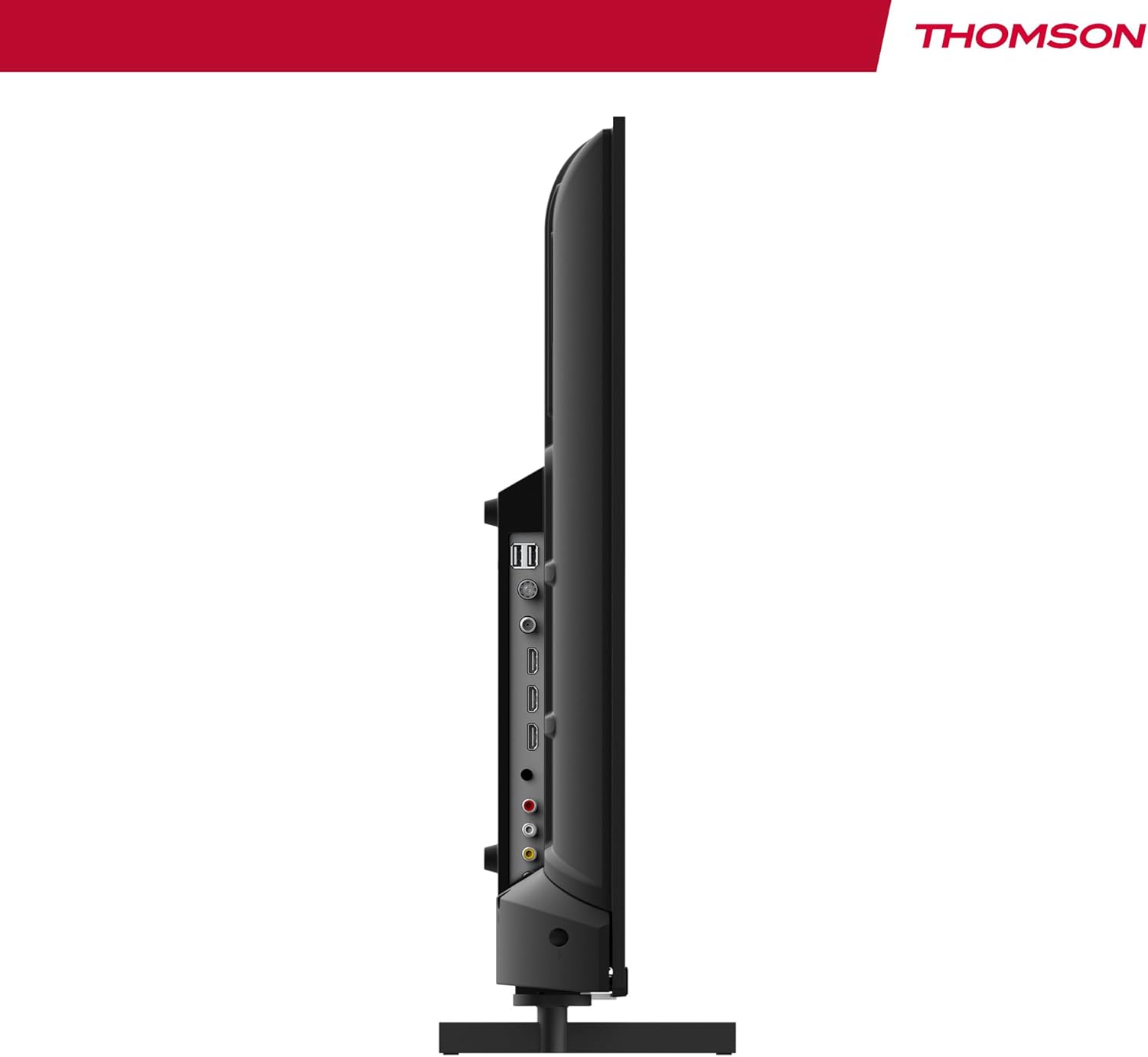
Сүрөт: каптал view of the THOMSON 40FD2S13 TV, highlighting the conveniently located side ports for easy access.
- HDMI (x3): Blu-ray ойноткучтарын, оюн консолдорун, приставкаларды же башка HDMI иштетилген түзмөктөрдү туташтырыңыз.
- USB (x2): Медиа ойнотуу үчүн USB сактагыч түзмөктөрдү туташтырыңыз.
- AV IN: Композиттик видео жана стерео аудио кабельдер аркылуу эски түзмөктөрдү туташтырыңыз.
- Наушник: Жеке угуу үчүн гарнитураны туташтырыңыз.
- Digital Audio Out: Жакшыртылган үн үчүн тышкы аудио системасына туташыңыз.
- Antenna (DVB-T2): Connect a terrestrial antenna for digital broadcast reception.
- Спутник (DVB-S2): Connect a satellite dish for satellite broadcast reception.
- CI+ Slot: Insert a Conditional Access Module (CAM) and smart card for encrypted channels.
4.4 Кубат туташтыруу
After connecting all necessary cables, plug the power cable into the TV's power input and then into a wall outlet. The TV will enter standby mode.
5. Телевизорду иштетүү
5.1 Алыстан башкаруу
The included remote control allows you to access all TV functions. It features backlit buttons for easy navigation in dim lighting.

Image: The THOMSON TV remote control, highlighting its ergonomic design and backlit buttons for convenient use.
- Кубат баскычы: Телевизорду күйгүзөт/өчүрөт же күтүү режимине коёт.
- Сан баскычтары: Каналдарды түз тандаңыз.
- Көлөм +/-: Үн деңгээлин тууралаңыз.
- Канал +/-: Каналдарды ырааттуу өзгөртүү.
- Меню баскычы: Орнотуулар үчүн негизги менюга кириңиз.
- Чабыттоо баскычтары (өйдө/төмөн/сол/оң/ОК): Менюларды аралап, тандоолорду ырастаңыз.
- Булак баскычы: Select input sources (HDMI, AV, Tuner).
- INFO баскычы: Display current channel information.
- ЖОЛ КӨРСӨТКҮЧ баскычы: Access the Electronic Program Guide (EPG).
- REC баскычы: Initiate recording to a connected USB storage device (if supported and configured).
5.2 Баштапкы орнотуу жана каналдарды сканерлөө
Upon first power-on, the TV will guide you through the initial setup process, including language selection, country, and channel scanning. Select your preferred reception type (Antenna, Cable, or Satellite) and follow the on-screen instructions to scan for available channels.

Image: Close-up of the TV's tuner inputs, indicating compatibility with DVB-T2 (terrestrial antenna), DVB-C (cable), and DVB-S2 (satellite) signals.
5.3 Медиа ойноткуч
Connect a USB storage device to one of the USB ports to access photos, music, videos, and text files directly on your TV. Use the remote control to navigate the media player interface.
5.4 Өзгөчөлүктөр
- Электрондук программалык колдонмо (EPG): View upcoming program schedules and set reminders.
- Убакыт кечигүү: Pause live TV broadcasts (requires a connected USB storage device).
- Ата-энелик көзөмөл: Set restrictions on channels or programs based on age ratings.
- Мейманкана режими: Configure specific settings for use in hotel environments, such as default volume and input source.
- Dolby Audio: Experience enhanced sound quality with Dolby Audio technology.

Image: A family enjoying content on the THOMSON TV, with the Dolby Audio logo indicating superior sound experience.
6. Техникалык тейлөө
To ensure the longevity and optimal performance of your THOMSON TV, follow these maintenance guidelines:
- Экранды тазалоо: Экранды жумшак, түксүз чүпүрөк менен акырын сүртүңүз. өжөр белгилери үчүн, бир аз гampчүпүрөккө суу же атайын экран тазалоочу каражат. Эч качан суюктукту түздөн-түз экранга чачпаңыз.
- Кабинетти тазалоо: Телевизордун шкафын сүртүү үчүн жумшак, кургак чүпүрөктү колдонуңуз. Абразивдүү тазалагычтарды же эриткичтерди колдонуудан алыс болуңуз.
- Вентиляция: Телевизордун артындагы желдеткич тешиктери жабылбаганын текшериңиз.
- Электр кабели: Электр шнурунун кандайдыр бир бузулууларын үзгүлтүксүз текшерип туруңуз. Эгерде бузулган болсо, алмаштыруу үчүн кардарларды колдоо кызматына кайрылыңыз.
7. Кыйынчылыктарды
If you encounter issues with your TV, consult the following common troubleshooting steps before contacting customer support.
| Көйгөй | Мүмкүн себеп | Чечим |
|---|---|---|
| Күч жок | Power cord not connected; power outlet not working. | Ensure the power cord is securely plugged into the TV and a working wall outlet. Check the power switch on the TV (if present). |
| Сүрөт жок, бирок үн бар | Туура эмес киргизүү булагы тандалды; арткы жарык көйгөйү. | Press the "Source" button on the remote to select the correct input. Try adjusting brightness/contrast settings. |
| Үн жок, бирок сүрөт бар | Үнү өчүрүлгөн же өтө төмөн; аудио чыгаруу жөндөөлөрү туура эмес. | Press the "Volume +" button or unmute the TV. Check audio output settings in the TV menu. |
| Пульт иштебей жатат | Батареялар өлүп калган же туура эмес салынган; пульт менен телевизордун ортосундагы тоскоолдук. | Replace batteries with new ones, ensuring correct polarity. Remove any obstructions. Point the remote directly at the TV's IR sensor. |
| Сүрөттүн сапаты начар / Сигнал жок | Antenna/cable/satellite connection loose or damaged; incorrect tuner settings. | Check all antenna/cable/satellite connections. Perform a channel scan again. Ensure the correct tuner input is selected. |
8. Техникалык шарттар
| Өзгөчөлүк | Деталь |
|---|---|
| Бренд | ТОМСОН |
| Модел | 40FD2S13 |
| Screen Size | 40 дюйм (101 см) |
| Дисплей технологиясы | LED |
| Резолюция | 1920 x 1080 (Full HD) |
| Жаңыртуу ылдамдыгы | 60 Гц |
| Tuner Technology | DVB-C, DVB-S2, DVB-T2 |
| HDMI порттору | 3 |
| USB порттору | 2 |
| Башка Interfaces | AV IN, Headphone, Digital Audio Out, CI+ Slot |
| Аудионун декоддоосу | DD (Dolby Digital) |
| Динамик конфигурациясы | 2.0 Айлана үн |
| Тtage | 230 вольт |
| Энергия эффективдүүлүгү классы | E |
| Өнүмдүн Өлчөмдөрү (Ж x Y x D) | 72 x 42 x 8.2 cm (without stand, approx.) |
| Салмагы | 6.9 кг (болжол менен) |
9. Кепилдик маалыматы
Your THOMSON 40FD2S13 TV comes with a 3 жылдык кепилдик from the date of purchase. This warranty covers manufacturing defects and ensures that your product meets high-quality standards. Please retain your proof of purchase for warranty claims.
For detailed warranty terms and conditions, please refer to the warranty card included with your product or visit the official THOMSON webсайт.
10. Кардарларды колдоо кызматы
If you require further assistance, have questions not covered in this manual, or need technical support, please contact THOMSON customer service.
- Онлайн колдоо: Visit the official THOMSON support webКөп берилүүчү суроолор, көйгөйлөрдү аныктоо боюнча колдонмолор жана байланыш формалары үчүн сайт.
- Телефондук колдоо: Refer to your product packaging or the THOMSON webаймактык кардарларды тейлөө кызматынын байланыш номерлери үчүн сайт.
When contacting support, please have your TV model number (40FD2S13) and serial number ready.


