1. Киришүү
Сатып алганыңыз үчүн рахматasing the ATTOP X-PACK 18 Drone. This manual provides essential information for the safe operation and maintenance of your drone. Please read it thoroughly before use and retain it for future reference.
2. Кутуда эмне бар
The ATTOP X-PACK 18 package includes the following components:
- ATTOP X-PACK 18 Drone
- Алыстан башкаруу
- 2 x 3.7V/1100mAh Rechargeable Batteries
- USB заряддоо кабели
- Запастык пропеллер
- Screwdriver
- Ташуу кутусу
- Колдонуучунун Колдонмосу (бул документ)
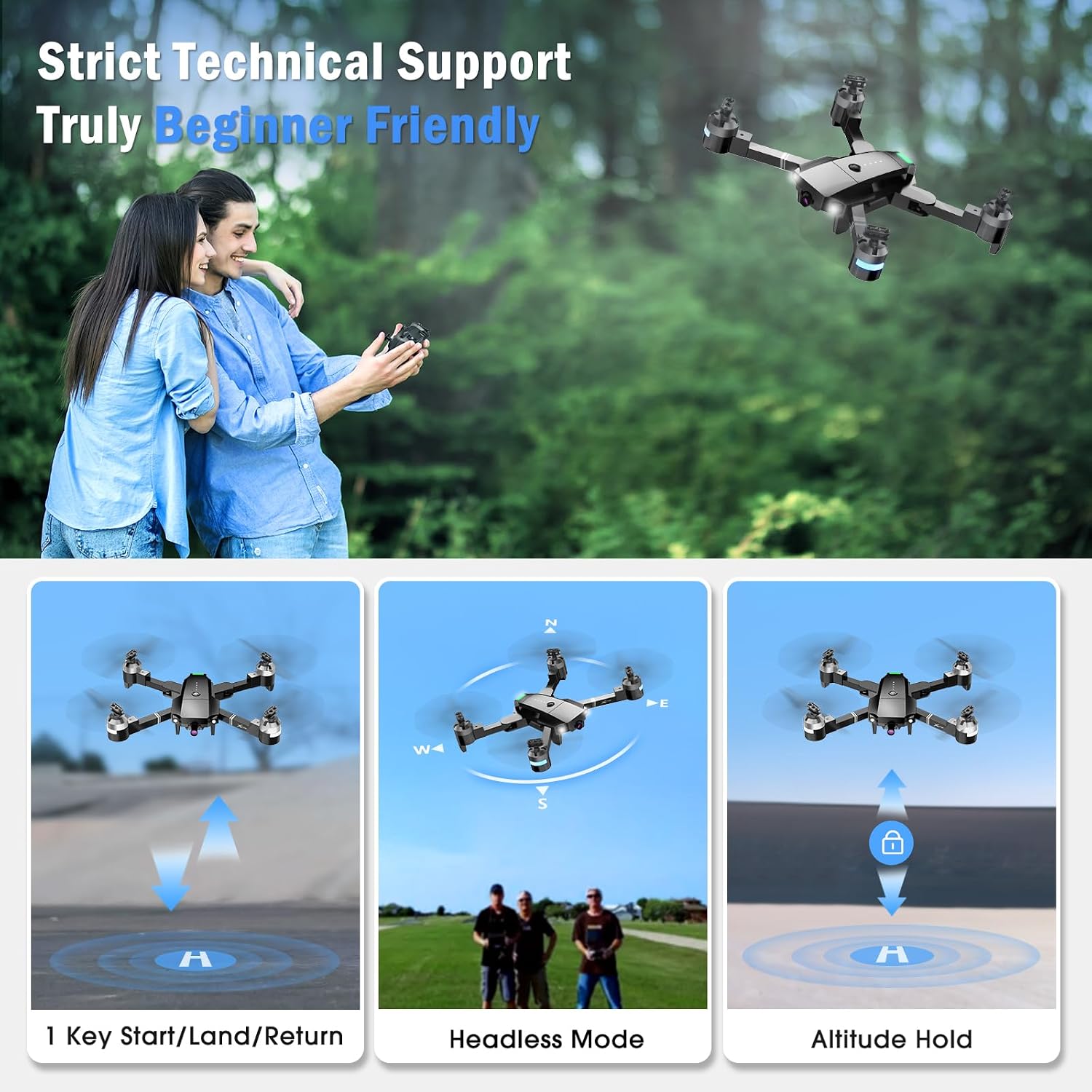
Image: The ATTOP X-PACK 18 drone, remote control, and various accessories neatly packed in its dedicated carrying case.
3. Орнотуу колдонмосу
3.1 Дронду ачуу
- Carefully remove the drone from its carrying case.
- Unfold the drone arms one by one until they are fully extended. Ensure they click into place.
Video: This video demonstrates the unboxing, unfolding, battery installation, and phone clamp setup for the ATTOP X-PACK 18 drone and its controller.
3.2 Батареяны орнотуу жана заряддоо
- Insert the fully charged 3.7V/1100mAh battery into the drone's battery compartment. Ensure it is securely latched.
- Батареяны заряддоо үчүн, аны USB кубаттоо кабелине туташтырып, кабелди ылайыктуу USB кубат булагына (мисалы, компьютерге, USB дубал адаптерине) сайыңыз. Заряддоо индикатору кубаттоо абалын көрсөтөт.
3.3 Алыстан башкарууну жөндөө
- Телефонду орнотуу clamp onto the remote control.
- Place your smartphone securely into the phone clamp.
- Ensure the remote control has sufficient power.
3.4 Колдонмону жүктөп алуу жана туташуу
- Download the "ATTOP CLUB" app from your device's app store (available on App Store and Google Play). You can scan the QR code provided in the app operation guide video or search for "ATTOP CLUB".
- Дронду жана пультту күйгүзүңүз.
- On your smartphone, go to Wi-Fi settings and connect to the drone's Wi-Fi network (e.g., "X-PACK 18-XXXXXX").
- Open the "ATTOP CLUB" app and select the drone model "X-PACK 18".
- Tap "Go To Connect" or "Go To Fly" to enter the control interface.
Video: This video provides a detailed guide on how to download the ATTOP CLUB app, connect to the drone's Wi-Fi, and navigate the app's interface for flight control.
4. Иштөө нускамалары
4.1 Учууну башкаруунун негизги каражаттары
- Күйгүзүү: Press the power button on the drone. Wait for 2 seconds until the lights stop flashing.
- Жупташтыруу: Turn on the remote control. Push the left joystick up and then down to pair with the drone.
- Калибрлөө: If flying for the first time, press the calibration button on the app interface or remote.
- Кулпуну ачуу: Push both joysticks on the remote control diagonally outwards to unlock the motors.
- One Key Take Off: Press the one-key take-off button on the remote or app, or push the left control stick up slowly.
- Өтүү/Төмөн: Use the left joystick to control altitude.
- Алдыга артка: Use the right joystick to move the drone forward or backward.
- Солго/Оңго буруңуз: Use the left joystick to rotate the drone left or right.
- Left/Right Side Flight: Use the right joystick to move the drone sideways.
- Бир негизги конуу: Press the one-key landing button on the remote or app, or push the left control stick down directly.

Image: The drone performing 1-key start/land/return, flying in headless mode, and maintaining altitude hold, illustrating beginner-friendly features.
Video: This video demonstrates the simple one-button take-off and landing, pairing, calibration, and basic flight maneuvers of the ATTOP X-PACK 18 drone.
4.2 Advanced Flight Functions
- 360° айлануу: Press the 360° flip button on the remote or app to perform aerial stunts.
- Башсыз режим: Activate headless mode for easier control, where the drone's orientation is relative to the pilot.
- Ылдамдыкты жөндөө: Switch between 3 speed settings (30%, 60%, 100%) for different flying experiences.
- Бийиктикти кармоо: The drone maintains a stable hover at a set altitude, ideal for photography and stable flight.
- Бир ачкыч менен кайтаруу: Press the one-key return button to automatically bring the drone back to its take-off point.
- Шашылыш токтотуу: In case of an emergency, press the emergency stop button to immediately halt the drone's motors and land it.

Image: The drone illustrating advanced flight functions including drawing a custom flight path, switching between three speed modes, and performing a 360-degree flip.
4.3 Smart App Control Features
- Жаңсоо башкаруу: Make specific hand gestures to trigger automatic picture-taking or video recording.
- Үн менен башкаруу: Control the drone's direction using voice commands (e.g., "Take off", "Forward").
- Гравитацияны көзөмөлдөө: Wave your phone to control the drone's movement, utilizing the phone's gravity sensor.
- VR режими: Compatible with VR glasses for an immersive 3D flight experience, syncing with your phone or iPad.
- Flight Path Mode: Draw a custom flight path on the app, and the drone will follow it automatically.

Image: This image highlights the various control methods for the drone, including traditional remote control, voice commands, gesture recognition, and gravity-sensing phone control.
4.4 Камеранын иштеши
The ATTOP X-PACK 18 features a 120° wide-angle 1080P FPV camera for real-time video transmission and high-definition photos.
- реалдуу убакыт View: Connect your phone or iPad to the drone's Wi-Fi to view live aerial footage through the "ATTOP CLUB" app.
- Сүрөткө тартуу: Press the photo button on the remote control or within the app interface.
- Видеолорду жаздыруу: Press the video button on the remote control or within the app interface to start/stop recording.
- Review Медиа: Photos and videos can be reviewed directly from the media folder within the "ATTOP CLUB" app.

Сүрөт: жакын план view of the drone's 120-degree wide-angle 1080P FPV camera, emphasizing its capability for real-time transmission and high-definition capture.
5. Техникалык тейлөө
5.1 Батареяга кам көрүү
- Always use the provided charging cable and follow charging instructions.
- Батареяларды ашыкча заряддабаңыз же ашыкча разрядтабаңыз.
- Батареяларды күн нурунан жана экстремалдык температурадан алыс салкын, кургак жерде сактаңыз.
- If the drone indicates a low battery warning, land it immediately to prevent damage.
5.2 Пропеллерге кам көрүү
- Пропеллерлердин бузулууларын (жарыктар, ийилүүлөрдү) үзгүлтүксүз текшерип туруңуз.
- Replace damaged propellers with spare ones using the provided screwdriver. Ensure correct orientation when replacing.
5.3 Тазалоо
- Дрондун корпусун жана камеранын линзасын тазалоо үчүн жумшак, кургак чүпүрөктү колдонуңуз.
- Катуу химиялык заттарды же эриткичтерди колдонуудан алыс болуңуз.
6. Кыйынчылыктарды
| Көйгөй | Мүмкүн себеп | Чечим |
|---|---|---|
| Дрон күйбөйт | Батарея заряддалган эмес же туура эмес орнотулган. | Батарея толук заряддалганын жана туура салынганын текшериңиз. |
| Drone not pairing with remote/app | Incorrect pairing sequence; Wi-Fi not connected. | Follow pairing steps (Section 4.1); ensure phone is connected to drone's Wi-Fi. |
| Туруксуз учуу/Дрифтинг | Drone not calibrated; damaged propellers; strong wind. | Perform calibration (Section 4.1); replace damaged propellers; fly in calm conditions. |
| Poor camera feed/No image | Weak Wi-Fi signal; app not connected to drone. | Ensure strong Wi-Fi connection; restart app and reconnect to drone. |
| Кыска учуу убактысы | Батарея толук заряддалган эмес; эски батарея. | Fully charge batteries before each flight; consider replacing old batteries. |
7. Техникалык шарттар
| Өзгөчөлүк | Деталь |
|---|---|
| Бренд | ATTOP |
| Модель аты | X-PACK 18 |
| Өзгөчөлүктөр | 360 Degree Flip, Auto-Landing, First Person View (FPV), Foldable, Speed Adjustment, Headless Mode, One Key Return, Emergency Stop, Gesture Control, Voice Control, Gravity Control, VR Mode, Flight Path Mode, Altitude Hold |
| Жаш аралыгы | 8 years and up (96 months) |
| Түс | Кара |
| Видео тартуунун резолюциясы | 1080p |
| Натыйжалуу дагы эле чечим | 2.07 Megapixels (2073600 Pixels) |
| Байланыш технологиясы | Wi-Fi |
| Камтылган компоненттер | Drone, Remote Control, 2 Batteries, Camera, Carrying Case, Propellers, USB Charging Cable, Screwdriver |
| Skill Level | Баары |
| Батарея сыйымдуулугу | 1100 миллионamp Hours (3.7V) |
| Видео тартуу форматы | MP4 |
| Алыстан башкаруу технологиясы | Wi-Fi |
| Башкаруу түрү | Алыстан башкаруу, Колдонмо башкаруу |
| Материал | Пластик |
| Зымсыз байланыш технологиясы | Wi Fi |
| Батарея клеткасынын курамы | Lithium-Cobalt |
| Батареялар камтылган | Yes (2 Lithium Polymer batteries) |
| Колдоого алынган сүрөт форматы | JPEG |
| Video Output токтому | 1920x1080 пиксел |
| Алыстан башкаруу камтылганбы? | Ооба |
| Оптикалык сенсор технологиясы | CMOS же CCD |
| Заряддалуучу батарея камтылган | Ооба |
| Продукциянын өлчөмдөрү | 13.8"L x 12.6"W x 2.76"H |
| Өндүрүүчү | Guangdong Attop Technology Co Ltd |
| Элемент Салмагы | 1.83 фунт |
| Чыгарылган күнү | 9-ноябрь, 2023-жыл |
8. Кепилдик жана колдоо
For technical support, customer service, or to inquire about an extended warranty, please contact ATTOP directly:
- Электрондук почта: support@attoptoys.com
- You can also scan the QR code within the "ATTOP CLUB" app's Help section for customer service and warranty information.

Image: The ATTOP X-PACK 18 drone showcasing its main features including 1080P camera, 360° flip, gesture control, voice control, gravity control, VR mode, 3 speed mode, flight path mode, altitude hold, and emergency stop.


