Introduction
The Tivoli Audio Model Two Digital is a versatile and elegantly designed speaker system, engineered to deliver superior audio quality with modern connectivity options. This manual provides essential information for setting up, operating, and maintaining your Model Two Digital speaker, ensuring optimal performance and longevity.

Сүрөт 1: Алдыңкы view of the Tivoli Audio Model Two Digital speaker in black.
Кутуда эмне бар
Upon unboxing your Tivoli Audio Model Two Digital, please verify that all the following components are included:
- Tivoli Audio Model Two Digital Speaker
- Электр камсыздоо
- Quick Start Guide
Жайгашуу
1. Жайгаштыруу
The Model Two Digital offers flexible placement options, allowing it to be positioned either horizontally or vertically to best suit your space and aesthetic preferences. Ensure the speaker is placed on a stable, flat surface.

Figure 2: Horizontal Placement

Figure 3: Vertical Placement
2. Power Connection
Connect the provided power supply to the DC input port on the back of the speaker, then plug the power adapter into a wall outlet. The speaker is designed for use with a 120V power source.
3. Initial Power On and LED Indicator
Press the power button located on the control knob. The integrated LED light bar will illuminate, indicating the speaker's status. This intuitive LED display provides visual feedback without the need for a separate screen.
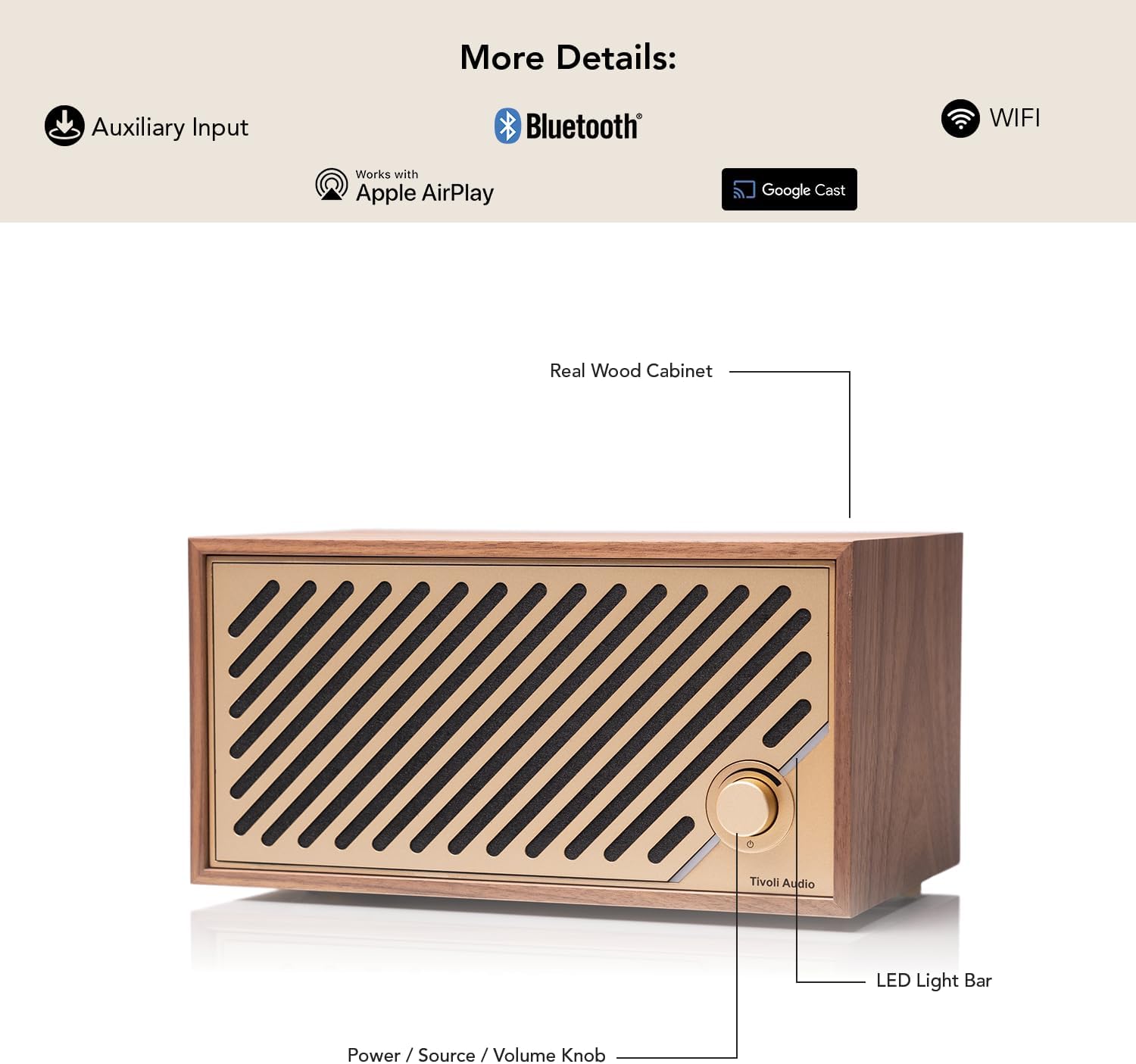
Figure 4: The LED light bar indicates speaker status.
4. Байланыш параметрлери
The Model Two Digital offers multiple ways to connect and stream your audio:
- Wi-Fi: Utilize Wi-Fi for high-quality streaming via Chromecast and Airplay 2. This allows for seamless integration with popular music streaming apps like Spotify Connect and Tidal Connect.
- Bluetooth: For quick and easy wireless connection with your smartphone or tablet.
- Көмөкчү киргизүү: Connect external audio devices using a standard 3.5mm auxiliary cable.

AirPlay & Google Cast

Bluetooth

Wi-Fi

Көмөкчү киргизүү
Operating the Model Two Digital
Башкаруу баскычынын функциялары
The single multi-function control knob on the front of the speaker allows for intuitive operation:
- Күч: Press the knob to turn the speaker on or off.
- Булак тандоо: Rotate the knob to cycle through available audio sources (Wi-Fi, Bluetooth, Auxiliary).
- Үндү көзөмөлдөө: Adjust the volume by rotating the knob.

Figure 5: Key components and controls of the Model Two Digital.
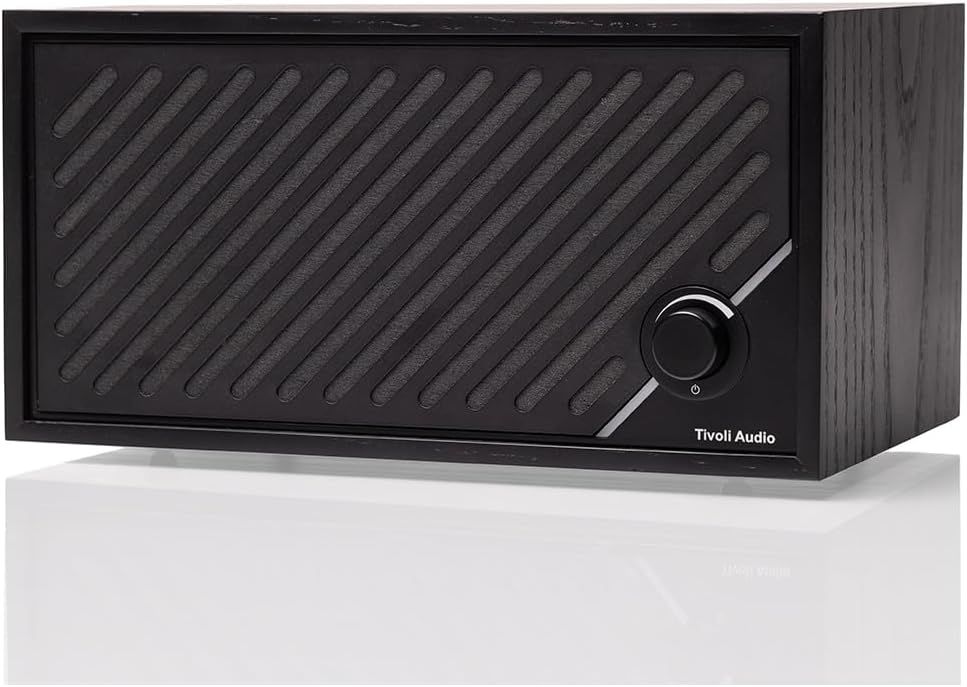
Figure 6: Detail of the multi-function control knob.
Техникалык тейлөө
To ensure the longevity and optimal appearance of your Tivoli Audio Model Two Digital speaker, follow these maintenance guidelines:
- Тазалоо: Use a soft, dry cloth to gently wipe the cabinet and grille. Avoid abrasive cleaners, solvents, or sprays, as these can damage the wood finish and electronic components.
- Чаңдан коргоо: The speaker is designed to be dustproof. However, regular dusting will help maintain its pristine condition.
- Жайгаштыруу чөйрөсү: Avoid placing the speaker in direct sunlight, near heat sources, or in areas with high humidity to prevent damage to the wood and internal electronics.
Проблемаларды чечүү
If you encounter issues with your Model Two Digital speaker, please refer to the following common troubleshooting steps:
- Кубат жок: Ensure the power supply is securely connected to both the speaker and a working wall outlet. Try a different outlet if necessary.
- Үн жок: Check the volume level on both the speaker and your connected device. Verify that the correct audio source (Wi-Fi, Bluetooth, Aux) is selected.
- Bluetooth жупташтыруу маселелери: Ensure the speaker is in Bluetooth pairing mode and your device's Bluetooth is enabled. Try unpairing and re-pairing the device.
- Wi-Fi туташуу көйгөйлөрү: Ensure your Wi-Fi network is active and the speaker is within range. Restart your router and the speaker.
- Бурмаланган аудио: Reduce the volume on both the speaker and the source device. Check for any physical obstructions around the speaker.
For more detailed troubleshooting or persistent issues, please consult the Quick Start Guide or contact Tivoli Audio customer support.
Техникалык шарттар
Key technical specifications for the Tivoli Audio Model Two Digital speaker:
| Өзгөчөлүк | Спецификация |
|---|---|
| Модель аты | Экинчи модель Digital |
| Модель номери | M2DBLK |
| Монтаж түрү | Столдун үстү |
| Материал | Жыгач |
| Динамик түрү | Китеп текчеси |
| Өзгөчөлүктөр | Dustproof, Hi Res Audio, Multi Room Audio |
| Продукциянын өлчөмдөрү (D x W x Y) | 5.1"D x 9.9"W x 6.2"H |
| Элемент Салмагы | 4.9 фунт |
| Башкаруу ыкмасы | тийүү |
| Зымсыз байланыш технологиясы | Bluetooth, WiFi |
| Power Source | Электр зымдары |
| Динамиктин максималдуу чыгаруу күчү | 60 Ватт |
| Байланыш технологиясы | Көмөкчү түзүлүштөр, Bluetooth, Wi-Fi |
| Аудио чыгаруу режими | Стерео |
| UPC | 850022506390 |
Кепилдик маалымат
The Tivoli Audio Model Two Digital comes with a Limited Warranty. Please refer to the included Quick Start Guide or visit the official Tivoli Audio website for detailed terms and conditions of the warranty coverage.
Кардарларды колдоо
For further assistance, technical support, or inquiries regarding your Tivoli Audio Model Two Digital speaker, please visit the official Tivoli Audio website or contact their customer service department. Contact information can typically be found in the Quick Start Guide or on the brand's official support pages.
You can visit the Tivoli Audio Store on Amazon for more information: Tivoli Audio Store


