1. Продукт бүтүп калдыview
The AOPUTTRIVER AP-189A is a high-accuracy digital dual-port manometer designed for measuring differential, positive, and negative air pressure. It is suitable for a wide range of applications including HVAC system control, airflow measurement, air quality monitoring, and gas pressure system calibration.

Figure 1: AOPUTTRIVER AP-189A Digital Manometer and accessories.
Негизги өзгөчөлүктөрү:
- High Accuracy: ±0.3%FSO (at 25°C) with a measurement range of ±2.000psi.
- Multi-functional: Supports differential pressure, positive pressure, negative pressure, data hold, MAX/MIN/Average, and DIF functions.
- Data Recording and Zeroing: Ability to record data and view MAX/MIN/AVG values. Features a zeroing function for accurate measurements.
- 11 Selectable Units: Easily switch between psi, kPa, Kgfcm², ozin², Bar, mbar, inHg, mmHg, inH₂O, ftH₂O, cmH₂O.
- User-Friendly Display: Large LCD with backlight for clear readability.
- Power Management: Low battery indicator and automatic power-off after 25 minutes of inactivity.
Пакеттин мазмуну:
- 1x AP-189A Manometer
- 1x Коргоочу баштык
- 1x Кичинекей отвертка
- 2x 1.5V AAA батареялары
- 1x User Manual (6 languages)

Figure 2: Included items in the AP-189A package.
2. Device Layout and Dimensions
Familiarize yourself with the physical components and dimensions of the AP-189A manometer.

Figure 3: AP-189A Manometer dimensions and port details.
Button Functions and Display:
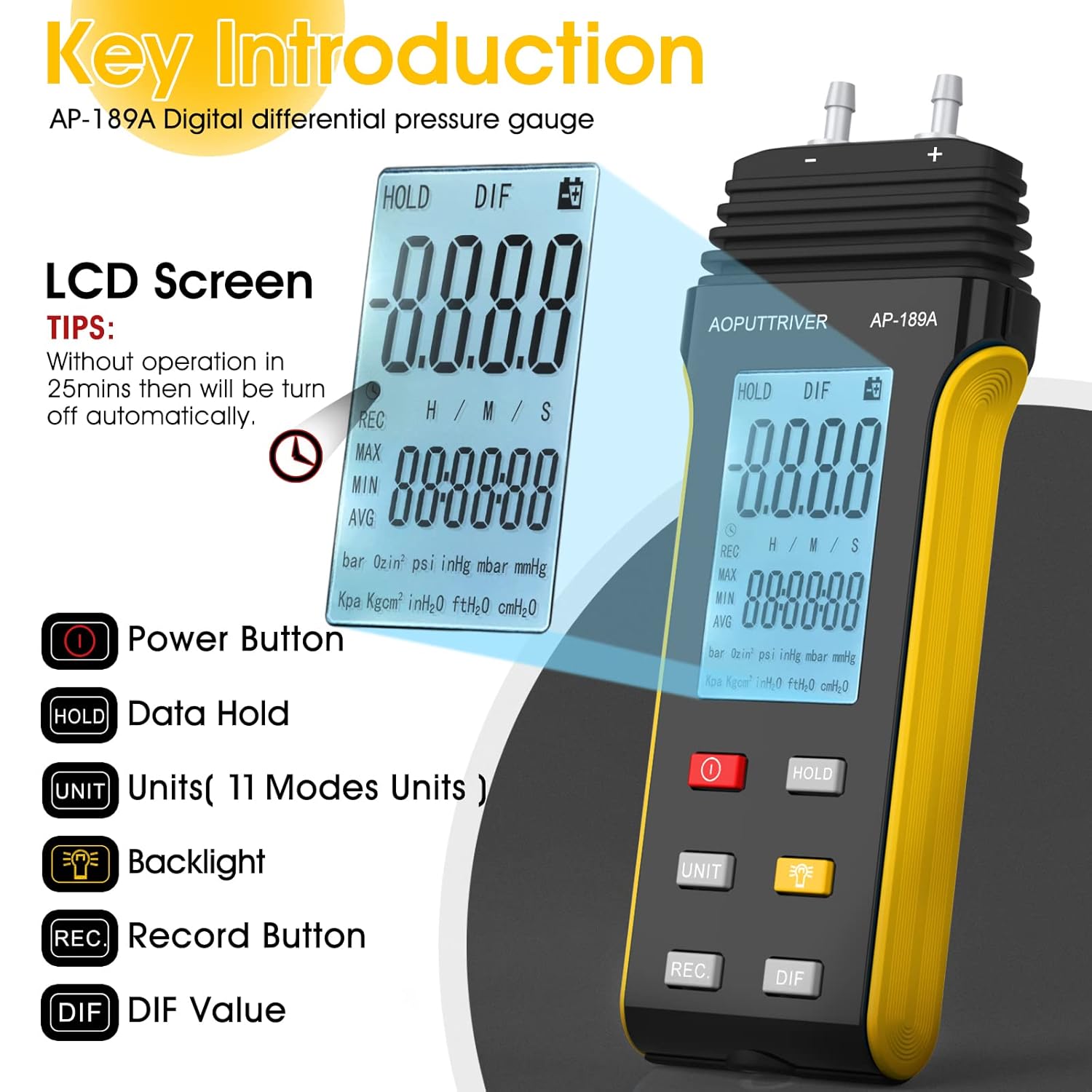
Figure 4: Key Introduction to AP-189A buttons and LCD screen.
- Кубат баскычы (ⓘ): Аппаратты күйгүзөт же өчүрөт.
- HOLD баскычы: Дисплейдеги учурдагы көрсөткүчтү тоңдурат.
- UNIT баскычы: Cycles through the 11 available pressure units.
- Арткы жарык баскычы (🔆): Activates or deactivates the LCD backlight.
- REC баскычы: Initiates or stops data recording (MAX/MIN/AVG).
- DIF баскычы: Displays the differential pressure value.
3. Орнотуу жана Батареяны орнотуу
3.1 Батареяны орнотуу:
- Locate the battery compartment on the back of the manometer.
- Use the included small screwdriver to open the battery compartment cover.
- Туура полярдуулукту (+/-) камсыз кылып, эки 1.5V AAA батарейкасын салыңыз.
- Батарея уясынын капкагын ордуна коюңуз жана аны бурама менен бекитиңиз.
3.2 Connecting Pressure Hoses:
The AP-189A features dual ports for differential pressure measurement. Connect the pressure hoses to the (+) and (-) ports as required for your application. The (+) port measures positive pressure, and the (-) port measures negative pressure relative to the other port.
4. Иштөө нускамалары
4.1 Күйгүзүү/өчүрүү:
басыңыз Кубат баскычы (ⓘ) to turn the manometer on. Press and hold the same button to turn it off.
4.2 Unit Selection:
басыңыз UNIT button to cycle through the 11 available pressure units: psi, kPa, Kgfcm², ozin², Bar, mbar, inHg, mmHg, inH₂O, ftH₂O, cmH₂O. The selected unit will be displayed on the LCD.
4.3 Data Hold Function:
басыңыз БЕРҮҮ Учурдагы көрсөткүчтү дисплейде тоңдуруу үчүн баскычты басыңыз. Кармоо баскычын коё берип, түз көрсөткүчтөрдү улантуу үчүн аны кайра басыңыз.
4.4 Zero Setting:
To ensure accurate differential pressure measurements, it is crucial to zero the gauge before use. Ensure both pressure ports are open to atmospheric pressure or connected to the same pressure source before zeroing.
- First, briefly press the БЕРҮҮ баскычы.
- Андан кийин, басып, кармап туруңуз БЕРҮҮ button for more than 5 seconds. The display will show a "---" symbol, indicating successful zeroing.

Figure 5: Zero Setting procedure.
4.5 MAX/MIN/AVG/DIF Functions:
басыңыз REC button to enter data recording mode. Subsequent presses will cycle through MAX (maximum), MIN (minimum), and AVG (average) values recorded during the session. The DIF button displays the differential pressure.
4.6 Арткы жарык:
басыңыз Арткы жарык баскычы (🔆) to illuminate the LCD for better visibility in low-light conditions. Press again to turn off the backlight.

Figure 6: Manometer with backlight and auto-shutdown reminder.
4.7 Automatic Power Off:
The device will automatically power off after approximately 25 minutes of no operation to conserve battery life. This feature can typically be disabled or enabled through specific button combinations (refer to the included 6-language manual for details if available).
5. Техникалык тейлөө жана кам көрүү
- Тазалоо: Аппаратты жумшак менен сүртүңүз, гamp кездеме. Абразивдүү тазалагычтарды же эриткичтерди колдонбоңуз.
- Сактагыч: Store the manometer in its protective pouch in a dry, cool place when not in use. Remove batteries if storing for extended periods to prevent leakage.
- Батареяны алмаштыруу: Дисплейде батарейка аз индикатору пайда болгондо батарейкаларды алмаштырыңыз.
- Шлангга кам көрүү: Inspect pressure hoses regularly for cracks or damage. Replace if necessary to ensure accurate readings.
6. Кыйынчылыктарды
| Көйгөй | Мүмкүн себеп | Чечим |
|---|---|---|
| Түзмөк күйбөйт. | Өлүк же туура эмес орнотулган батарейкалар. | Check battery polarity. Replace with new 1.5V AAA batteries. |
| Inaccurate readings or "doesn't zero out". | Incorrect zeroing procedure; blocked or damaged pressure ports/hoses; device not at stable temperature. | Perform zero setting correctly (long press HOLD button for 5 seconds). Ensure ports are clear. Check hoses for leaks or blockages. Allow device to stabilize at ambient temperature. |
| Дисплей күңүрт же бүлбүлдөп турат. | Батарея аз. | Батареяларды алмаштырыңыз. |
| Automatic shutdown occurs too quickly. | Standard auto-off feature. | This is a power-saving feature. Refer to the full manual for options to disable or adjust auto-off if available. |
7. Техникалык шарттар
| Параметр | Нарк |
|---|---|
| Өлчөө диапазону | ±2.000psi (±13.79Kpa) |
| Тактык | ±0.3%FSO (at 25°C) |
| Кайталануучулук | ±0.25%FSO |
| Сызыктуулугу/Гистерезис | ±0.1%FSO of full scale |
| Limit Maximum Pressure | 6Psi |
| Selectable Units | psi, kPa, Kgfcm², ozin², Bar, mbar, inHg, mmHg, inH₂O, ftH₂O, cmH₂O (11 units) |
| Функциялар | Backlight, Data Hold, Auto Power Off (25 mins), MAX/MIN/AVG/DIF, Zero Setting |
| Электр камсыздоо | 2x 1.5V AAA батареялары |
| Элемент моделинин номери | АП-189А |
| Өндүрүүчү | AOPUTTRIVER |
| Пакеттин өлчөмдөрү | 7.28 x 3.62 x 1.69 дюйм |
| Элемент Салмагы | 8.29 унция |

Figure 7: Professional features and specifications overview.
8. Кепилдик жана колдоо
The AOPUTTRIVER AP-189A manometer comes with a 365-day warranty and lifetime technical support. If you encounter any product quality issues, please contact AOPUTTRIVER customer service for assistance. They are committed to resolving problems promptly.
For further support or to explore other AOPUTTRIVER products, visit the official AOPUTTRIVER Store on Amazon.
9. Жалпы колдонмолор
The AP-189A differential pressure gauge is a versatile tool applicable in various professional and domestic settings:
- HVAC системалары: For balancing airflows, checking filter pressure drop, and verifying fan performance.
- Air Conditioning & Ventilation Systems: Monitoring pressure differences across coils and ducts.
- Clean Rooms: Maintaining precise pressure differentials to prevent contamination.
- Laboratory Testing: For various experiments requiring accurate pressure measurements.
- Gas Pressure Systems: On-site calibration and troubleshooting of gas appliances and lines.

8-сүрөт: Мисamples of common applications for the differential pressure gauge.


