1. Киришүү
Welcome to the user manual for your new HP Victus 16.1" Gaming Notebook. This document provides essential information to help you set up, operate, maintain, and troubleshoot your device. Please read this manual thoroughly to ensure optimal performance and longevity of your notebook.
The HP Victus 16.1" Gaming Notebook is designed for high-performance computing and gaming, featuring an AMD Ryzen 5 7640HS processor, NVIDIA GeForce RTX 3050 graphics, 16GB of RAM, and a 512GB SSD, all complemented by a 144Hz Full HD display.
2. Коопсуздук маалыматы
Observe the following safety guidelines to prevent damage to your device or personal injury:
- Use only the power adapter supplied with your notebook.
- Do not expose the notebook to extreme temperatures, humidity, or direct sunlight.
- Avoid placing heavy objects on the notebook.
- Keep liquids away from the device. In case of accidental spills, disconnect power immediately and contact support.
- Do not attempt to disassemble or repair the notebook yourself. Refer to qualified service personnel.
- Ашыкча ысып кетүүнүн алдын алуу үчүн туура желдетүүнү камсыз кылыңыз. Вентиляция тешиктерин жаап албаңыз.
3. Пакеттин мазмуну
Продукцияңыздын таңгагында бардык элементтер бар экенин текшериңиз:
- HP Victus 16.1" Gaming Notebook
- Кубат адаптери жана электр шнуры
- Ыкчам баштоо колдонмосу (эгер камтылган болсо)
- Кепилдик маалыматы (эгер камтылган болсо)
If any items are missing or damaged, contact your retailer or HP support.
4. Продукт бүтүп калдыview
Familiarize yourself with the components and features of your HP Victus Gaming Notebook.

4.1-сүрөт: Фронт view of the HP Victus 16.1" Gaming Notebook with the lid open, showcasing the display running Windows 11.

4.2-сүрөт: Бурчтуу view of the HP Victus 16.1" Gaming Notebook, illustrating the keyboard, touchpad, and the vibrant display.
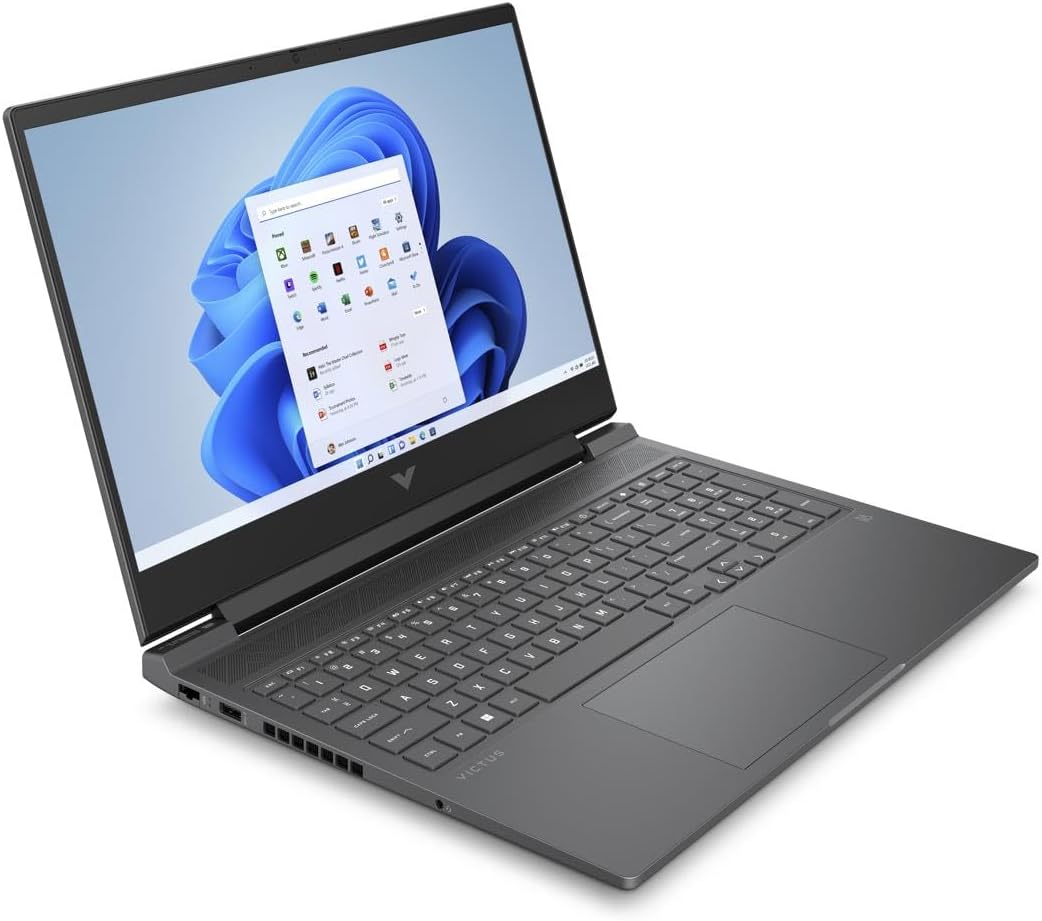
4.3-сүрөт: Another angled perspective of the HP Victus 16.1" Gaming Notebook, highlighting its sleek design and screen clarity.
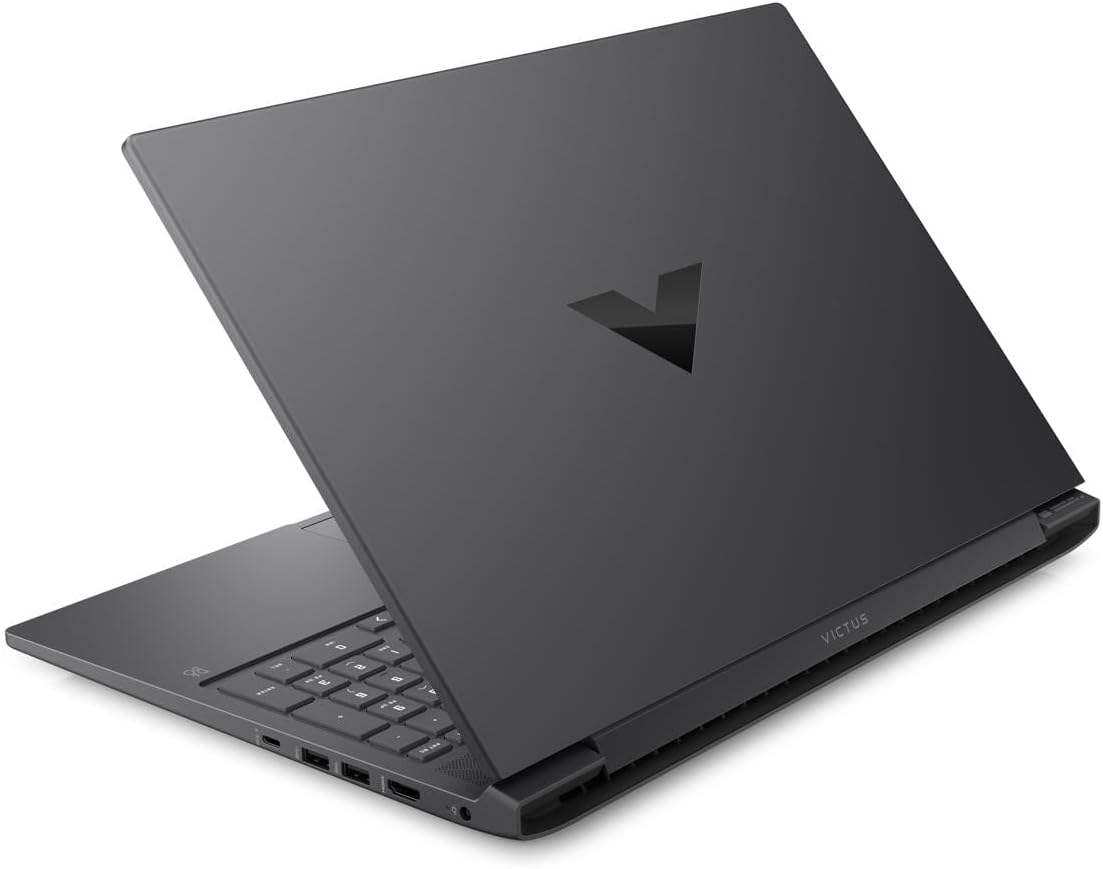
4.4-сүрөт: Арткы view of the HP Victus 16.1" Gaming Notebook with the lid closed, featuring the distinct Victus logo on the cover.

4.5-сүрөт: Side profiles of the HP Victus 16.1" Gaming Notebook, detailing the placement of various input/output ports and ventilation grilles.
Негизги компоненттер:
- Дисплей: 16.1-inch Full HD (1920 x 1080) 144Hz Anti-glare panel.
- Баскычтоп: Сандык баскычтоп менен толук өлчөмдөгү клавиатура.
- Сенсордук такта: Multi-touch gesture enabled touchpad.
- Порттор: USB Type-A, USB Type-C, HDMI, Ethernet, Audio Jack, Power connector.
- Webкамера: Интеграцияланган webcam for video communication.
- Баяндамачылар: Integrated stereo speakers.
5. Орнотуу
Follow these steps for the initial setup of your HP Victus Gaming Notebook:
- Ноутбукту таңгактан чыгаруу: Carefully remove the notebook and all accessories from the packaging.
- Туташуу кубаты: Plug the power adapter into the notebook's power port and then into a wall outlet. Ensure the power indicator light illuminates.
- Баштапкы күйгүзүү: Open the lid and press the power button, typically located on the keyboard deck.
- Windows орнотуулары: Follow the on-screen instructions to complete the Windows 11 setup process. This includes selecting your region, connecting to a Wi-Fi network, creating a user account, and accepting terms and conditions.
- Жаңыртуулар: After initial setup, it is recommended to check for and install all available Windows updates and HP driver updates to ensure optimal performance and security.
6. Иштөө нускамалары
Энергияны башкаруу:
- Күйгүзүү: Кубат баскычын басыңыз.
- Өчүрүү: Баштоо баскычын чыкылдатып, андан кийин Кубат > Өчүрүү.
- Уйку режими: Капкагын жабыңыз же "Баштоо" баскычын, андан кийин "Күчүн жана Уйку режимин" чыкылдатыңыз.
- Кайра баштоо: Баштоо баскычын чыкылдатып, андан кийин Кубат > Кайра иштетүү.
Баскычтопту жана сенсордук тактаны колдонуу:
- The keyboard functions like a standard PC keyboard. Use the Fn key in combination with function keys (F1-F12) for special features like volume control, brightness adjustment, and Wi-Fi toggle.
- The touchpad supports multi-touch gestures for scrolling, zooming, and switching applications. Refer to Windows settings for customization.
Перифериялык түзүлүштөрдү туташтыруу:
Your notebook features various ports for connecting external devices:
- USB порттору: Тышкы катуу дисктер, чычкандар же баскычтоптор сыяктуу USB түзмөктөрүн туташтырыңыз.
- HDMI порту: Кеңейтилген дисплей үчүн тышкы мониторду же телевизорду туташтырыңыз.
- Аудио Jack: Наушниктерди же тышкы динамиктерди туташтырыңыз.
- Ethernet порту: Туруктуу интернетке жетүү үчүн зымдуу тармакка туташыңыз.
Дисплейдин жөндөөлөрү:
To utilize the 144Hz refresh rate for smoother visuals, especially in gaming:
- Иш тактасын оң баскыч менен чыкылдатып, "Дисплей орнотууларын" тандаңыз.
- Scroll down and click 'Advanced display settings'.
- Under 'Choose a refresh rate', select '144 Hz'.
7. Техникалык тейлөө
Proper maintenance ensures the longevity and performance of your notebook:
- Тазалоо: Экранды жана шассиди тазалоо үчүн жумшак, түксүз чүпүрөктү колдонуңуз. Кежир белгилер үчүн, гampчүпүрөккө бир аз суу же экран тазалагыч менен. Катуу химиялык заттардан алыс болуңуз.
- Программалык камсыздоо жаңыртуулары: Regularly check for and install operating system updates (Windows Update) and driver updates (HP Support Assistant or HP website) to ensure security and optimal performance.
- Батареяга кам көрүү: To maximize battery lifespan, avoid fully discharging the battery frequently. If storing the notebook for an extended period, charge it to about 50-70%.
- Вентиляция: Ensure the ventilation grilles are clear of dust and debris. Use the notebook on a hard, flat surface to allow for proper airflow.
- Маалыматтын камдык көчүрмөсү: Дайыма маанилүү маалыматтарыңыздын камдык көчүрмөсүн тышкы дискке же булут сактагычка көчүрүп, маалыматтарды жоготпоо үчүн.
8. Кыйынчылыктарды
This section addresses common issues you might encounter with your HP Victus Gaming Notebook.
No Power / Not Turning On:
- Ensure the power adapter is securely connected to both the notebook and a working wall outlet.
- Башка аспапка туташтыруу менен электр розеткасынын иштешин текшериңиз.
- Эгерде батарейка толугу менен түгөнгөн болсо, аны күйгүзүүдөн мурун кеминде 15-30 мүнөт заряддап коюңуз.
Дисплей маселелери:
- Бош экран: Try connecting an external monitor to see if there is output. If so, the internal display might have an issue.
- Жаркылдаган/Бурмаланган сүрөт: Update your graphics drivers. Check display cable connections if using an external monitor.
- Туура эмес чечим/жаңылоо ылдамдыгы: Adjust settings in Windows Display settings as described in Section 6.
Аткаруу маселелери:
- Жай аткаруу: Close unnecessary applications. Check Task Manager for processes consuming high CPU or RAM. Ensure sufficient free space on the SSD.
- Ашыкча ысып кетүү: Ensure ventilation vents are clear. Use the notebook on a hard, flat surface. Consider using a cooling pad if issues persist.
- Оюндун натыйжалуулугу: Ensure graphics drivers are up to date. Adjust in-game graphics settings to match your system's capabilities.
Туташуу көйгөйлөрү:
- Wi-Fi көйгөйлөрү: Restart your router and modem. Check if Wi-Fi is enabled on the notebook (Fn + F12 or similar key combination). Update wireless drivers.
- Bluetooth көйгөйлөрү: Ensure Bluetooth is enabled in Windows settings. Try re-pairing the device.
If you cannot resolve an issue using these steps, please refer to the HP support webсайтка же кардарларды тейлөөгө кайрылыңыз.
9. Техникалык шарттар
Detailed technical specifications for the HP Victus 16.1" Gaming Notebook (Model 16-s0001nr).
| Өзгөчөлүк | Спецификация |
|---|---|
| Модель аты | 16-s0001nr (823F0UA#ABA) |
| Процессор | AMD Ryzen 5 7640HS (Hexa-core) |
| Графика | NVIDIA GeForce RTX 3050 (6 GB GDDR6 Dedicated) |
| Дисплей | 16.1-inch FHD (1920 x 1080) 144Hz, Anti-glare |
| RAM | 16 ГБ DDR5 SDRAM |
| Сактагыч | 512 ГБ SSD |
| Операция системасы | Windows 11 Home |
| Зымсыз байланыш | 802.11ax (Wi-Fi 6), Bluetooth |
| Порттар | USB Type-A, USB Type-C, HDMI, Ethernet, Audio Jack |
| Өлчөмдөрү (LxWxH) | 23.5 x 13.7 x 2.8 дюйм |
| Салмагы | 10 фунт |
| Түс | Слюда күмүш |
| Чыгарылган жылы | 2024 |
10. Кепилдик жана колдоо
Your HP Victus Gaming Notebook comes with a standard manufacturer's warranty. Please refer to the warranty documentation included with your product for specific terms and conditions, including coverage period and service options.
Техникалык колдоо, драйверди жүктөп алуу жана кошумча ресурстар үчүн расмий HP колдоо бөлүмүнө баш багыңыз webсайт:
When contacting support, please have your product model number (16-s0001nr or 823F0UA#ABA) and serial number ready.