1. Киришүү
The Leotec SENIOR SMART BAND 4G GPS is a smart bracelet designed for monitoring and communication, particularly for seniors. It features 4G connectivity, real-time GPS tracking, heart rate monitoring, a pedometer, and call functionality. This manual provides instructions for setting up, operating, and maintaining your device.
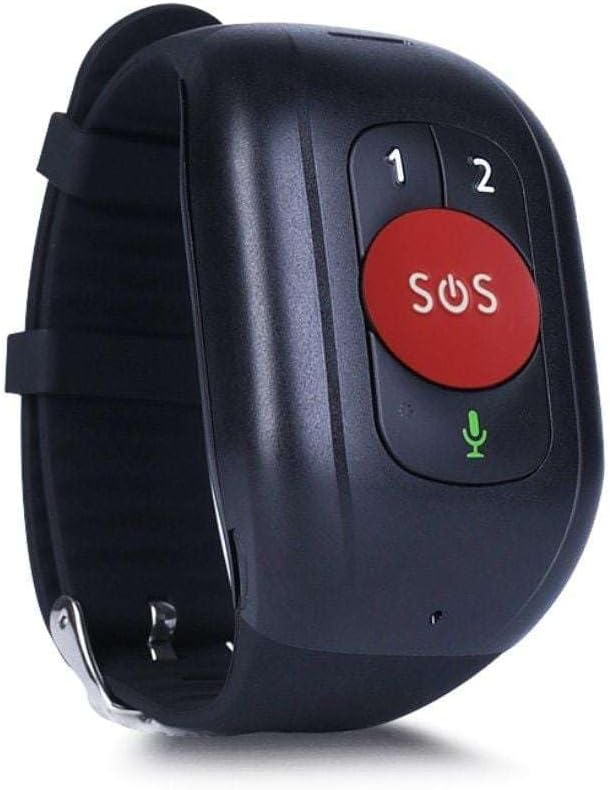
1-сүрөт: Leotec SENIOR SMART BAND 4G GPS RED. The device features a large red SOS button, two smaller call buttons labeled '1' and '2', and a microphone icon.
2. Орнотуу колдонмосу
2.1. Пакеттин мазмуну
- Leotec SENIOR SMART BAND 4G GPS
- User Manual
- Charging Cable/Connector
2.2. SIM картаны орнотуу
The device requires a nanoSIM card for 4G LTE and 2G GSM connectivity. Ensure the SIM card is from any mobile phone operator on the market.
- Аппараттагы SIM картанын уячасын табыңыз.
- Carefully insert the nanoSIM card into the slot, ensuring correct orientation.
- Close the SIM card slot cover securely to protect against dust and moisture.
2.3. Аппаратты заряддоо
Before first use, fully charge the smart band.
- Connect the charging cable to the charging port on the smart band.
- Кабелдин экинчи учун USB кубат адаптерине (кошумча эмес) же компьютердин USB портуна туташтырыңыз.
- The device will indicate charging status. A full charge typically takes approximately 2 hours.
2.4. Application Download and Pairing
To utilize all features, download the recommended application on your smartphone.
- The application is available for both Google Android and Apple iOS devices.
- Издөө "Leotec Senior" or the specified app name in your device's app store.
- Install the application and follow the on-screen instructions to create an account and pair your smart band.
- A web-based interface is also available for greater convenience.
3. Иштөө нускамалары
3.1. Күйгүзүү/өчүрүү
- Күйгүзүү: Press and hold the power button (if available, otherwise assume automatic power on after charging/SIM insertion) until the device vibrates or the screen illuminates.
- Өчүрүү: Access the power off option through the device menu or the companion app, or press and hold the power button for several seconds.
3.2. Real-time Geolocation
The smart band incorporates a real GPS chip, 4G LTE, 2G GSM, WiFi, and LBS networks for accurate location tracking.
- Location can be viewed in real-time via the companion application or the web интерфейс.
- The margin of error for GPS location is approximately 5 meters.
3.3. Чалууларды кабыл алуу жана кабыл алуу
With an installed nanoSIM card, the device supports two-way communication.
- Чалууларды жасоо: Use the pre-configured buttons (labeled '1' and '2' on the device) to call authorized contacts. These contacts are set up through the companion application.
- Чалууларды кабыл алуу: The device will ring for incoming calls from authorized numbers. Answer calls directly from the smart band.
3.4. SOS функциясы
The large red SOS button is for emergency situations.
- Press and hold the SOS button for a few seconds to activate the emergency protocol.
- The device will automatically call pre-authorized emergency contacts and send location alerts.
3.5. Иш-аракеттерди көзөмөлдөө
The smart band monitors various health and activity metrics.
- жөө: Tracks steps taken throughout the day.
- Жүрөктүн кагышын көзөмөлдөөчү: Measures heart rate. Consult the app for detailed readings and historical data.
- View all activity data and trends within the companion application.
4. Техникалык тейлөө
4.1. Тазалоо
- Аппаратты дайыма жумшак, гamp кездеме.
- Катуу химиялык заттарды же абразивдүү тазалоочу каражаттарды колдонуудан алыс болуңуз, анткени алар түзмөккө зыян келтириши мүмкүн.
- Ensure the charging port and SIM card slot are free from debris.
4.2. Батареяга кам көрүү
- Charge the device regularly to maintain optimal battery health.
- Avoid extreme temperatures, as these can affect battery performance and lifespan.
- Эгер аппарат узак убакыт бою колдонулбаса, сактоо алдында аны болжол менен 50% га чейин заряддаңыз.
4.3. Сактоо
Store the smart band in a cool, dry place away from direct sunlight and extreme temperatures.
5. Кыйынчылыктарды
5.1. Түзмөк күйбөй жатат
- Түзмөктүн толук заряддалганын текшериңиз. Аны кубаттагычка туташтырып, кайра күйгүзүүгө аракет кылуудан мурун бир нече мүнөт күтө туруңуз.
- Кубаттоочу кабелди жана адаптерди кандайдыр бир бузулуулар бар-жогун текшериңиз.
5.2. No Network Connectivity (4G/2G)
- Verify that the nanoSIM card is correctly inserted and activated with a mobile network plan.
- Check for network coverage in your current location.
- Аппаратты кайра иштетиңиз.
- Ensure the SIM card has sufficient credit or data allowance.
5.3. Inaccurate GPS Location
- Аппараттын таза болушун текшериңиз view оптималдуу GPS сигнал кабыл алуу үчүн асман.
- Location accuracy can be affected by dense urban areas, indoor environments, or adverse weather conditions.
- The device also uses WiFi and LBS for location, which may be less precise than GPS.
5.4. Calls Not Working
- Confirm that the SIM card is active and has calling capabilities.
- Ensure that the contact numbers are correctly configured as authorized contacts in the companion application.
- Check the device's volume settings.
5.5. App Connection Issues
- Смартфонуңузда активдүү интернет байланышы бар экенин текшериңиз.
- Verify that Bluetooth (if applicable for initial pairing) is enabled on your smartphone.
- Restart both the smart band and your smartphone.
- Update the companion application to the latest version.
6. Техникалык шарттар
| Модель аты | LESB01R |
| Байланыш технологиясы | 4G LTE, 2G GSM, GPS, WiFi, LBS, USB |
| Location Accuracy (GPS) | Болжол менен 5 метр |
| Батарея түрү | 1 AAAA batteries required. (included) |
| Батареянын иштөө мөөнөтү | 12 саатка чейин |
| Монтаж түрү | Билек тоо |
| Камтылган компоненттер | Колдонуучунун колдонмосу, кабель же туташтыргыч |
| Өндүрүүчү | Leotec |
| ASIN | B0CHYCX55N |
7. Кепилдик маалыматы
This Leotec product comes with a үч жылдык кепилдик against manufacturing defects. Please retain your proof of purchase for warranty claims. The warranty does not cover damage caused by misuse, accidents, unauthorized modifications, or normal wear and tear.
8. Кардарларды колдоо кызматы
For technical assistance, troubleshooting beyond this manual, or warranty inquiries, please contact Leotec customer support. Refer to the official Leotec webэң акыркы байланыш маалыматы үчүн сайтка же продуктунун таңгагына кайрылыңыз.
Онлайн ресурстар: Visit the official Leotec webКөп берилүүчү суроолор, программалык камсыздоону жаңыртуу жана кошумча колдоо материалдары үчүн сайт.


