Baseus Brilliance сериясы магниттик клавиатура корпусу
Модель: P40112602111-04
1. Киришүү
Thank you for choosing the Baseus Brilliance Series Magnetic Keyboard Case. This manual provides essential information for the proper setup, operation, and maintenance of your new keyboard case, designed to enhance your iPad Pro 12.9″ (2018-2022) experience. This accessory transforms your tablet into a versatile workstation, offering protection, functionality, and a comfortable typing experience.

Figure 1.1: Baseus Brilliance Series Magnetic Keyboard Case with iPad Pro.
2. Пакеттин мазмуну
Пакетте бардык буюмдар бар экенин текшериңиз:
- Baseus Brilliance Series Magnetic Keyboard Case (x1)
- Exquisite Sticker (x1)
- Кепилдик картасы (x1)
- Type-C заряддоо кабели (x1)
3. Продукт бүтүп калдыview
The Baseus Brilliance Series Magnetic Keyboard Case is designed for seamless integration with your iPad Pro, offering a blend of protection and productivity features.

Figure 3.1: Key features of the keyboard case, including its ultra-thin profile, comfortable scissor mechanism keys, powerful magnetic support, and 150-hour battery life.
Негизги өзгөчөлүктөрү:
- Ультра жука дизайн: At 5.8mm, it maintains the sleek profile of your iPad Pro.
- Кайчы механизминин ачкычтары: Provides a comfortable and responsive typing experience.
- Магниттик тиркеме: Securely holds your iPad Pro in place.
- Non-Slip Cradle: Колдонуу учурунда туруктуулукту камсыз кылат.
- Калкыма консоль стенд: Ар тараптуу сунуштайт viewбурчтар.
- Батареянын узак иштөө мөөнөтү: 150 саатка чейин үзгүлтүксүз колдонуу.
- Bluetooth 5.3 туташуусу: Туруктуу жана натыйжалуу зымсыз байланыш үчүн.
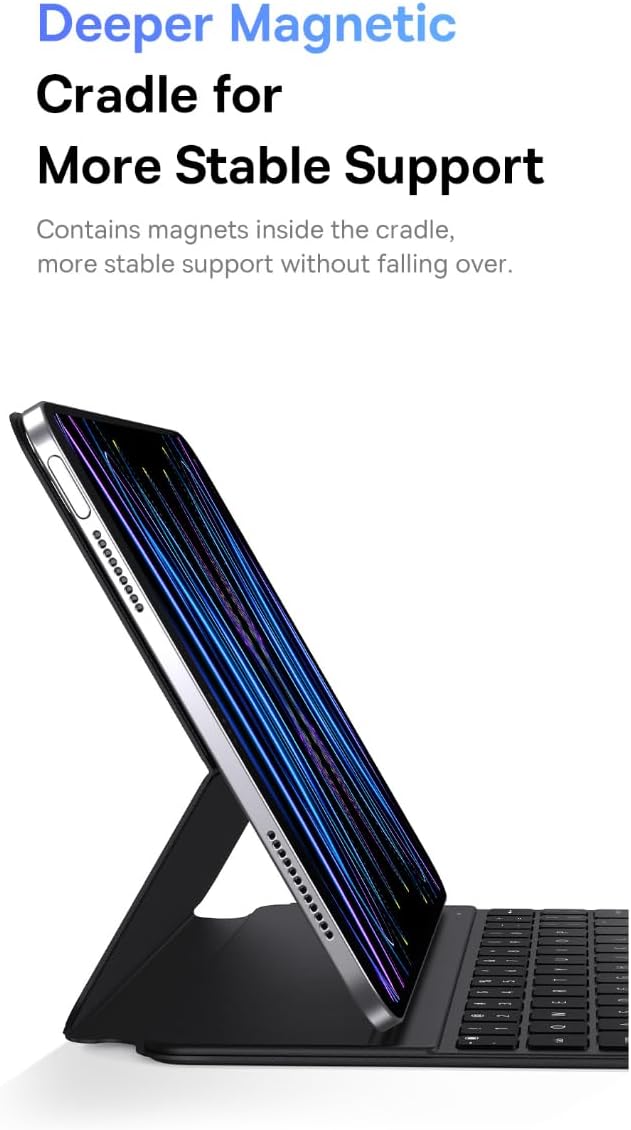
Figure 3.2: The deeper magnetic cradle ensures stable support for the iPad.
4. Орнотуу
4.1 Баскычтопту заряддоо
Before first use, fully charge the keyboard case. Use the provided Type-C cable to connect the keyboard to a power source. The charging indicator light will show the charging status.
- Заряддоо убактысы: Толук кубаттоо үчүн болжол менен 2 саат.
4.2 iPad тиркеңиз
- Баскычтоп кутусун ачыңыз.
- Align your iPad Pro 12.9″ with the magnetic cradle. The magnets will automatically secure the iPad in place.
- Adjust the floating cantilever stand to your desired viewбурч.
4.3 Bluetooth жупташтыруу
To connect the keyboard to your iPad via Bluetooth:
- Баскычтоп кубатталып, күйгүзүлгөнүн текшериңиз.
- iPad'иңизден төмөнкүгө өтүңүз Орнотуулар > Bluetooth жана Bluetooth күйгүзүңүз.
- The iPad will search for nearby Bluetooth devices. Select the Baseus keyboard from the list of available devices.
- Follow any on-screen prompts to complete the pairing process. Once paired, the keyboard will automatically connect to your iPad when both are powered on and within range (approx. 10m).

Figure 4.1: The keyboard case features upgraded Bluetooth 5.3 technology for stable, long-distance transmission.
5. Иштөө нускамалары
5.1 Терүү
The keyboard features a scissor mechanism for comfortable and responsive typing. Simply place your iPad in the magnetic cradle and begin typing as you would on a traditional laptop keyboard.

Figure 5.1: The dull-polished keycaps provide a better grip for a smooth and comfortable typing experience.
5.2 Тууралоо Viewбурчтар
The floating cantilever stand allows for multiple viewing angles. Gently adjust the iPad's position within the magnetic cradle to find the most comfortable angle for typing, drawing, or media consumption.
5.3 Электр энергиясын башкаруу
The keyboard case offers an impressive 150 hours of continuous use on a single charge. To conserve battery life, the keyboard will automatically enter sleep mode after a period of inactivity. Press any key to wake it up.
6. Техникалык тейлөө
Клавиатураңыздын кутучасынын узак мөөнөттүү жана оптималдуу иштешин камсыз кылуу үчүн, төмөнкү тейлөө көрсөтмөлөрүн аткарыңыз:
- Тазалоо: Use a soft, dry, lint-free cloth to wipe the exterior of the case. For stubborn marks on the PU leather, a slightly damp кездемени колдонсо болот, андан кийин дароо кургатуу. Катуу химиялык заттардан же абразивдүү тазалагычтардан алыс болуңуз.
- Сактагыч: Колдонулбаган учурда, клавиатура корпусун күн тийбеген жана өтө температурадан алыс, салкын, кургак жерде сактаңыз.
- Коргоо: While the case offers comprehensive protection, avoid dropping it or exposing it to excessive force.
7. Кыйынчылыктарды
If you encounter any issues with your Baseus Brilliance Series Magnetic Keyboard Case, please refer to the following common solutions:
| Көйгөй | Мүмкүн себеп | Чечим |
|---|---|---|
| Баскычтоп Bluetooth аркылуу туташпай жатат. | Keyboard battery low; Bluetooth off on iPad; not paired correctly; out of range. | Charge the keyboard. Ensure Bluetooth is enabled on your iPad. Re-pair the keyboard by forgetting the device on your iPad and repeating the pairing steps. Ensure the keyboard is within 10m of the iPad. |
| Ачкычтар жооп бербейт. | Keyboard battery low; connection issue. | Charge the keyboard. Check Bluetooth connection. If the issue persists, restart both the iPad and the keyboard. |
| iPad not stable in the case. | iPad not correctly seated in the magnetic cradle. | Ensure the iPad is fully aligned and seated within the magnetic cradle. The magnets should provide a firm hold. |
| Клавиатура күйбөй жатат. | Батарея түгөнүп калды. | Connect the keyboard to a power source using the Type-C cable and allow it to charge for at least 15 minutes before attempting to turn it on again. |
8. Техникалык шарттар
Detailed specifications for the Baseus Brilliance Series Magnetic Keyboard Case:

Figure 8.1: Comprehensive specifications for the keyboard case.
| Өзгөчөлүк | Деталь |
|---|---|
| Бренд | Baseus |
| Модел | P40112602111-04 |
| Шайкеш түзмөктөр | iPad Pro 12.9″ (2018-2022), Pad (2019/2020/2021) 10.2″, Pad 10 (2022) 10.9″, Pad Air4/Air5 10.9″, Pad Pro (2018/2020/2021/2022) 11″, Pad mini 6 8.3″ |
| Байланыш технологиясы | Bluetooth 5.3 |
| Bluetooth туташуу аралыгы | Болжол менен. 10м |
| Keyboard Description | Өз алдынча |
| Материалдын түрү | PU leather + plastic |
| Элемент Салмагы | 519 г |
| Өзгөчөлүктөр | Ultra-Thin Design, Scissor Mechanism, Magnetic Cradle, Floating Cantilever Stand |
| Power Source | Батарея менен иштейт |
| Батарея сыйымдуулугу | 300mAh |
| Заряддоо убактысы | Болжол менен 2 саат |
| Үзгүлтүксүз колдонуу убактысы | Болжол менен 150 саат |
| Аксессуарлар камтылган | Type-C кабели |
9. Кепилдик жана колдоо
This product comes with a warranty card included in the package. Please refer to the warranty card for specific terms and conditions regarding warranty coverage. For technical support or further inquiries, please contact Baseus customer service through the official Baseus webсайт же сатып алуу пункту.


