Introduction
Thank you for choosing the LIORQUE Colorful Digital Alarm Clock. This manual provides detailed instructions for setting up and operating your new alarm clock. Please read it carefully to ensure proper use and to fully utilize all its features.

The LIORQUE Colorful Digital Alarm Clock features a vibrant LED display showing time and temperature.
Пакеттин мазмуну
- LIORQUE Colorful Digital Alarm Clock
- USB заряддоо кабели
- Колдонуучунун Колдонмосу (бул документ)
Note: AAA batteries are not included and must be purchased separately for battery power option.
Продукт бүттүview
Familiarize yourself with the clock's components and controls.
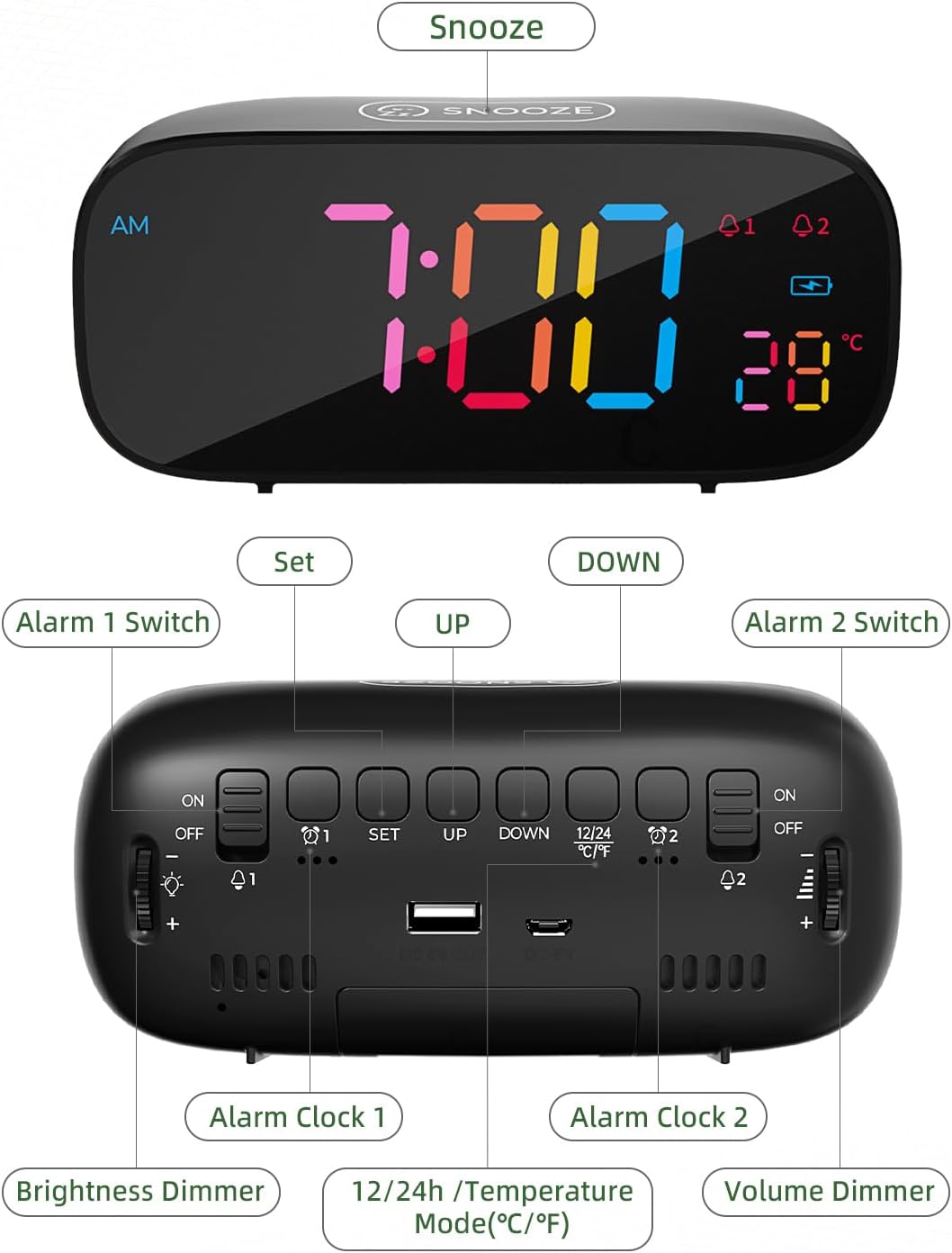
Деталдаштырылган view of the alarm clock's top and rear controls.
Башкаруу баскычтары:
- SNOOZE Button (Top): Activates snooze function, provides 10 extra minutes of sleep.
- ALARM 1 Switch (Rear): Toggles Alarm 1 ON/OFF.
- SET Button (Rear): Enters time/alarm setting mode.
- UP Button (Rear): Increases values during setting, switches 12/24H mode.
- DOWN Button (Rear): Decreases values during setting, switches Celsius/Fahrenheit.
- ALARM 2 Switch (Rear): Toggles Alarm 2 ON/OFF.
- Brightness Dimmer (Side): Rotary knob to adjust display brightness (0-100%).
- Volume Dimmer (Side): Rotary knob to adjust alarm volume.
- DC 5V Input (Rear): For USB power cable.
- USB Output (Rear): Тышкы түзмөктөрдү кубаттоо үчүн.
- Battery Compartment (Bottom): Holds 3x AAA batteries for backup power.
Жайгашуу
1. Саатты иштетүү
The LIORQUE alarm clock offers dual power options:
- Электр зымдары: Connect the provided USB charging cable to the DC 5V input port on the back of the clock and plug the other end into a USB power adapter (not included) or a powered USB port. This is the primary power source.
- Батареянын камдык көчүрмөсү: Бийлик үчүнtage protection and to retain settings, insert 3 AAA batteries (not included) into the battery compartment on the bottom of the clock. The clock can also operate solely on battery power, but the display will only light up briefly when a button is pressed to conserve energy.

The clock can be powered by USB cable and supports battery backup. It also features a USB output for charging other devices.
2. Баштапкы убакытты орнотуу
- басып, кармап туруңуз SET Сааттын арткы бетиндеги баскычты басыңыз. Сааттын сандары күйүп-өчө баштайт.
- колдонуу UP or ылдый саатты тууралоо үчүн баскычтар.
- Басыңыз SET Саатты ырастоо жана мүнөт коюуга өтүү үчүн кайрадан басыңыз. Мүнөт сандары күйүп-өчүп турат.
- колдонуу UP or ылдый мүнөттөрдү тууралоо үчүн баскычтар.
- Басыңыз SET Мүнөттөрдү ырастоо жана убакытты коюу режиминен чыгуу үчүн кайрадан басыңыз.
Иштөө нускамалары
1. Сигнализацияларды орнотуу (1-сигнализация жана 2-сигнализация)
The clock features two independent alarms. The process is identical for both.
- Ойготкуч 1 коюу үчүн, басыңыз SET button once (do not hold). The Alarm 1 icon (A1) will appear, and the hour digits will flash.
- колдонуу UP or ылдый ойготкуч саатын тууралоо үчүн баскычтар.
- Басыңыз SET Саатты ырастоо жана мүнөт коюуга өтүү үчүн кайрадан басыңыз. Мүнөт сандары күйүп-өчүп турат.
- колдонуу UP or ылдый ойготкуч мүнөттөрдү тууралоо үчүн баскычтар.
- Басыңыз SET again to confirm the minutes and move to alarm tone selection.
- колдонуу UP or ылдый buttons to cycle through the 8 available alarm tones.
- Басыңыз SET again to confirm the alarm tone and exit alarm setting mode.
- To activate Alarm 1, slide the ALARM 1 Switch on the back to the ON position. The Alarm 1 icon will remain lit on the display.
- 2-сигнализация үчүн процессти төмөнкүнү колдонуп кайталаңыз ALARM 2 Switch and corresponding settings.

Set two distinct alarms to manage your schedule effectively.

Choose from 8 diverse alarm tones, including natural sounds and melodies.
2. Тындырма функциясы
Ойготкуч чыкканда чоң баскычты басыңыз СОЮЗ button on the top of the clock. The alarm will pause and sound again after 10 minutes. To turn off the alarm completely, press any other button on the back of the clock, or slide the corresponding alarm switch to OFF.

Activate the snooze function for an additional 10 minutes of rest.
3. Жарыктыкты жөндөө
The display brightness can be adjusted from 0% to 100% using the rotary Brightness Dimmer knob located on the side of the clock. Rotate the knob to achieve your preferred comfort level.

Customize the display brightness for optimal visibility day or night.
4. Үндү тууралоо
The alarm volume can be adjusted using the rotary Volume Dimmer knob located on the side of the clock. Rotate the knob to increase or decrease the alarm sound level.
5. 12/24 саат форматы
To switch between 12-hour and 24-hour time display formats, briefly press the UP button (labeled 12/24H) on the back of the clock when not in setting mode. In 12-hour format, an "AM" or "PM" indicator will be displayed.
6. Температураны чагылдыруу
The clock displays the indoor temperature. To switch between Celsius (℃) and Fahrenheit (℉) units, briefly press the ылдый button (labeled ℃/℉) on the back of the clock when not in setting mode.

The clock provides an indoor temperature reading, switchable between Celsius and Fahrenheit.
7. USB кубаттоочу порт
The clock features a USB output port on the back, allowing you to charge external devices such as smartphones or tablets while the clock is powered via its USB cable.
Техникалык тейлөө
- Саатты жумшак, кургак чүпүрөк менен тазалаңыз. Абразивдүү тазалагычтарды же эриткичтерди колдонбоңуз.
- Саатты өтө жогорку температурага, түз күн нуруна же жогорку нымдуулукка дуушар кылбаңыз.
- If using batteries, replace them annually or when the display becomes dim (in battery-only mode) to ensure proper function and prevent leakage.
Проблемаларды чечүү
| Көйгөй | Мүмкүн себеп | Чечим |
|---|---|---|
| Дисплей бош же күңүрт. | No power, low batteries, or brightness set too low. | Ensure USB cable is connected and powered. Replace AAA batteries if using battery-only mode. Adjust Brightness Dimmer knob. |
| Ойготкуч угулбайт. | Alarm not activated, volume too low, or incorrect alarm time. | Check if Alarm 1/2 switch is ON. Adjust Volume Dimmer knob. Verify alarm time is set correctly. |
| Убакыт/Ойготкуч жөндөөлөрү баштапкы абалга келтирилди. | Күч алtage without battery backup, or dead backup batteries. | Ensure AAA batteries are installed and fresh for backup. |
| USB заряддоо порту иштебей жатат. | Clock not powered by USB cable, or device incompatible. | Ensure the clock is connected to a power source via its USB cable. Try a different device or cable. |
Техникалык шарттар
- Бренд: ЛИОРК
- Модел: Colorful Digital Alarm Clock
- Дисплей түрү: Digital LED
- Түсү: Кара
- Продукциянын өлчөмдөрү: 16.3 x 3.81 x 9.6 см
- Элемент Салмагы: 290 г
- Өзгөчөлүктөр: Adjustable Brightness, Adjustable Volume, Dual Alarms, Snooze, Temperature Display (℃/℉), 12/24H Format, USB Charging Port
- Кубат булагы: Corded Electric (USB DC 5V) & Battery Powered (3x AAA, not included)
- Бөлмө түрү: Уктоочу бөлмө
Кепилдик жана колдоо
LIORQUE products are designed for reliability and performance. For any questions, technical support, or warranty inquiries, please refer to the contact information provided with your purchase or visit the official LIORQUE webсайт. Кепилдик дооматтары үчүн сатып алганыңыздын далилин сактап коюңуз.


