Introduction
Welcome to the user manual for your new Altice F2 GSM Mobile Phone. This guide provides comprehensive instructions to help you set up, operate, maintain, and troubleshoot your device. Please read this manual carefully to ensure proper use and to maximize the performance of your phone.
Продукт бүттүview
The Altice F2 is a practical and user-friendly mobile phone designed for essential communication. It features dual SIM capability, a compact design, and a long-lasting battery.
Негизги өзгөчөлүктөрү:
- Dual SIM functionality for convenient usage.
- 0.08 MP rear camera for basic photography.
- Bluetooth 3.0 for wireless document and music sharing.
- Integrated FM Radio.
- Камтылган кол чырак.
- Micro-SD card slot, expandable up to 32 GB (memory card not included).
- 1000 mAh Lithium-ion battery providing up to 10 days standby or 10 hours talk time.
- Supported languages: French, English, Spanish, Portuguese.
Пакеттин мазмуну:
Кутучаны ачканда, төмөндө көрсөтүлгөн бардык буюмдар бар экенин текшериңиз:
- 1x Altice F2 Mobile Phone
- 1x Батарея
- 1x Pair of Earphones
- 1x заряддагыч
- 1x колдонуучунун колдонмосу
- 1x Notice (Additional documentation)

Сүрөт 1: Алдыңкы жана арткы view of the Altice F2 GSM Mobile Phone. The phone is black with a physical keypad and a small display screen. The back shows the camera lens.
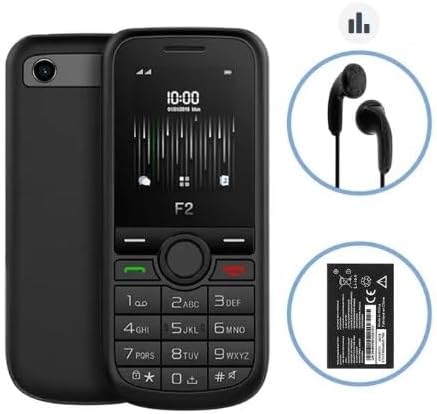
Image 2: The Altice F2 Mobile Phone displayed alongside its included accessories: a pair of black wired earphones and the removable Lithium-ion battery.
Жайгашуу
1. Батареяны орнотуу:
- Gently remove the back cover of the phone by prying it from the notch usually located at the bottom or side.
- Батареянын контакттарын батарея бөлүмүнүн ичиндеги терминалдар менен тегиздеңиз.
- Press the battery down firmly until it is securely in place.
- Арткы капкакты ордуна коюңуз, анын чыкылдаганын текшериңиз.
2. SIM Card(s) Installation:
The Altice F2 supports dual SIM cards.
- With the back cover and battery removed, locate the SIM card slots. There are typically two slots labeled SIM1 and SIM2.
- Insert your SIM card(s) into the respective slots with the gold contacts facing down and the cut corner aligned as indicated.
- Ensure the SIM cards are fully inserted.
3. Micro-SD Card Installation (Optional):
To expand storage, you can install a Micro-SD card (up to 32 GB).
- Locate the Micro-SD card slot, usually adjacent to the SIM card slots.
- Insert the Micro-SD card with the gold contacts facing down until it clicks into place.
4. Алгачкы кубаттоо:
Биринчи жолу колдонуудан мурун, телефондун батарейкасын толугу менен заряддаңыз.
- Заряддагычты телефондун заряддоо портуна туташтырыңыз.
- Заряддоо түзүлүштү розеткага сайыңыз.
- Allow the phone to charge until the battery indicator shows full. This may take several hours for the first charge.
5. Күйгүзүү/өчүрүү:
- Күйгүзүү үчүн: Press and hold the Power/End Call button (usually red or marked with a power symbol) until the screen lights up.
- Өчүрүү үчүн: Press and hold the Power/End Call button until a power-off menu appears, then select "Power Off" or similar option.
Иштөө нускамалары
Чалууларды жасоо:
- Үй экранынан баскычтопту колдонуп телефон номерин киргизиңиз.
- Press the Call button (usually green or marked with a phone symbol) to initiate the call.
- Чалууну аяктоо үчүн, Чалууну аяктоо баскычын (адатта кызыл түстө) басыңыз.
Кабарларды жөнөтүү:
- Негизги менюдан "Билдирүүлөр" же "SMS" менюсуна өтүңүз.
- "Жаңы билдирүү" же "Кабар түзүү" тандаңыз.
- Алуучунун телефон номерин киргизиңиз же байланыштардан тандаңыз.
- Ариптакта аркылуу билдирүүңүздү териңиз.
- "Жөнөтүү" баскычын басыңыз.
Камераны колдонуу:
- Access the "Camera" application from the main menu.
- Кадрыңызды экран катары колдонуп кадрга тартыңыз viewтапкыч.
- Press the designated camera button or the center navigation key to capture the photo.
FM радиосу:
To use the FM Radio, ensure the earphones are plugged into the 3.5mm audio jack, as they act as the antenna.
- Plug in the earphones.
- Go to the "FM Radio" application in the menu.
- Станцияларды издөө же кол менен жөндөө үчүн навигация баскычтарын колдонуңуз.
Bluetooth байланышы:
- "Орнотуулар" > "Bluetooth" бөлүмүнө өтүңүз.
- Bluetooth'ту "күйгүзүңүз".
- тандоо "Издөө түзмөктөр" же "Жаңы түзмөктү жупташтыруу".
- Тизмеден каалаган түзмөктү тандап, жупташтыруу үчүн экрандагы көрсөтмөлөрдү аткарыңыз.
Кол чырак:
The flashlight can usually be activated quickly from the home screen or through a dedicated menu option.
- Check your phone's specific shortcut (e.g., long-press a key) or find "Flashlight" in the Tools/Utilities menu.
Техникалык тейлөө
Тазалоо:
- Use a soft, lint-free cloth to clean the phone's screen and body.
- Күчтүү химиялык заттарды, тазалоочу аэрозолдорду же абразивдүү материалдарды колдонуудан алыс болуңуз.
Батареяга кам көрүү:
- Батареяны экстремалдуу температурага калтырбаңыз.
- Түпнуска же бекитилген кубаттагычты гана колдонуңуз.
- Батареянын иштөө мөөнөтүн узартуу үчүн бат-баттан батареяны толугу менен түгөтпөңүз.
Сактагыч:
- Телефонду салкын, кургак жерде, күн нуру түз тийбеген жана нымдуулуктан алыс сактаңыз.
- Эгерде сиз аны узак убакытка сактасаңыз, анда батарейканын жарым-жартылай заряддалганын (болжол менен 50%) текшериңиз.
Проблемаларды чечүү
If you encounter issues with your Altice F2 phone, refer to the common problems and solutions below:
Phone Does Not Turn On:
- Батарея туура орнотулганын жана толук заряддалганын текшериңиз.
- Try connecting the charger and attempting to power on while connected.
- Verify the charger and charging cable are not damaged.
Тармак сигналы жок:
- SIM карта туура салынганын текшериңиз.
- Тармактын камтуусу бар аймакта экениңизди текшериңиз.
- Телефонду кайра күйгүзүңүз.
- Verify with your service provider if there are any network issues in your area or with your SIM card.
Батарея бат эле түгөнөт:
- Экран жарыктыгын азайтыңыз.
- Колдонулбаган колдонмолорду жабуу.
- Turn off Bluetooth when not in use.
- Эгер маселе чечилбесе, батареяны алмаштыруу керек болушу мүмкүн.
Cannot Connect to Bluetooth Device:
- Bluetooth эки түзмөктө тең иштетилгенин текшериңиз.
- Make sure both devices are within the effective Bluetooth range (typically 10 meters).
- Түзмөктөрдү ажыратып, кайра жупташтырып көрүңүз.
Техникалык шарттар
| Өзгөчөлүк | Деталь |
|---|---|
| Модел | F2 |
| Өлчөмдөрү (L x W x Y) | 11.00 x 4.80 x 1.40 см |
| Жалпы салмак | 77г |
| Screen Size | 1.7 inches (4.5 cm) / 1.77 inches |
| Bluetooth версиясы | 3.0 |
| Тармак түрү | 2G |
| GSM жыштыктары | 900/1800 МГц |
| Аудио Jack | 3.5 мм |
| Батарея түрү | Литий-ион |
| Батарея сыйымдуулугу | 1000 мАч |
| Кеңейтүүчү сактагыч | Micro-SD up to 32 GB (card not included) |
| Өндүрүүчү | SFR / Mobiwire SAS |
| Түс | Кара |
| Операция системасы | Android 10.0 |
| Эстутум сактоо сыйымдуулугу | 32 ГБ |
| Резолюция | 1548 x 862 |
Эскертүү: Техникалык мүнөздөмөлөр алдын ала эскертүүсүз өзгөртүлүшү мүмкүн.
Кепилдик жана колдоо
For warranty information, please refer to the warranty card included in your product packaging or visit the manufacturer's official webсайт. Кепилдиктин шарттары аймакка жана сатуучуга жараша өзгөрүшү мүмкүн.
For technical support, troubleshooting assistance beyond this manual, or service inquiries, please contact the retailer or the manufacturer's customer service department. Contact details are typically available on the product packaging or the official brand webсайт.
- Өндүрүүчү: SFR / Mobiwire SAS
- Модел: Altice F2


