1. Продукт бүтүп калдыview
The PELADN Mini PC WI-6 is a compact and powerful desktop computer designed for various applications, including light office work, 4K video playback, online education, and design tasks. It features the latest 12th Gen Alder Lake-N100 Processor, 16GB DDR4 RAM, and a 512GB M.2 PCIe SSD, offering efficient performance in a small form factor.

Сүрөт 1.1: Алдыңкы view of the PELADN Mini PC WI-6, showcasing its compact design and sleek blue finish.
Негизги өзгөчөлүктөрү:
- Күчтүү процессор: Equipped with the 12th Gen Alder Lake-N100 Processor (4C/4T, up to 3.4GHz) for enhanced performance.
- AmpЭстутум жана сактоо: 16GB DDR4 RAM and 512GB M.2 SSD, with upgrade friendly options.
- 4K Dual Screen Display: Supports 4K video playback and dual 4K@60Hz displays via two HD 2.0 ports.
- Ар тараптуу байланыш: Features Gigabit Ethernet, 2.4G+5.0G dual-band WiFi, and Bluetooth 4.2.
- Компакт дизайн: Lightweight and portable, measuring 124mm x 112mm x 35mm, with VESA mount support.
- Натыйжалуу муздатуу: Built-in fan cooling system to prevent overheating during multitasking.

Figure 1.2: Diagram illustrating the key features of the PELADN Mini PC, including processor, memory, storage, graphics, and connectivity options.
2. Пакеттин мазмуну
Сураныч, кутудан чыгарганда пакеттин мазмунун текшериңиз, бардык буюмдар бар жана жакшы абалда.
- 1 x PELADN Mini PC WI-6
- 1 х кубат адаптери
- 1 х HD Cable
- 1 x User Manual
- 1 x Wall-Mounted Bracket (VESA mount)
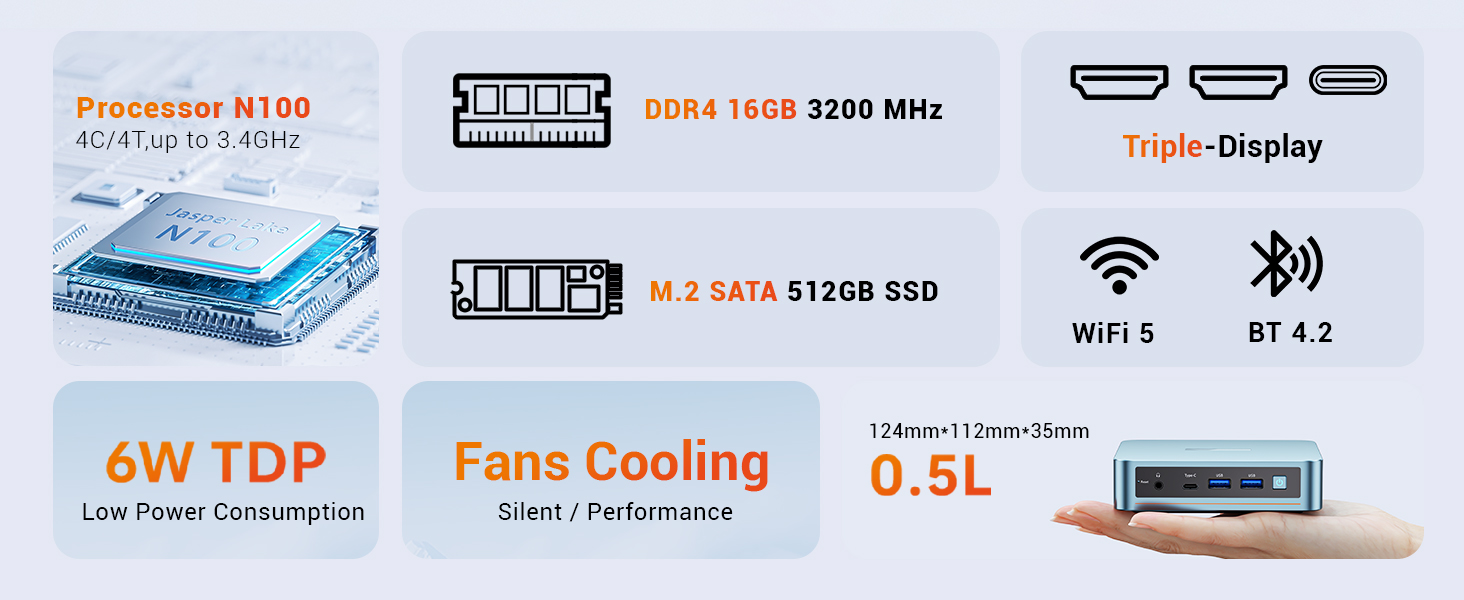
Figure 2.1: An illustration of the items included in the PELADN Mini PC package, such as the PC unit, power adapter, HD cable, user manual, and VESA mount.
3. Орнотуу колдонмосу
3.1 Перифериялык түзүлүштөрдү туташтыруу
Before powering on your Mini PC, connect the necessary peripherals.
- Дисплейди туташтыруу: Use the provided HD cable to connect your monitor(s) to the HD ports on the back of the Mini PC. The device supports dual 4K@60Hz displays.
- Баскычтоп менен чычканды туташтыруу: Plug your wired or wireless keyboard and mouse into the available USB ports (USB 2.0 or USB 3.0). For initial setup, a wired keyboard and mouse are recommended.
- Тармакка туташуу: For a wired connection, plug an Ethernet cable into the RJ45 LAN port. For wireless, ensure your WiFi network is available.
- Туташуу кубаты: Plug the power adapter into the DC 12V port on the Mini PC, then connect the adapter to a power outlet.

3.1-сүрөт: Детальдуу view of the PELADN Mini PC's front and rear ports, including HD, USB 2.0, RJ45 LAN, DC 12V, Earphone, Type-C, and USB 3.0 ports.
3.2 Күйгүзүү жана баштапкы орнотуу
Once all peripherals are connected:
- Press the Power Button located on the front of the Mini PC.
- The device will boot up. As Windows 11 is pre-installed, you will be guided through the initial Windows setup process, including language selection, network configuration, and user account creation.
- Орнотууну аяктоо үчүн экрандагы нускамаларды аткарыңыз.
3.3 VESA орнотуу (милдеттүү эмес)
The included VESA mount allows you to attach the Mini PC to the back of a compatible monitor or TV, saving desk space.
- Secure the VESA bracket to the Mini PC using the provided screws.
- Attach the Mini PC with the bracket to the VESA mounting holes on the back of your display, securing it with screws.

Figure 3.2: Step-by-step guide on how to install the PELADN Mini PC using the VESA mount, showing attachment to the back of a monitor.
4. Иштөө нускамалары
4.1 Негизги колдонуу
The PELADN Mini PC is optimized for everyday computing tasks.
- Office колдонмолору: Run Microsoft Office suite and other productivity software smoothly.
- Web Серептөө: Enjoy fast and responsive internet browsing.
- 4K видео ойнотуу: Stream and play 4K content with ease, ideal for home theater setups.
- Көп тапшырма: The N100 processor and 16GB RAM allow for efficient switching between multiple applications.

Figure 4.1: An image depicting the PELADN Mini PC in an office setting, demonstrating its suitability for business and everyday use.
4.2 Дисплейдин конфигурациясы
Utilize the dual HD 2.0 ports for extended desktop or mirrored display setups.
- Connect two monitors to the HD ports for a dual-screen workspace.
- Adjust display settings (resolution, orientation) through Windows Display Settings.
4.3 Тармак жана Bluetooth
The Mini PC offers flexible connectivity options:
- Wi-Fi: Connect to 2.4G or 5.0G wireless networks for internet access.
- Ethernet: For a stable and fast connection, use the Gigabit Ethernet port.
- Bluetooth 4.2: Pair Bluetooth-enabled devices such as headphones, speakers, or input devices.
5. Техникалык тейлөө
5.1 Жалпы кам көрүү
- Keep the Mini PC in a clean, dry environment, away from direct sunlight and extreme temperatures.
- Avoid placing objects on top of the unit that could obstruct airflow.
- Сыртын жумшак, кургак чүпүрөк менен тазалаңыз. Суюк тазалоочу каражаттарды колдонбоңуз.
5.2 Муздатуу системасы
The PELADN Mini PC features a built-in cooling fan to maintain optimal operating temperatures. Ensure the ventilation holes are not blocked to allow proper airflow.

5.1-сүрөт: жарылган view of the PELADN Mini PC, highlighting the internal components including the cooling fan and SSD, which contribute to its silent and efficient performance.
5.3 Программалык камсыздоо жаңыртуулары
Regularly update your Windows operating system and drivers to ensure system stability, security, and optimal performance.
- Windows жөндөөлөрү > Жаңыртуу жана коопсуздук > Windows жаңыртуусу бөлүмүнө өтүңүз.
- Check for and install any available updates.
6. Кыйынчылыктарды
This section addresses common issues you might encounter with your PELADN Mini PC.
| Көйгөй | Мүмкүн себеп | Чечим |
|---|---|---|
| Кубат жок/Күйгүзбөйт | Кубат адаптери туура эмес туташтырылган; розеткада көйгөй бар. | Ensure power adapter is securely connected to both the PC and the power outlet. Try a different outlet. |
| Монитордо дисплей жок | HD cable loose or faulty; Incorrect input selected on monitor. | Check HD cable connections. Ensure monitor is set to the correct input source (e.g., HDMI 1, HDMI 2). Try a different HD cable or monitor. |
| No internet connection (Wi-Fi) | Wi-Fi өчүрүлгөн; Туура эмес сырсөз; Роутердеги көйгөй. | Check Wi-Fi settings in Windows. Verify Wi-Fi password. Restart your router. |
| No internet connection (Ethernet) | Ethernet cable loose or faulty; Network driver issue. | Ensure Ethernet cable is securely connected. Try a different cable. Check network adapter status in Device Manager. |
| System slow or unresponsive | Өтө көп тиркемелер иштеп жатат; Сактоо орду аз; Ысып кетүү. | Close unnecessary applications. Free up disk space. Ensure proper ventilation around the PC. |
For more advanced troubleshooting or persistent issues, please refer to the official PELADN support resources or contact customer service.
Өркүндөтүлгөн өзгөчөлүктөр:
- Авто күйгүзүү: Configure in BIOS for automatic startup.
- Wake on LAN (WoL): Enable in BIOS and network adapter settings to wake the PC remotely.
- PXE жүктөө: Preboot Execution Environment support for network booting.
7. Техникалык шарттар
| Өзгөчөлүк | Деталь |
|---|---|
| Бренд | ПЕЛАДН |
| Модель номери | WI-6 |
| Процессор | 12th Gen Intel Alder Lake-N100 (4C/4T, up to 3.4GHz, 6W TDP) |
| RAM | 16GB DDR4 (Max 3200MHz) |
| Сактагыч | 512GB M.2 PCIe SSD |
| Графика | Intel UHD Graphics (750MHz max), Integrated |
| Display Output | 2 x HD 2.0 (Supports 4K@60Hz Dual Display) |
| USB порттору | 2 x USB 3.0, 2 x USB 2.0, 1 x Type-C (Data/Video) |
| Network | Gigabit Ethernet (RJ45), Wi-Fi 2.4G+5.0G |
| Bluetooth | Bluetooth 4.2 |
| Аудио | 1 x Audio Jack (HP&MIC) |
| Операция системасы | Windows 11 Pro (Алдын ала орнотулган) |
| Өлчөмдөрү (LxWxH) | 4.88 x 4.41 x 1.38 дюйм (124 мм x 112 мм x 35 мм) |
| Салмагы | 1.76 фунт |
| Түс | Көк |
8. Кепилдик жана колдоо
PELADN is committed to providing high-quality products and excellent customer service.
- Кепилдик: The PELADN Mini PC comes with a 12-month (1 year) warranty from the date of purchase.
- Кайтаруулар: Enjoy a 30-day no-reason return and exchange policy.
- Техникалык колдоо: Professional technical staff are available to assist you.
- Жооп убактысы: Бардык суроолорго 24 сааттын ичинде жооп берүүгө ниеттенип жатабыз.
For support, please visit the official PELADN store or contact their customer service directly. You can find more information and contact details at the PELADN Store on Amazon.
Figure 8.1: An image detailing PELADN's customer support offerings, including technical support, 24-hour reply, 30-day return policy, and 12-month warranty.


