Introduction
This manual provides detailed instructions for the SUNOL GM20 True Wireless Earbuds. Please read this manual carefully before using the product to ensure proper operation and to maximize your listening experience. These earbuds feature Bluetooth 5.3 connectivity, a waterproof design, and a charging case with an LED display.
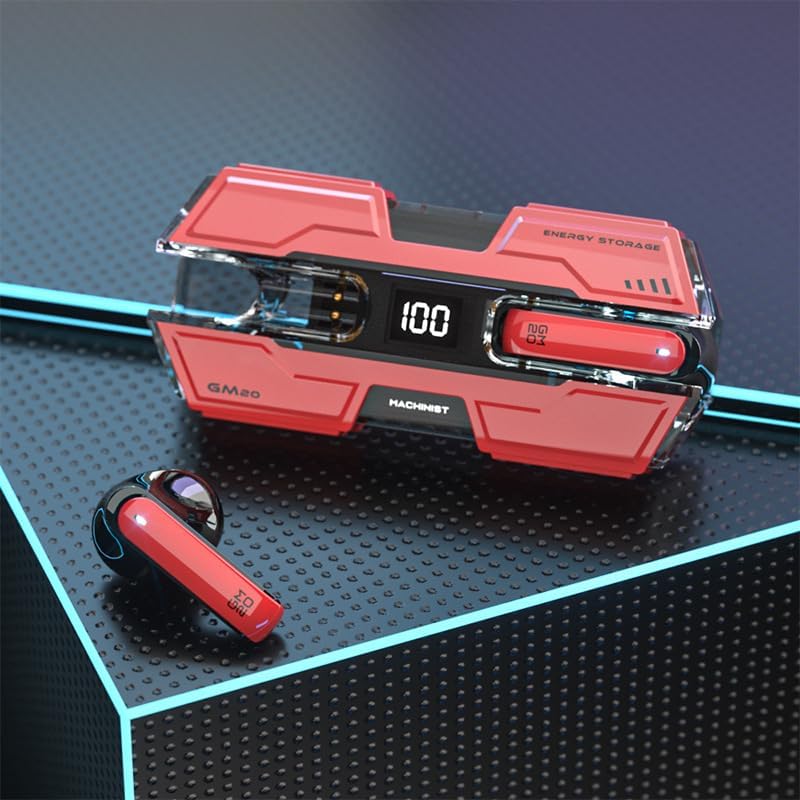
Image: The SUNOL GM20 True Wireless Earbuds with their charging case, showcasing the design and LED display.
Пакеттин мазмуну
Пакетте бардык буюмдар бар экенин текшериңиз:
- GM20 True Wireless Earbuds (Left and Right)
- Заряддоо кутусу
- Заряддоо кабели
- User Manual
- Кулак учтарынын бир нече өлчөмү
Продукт өзгөчөлүктөрү
- Bluetooth 5.3 технологиясы: Offers faster pairing, stable connection, and lower power consumption with an effective range of up to 10 meters.
- 48-Hour Playback: The charging case provides multiple charges, extending total listening time.
- IPX8 Суу өткөрбөйт: Designed to withstand water exposure, suitable for sports and outdoor activities.
- LED дисплей: The charging case features an LED display to show battery life.
- Deep Bass Audio: Equipped with a 14mm dynamic bass unit for enhanced sound quality.
- Камтылган микрофон: Supports hands-free calls with environmental noise reduction.
- Эргономикалык дизайн: Жеңил жана узакка колдонууга ыңгайлуу.

Image: The GM20 earbuds and charging case, emphasizing Bluetooth 5.3 and high-definition sound quality.

Сүрөт: жарылган view diagram illustrating the internal components of the earbud, highlighting the 13mm moving coil and composite diaphragm for high-fidelity sound.
Жайгашуу
1. Кулакчындарды кубаттоо жана заряддоо куту
Before first use, fully charge the earbuds and the charging case. Connect the provided charging cable to the charging case and a USB power source. The LED display on the charging case will indicate the charging status and battery level. When charging the earbuds inside the case, the display will show their individual battery life.
2. Күйгүзүү / Өчүрүү
- Күйгүзүү: Кулакчындар кубаттоочу кутудан чыгарылганда автоматтык түрдө күйөт.
- Өчүрүү: Кулакчындарды автоматтык түрдө өчүрүп, кубаттап баштоо үчүн аларды кайра кубаттоочу кутуга салыңыз.
3. Түзмөк менен жупташтыруу
Кулакчындар ыңгайлуулук үчүн бир кадам жупташтырууга жардам берет.
- Кулакчындардын кубатталганын текшериңиз.
- Open the charging case and remove both earbuds. They will automatically power on and attempt to connect to each other.
- After approximately 10 seconds, the earbuds will enter pairing mode.
- Түзмөгүңүздө (смартфон, планшет ж.б.) Bluetooth иштетиңиз жана жеткиликтүү түзмөктөрдү издеңиз.
- Select "GM20 TWS" from the list of found devices to complete the pairing process.
- Once paired, the earbuds will automatically connect to the last paired device when removed from the charging case.

Image: The GM20 earbuds and charging case, illustrating the quick connect and pairing process with a smartphone.
Иштөө нускамалары
1. Кулакчын тагынуу
Select the ear tips that provide the most comfortable and secure fit. Insert the earbuds gently into your ear canal and rotate slightly until they feel snug. A proper fit ensures optimal sound quality and noise isolation.
2. Негизги башкаруу элементтери
The earbuds feature a multifunction button for various controls:
- Музыканы ойнотуу/тындыруу: Single press the multifunction button on either earbud.
- Кийинки ыр: Double press the multifunction button on the right earbud.
- Мурунку ыр: Double press the multifunction button on the left earbud.
- Чалууга жооп берүү/аяктоо: Single press the multifunction button on either earbud during an incoming call or active call.
- Чакырууну четке кагуу: Press and hold the multifunction button on either earbud during an incoming call.
- Үндү көзөмөлдөө: (Note: Specific volume control via earbuds is not detailed in product information. Adjust volume via your connected device.)
3. Waterproof Functionality
The GM20 earbuds are designed with an IPX8 waterproof nano-coating, making them resistant to water. This feature makes them suitable for activities such as running, cycling, and other sports where exposure to sweat or light rain may occur. Avoid prolonged submersion in water.

Image: The GM20 earbuds and charging case in a gaming context, highlighting fast transmission and no delay for an enhanced experience.
Техникалык тейлөө
1. Тазалоо
Regularly clean your earbuds and charging case to maintain optimal performance and hygiene. Use a soft, dry, lint-free cloth. For stubborn dirt, a slightly damp cloth can be used, but ensure no moisture enters the earbud openings or charging ports. Do not use harsh chemicals or abrasive materials.
2. Сактоо
Колдонбогондо, кулакчындарды чаңдан, бузулуудан жана кубатталган бойдон калуудан сактоо үчүн кубаттоочу кутучага салып сактаңыз. Корпусту күн нурунан жана экстремалдык температурадан алыс салкын, кургак жерде сактаңыз.
3. Батареяга кам көрүү
To prolong battery life, avoid fully discharging the earbuds and charging case frequently. Charge them regularly, even if not in constant use. Do not expose batteries to excessive heat.
Проблемаларды чечүү
- Кулакчындар бири-бири менен жупташпайт: Place both earbuds back into the charging case, close the lid, wait a few seconds, then remove them again. They should automatically connect.
- Кулакчындар түзмөккө туташпай жатат: Ensure Bluetooth is enabled on your device and the earbuds are in pairing mode. Forget "GM20 TWS" from your device's Bluetooth list and try pairing again.
- Бир кулакчындан үн чыкпайт: Check if both earbuds are charged. Try resetting them by placing them in the case and then removing them.
- Заряддоо маселелери: Ensure the charging cable is securely connected and the power source is functional. Clean the charging contacts on both the earbuds and the case.
- Үн сапаты начар: Ensure the earbuds are properly seated in your ears. Try different sized ear tips for a better seal. Check the audio source device for any issues.
Техникалык мүнөздөмөлөр
| Модель аты | GM20 (K8) |
| Bluetooth версиясы | 5.3 |
| Bluetooth диапазону | 10 метрге чейин |
| Батареянын иштөө мөөнөтү (наушник) | Approximately 48 hours with charging case |
| Заряддоо корпусунун батареясы | 600mAh |
| Сууга туруктуулук деңгээли | IPX8 |
| Аудио драйвер түрү | 14мм динамикалык драйвер |
| Жыштык диапазону | 20 Гц - 20 КГц |
| Башкаруу ыкмасы | Сенсор/баскыч |
| Материал | Акрилонитрил бутадиен стирол (ABS) |
Кепилдик маалымат
The SUNOL GM20 True Wireless Earbuds come with a standard manufacturer's warranty. Please refer to the warranty card included in your package or contact customer support for specific details regarding warranty coverage and duration. Keep your proof of purchase for warranty claims.
Кардарларды колдоо
If you encounter any issues not covered in this manual or require further assistance, please contact SUNOL customer support. Contact information can typically be found on the product packaging or the official SUNOL webсайт.


