1. Киришүү
The emporiaSMART.5 Mini is a user-friendly smartphone designed with practical features, especially suitable for seniors. It supports the fast 4G VoLTE mobile network standard for reliable internet connectivity and high-quality calls. Key features include an integrated emergency button for added safety, a compact 4.95-inch screen for easy readability, and a powerful camera system.

Сүрөт 1.1: Алдыңкы view of the emporiaSMART.5 Mini smartphone, showcasing анын компакттуу дизайны.
2. Кутуда эмне бар
Please check the package contents upon unboxing. The emporiaSMART.5 Mini package typically includes:
- emporiaSMART.5 Mini Smartphone
- Additional Battery Cover
- Батарея
- USB-C Cable
- Колдонуучунун Колдонмосу (бул документ)
3. Орнотуу
3.1. Inserting the Battery and SIM Card
- Телефондун арткы капкагын кылдаттык менен алып салыңыз.
- Батареяны анын бөлүмүнө салып, контакттардын туура тегизделгенин текшериңиз.
- Locate the SIM card slot(s). Insert your Nano-SIM card(s) with the gold contacts facing down, following the diagram on the phone.
- If applicable, insert a microSD card into the designated slot for expandable memory.
- Арткы капкакты коопсуз ордуна коюңуз.
3.2. Күйгүзүү / Өчүрүү
- Күйгүзүү үчүн: Press and hold the Power button (usually on the side) until the emporia logo appears on the screen.
- Өчүрүү үчүн: Кубат баскычын басып, кармап туруңуз, андан кийин экрандагы параметрлерден "Өчүрүү" дегенди тандаңыз.
3.3. Баштапкы орнотуу устасы
Upon first power-on, the phone will guide you through an initial setup wizard. Follow the on-screen prompts to:
- Тилиңизди тандаңыз.
- Wi-Fi тармагына туташыңыз.
- Sign in with your Google account (optional, but recommended for app access).
- Экран кулпусун орнотуу (PIN, үлгү же сырсөз).
4. Иштөө нускамалары
4.1. Өзгөчө кырдаал баскычы
The emporiaSMART.5 Mini features a dedicated emergency button for quick assistance. Up to 5 emergency numbers can be programmed. When activated, the phone automatically dials these numbers sequentially until an answer is received. After confirming the emergency call, an emergency SMS is sent to the designated numbers.
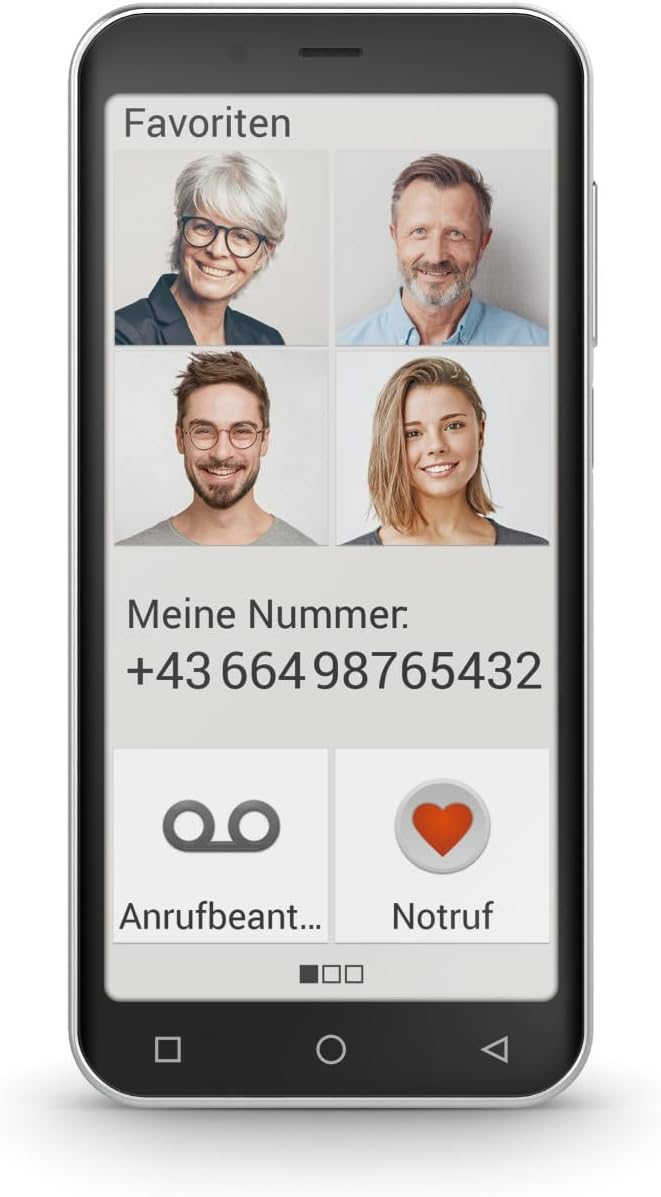
Image 4.1: The phone display showing the 'Favorites' screen with quick dial contacts and a prominent 'Emergency' button.
4.2. Making Calls with 4G VoLTE
The device supports 4G VoLTE technology, ensuring high voice quality and reduced background noise for clear, worry-free calls. It is also hearing aid compatible (M4/T4).
- Чалуу үчүн: Tap the Phone icon, enter the number, and press the call button.
- Чалууга жооп берүү үчүн: Swipe the green phone icon upwards when a call comes in.
4.3. Камеранын иштеши
The emporiaSMART.5 Mini is equipped with a powerful triple main camera (13 + 2 + TOF MP) for capturing high-quality photos and videos, and an 8-megapixel selfie camera for self-portraits.
- To open the camera: Үй экранындагы же колдонмо суурмасындагы Камера сүрөтчөсүн таптаңыз.
- Сүрөткө тартуу үчүн: Экрандагы жапкыч баскычын басыңыз.
- Видео жаздыруу үчүн: Видео режимине которулуп, жаздыруу баскычын басыңыз.
4.4. Android 13 операциялык системасы
The smartphone runs on Android 13, offering a modern and user-friendly interface. This allows access to a wide variety of functions and applications available through the Google Play Store.

Image 4.2: The phone display showing a simplified app grid for easy navigation.
4.5. NFC for Contactless Payments
The device includes NFC (Near Field Communication) functionality, enabling contactless payments where supported. To use NFC, ensure it is enabled in your phone's settings and configure a payment app.
5. Техникалык тейлөө
- Тазалоо: Use a soft, dry cloth to clean the screen and body of the phone. Avoid harsh chemicals or abrasive materials.
- Батареяга кам көрүү: To prolong battery life, avoid extreme temperatures and do not let the battery fully discharge frequently.
- Программалык камсыздоо жаңыртуулары: Оптималдуу аткарууну жана коопсуздукту камсыз кылуу үчүн программалык камсыздоо жаңыртууларын дайыма текшерип, орнотуп алыңыз.
- Сактагычты башкаруу: Мезгил-мезгили менен ачык-айкын керексиз fileлар жана колдонмолор жетиштүү сактоо мейкиндигин сактоо үчүн.
6. Кыйынчылыктарды
| Көйгөй | Мүмкүн себеп | Чечим |
|---|---|---|
| Телефон күйбөйт | Low battery, faulty battery, or software issue. | Charge the phone for at least 30 minutes. Try a different charger/cable. If still unresponsive, contact support. |
| Чалуу сапаты начар | Weak network signal, interference, or speaker/microphone issue. | Move to an area with better signal. Restart the phone. Check if hearing aid compatibility settings are correct. |
| Колдонмолор бузулуп же катып калууда | Insufficient RAM, outdated app, or software bug. | Close background apps. Update the app. Clear app cache. Restart the phone. |
| Батарея бат эле түгөнөт | Many background apps, high screen brightness, or old battery. | Reduce screen brightness. Close unused apps. Check battery usage in settings. Consider battery replacement if very old. |
7. Техникалык шарттар
| Өзгөчөлүк | Деталь |
|---|---|
| Бренд | Emporia |
| Модель номери | E5m_001 |
| Түс | Кара |
| Операция системасы | Android 13.0 |
| Screen Size | 4.95 дюйм |
| Резолюция | 480 x 960 пиксель |
| Негизги камеранын чечилиши | 13 Megapixels (Triple camera: 13 + 2 + TOF MP) |
| Selfie Camera Resolution | 8 мегапиксел |
| RAM өлчөмү | 4 ГБ |
| Эстутум сактоо сыйымдуулугу | 60 ГБ (microSD аркылуу кеңейтүүгө болот) |
| CPU модели | Кортекс |
| CPU ылдамдыгы | 1.8 ГГц |
| Байланыш | USB Cellular, USB Type C |
| Өзгөчөлүктөр | Mobile hotspot functionality, Expandable memory, USB OTG support, NFC |
| Батареянын курамы | Литий-ион |
| Зымсыз оператор | Бардык операторлор (кулпусу ачылган) |
| Дата биринчи жеткиликтүү | 5-октябрь, 2023-жыл |
8. Кепилдик жана колдоо
Emporia products are designed for durability. Spare parts availability is guaranteed for 5 years. For warranty information, please refer to the documentation included in your product packaging or visit the official Emporia webсайт.
For technical support or further assistance, please contact Emporia customer service. Contact details can typically be found on the manufacturer's webсайтында же кепилдик картасында көрсөтүлгөн.


