1. Киришүү
This manual provides essential information for the safe and efficient operation of your ATOMSTACK A24 Pro Laser Engraver and Cutter. Please read this manual thoroughly before operating the machine and keep it for future reference.
The ATOMSTACK A24 Pro is a high-power 20W laser engraving and cutting machine, featuring a 0.06 x 0.06 mm ultra-fine laser focus area. It is designed for precise engraving and efficient cutting of various materials, including wood, acrylic, and certain metals, with cutting capabilities comparable to a 300W CO₂ laser engraving machine.
2. Коопсуздук чаралары
Operating a laser machine requires strict adherence to safety guidelines to prevent injury and damage. Always prioritize safety.
- Көздү коргоо: The laser module includes a protective cover to shield the user's eyes. However, it is highly recommended to wear additional certified laser safety goggles during operation.
- Вентиляция: Ensure adequate ventilation in the work area to dissipate fumes and smoke produced during engraving and cutting.
- Материалдык коопсуздук: Only engrave or cut materials specified as safe for laser processing. Avoid materials that produce toxic fumes or are highly flammable.
- Өрт коркунучу: Keep a fire extinguisher nearby. Never leave the machine unattended during operation.
- Балдар жана үй жаныбарлары: Keep children and pets away from the machine during operation. The laser protective cover helps prevent accidental contact with the laser point.
- Электр камсыздоо: Use only the provided power adapter. Ensure the power supply meets the machine's requirements (AC 100-240 V, 50/60 Hz, Output: 24 V, 5 A).
- Шашылыш токтотуу: Авариялык токтотуу баскычынын жайгашкан жери жана функциясы менен таанышып алыңыз.
3. Продукциянын компоненттери
The ATOMSTACK A24 Pro comes with the following components:
- 1 x ATOMSTACK A24 Pro Laser Engraving Machine Frame
- 1 x Laser Module
- 1 x Cable Chain
- 1 x Fixing Screw
- 1 x Tool Set
- 1 x Fixed Focus Film
- 3 x Acrylic Plates
- 3 x Wood Chips
- 10 x Кабель байламталары
- 1 x Кургаткыч
- 1 Brush х
- 1 x Dust-free Cloth
- 1 х кубат адаптери
- 1 х Колдонуучунун колдонмосу (бул документ)
- 1 x Маалымат кабели (USB)

Сүрөт: бүттүview of the accessories and components included with the ATOMSTACK A24 Pro.
4. Орнотуу колдонмосу
The ATOMSTACK A24 Pro features a unibody aluminum alloy casting, requiring no complex installation. It is designed for immediate use.
- Пакеттен чыгаруу: Бардык компоненттерди таңгактан кылдаттык менен алып салыңыз. Транзит учурунда ар кандай бузулууларды текшериңиз.
- Жайгашкан жери: Place the machine on a stable, level, and heat-resistant surface in a well-ventilated area. Ensure sufficient space around the machine for operation and material handling.
- Кубат туташуу: Connect the provided power adapter to the machine's power input and then to a suitable electrical outlet.
- USB туташуу: Connect the machine to your computer using the supplied USB data cable.
- Программалык камсыздоону орнотуу: Install the recommended operating software (LaserGRBL or LightBurn) on your computer. The machine supports Win XP/Win 7/Win 8/XP/Win 10 systems. Refer to the software's documentation for installation and setup.
- Фокусту жөнгө салуу: The laser module features a fixed-focus design, eliminating the need for manual focus adjustment. For initial setup or specific material thickness, use the provided fixed focus film to ensure optimal laser performance.

Image: The ATOMSTACK A24 Pro laser engraver, ready for operation.
5. Иштөө нускамалары
This section outlines the general steps for operating your ATOMSTACK A24 Pro.
- Дизайныңызды даярдаңыз: Create or import your design using your chosen software (LaserGRBL, LightBurn). Supported file formats include NC, BMP, JPG, PNG, DXF.
- Материалды жайгаштыруу: Place the material to be engraved or cut onto the working area of the machine. Ensure it is flat and securely positioned.
- Позициялоо: Utilize the cross-positioning system for precise and horizontal engraving. This system aids in visual edge finding and object alignment.
- Программалык камсыздоонун жөндөөлөрү: Adjust laser power, speed, and passes in your software based on the material type and desired effect. The A24 Pro offers high precision (0.02 mm) and high-speed operation (up to 36000 mm/min).
- Ишти баштоо: Once all settings are confirmed and safety precautions are in place, initiate the engraving or cutting process from your software.
- Мониторинг: Continuously monitor the machine during operation. Be prepared to use the emergency stop if any issues arise.
- Аяктоо: After the process is complete, allow the material to cool if necessary before handling. Disconnect the machine from power when not in use.

Image: Cross positioning system for accurate material placement.

Image: High-speed engraving capability of the ATOMSTACK A24 Pro.
5.1. Гравюра жана кесүү мүмкүнчүлүктөрү
The ATOMSTACK A24 Pro is equipped with a 24W optical power laser module, utilizing second-generation fiber compression packaging technology for an ultra-fine laser spot of 0.06 x 0.06 mm. This allows for powerful cutting and fine engraving.
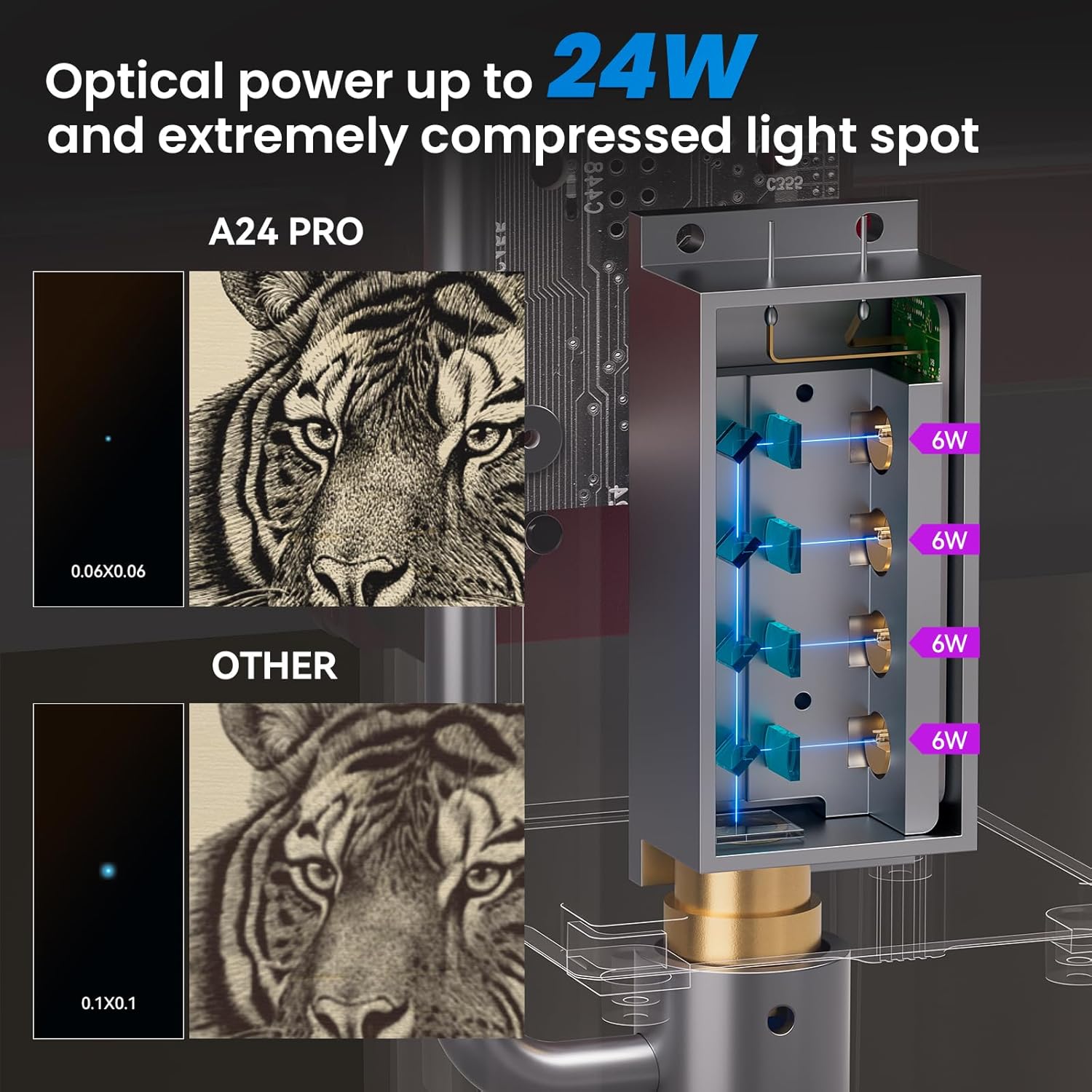
Image: Comparison of laser spot size, highlighting the A24 Pro's precision.

Image: Demonstration of the A24 Pro's high precision engraving.
Оюлуучу материалдар:
- Wood, Bamboo, Cardboard, Plastic, Leather, PCB, Aluminum Oxide, Non-reflective Electroplated and Painted Metal, 304 Mirror Stainless Steel, Glass, Ceramic, Cotton Cloth, Slate.
Cuttable Materials:
- Cardboard, Non-woven Fabrics, Wood Boards, Plywood (up to 20mm), Acrylic (transparent acrylic needs to be painted black, up to 30mm black acrylic), Some Thin Plastic Boards, Sponges, Aluminum and Stainless Steel (up to 0.05mm thick), and other metal sheets.

Сүрөт: Мисamples of maximum cutting thickness for various materials.

Image: Illustration of the long beam waist laser for enhanced deep cutting.

Image: Close-up of the Second Generation Packaged Blue Laser module.
6. Техникалык тейлөө
Үзгүлтүксүз техникалык тейлөө сиздин ATOMSTACK A24 Pro түзмөгүңүздүн узак мөөнөттүү иштешин жана оптималдуу иштешин камсыз кылат.
- Линзаны тазалоо: The laser module features a dual-layer wind cover design to prevent the lens from being blocked or soiled. However, periodic inspection and gentle cleaning of the laser lens with the provided dust-free cloth are recommended to maintain laser efficiency.
- Чаңды тазалоо: Regularly clean dust and debris from the machine's frame and moving parts using the provided brush or compressed air. Accumulation of dust can affect performance and lead to wear.
- Рельс майлоо: Periodically check the X-axis guide rail for smooth movement. If necessary, apply a small amount of appropriate lubricant to ensure frictionless operation.
- Программалык камсыздоонун жаңыртуулары: Расмий ATOMSTACKты текшериңиз website for any available firmware updates for the 32-bit motherboard to ensure you have the latest features and performance enhancements.
7. Кыйынчылыктарды
Бул бөлүмдө сиз кабылышы мүмкүн болгон жалпы көйгөйлөр жана аларды чечүү жолдору каралат.
| Көйгөй | Мүмкүн себеп | Чечим |
|---|---|---|
| Машина иштебей жатат. | Loose power connection, faulty power adapter, power outlet issue. | Бардык электр байланыштарын текшериңиз. Башка электр розеткасын колдонуп көрүңүз. Кубат адаптери туура иштеп жатканын текшериңиз. |
| Лазер иштебейт же алсыз чыгаруу. | Dirty laser lens, incorrect focus, low power setting in software, laser module issue. | Clean the laser lens. Verify focus using the fixed focus film. Increase laser power in software. Contact support if the issue persists. |
| Engraving/cutting results are inconsistent or inaccurate. | Material not flat/secure, incorrect speed/power settings, loose belts/components, software error. | Ensure material is flat and secured. Adjust speed and power settings. Check for any loose mechanical parts. Restart software and machine. |
| Software not connecting to the machine. | USB cable issue, driver not installed, incorrect COM port selected, software conflict. | Try a different USB port or cable. Ensure USB drivers are installed. Select the correct COM port in software. Close other applications. |
8. Техникалык шарттар
| Өзгөчөлүк | Спецификация |
|---|---|
| Продукт модели | ATOMSTACK A24 Pro |
| Engraving Dimensions | 370 x 310 мм |
| Машинанын күчү | 120 Вт |
| Laser Optical Output Power | 24 Вт |
| Лазердик толкун узундугу | 455 ± 5 нм |
| Гравюранын тактыгы | 0.02 мм |
| Фокустун ыкмасы | Fixed focus laser, no focus adjustment needed |
| Laser Protection Cover | Yes, integrated cover to protect eyes |
| Операциялык программалык камсыздоо | LaserGRBL, LightBurn |
| Колдоого алынган операциялык системалар | Win XP/Win 7/Win 8/XP/Win 10 |
| Колдоого алынган File Форматтар | NC, BMP, JPG, PNG, DXF |
| Маалыматтарды өткөрүү ыкмасы | USB туташуу |
| Электр камсыздоо | International Standard Input: AC 100-240 V, 50/60 Hz; Output: 24 V, 5 A |
| Сертификаттар | CE, FCC, RoHS, FDA, PSE |
| Продукциянын өлчөмдөрү (L x W x Y) | 64 x 35 x 13 см |
| Продукт Салмагы | 8.12 кг |
9. Кепилдик маалыматы
ATOMSTACK products are manufactured to high-quality standards. For information regarding warranty coverage and terms, please refer to the warranty card included with your product or visit the official ATOMSTACK website. Typically, products are eligible for a refund or replacement within 30 days of purchase, subject to the seller's return policy.
10. Кардарларды колдоо кызматы
If you encounter any issues or have questions not covered in this manual, please contact ATOMSTACK customer support. Refer to the contact information provided on the product packaging or the official ATOMSTACK webэң заманбап колдоо каналдары үчүн сайт.
When contacting support, please have your product model (ATOMSTACK A24 Pro) and serial number (if applicable) ready.


