1. Киришүү
This manual provides detailed instructions for the installation, operation, and maintenance of your EverBrite 88LED Under Cabinet Lighting. This versatile lighting solution features a motion sensor, remote control, adjustable color temperatures, and dimmable brightness, designed to enhance visibility in various indoor spaces.
2. Пакеттин мазмуну
Төмөндө тизмеленген нерселердин баары пакетиңизге камтылганын текшериңиз:
- EverBrite 88LED Under Cabinet Light Bar
- Алыстан башкаруу
- USB заряддоо кабели
- Magnetic Mounting Bracket(s)
- Жабыштыргыч аянттар
- Бурамалар жана дубал анкерлери
- User Manual

3. Продукциянын өзгөчөлүктөрү
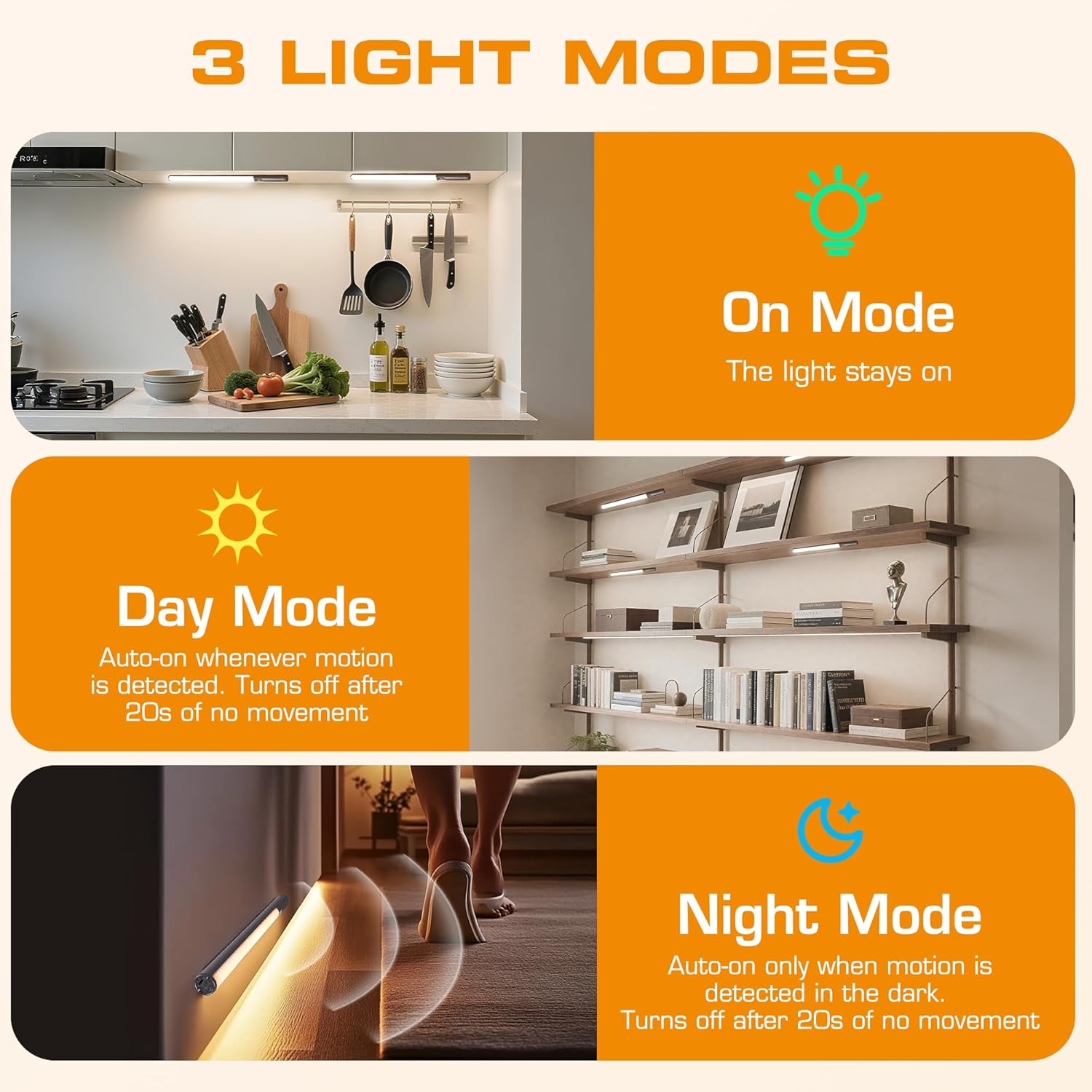
- 3 жарык режимдери: On Mode (light stays on), Day Mode (motion-activated regardless of ambient light), Night Mode (motion-activated only in dark).
- 3 Түстүк температуралар: Warm Light (3000K), Natural Light (4000K), Cold Light (6500K).
- Өчүрүүчү: 10 brightness levels with short press, stepless dimming with long press.
- Кош башкаруу: Operable via remote control or direct touch on the light bar.
- Оңой орнотуу: Multiple mounting options including magnetic, adhesive, and screw-in.
- Кайра заряддалуучу батарея: 2600mAh capacity for extended use.
- Кеңири колдонуу: Suitable for kitchens, closets, wardrobes, garages, stairwells, and more.
4. Орнотуу жана орнотуу
The EverBrite Under Cabinet Light offers flexible installation to suit various surfaces and needs.
- Орнотуу ыкмасын тандаңыз:
- Магниттик тиркеме: For iron surfaces, simply attach the light bar directly. The light has built-in magnets.
- Клей монтаждоо: For non-iron surfaces, peel the backing from the adhesive pads and attach them to the magnetic mounting bracket. Then, adhere the bracket to your desired surface. The light bar can then be magnetically attached to this bracket.
- Бурама орнотуу: For a more permanent installation, use the provided screws and wall anchors. Determine the mounting location, drill two holes, insert anchors, and fasten the magnetic mounting bracket with screws. Attach the light bar magnetically.
- Позициялоо: Ensure the motion sensor is facing the area where movement is expected for optimal detection. The light bar can be rotated up to 90 degrees on its magnetic mount to direct illumination.


5. Заряддоо
The EverBrite light is equipped with a 2600mAh rechargeable Lithium-Ion battery.
- Locate the USB-C charging port on the end of the light bar.
- Connect the provided USB charging cable to the light bar and a compatible USB power source (e.g., wall adapter, computer USB port).
- The indicator light will show charging status (refer to product for specific indicator behavior).
- A full charge provides approximately 25 hours of continuous light or up to 25 days in motion sensor mode (based on 1 hour of activation per day).


6. Иштөө нускамалары
Your EverBrite light can be operated using either the manual touch controls on the device or the included remote control.
6.1. Manual Control (On-Device)
The light bar features a switch and a touch sensor on one end for direct control.
- Режим которуу: Slide the switch to select between 'Off', 'Day Mode' (motion sensor always active), 'Night Mode' (motion sensor active only in dark), or 'On Mode' (light stays on continuously).
- Түс температурасы: In 'On Mode', short press the touch sensor to cycle through the 3 color temperatures: Warm White (3000K), Natural White (4000K), and Cold White (6500K).
- Жарыктыкты жөндөө: In 'On Mode', long press the touch sensor to activate stepless dimming. Release at your desired brightness level.

6.2. Алыстан башкаруу
The remote control provides convenient access to all light functions from a distance.
- Күйгүзүү/өчүрүү: басыңыз ӨЧҮРҮҮ button to turn the light off. Press the ON аны күйгүзүү үчүн баскыч.
- Жарык режимдери: Атайын баскычтарды колдонуңуз ON (continuous light), КҮН (motion sensor always active), or ТҮН (motion sensor active only in dark).
- Түс температурасы: Тандоо WW (Warm White), NW (Natural White), or CW (Cold White) to change the light color.
- Жарыктыкты жөндөө: Short press the brightness buttons (sun icons) to cycle through 10 preset brightness levels. Long press for stepless dimming.
- Таймердин жөндөөлөрү: Басыңыз 15мин, 30мин, же 60мин to set an automatic shut-off timer. Press the Өчүрүү таймери button to cancel any active timer.

6.3. Кыймыл сенсорунун режимдери
The integrated motion sensor provides hands-free illumination.
- Күн режими: The light will turn on automatically when motion is detected, regardless of the ambient light level. It will turn off after 20 seconds of no movement.
- Түнкү режим: The light will turn on automatically only when motion is detected in dark conditions. It will turn off after 20 seconds of no movement.

7. Техникалык шарттар
| Өзгөчөлүк | Спецификация |
|---|---|
| Бренд | EverBrite |
| Модель номери | E101115A |
| Power Source | Батарея менен иштейт (1 литий-иондук батарейка камтылган) |
| Батарея сыйымдуулугу | 2600mAh |
| Жарык булагы түрү | LED |
| Түс температурасы | 3000K (Warm Light), 4000K (Natural Light), 6500K (Cold Light) |
| Башкаруу ыкмасы | Тийүү, алыстан башкаруу |
| Өзгөчө өзгөчөлүк | Cordless, Motion Sensor, Dimmable |
| Орнотуу түрү | Surface Mount (Magnetic, Adhesive, Screws) |
| Материал | Алюминий |
| Элемент Салмагы | 9.9 унция |
| Пакеттин өлчөмдөрү | 16.3 x 1.97 x 1.65 дюйм |
| Ички/тышкы колдонуу | Indoor |
8. Техникалык тейлөө
To ensure the longevity and optimal performance of your EverBrite Under Cabinet Light, follow these simple maintenance guidelines:
- Тазалоо: Wipe the light bar and remote control with a soft, dry cloth. Avoid using abrasive cleaners or solvents, as these may damage the finish or electronic components.
- Батареяга кам көрүү: Recharge the battery when the light output diminishes. Avoid fully depleting the battery frequently to prolong its lifespan. Store the device in a cool, dry place if not in use for extended periods.
- Сенсорду тейлөө: Так аныктоо үчүн кыймыл сенсорунун линзасын таза жана тоскоолдуктардан алыс кармаңыз.
9. Кыйынчылыктарды
If you encounter any issues with your EverBrite Under Cabinet Light, please refer to the following common problems and solutions:
- Жарык күйбөйт:
- Батарея заряддалганын текшериңиз.
- Check the mode switch on the light bar; it should be set to 'On', 'Day Mode', or 'Night Mode'.
- If using the remote, ensure the light bar's main switch is in an active mode (not 'Off').
- Motion sensor is not working:
- Verify the light is set to 'Day Mode' or 'Night Mode'.
- In 'Night Mode', ensure the environment is sufficiently dark.
- Check for any obstructions blocking the sensor lens.
- Ensure the motion is within the 9.8ft (3m) detection range and 120-degree angle.
- Алыстан башкаруу жооп бербей жатат:
- Ensure the light bar's main switch is in an active mode (not 'Off').
- Пульттун батареясын текшериңиз.
- Пульт менен жарык тилкесинин ортосунда эч кандай тоскоолдуктар жок экенин текшериңиз.
- Light is not charging:
- USB кабелинин жарык тилкесине жана кубат булагына бекем туташтырылганын текшериңиз.
- Башка USB кабелин же кубат адаптерин колдонуп көрүңүз.
10. Кепилдик жана колдоо
For warranty information, technical support, or further assistance, please refer to the manufacturer's official webсайтка же түздөн-түз кардарларды тейлөөгө кайрылыңыз. Кепилдик дооматтар үчүн сатып алуу дүмүрчөгүңүздү сактаңыз.


