1. Киришүү
This manual provides essential instructions for the safe and efficient operation of your eKids Disney Wish Karaoke Machine, Model WH-555. Please read this manual thoroughly before using the device and retain it for future reference.

Сүрөт 1.1: Алдыңкы view of the eKids Disney Wish Karaoke Machine with its wired microphone.
2. Коопсуздук маалыматы
Коопсуз иштөө үчүн төмөнкү сактык чараларын сактаңыз:
- Түзмөктү өтө жогорку температурага, түз күн нуруна же нымдуулукка дуушар кылбаңыз.
- Аспапты сууга же башка суюктуктарга батырбаңыз.
- Заряддоо үчүн берилген USB кабелин гана колдонуңуз.
- Аппаратты радиаторлор, жылуулук регистрлери, мештер же башка аппараттар (анын ичинде) сыяктуу жылуулук булактарынан алыс кармаңыз. ampкөтөргүчтөр) жылуулукту пайда кылуучу.
- Do not attempt to disassemble or modify the unit. Refer all servicing to qualified service personnel.
- This product is intended for use by children under adult supervision.
3. Пакеттин мазмуну
Пакетте бардык буюмдар бар экенин текшериңиз:
- eKids Disney Wish Karaoke Machine (Model WH-555)
- Зымдуу микрофон
- USB заряддоо кабели
4. Продукт бүтүп калдыview
Familiarize yourself with the various parts and controls of your karaoke machine.
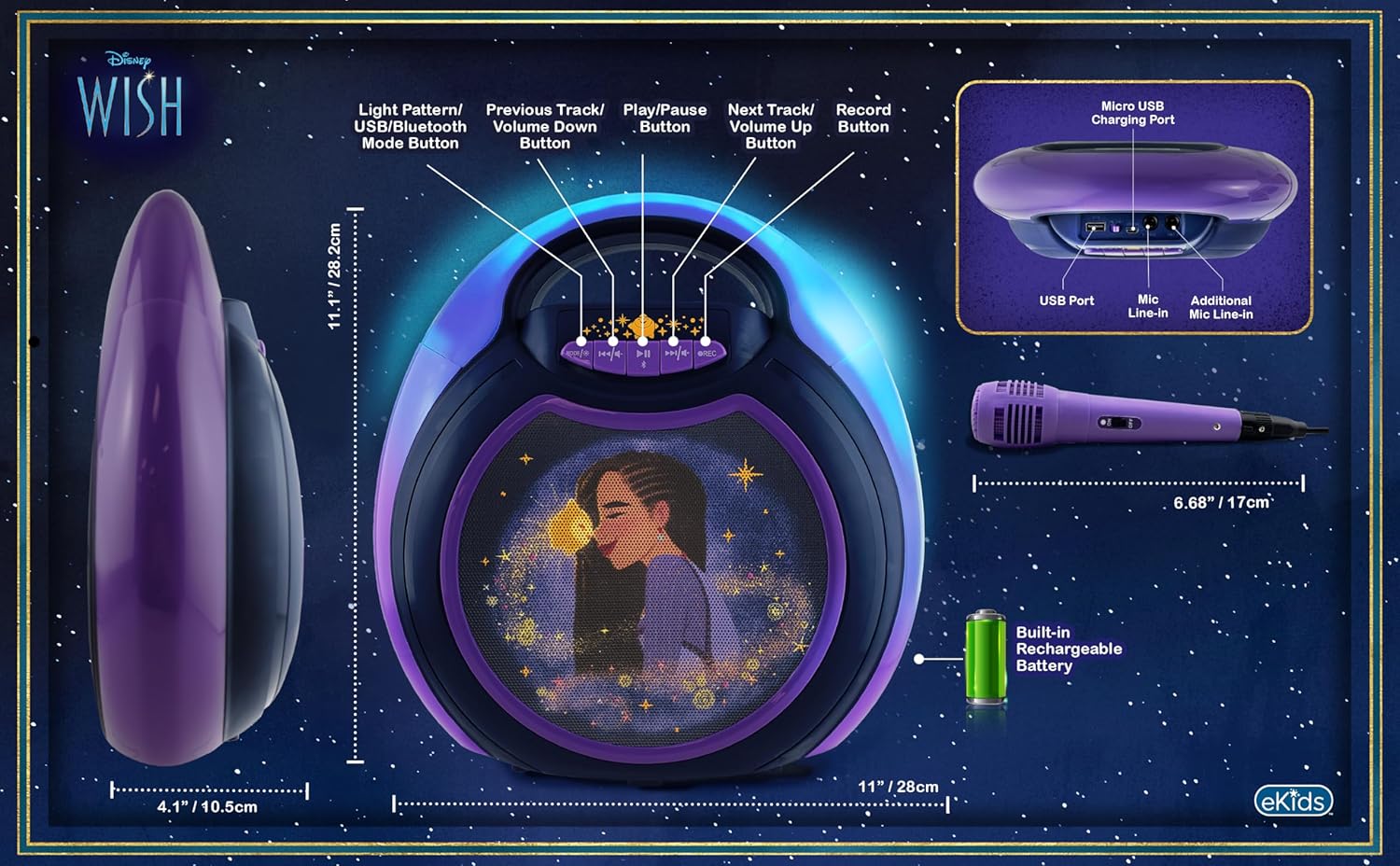
Image 4.1: Diagram of the eKids Disney Wish Karaoke Machine's controls, ports, and dimensions.
Башкаруу каражаттары жана порттор:
- MODE / # Button: Switches between input modes (Bluetooth, USB) and adjusts light patterns.
- Мурунку трек / Үндү азайтуу баскычы: Navigates to the previous track or decreases volume.
- Ойнотуу / Пауза баскычы: Аудиону ойнотот же тындырат.
- Кийинки трек / Үндү катуулатуу баскычы: Navigates to the next track or increases volume.
- REC баскычы: Initiates recording (requires USB flash drive).
- Микро USB кубаттоочу порт: Ички батареяны заряддоо үчүн.
- USB порт: For connecting a USB flash drive for recording or playback.
- Mic Line-in: Primary port for the included wired microphone.
- Additional Mic Line-in: For connecting a second microphone (not included) for duets.
5. Орнотуу
5.1 Бөлүктү кубаттоо
Before first use, fully charge the karaoke machine. Connect the provided USB charging cable to the Micro USB Charging Port on the unit and to a standard USB power adapter (not included) or a computer's USB port. The charging indicator will illuminate during charging and turn off when fully charged.
5.2 Микрофонду туташтыруу
Plug the wired microphone's connector into the 'Mic Line-in' port on the karaoke machine. For duet performances, an additional microphone (not included) can be connected to the 'Additional Mic Line-in' port.

Сүрөт 5.1: Каптал view of the karaoke machine with the wired microphone connected.
6. Иштөө нускамалары
6.1 Күйгүзүү/өчүрүү
басып, кармап туруңуз MODE / # button to power the unit on or off.
6.2 Bluetooth жупташтыруу
When the unit is powered on, it will automatically enter Bluetooth pairing mode. The indicator light will flash. On your compatible device (smartphone, tablet, etc.), enable Bluetooth and select "eKids Wish Karaoke" from the list of available devices. A confirmation tone will sound when pairing is successful.

Image 6.1: Bluetooth compatibility with various devices.
6.3 Музыка ойнотуу
Once paired via Bluetooth, start playing music from your connected device. Use the Ойнотуу / Тыныгуу, Мурунку трек / Көлөмүн төмөндөтүү, жана Кийинки Track / Volume Up buttons on the karaoke machine to control playback.
6.4 Микрофонду колдонуу
Ensure the microphone is connected to the 'Mic Line-in' port. Adjust the microphone's volume using the dedicated switch on the microphone itself. Sing into the microphone while music plays from the speaker.
6.5 Жаздыруу аткаруулары
To record your singing, insert a USB flash drive (not included) into the USB Port. Press the REC button to start recording. Press it again to stop recording. Recordings will be saved to the USB flash drive. Refer to the Product Overview (Image 4.1) for the location of the USB port.
6.6 Light Show Modes
басыңыз MODE / # button repeatedly to cycle through different color-changing LED light show patterns.
6.7 Үндү башкаруу
Adjust the main speaker volume using the Мурунку трек / Көлөмүн төмөндөтүү жана Кийинки Track / Volume Up buttons. The microphone has its own volume control switch.
7. Техникалык тейлөө
7.1 Тазалоо
Агрегатты жумшак, кургак чүпүрөк менен сүртүңүз. Суюк тазалагычтарды же абразивдүү материалдарды колдонбоңуз.
7.2 Сактоо
Колдонулбаганда, аппаратты салкын, кургак жерде, тике күндүн нурунан жана өтө температурадан алыс сактаңыз.
8. Кыйынчылыктарды
- Кубат жок: Ensure the unit is charged. Connect the USB charging cable and allow it to charge for a period.
- Үн жок: Check that the volume on both the karaoke machine and the connected Bluetooth device is turned up. Ensure the microphone is properly connected and its switch is on.
- Bluetooth туташпай жатат: Make sure Bluetooth is enabled on your device and the karaoke machine is in pairing mode. Try unpairing and re-pairing the device. Ensure no other devices are currently connected to the karaoke machine.
- Жаздыруу иштебей жатат: Verify that a compatible USB flash drive is inserted into the USB port and has sufficient free space.
9. Техникалык шарттар
| Модель номери | WH-555 |
| Өлчөмдөр | 11.07 x 4.14 x 11.11 дюйм |
| Салмагы | 3.67 фунт |
| Power Source | Батарея менен иштейт (кайра заряддалуучу) |
| Тtage | 3 вольт |
| Байланыш | Bluetooth, USB |
| Спикер саны | 1 |
| Өзгөчөлүктөр | Light Up Speaker, Recording Function |
10. Кепилдик жана колдоо
Кепилдик жөнүндө маалымат жана кардарларды колдоо кызматы үчүн, сатып алууңузга тиркелген документтерди караңыз же расмий eKids веб-сайтына кириңиз webсайт. Кепилдик дооматтар үчүн сатып алганыңыздын далилин сактаңыз.


