1. Киришүү
Thank you for choosing the FOREVER MATB-100 Wireless Power Bank. This device is designed to provide convenient and efficient charging for your mobile devices, featuring both wired and wireless charging capabilities. Please read this manual carefully before using the product to ensure safe and optimal performance.
2. Негизги өзгөчөлүктөрү
- Ар тараптуу заряддоо: Supports simultaneous charging of three devices via wireless induction, USB-A, and USB-C ports.
- LED көрсөткүчү: A practical LED display accurately shows the current battery level of the power bank.
- Smart Magnetic Grip: Features a special magnetic grip to stabilize your phone with the power bank, allowing hands-free use during charging.
- Жогорку кубаттуулугу: Equipped with a 10,000 mAh battery, providing multiple recharges for your devices.
- Тез кубаттоо: Supports Power Delivery (PD) and Quick Charge (QC) technologies for rapid charging.
- Integrated Kickstand: Allows the power bank to function as a stand for your phone while charging.
3. Продукт бүтүп калдыview
Familiarize yourself with the components of your FOREVER MATB-100 Wireless Power Bank.

Сүрөт 3.1: Алдыңкы жана арткы view of the FOREVER MATB-100 Wireless Power Bank, highlighting the wireless charging pad and the integrated kickstand.

Сүрөт 3.2: Side view of the power bank, illustrating the USB-A output port, USB-C input/output port, and the LED battery level indicators.

Сүрөт 3.3: The power bank magnetically attached to the back of a smartphone, demonstrating the secure magnetic grip feature.

Сүрөт 3.4: Diagram showing the dimensions of the power bank: approximately 10.8 cm in length and 6.8 cm in width.
Компоненттери:
- Wireless Charging Pad (with magnetic alignment)
- LED Батарея деңгээл көрсөткүчү
- Кубат баскычы
- USB-A Чыгаруу Порт
- USB-C киргизүү/чыгаруу порту
- Integrated Kickstand
4. Орнотуу жана баштапкы заряддоо
4.1 Power банкты заряддоо
Before first use, fully charge your FOREVER MATB-100 Power Bank.
- Берилген USB-C кабелин кубат банкындагы USB-C портуна туташтырыңыз.
- Connect the other end of the USB-C cable to a compatible USB wall adapter (not included). For optimal charging speed, use a Power Delivery (PD) compatible adapter.
- The LED indicators will illuminate to show the charging progress. When all LEDs are solid, the power bank is fully charged.
Эскертүү: The power bank can be charged using the USB-C port. It is recommended to fully charge the power bank every three months if not in regular use to maintain battery health.
5. Иштөө нускамалары
5.1 Батареянын деңгээлин текшерүү
Press the power button once to check the remaining battery level. The LED indicators will light up, with each LED representing approximately 25% of the battery capacity.
5.2 Зымсыз заряддоо
The MATB-100 supports wireless charging for compatible devices, including MagSafe-enabled iPhones and other Qi-compatible smartphones.
- Кубат банкынын жетиштүү кубатталганын текшериңиз.
- Place your wireless charging compatible device onto the wireless charging pad of the power bank. For MagSafe-enabled devices, the power bank will magnetically align.
- The device should begin charging automatically. If not, press the power button on the power bank to activate wireless charging.
- The LED indicators on the power bank may show charging status.
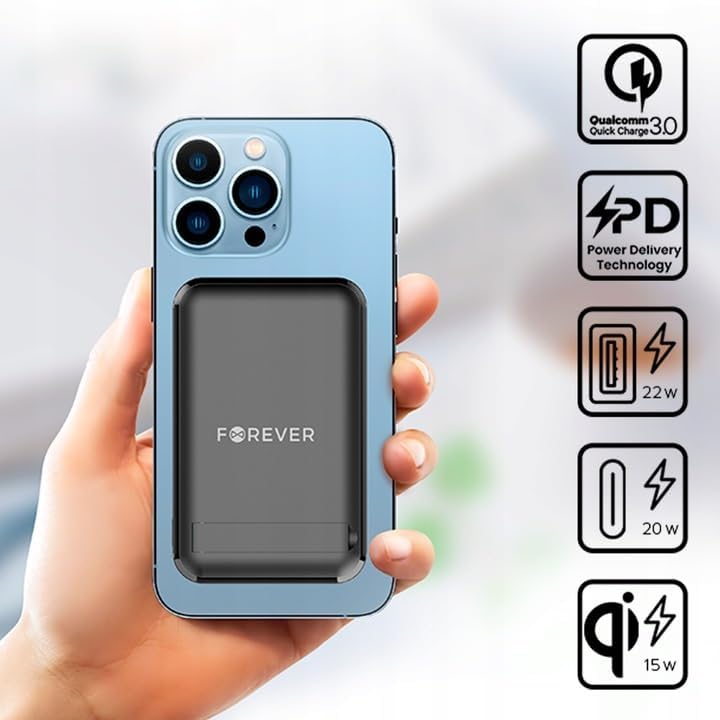
Сүрөт 5.1: A smartphone attached to the power bank, illustrating wireless charging in progress and icons representing Quick Charge, Power Delivery, and various wattage чыгышы.
Кеңеш: Use the integrated kickstand to prop up your phone while it charges wirelessly, allowing for comfortable viewing.
5.3 Wired Charging (USB-A and USB-C)
The power bank can charge devices via its USB-A and USB-C ports.
- Кубат банкынын жетиштүү кубатталганын текшериңиз.
- Connect one end of a compatible charging cable to your device and the other end to either the USB-A or USB-C output port on the power bank.
- The device should begin charging automatically. If not, press the power button on the power bank.

Сүрөт 5.2: A smartphone connected to the power bank via a USB-C cable, demonstrating wired charging.
Эскертүү: The USB-C port functions as both an input for charging the power bank and an output for charging other devices. The USB-A port is an output only.
5.4 Бир убакта заряддоо
The FOREVER MATB-100 can charge up to three devices simultaneously (one wirelessly, one via USB-A, and one via USB-C). The total output power will be distributed among the connected devices.
6. Кароо жана тейлөө
- Keep the power bank dry. Moisture can damage the internal circuitry.
- Ашыкча температурага (ысык же муздак) тийгизбеңиз.
- Power банкты кулап же катуу таасирлерге дуушар кылуудан качыңыз.
- Бетти жумшак, кургак чүпүрөк менен тазалаңыз. Катуу химиялык заттарды же абразивдүү тазалоочу каражаттарды колдонбоңуз.
- Күн тийбеген, салкын, кургак жерде сактаңыз.
- If not used for extended periods, charge the power bank at least once every three months to prolong battery life.
7. Кыйынчылыктарды
7.1 Power Bank заряддалбай жатат
- USB-C кабелинин кубат банкына жана дубал адаптерине бекем туташтырылганын текшериңиз.
- Дубал адаптеринин туура иштеп жатканын жана иштеп жаткан розеткага сайылып турганын текшериңиз.
- Try using a different USB-C cable and/or wall adapter.
7.2 Түзмөк Power Bankтан кубатталбай жатат
- Check the power bank's battery level. If it's low, recharge the power bank.
- Кубаттоону иштетүү үчүн Power Bank'тагы кубат баскычын басыңыз.
- For wired charging, ensure the cable is securely connected to both the power bank and your device. Try a different cable or port.
- For wireless charging, ensure your device is properly aligned on the charging pad and is wireless charging compatible. Remove any thick cases that might interfere.
- Ensure there are no metallic objects between the power bank and your device during wireless charging.
7.3 Жай заряддоо
- Ensure you are using a high-quality, compatible charging cable.
- For wired charging, ensure your device supports Quick Charge (QC) or Power Delivery (PD) if you expect fast charging speeds.
- For wireless charging, ensure your device supports fast wireless charging and is correctly aligned.
- Бир эле учурда бир нече түзмөктү кубаттоо ар бир аппараттын кубаттоо ылдамдыгын азайтышы мүмкүн.
8. Техникалык шарттар
| Модель аты | МАТБ-100 |
| Бренд | ТҮБӨЛҮК |
| Батарея сыйымдуулугу | 10000 мАч (миллиampсаат) |
| Батареянын курамы | Литий-ион |
| Туташтыргыч түрү | USB Type A, USB Type C |
| Өзгөчө өзгөчөлүк | Wireless Charging, Magnetic Grip, Integrated Kickstand |
| Тtage | 5 Volts (Output) |
| Порттардын саны | 2 (USB-A, USB-C) + Wireless Charging |
| Шайкеш түзмөктөр | Smartphones (including MagSafe compatible), Tablets, Headphones, Smartwatches |
| Өлчөмдөрү (L x W x Y) | 10.8 см x 6.8 см x 2 см (болжол менен) |
| Max Wireless Output | 15 Вт |
| Max USB-A Output | 22.5W (Quick Charge) |
| Max USB-C Output | 20 Вт (кубат берүү) |
9. Коопсуздук маалыматы
- Батарея пакетин бөлбөңүз, ачпаңыз же майдалабаңыз.
- Электр кубаты банкын ысыкка же отко тийгизбеңиз. Түз тийген күн нурунда сактоодон алыс болуңуз.
- Do not short-circuit the power bank. Do not store battery packs haphazardly in a box or drawer where they may short-circuit each other or be short-circuited by conductive materials.
- Power банкты механикалык соккуга дуушар кылбаңыз.
- Батарея агып кетсе, суюктуктун териге же көзгө тийүүсүнө жол бербеңиз. Эгерде тийип калса, жабыркаган жерди көп суу менен жууп, медициналык жардамга кайрылыңыз.
- Power банкты балдар жетпеген жерде сактаңыз.
- Powerbank колдонуп жатканда балдарды көзөмөлдөңүз.
- Жабдуу менен колдонуу үчүн атайын берилгенден башка эч кандай заряддагычты колдонбоңуз.
- Dispose of the power bank properly according to local regulations. Do not dispose of with household waste.
10. Кепилдик жана колдоо
For warranty information and technical support, please refer to the documentation provided with your purchase or contact the FOREVER customer service department. Keep your proof of purchase for warranty claims.
For further assistance, you may visit the official FOREVER webсайтка же сатуучуга кайрылыңыз.


