1. Киришүү
Thank you for choosing the Takstar MS-189 Table Conference Microphone. This manual provides detailed instructions for the proper setup, operation, and maintenance of your microphone. The MS-189 is a unidirectional condenser microphone designed for clear vocal pickup in conference settings, computer use, and other desktop applications. Please read this manual thoroughly before use to ensure optimal performance and longevity of the product.
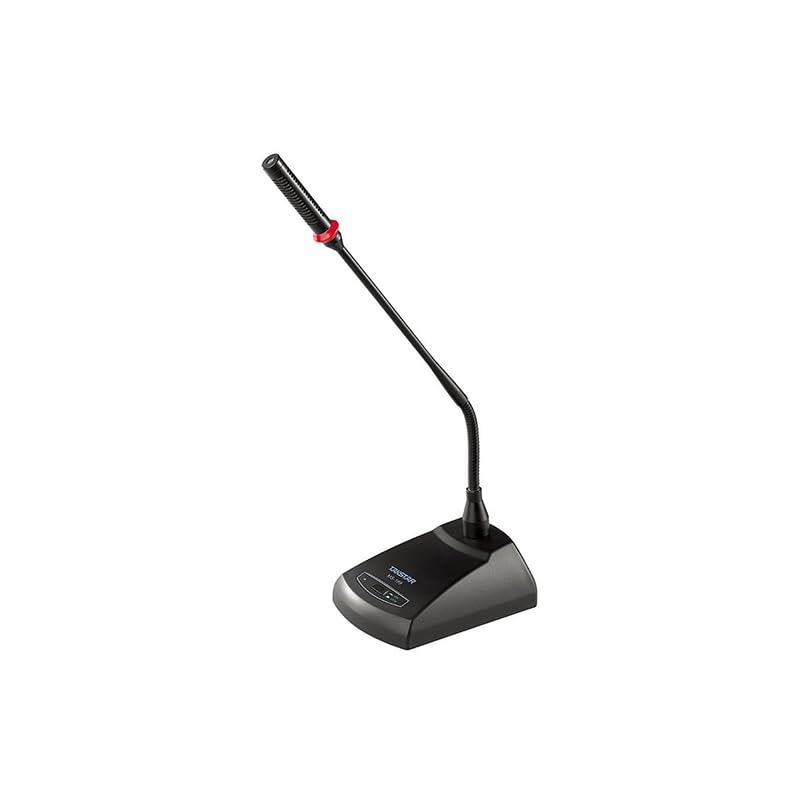
Сүрөт 1.1: The Takstar MS-189 Table Conference Microphone. This image displays the microphone with its gooseneck design and base unit, ready for desktop placement.
2. Продукциянын өзгөчөлүктөрү
- Back Electret Condenser Transducer: Ensures high-quality audio capture.
- High Sensitivity and Low Noise: Delivers clear and crisp sound reproduction.
- Clear and Bright Vocal Pick-up: Optimized for speech and vocal applications.
- On/Off Button with LED Indicator: Located on both the base and gooseneck for easy control and status indication.
- Ийкемдүү кубат параметрлери: Can be powered by 9-52V phantom power or two 1.5V AA batteries.
- Бир багыттуу полярдык үлгү: Фондук ызы-чууну азайтып, алдыңкы тараптан келген үнгө басым жасайт.
- Durable Gooseneck Design: Allows for flexible positioning and adjustment.
3. Пакеттин мазмуну
Сураныч, кутудан чыгарганда пакеттин мазмунун текшерип, бардык буюмдар бар экенин текшериңиз:
- Takstar MS-189 Table Conference Microphone (Gooseneck and Base Unit)
- Колдонуучунун Колдонмосу (бул документ)
Note: XLR cable and AA batteries are typically sold separately and may not be included.
4. Орнотуу нускамалары
4.1 Микрофонду күйгүзүү
The MS-189 microphone offers two power options:
- Phantom Power (9-52V): If your audio mixer, interface, or computer sound card provides phantom power, connect the microphone using an XLR cable. The microphone will draw power directly from the connected device. Ensure phantom power is enabled on your device.
- AA Batteries (2 x 1.5V): If phantom power is not available, insert two 1.5V AA batteries into the battery compartment located on the underside of the microphone base. Ensure correct polarity (+/-) when inserting batteries.
Note: Do not use both phantom power and batteries simultaneously. The microphone will prioritize phantom power if both are connected.
4.2 Түзмөккө туташуу
The MS-189 connects via an XLR connector.
- Locate the XLR output port on the microphone base.
- Connect one end of a standard XLR cable (not included) to the microphone's XLR output.
- Connect the other end of the XLR cable to an available XLR input on your audio mixer, audio interface, or computer sound card. Ensure the input is compatible with a condenser microphone.
4.3 Микрофонду жайгаштыруу
Place the microphone on a stable, flat surface. Position the gooseneck so the microphone head is approximately 15-30 cm (6-12 inches) from the speaker's mouth, pointing directly towards them for optimal sound capture.
5. Иштөө нускамалары
5.1 Күйгүзүү/өчүрүү
Press the ON/OFF button located on the microphone base. The LED indicator will illuminate when the microphone is active. Press the button again to turn off the microphone.
5.2 Adjusting the Gooseneck
Gently bend the flexible gooseneck to adjust the microphone's position and angle. Avoid excessive force to prevent damage.
5.3 Optimal Usage
- For best results, speak directly into the microphone from a consistent distance.
- Minimize background noise in the environment to enhance clarity.
- Monitor audio levels on your connected device to prevent clipping or distortion.
6. Техникалык тейлөө
- Тазалоо: Микрофондун сыртын тазалоо үчүн жумшак, кургак чүпүрөктү колдонуңуз. Суюк тазалоочу каражаттарды же эриткичтерди колдонбоңуз.
- Сактагыч: When not in use, store the microphone in a dry, dust-free environment. Avoid extreme temperatures and humidity.
- Батареяны алмаштыруу: If using battery power, replace AA batteries when the LED indicator dims or audio quality degrades. Remove batteries if the microphone will not be used for an extended period to prevent leakage.
7. Кыйынчылыктарды
| Көйгөй | Мүмкүн себеп | Чечим |
|---|---|---|
| Үн чыгышы жок |
|
|
| Poor sound quality (low volume, distortion) |
|
|
| LED индикатору күйбөйт |
|
|
8. Техникалык шарттар
| Модел | MS-189 |
| Трансформатор принциби | Артка Electret Конденсатор |
| Directivity Characteristic (Polar Pattern) | Бир багыттуу |
| Frequency Response | 100Гц-16кГц |
| Сезимталдуулук | -33дБ±3дБ (0кГц боюнча 1дБ=1В/Па) |
| Чыгуу импедансы | 340Ω±30% (1kHz боюнча) |
| Power талаптар | 9-52V phantom power or 2 x 1.5V AA battery |
| Байланыш технологиясы | XLR |
| Туташтыргыч түрү | XLR |
| Шайкеш түзмөктөр | Ноутбук, персоналдык компьютер |
| Микрофон форма фактору | Gooseneck, Table Array |
| Элементтин өлчөмдөрү (L x W x Y) | 15 x 15 x 15 см |
| Таза Салмак | 500г |
| Түс | Кара |
9. Кепилдик жана колдоо
For warranty information and technical support, please refer to the warranty card included with your product or visit the official Takstar webсайт. Ошондой эле, жардам алуу үчүн жергиликтүү дистрибьюторуңузга же сатуучуңузга кайрылсаңыз болот.
Visit the Takstar Store on Amazon көбүрөөк продукт маалымат жана колдоо ресурстар үчүн.


