1. Киришүү
This manual provides essential instructions for setting up, operating, and maintaining your ZOTAC ZBOX-CI343-BE Intel N100 Mini PC. Please read this manual thoroughly before using the device to ensure proper functionality and longevity.
2. Пакеттин мазмуну
Төмөндө тизмеленген нерселердин баары пакетиңизге камтылганын текшериңиз. Эгерде кандайдыр бир буюмдар жок же бузулуп калса, сатуучуга кайрылыңыз.

Сүрөт 2.1: Contents of the ZOTAC ZBOX-CI343-BE package, including the mini PC unit, power adapter, power cable, WiFi antenna, VESA mounting kit, and a quick start guide.
- ZOTAC ZBOX-CI343-BE Mini PC Unit
- Кубаттуу адаптер
- Power Cable (type may vary by region)
- WiFi антеннасы
- VESA орнотуу комплекти
- Quick Start Guide
3. Продукт бүтүп калдыview
Familiarize yourself with the various components and ports of your ZOTAC ZBOX-CI343-BE Mini PC.
3.1 алдыңкы панели

Сүрөт 3.1: Фронт view of the ZOTAC ZBOX-CI343-BE, showing the power button, USB 3.1 ports, USB-C port, SD card slot, and audio jack.
- Кубат баскычы: Press to power on or off the device.
- SD карта уячасы: SD эстутум карталарын салуу үчүн.
- USB 3.1 Type-C порту: For connecting USB-C compatible devices.
- USB 3.1 Type-A порту: USB түзмөктөрүн туташтыруу үчүн.
- Наушник/микрофон айкалыштырылган уяча: Аудио чыгаруу жана киргизүү үчүн.
3.2 Арткы панель

Сүрөт 3.2: Арткы view of the ZOTAC ZBOX-CI343-BE, displaying the WiFi antenna connector, dual LAN ports, USB 3.1 port, DisplayPort, HDMI port, and DC power input.
- WiFi антенна туташтыргычы: For attaching the included WiFi antenna.
- Dual LAN Ports: Зымдуу тармак байланыштары үчүн.
- USB 3.1 Type-A порту: USB түзмөктөрүн туташтыруу үчүн.
- DisplayPort (DP): Дисплейге туташуу үчүн.
- HDMI порту: Дисплейге туташуу үчүн.
- DC IN: Кубат адаптерин туташтыруу үчүн.
3.3 Үстү жана капталы Views

Сүрөт 3.3: Жогорку view of the ZOTAC ZBOX-CI343-BE, showing the ZOTAC logo and ribbed passive cooling design.
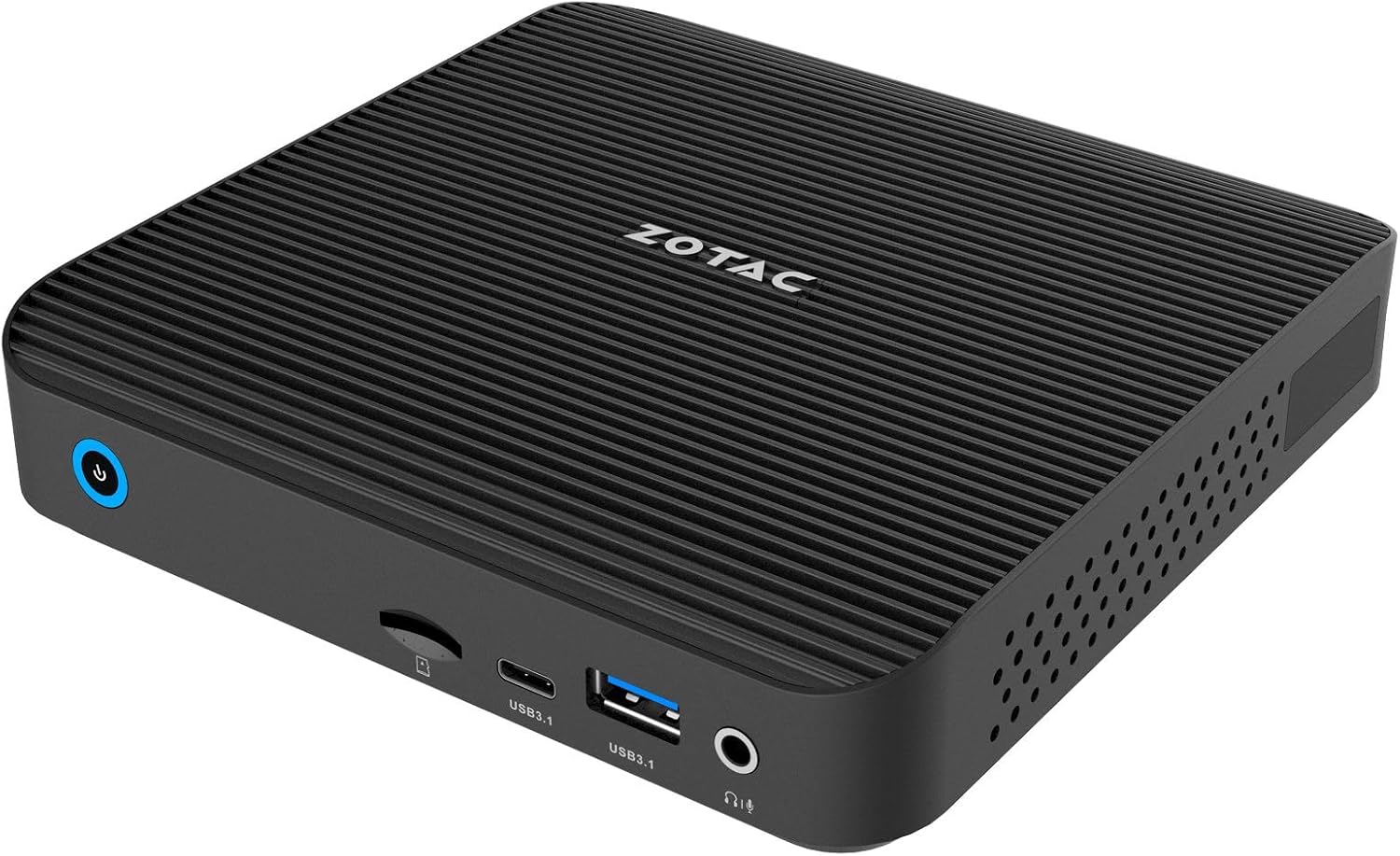
Сүрөт 3.4: Бурчтуу алдыңкы view of the ZOTAC ZBOX-CI343-BE, highlighting the compact form factor and front panel ports.

Сүрөт 3.5: Бурчтуу арткы view of the ZOTAC ZBOX-CI343-BE, showing the rear panel ports and side ventilation.
4. Орнотуу нускамалары
Follow these steps to set up your ZOTAC ZBOX-CI343-BE Mini PC.
- Install Memory and Storage (if not pre-installed): As a barebone system, you will need to install compatible DDR5 RAM and an SSD. Refer to the Quick Start Guide for detailed instructions on opening the chassis and installing components.
- Перифериялык түзүлүштөрдү туташтыруу:
- Connect your monitor(s) to the HDMI or DisplayPort on the rear panel.
- Баскычтопту жана чычканыңызды жеткиликтүү USB портторуна (алдыңкы же арткы) туташтырыңыз.
- If using a wired network, connect an Ethernet cable to one of the LAN ports.
- Attach the included WiFi antenna to the connector on the rear panel for wireless connectivity.
- Туташуу кубаты: Connect the power adapter to the DC IN port on the rear panel, then plug the power cable into an electrical outlet.
- Initial Boot and OS Installation:
- Mini PCти күйгүзүү үчүн алдыңкы панелдеги кубат баскычын басыңыз.
- Since this is a barebone system, you will need to install an operating system (e.g., Windows 10/11, Linux). Prepare a bootable USB drive with your preferred OS installer.
- Follow the on-screen prompts to install the operating system. You may need to enter the BIOS/UEFI settings (typically by pressing DEL or F2 during boot) to configure boot order.
- After OS installation, install necessary drivers, which can usually be found on the ZOTAC support webсайт.
5. Иштөө нускамалары
Once the operating system is installed and configured, your ZBOX-CI343-BE is ready for use.
- Күйгүзүү/өчүрүү: Press the power button once to turn on. To turn off, use the operating system's shutdown function. A short press of the power button can also put the system to sleep. A long press (approx. 5 seconds) will force a shutdown.
- Байланыш: Utilize the various USB ports for external devices, HDMI/DisplayPort for displays, and LAN/WiFi for network access.
- VESA орнотуу: The included VESA mounting kit allows you to attach the Mini PC to the back of a compatible monitor or to a wall mount, saving desk space.
6. Техникалык тейлөө
Regular maintenance helps ensure optimal performance and extends the lifespan of your Mini PC.
- Тазалоо:
- Сыртын жумшак, кургак чүпүрөк менен акырын сүртүңүз.
- Use compressed air to clear dust from ventilation openings periodically. Ensure the device is powered off before cleaning.
- Avoid using liquid cleaners or solvents directly on the device.
- Программалык камсыздоо жаңыртуулары:
- Keep your operating system and drivers updated to the latest versions for security and performance improvements.
- Check the ZOTAC website for updated drivers specific to the ZBOX-CI343-BE model.
- Экологиялык шарттар: Operate the device in a well-ventilated area, away from direct sunlight, heat sources, and excessive moisture.
7. Кыйынчылыктарды
Бул бөлүм сиз кабылышы мүмкүн болгон жалпы көйгөйлөрдү карайт.
- Кубат жок:
- Ensure the power adapter is securely connected to both the Mini PC and a working electrical outlet.
- Электр кабелинин бузулбагандыгын текшериңиз.
- Дисплей чыгышы жок:
- Check that the monitor is powered on and correctly connected to the HDMI or DisplayPort.
- Башка дисплей кабелин же бар болсо мониторду колдонуп көрүңүз.
- Мониторуңузда туура киргизүү булагы тандалганын текшериңиз.
- Иштетүү системасы жүктөлбөй жатат:
- Verify that an operating system has been successfully installed.
- Check BIOS/UEFI settings to ensure the correct boot device is selected.
- If recently installed, ensure all necessary drivers are present.
- Интернет байланышы жок:
- For wired connections, ensure the Ethernet cable is properly connected and router/modem is working.
- For wireless connections, ensure the WiFi antenna is attached, WiFi is enabled in the OS, and you are connected to the correct network with the correct password.
- Зарыл болсо, тармак драйверлерин жаңыртыңыз.
For further assistance, refer to the ZOTAC support webсайтка же кардарларды тейлөөгө кайрылыңыз.
8. Техникалык шарттар
Detailed technical specifications for the ZOTAC ZBOX-CI343-BE Mini PC.
| Өзгөчөлүк | Спецификация |
|---|---|
| Бренд | ZOTAC |
| Модель аты | ZBOX-CI343-BE |
| Процессор | Intel N100 (1.1 GHz) |
| Графикалык сопроцессор | Intel UHD графикасы |
| Memory Type | DDR5 RAM (Barebone - user installable) |
| Сактагыч түрү | SSD (Barebone - user installable) |
| Max Screen Resolution | 3840x2160 |
| Video Output | HDMI, DisplayPort |
| Зымсыз байланыш | 802.11ax, Bluetooth |
| LAN | Dual Gigabit Ethernet |
| USB порттору | USB 3.1 Type-A, USB 3.1 Type-C |
| Card Reader | SD карта уячасы |
| Аудио | Наушник/микрофондун айкалыштырылган уячасы |
| Операция системасы | Barebone (Compatible with Windows 10/11, Linux) |
| Элемент Салмагы | 2.2 фунт |
| Продукциянын өлчөмдөрү | 3.94 x 1.97 x 0.5 дюйм |
9. Кепилдик жана колдоо
ZOTAC products are covered by a limited warranty. Please refer to the official ZOTAC webСиздин аймакка тиешелүү деталдуу кепилдик шарттары жана шарттары үчүн сайт.
For technical support, driver downloads, and frequently asked questions, visit the ZOTAC support portal:
When contacting support, please have your product model (ZBOX-CI343-BE) and serial number ready.


