1. Киришүү
The Qolsys IQ Lock-PG Push Button Deadbolt provides enhanced security and convenient access to your property. This smart motorized deadbolt integrates PowerG wireless communication for reliable and stable connectivity, compatible with IQ Panel 4, IQ4 Hub, and IQ4 NS systems. It offers multiple access methods, including a pushbutton keypad, traditional key, thumb-turn, and remote control via the Alarm.com app.
Designed for durability, the IQ Lock-PG meets ANSI Grade 2 certifications and features an attractive oil-rubbed bronze finish to complement various door styles.
2. Негизги өзгөчөлүктөрү
- Motorized Deadbolt: Push button operation with an attractive finish.
- Көп жолдуу мүмкүндүк алуу ыкмалары: Lock/unlock via PowerG wireless communication (App and Panel), user code, thumb-turn, or physical key.
- User Code Capacity: Supports up to 250 user codes (4 to 8 digits) for family, friends, or temporary guests.
- Алыстан башкаруу: Create or remove individual codes remotely via the Alarm.com app.
- Оңой орнотуу: Battery-powered (AA batteries, not included), requiring no complex wiring.
- Туруктуу курулуш: ANSI/BHMA Grade 2 certified for strong, reliable security.
3. Пакеттин мазмуну
Орнотууну баштоодон мурун пакетте бардык элементтер бар экенин текшериңиз:
- Qolsys IQ Lock-PG Deadbolt Assembly
- (2) Ачкычтар даяр
- Монтаждоочу жабдык
- Көрсөтмө (бул документ)
4. Орнотуу жана орнотуу
The Qolsys IQ Lock-PG motorized deadbolt is designed for straightforward installation. All necessary hardware and detailed instructions are included. Please read these instructions carefully before proceeding.
4.1 Compatibility and Requirements
- Эшик калыңдыгы: Installs on standard doors measuring 1-3/8 inches to 2-1/4 inches (35-58mm) thick.
- Артка: Adjustable latch fits existing backsets of either 2-3/8 inches or 2-3/4 inches (60/70mm).
- Эшик тапшыруу: Suitable for both right-handed and left-handed door operations.
- Системалык интеграция: Requires an IQ Panel 4, IQ4 Hub, or IQ4 NS (sold separately) and an active Internet connection for smart features.
- Күч: Requires four (4) AA alkaline batteries (not included).
4.2 Орнотуу кадамдары (Ашыкчаview)
While detailed steps are provided in the included physical manual, here is a general overview:
- Prepare the door: Ensure the door bore holes and backset are compatible with the lock.
- Бекемди жана чаптоочу пластинаны орнотуңуз.
- Сырткы клавиатура монтажын орнотуңуз.
- Ички монтаждоо плитасын орнотуңуз.
- Кабелди тышкы монтаждан ички монтажга туташтырыңыз.
- Ички жамаатты орнотуңуз.
- Insert four (4) AA alkaline batteries into the battery compartment.
- Эшикти өткөрүп берүү процессин аткарыңыз (автоматтык түрдө жөндөө).
- Test the lock's functionality with the keypad and thumb-turn.
- Pair the lock with your IQ Panel system and Alarm.com app for smart features.

Сүрөт 4.1: Алдыңкы view of the Qolsys IQ Lock-PG Deadbolt, showcasing баскычтоп жана ачкыч тешиги.
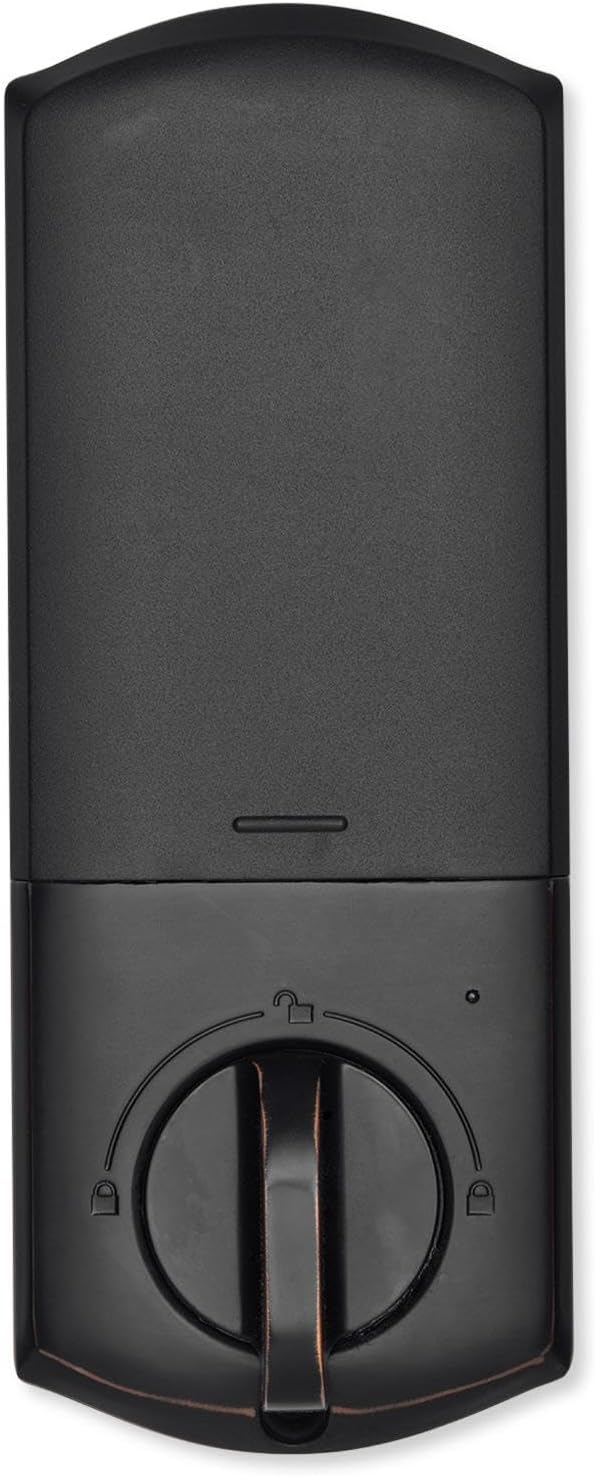
4.2-сүрөт: Интерьер view of the Qolsys IQ Lock-PG Deadbolt, highlighting the thumb-turn and battery cover.

Figure 4.3: Qolsys IQ Lock-PG Deadbolt installed on a door, illustrating its appearance in a real-world setting.
5. Иштөө нускамалары
Qolsys IQ Lock-PG эшигиңизди бекитүүнүн жана ачуунун бир нече ыңгайлуу жолдорун сунуштайт.
5.1 Кирүү ыкмалары
- Pushbutton Keypad: Enter a valid 4-to-8 digit user code on the exterior keypad to unlock the deadbolt. The lock will automatically engage when closed.
- Физикалык ачкыч: Use one of the provided turnkeys in the exterior key cylinder for manual unlocking and locking.
- Thumb-Turn: From the interior, rotate the thumb-turn to manually lock or unlock the deadbolt.
- PowerG Wireless Communication (Alarm.com App/Panel):
The Alarm.com mobile app allows for remote monitoring and control of your Qolsys devices. Once paired with your IQ Panel, you can:
- Lock or unlock your smart doors from anywhere.
- Create, modify, or delete up to 250 individual user codes. User codes are managed through the Alarm.com app and sent to the lock.
- Receive notifications regarding lock status and activity.
The Alarm.com app is available for Android, iOS, Windows, and Blackberry devices.
6. Техникалык тейлөө
Regular maintenance ensures the longevity and optimal performance of your Qolsys IQ Lock-PG deadbolt.
6.1 Батареяны алмаштыруу
The deadbolt is powered by four (4) AA alkaline batteries. Battery life is approximately 12 months, based on typical usage (6 user code unlock events and 10 locking/unlocking cycles per day). The lock features a low battery alarm to notify you when replacement is needed.
- When the low battery alarm sounds or is indicated, replace all four AA batteries simultaneously.
- Remove the interior cover to access the battery compartment.
- Эски батареяларды алып чыгып, жергиликтүү эрежелерге ылайык жок кылыңыз.
- Туура полярдуулукту камсыз кылып, жаңы AA щелочтуу батареяларын салыңыз.
- Replace the interior cover.
6.2 Тазалоо
Clean the exterior and interior surfaces of the lock with a soft, damp кездеме. Абразивдүү тазалагычтарды же эриткичтерди колдонуудан алыс болуңуз, анткени алар финишке зыян келтириши мүмкүн.
7. Кыйынчылыктарды
This section addresses common issues you might encounter with your Qolsys IQ Lock-PG deadbolt.
7.1 Баскычтарды бөгөттөө
If 10 consecutive invalid user codes are entered, the keypad will enter a lockout mode for 3 minutes. During this time, no codes can be entered. Wait for the lockout period to expire before attempting to enter a valid code again.
7.2 Кулпу жооп бербейт
- Check the batteries: Ensure they are correctly installed and not depleted. Replace all four AA batteries if necessary.
- Verify connection to IQ Panel: Ensure the lock is properly paired with your IQ Panel 4, IQ4 Hub, or IQ4 NS. Check the panel's status for the lock.
- Check door alignment: Ensure the door and frame are properly aligned and there is no obstruction preventing the deadbolt from extending or retracting smoothly.
7.3 Issues with Alarm.com App Control
- Ensure your IQ Panel has an active Internet connection.
- Смартфонуңуз же планшетиңизде туруктуу интернет байланышы бар экенин текшериңиз.
- Log out and log back into the Alarm.com app.
- Ensure the lock is properly enrolled in your Alarm.com account.
8. Техникалык шарттар
| Өзгөчөлүк | Спецификация |
|---|---|
| Өндүрүүчү бөлүгү # | IQ Lock-PGK-ORB |
| UPC | 7290109986104 |
| Бүтүрүү | Мунай менен сүртүлгөн коло |
| Өзүн-өзү колго алуу | Колдоого алынган |
| Болт түрү | Моторлуу/стандарттуу бекиткич |
| Backset | 2-3/8" / 2-3/4" Жөнгө салынуучу (60/70 мм) |
| Эшик даярдоо | 1-1/2" / 2-1/8" (38/54mm) |
| Эшиктин калыңдыгы | 1-3/8" дан 2-1/4" га чейин (35-58 мм) автоматтык түрдө жөндөө |
| Кулпуну ачуу ыкмасы | PowerG wireless communication (App and Panel), Button keypad, key, thumb-turn |
| Code Capacity | Колдонуучу коду x 250 |
| Code Length | 4-8 сан |
| Ачкыч цилиндрин жокко чыгаруу | Ооба |
| Цилиндр | KW1 ачкыч жолу |
| Working Voltage | DC 6V |
| Батарея (киргизилген эмес) | AA x 4 |
| Иштөө температурасы сыртта | -31°F – 150°F (-35°C – 65°C) |
| Жумушчу температура Ички | 32°F – 140°F (0°C – 60°C) |
| IP рейтинги Сырткы чогултуу | IP54 |
| Блоктоо режими (Туура эмес кирүү чеги) | 10 жолу жараксыз колдонуучу кодун киргизгенден кийин баскычтоп 3 мүнөткө кулпуланып калат |
| Батарея аз сигнал | Ооба |
| Батареянын иштөө мөөнөтү | Эң аз дегенде 12 ай (колдонуучу кодунун кулпусун ачуу боюнча 6 иш-чара жана ар бир күн үчүн кулпуну ачуу жана кулпулоо боюнча 10 цикл) |
| Сертификаттар | FCC, IC, ANSI BHMA A156.36 2-класс, UL10C (өрткө туруктуулук рейтинги 20 мүнөт) |
| IoT туташуу | PowerG |
| Продукт Салмагы | 1.6KG (3.6 LB) |
| Иштөө нымдуулугу сыртта | 100% конденсациялоо |
| Ички нымдуулук | 20% ~ 95% конденсацияланбайт |
9. Кепилдик жана колдоо
9.1 Кепилдик маалыматы
The Qolsys IQ Lock-PG Push Button Deadbolt comes with a warranty of Twelve months from the date of purchase. Кепилдик дооматтары үчүн сатып алганыңыздын далилин сактап коюңуз.
9.2 Кардарларды колдоо
For technical assistance, troubleshooting beyond this manual, or warranty inquiries, please contact Qolsys customer support. Refer to the Qolsys official webакыркы байланыш маалыматы үчүн сайтка же продуктунун таңгагына кайрылыңыз.


