Introduction
Thank you for choosing the Xiaomi Robot Vacuum E12. This intelligent robotic vacuum cleaner is designed to provide efficient and thorough cleaning for your home, featuring powerful suction, smart navigation, and app control. This manual provides essential information for the safe and effective operation, maintenance, and troubleshooting of your device. Please read this manual carefully before use and retain it for future reference.
Продукт бүттүview
Негизги өзгөчөлүктөрү
- Күчтүү соргуч: Up to 4000 Pa suction power for effective cleaning on various surfaces.
- Колдонмону башкаруу: Manage and schedule cleaning tasks conveniently via the Xiaomi Home app.
- Efficient Cleaning Route: Intelligent navigation system ensures organized and comprehensive cleaning coverage.
- Акылдуу суу резервуары: Automatically dispenses water for effective mopping.
- Комплекстүү сенсорлор: Equipped with multiple sensors for obstacle avoidance and complete area coverage.
Компоненттер
Familiarize yourself with the main components of your Xiaomi Robot Vacuum E12.

1-сүрөт: Жогорку view of the Xiaomi Robot Vacuum E12, showing the main unit and an included mop pad.

Сүрөт 2: Алдыңкы view of the robot vacuum, highlighting the bumper and sensor area.
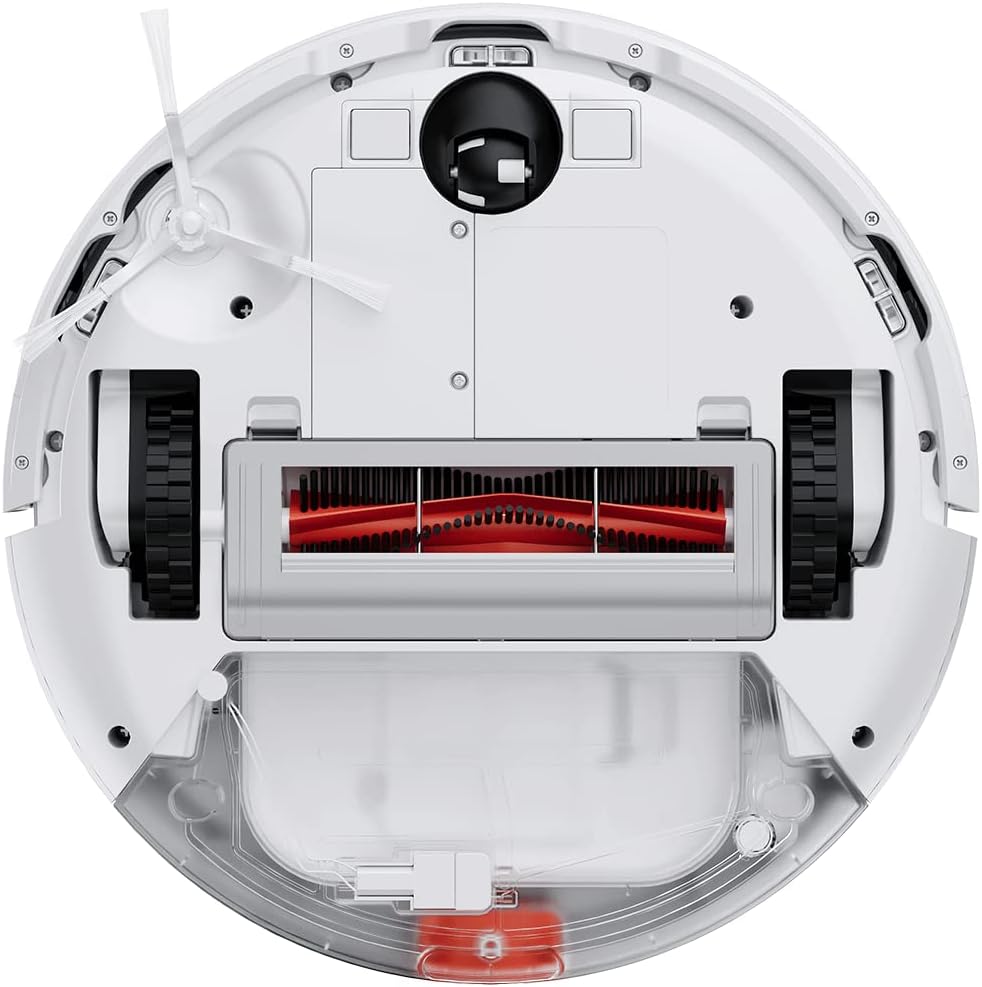
Figure 3: Underside of the robot vacuum, showing the main brush, side brushes, wheels, and dustbin/water tank compartment.

Figure 4: The robot vacuum with the mop attachment installed, ready for wet cleaning.
Жайгашуу
1. таңгактан чыгаруу
- Бардык компоненттерди таңгактан кылдаттык менен алып салыңыз.
- Remove all protective films and packaging materials from the robot and charging dock.
- Ensure all accessories listed in the packing list are present.
2. Заряддоо докунун жайгашуусу
- Кубаттоочу докту дубалга катуу, тегиз жерге коюңуз.
- Доктун эки тарабында кеминде 0.5 метр (1.6 фут) жана анын алдында 1.5 метр (4.9 фут) бош орун бар экенин текшериңиз.
- Кубат адаптерин кубаттоочу докко туташтырыңыз жана аны розеткага сайыңыз.
- Ensure the power cable is neatly tucked away to prevent entanglement.
3. Баштапкы төлөм
- Place the robot vacuum onto the charging dock, ensuring the charging contacts align.
- The robot will automatically power on and begin charging. Allow it to fully charge before first use (approximately 4-6 hours).
- The indicator light on the robot will show charging status.
4. Xiaomi Home App Connection
- Download the "Xiaomi Home" app from your mobile device's app store (Google Play Store or Apple App Store).
- Колдонмону ачып, Xiaomi аккаунтун түзүңүз же эгер сизде мурунтан эле бар болсо, кириңиз.
- Түзмөктү кошуу үчүн жогорку оң бурчтагы "+" сөлөкөтүн таптаңыз.
- Follow the on-screen instructions to connect your robot vacuum to the app. This typically involves resetting the Wi-Fi on the robot and connecting your phone to the robot's temporary Wi-Fi network.
- Туташкандан кийин, сиз роботту башкара аласыз, view cleaning maps, set schedules, and access additional features.
Иштөө нускамалары
Тазалоо циклин баштоо
- Робот баскычтары аркылуу: Press the Power button once to start a general cleaning cycle. Press it again to pause. Press and hold to send the robot back to the charging dock.
- Xiaomi Home колдонмосу аркылуу: Open the app, select your robot vacuum, and tap the "Clean" button. You can also select specific cleaning modes (e.g., Spot Clean, Edge Clean) or adjust suction power.

Figure 5: Illustration of the robot vacuum following an efficient, organized cleaning path to cover the entire floor area.
Mopping функциясын колдонуу
- Суу куюлган бактын ичин таза суу менен толтуруңуз. Жуучу каражаттарды же дат басуучу суюктуктарды колдонбоңуз.
- Attach the mop pad securely to the water tank module.
- Install the water tank module into the robot vacuum according to the instructions.
- Start a cleaning cycle. The robot will automatically dispense water for mopping.
- Эскертүү: The mopping function is best suited for hard floors. Avoid using it on carpets or rugs.
Тазалоолорду пландаштыруу
Use the Xiaomi Home app to set up cleaning schedules. You can specify cleaning times, days of the week, and even cleaning modes for automated cleaning.

Figure 6: The robot vacuum's low profile allows it to clean effectively under beds and other furniture.
Техникалык тейлөө
Regular maintenance ensures optimal performance and extends the lifespan of your robot vacuum. Always power off the robot before performing any maintenance.
1. Таштанды кутусун бошотуу
- Таштанды урнасын чыгаруу баскычын басып, таштанды челектерин чыгарыңыз.
- Таштанды челектин капкагын ачып, анын ичиндегисин таштанды челекке төгүңүз.
- Rinse the dustbin with water if necessary, ensuring it is completely dry before re-installing.
2. Фильтрди тазалоо
- Чыпканы таштанды челекинен алып салыңыз.
- Tap the filter gently to remove dust. You can also rinse it under running water.
- Allow the filter to air dry completely for at least 24 hours before re-installing. Do not use a dryer or direct sunlight.
- Колдонууга жараша чыпканы ар бир 3-6 ай сайын алмаштырып туруңуз.
3. Негизги щетканы тазалоо
- Роботту оодарып, негизги щетка капкагын алып салыңыз.
- Негизги щетканы көтөрүңүз.
- Use the cleaning tool (if provided) or scissors to cut and remove any hair or debris tangled around the brush.
- Негизги щетканы жана капкакты кайра орнотуңуз.
4. Каптал щетканы тазалоо
- Gently pull the side brush to remove it.
- Ар кандай чачты же таштандыларды алып салыңыз.
- Re-attach the side brush, ensuring it clicks into place.
5. Сенсорлорду жана заряддоо контакттарын тазалоо
- Wipe the cliff sensors (located on the bottom of the robot) and wall sensors (on the side bumper) with a clean, dry cloth.
- Clean the charging contacts on both the robot and the charging dock with a dry cloth.

Figure 7: Diagram illustrating the function of the cliff sensors, which prevent the robot from falling down stairs or off ledges.
Проблемаларды чечүү
Эгерде робот чаң соргучуңуз көйгөйгө туш болсо, төмөнкү кеңири таралган көйгөйлөрдү жана чечимдерди караңыз.
| Көйгөй | Мүмкүн себеп | Чечим |
|---|---|---|
| Робот күйбөйт. | Low battery; not properly charged. | Роботту кубаттоочу докко коюп, анын толук заряддалганын текшериңиз. |
| Робот заряддоочу жайга кайтып келе албайт. | Charging dock is obstructed or out of reach; low battery. | Ensure the charging dock is in an open area. Manually place the robot on the dock if needed. |
| Начар тазалоо көрсөткүчү. | таштанды челек толгон; щеткалар чаташкан; фильтр бүтүп калган. | Empty dustbin, clean main brush and side brushes, clean or replace filter. |
| Робот бат-баттан тыгылып калат. | Тоскоолдуктар (кабельдер, килемдер); кир сенсорлор. | Тазалоочу жерди тоскоолдуктардан тазалаңыз. Бардык сенсорлорду тазалаңыз. |
| Чыпкалоо функциясы иштебейт. | Water tank empty; mop pad not attached correctly. | Fill the water tank. Ensure the mop pad is securely attached. |
| Колдонмого туташуу маселелери. | Incorrect Wi-Fi password; robot too far from router; temporary network glitch. | Ensure correct Wi-Fi details. Move robot closer to router. Restart robot and router. Try re-pairing via the app. |
For persistent issues not covered here, please refer to the Xiaomi Home app's help section or contact Xiaomi customer support.
Техникалык шарттар
| Өзгөчөлүк | Деталь |
|---|---|
| Бренд | XIAOMI |
| Модель номери | BHR7331EU |
| Продукциянын өлчөмдөрү | 12.6"L x 3.15"W x 12.6"H |
| Элемент Салмагы | 10.14 фунт |
| Соруу күчү | 4000 Па чейин |
| Power Source | Батарея менен иштейт (1 литий-иондук батарейка камтылган) |
| Башкаруу ыкмасы | App (Xiaomi Home) |
| Өзгөчө өзгөчөлүк | Программалануучу |
| Камтылган компоненттер | Robot Vacuum, Charging Dock, Power Adapter, Water Tank, Mop Pad, Side Brush, Cleaning Tool |
Коопсуздук маалыматы
Жаракат алуунун же зыяндын алдын алуу үчүн бардык коопсуздук көрсөтмөлөрүн окуп чыгып, аткарыңыз.
- Бул шайманды 8 жаштан жогорку балдар жана физикалык, сезүү же акыл-эс жөндөмү начар же тажрыйбасы жана билими жок адамдар колдонсо болот, эгерде алар көзөмөлгө алынган же шайманды коопсуз колдонуу боюнча нускама алган болсо жана келтирилген коркунучтарды түшүнсө. .
- Балдар шайман менен ойнобошу керек. Тазалоо жана колдонуучу тейлөөнү балдар көзөмөлсүз жасабашы керек.
- Робот чаң соргучту нымдуу беттерде же суу токтоп калган жерлерде колдонбоңуз.
- Роботту чоң буюмдарды, курч буюмдарды же күйүп жаткан/түтөп жаткан материалдарды алуу үчүн колдонбоңуз.
- Чачты, кенен кийимдерди, манжаларды жана дененин бардык бөлүктөрүн тешиктерден жана кыймылдуу бөлүктөрдөн алыс кармаңыз.
- Ensure the charging dock is placed in a stable location to prevent tipping.
- Буюм менен кошо берилген түпнуска кубат адаптерин жана кубаттоочу докту гана колдонуңуз.
- Роботту түз күн нуруна же өтө жогорку температурага дуушар кылбаңыз.
- The product contains batteries that are only replaceable by skilled persons.
- Маанилүү эскертүү: This robot vacuum is primarily designed for hard floors. It is not recommended for cleaning carpets, especially thick pile carpets, as stated in some product information.
Кепилдик жана колдоо
Кепилдик маалыматы үчүн продуктуңузга кошулган кепилдик картасын караңыз же расмий Xiaomi'ге баш багыңыз webсайт.
If you require technical support or have questions regarding your Xiaomi Robot Vacuum E12, please contact Xiaomi customer service through their official website or the Xiaomi Home app. Provide your model number (BHR7331EU) and purchase details when contacting support.
Xiaomi расмий Webсайт: www.mi.com


